Are you building a WordPress website and wondering about the importance of a logo? You’re in the right place.
A logo isn’t just a small image in the corner of your site; it’s the face of your brand. It tells visitors who you are in an instant, creating a first impression that can last. Think of it as your website’s handshake, greeting every visitor with a promise of what they can expect.
We’ll dive into what a logo is in WordPress, why it matters, and how it can boost your site’s credibility and recognition. Stay tuned to discover how a well-crafted logo can transform your website into a memorable brand.
Logo Functionality In WordPress
A logo is a small image for your website. It shows your brand. In WordPress, adding a logo is simple. Go to the customizer. Choose the site identity section. Upload your logo there. Logos help people remember your site. They give a professional look.
Logos must be clear and easy to see. Use a file format like PNG or JPEG. These formats work well online. Logos should be the right size. Not too big. Not too small. This makes sure they look good on all devices.
A good logo builds trust. Visitors feel more confident with a site that looks neat. Always use the same logo everywhere. This keeps your brand message clear. Ensure your logo matches your site’s style and colors.
Importance Of A Logo
A logo is a small image or symbol. It represents your website or brand. People see it and remember you. It makes your website look professional. A good logo is like a face for your site. It helps visitors know where they are.
Logos are not just pictures. They are identities. They tell stories about your brand. They can show your values and style. Logos make your site feel unique.
Having a logo helps in building trust. People feel safe when they see a familiar logo. They know what to expect. A logo can increase recognition. It makes your site easy to find. People remember your logo and come back.
Customizing your logo is important. Make sure it fits your brand. Choose colors and shapes wisely. A well-designed logo can make a big difference.
Logo Dimensions And Formats
Choosing the right logo size is important. WordPress usually likes logos of 200×100 pixels. This size fits well in most themes. It’s crucial to keep your logo clear and not blurry. The logo should be in a PNG or JPEG format. These formats keep the logo sharp. A transparent background is good for flexibility. It helps the logo match any background. Always check your theme’s specific requirements. They might have different logo size suggestions. Resize your logo if needed. This ensures it looks good on all devices.
Using a vector file is also smart. SVG files work well because they don’t lose quality. This is true even when the logo gets resized. Keep your logo file size small. This helps the website load fast. A fast website makes visitors happy.
Credit: wordpress.org
Adding A Logo In WordPress
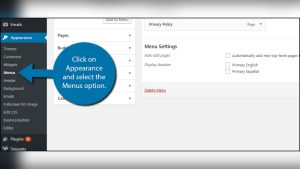
Use the WordPress Customizer to add a logo. First, go to the dashboard. Then, click on Appearance and select Customize. Find the Site Identity section. Upload your logo here. Adjust the size if needed. Press Publish to save changes. Your logo is now live.
Some themes have a Theme Options Panel. This panel helps you add a logo. Access it from the dashboard. Locate the logo option. Upload your logo file. Save the changes to apply them. Your theme will now show the logo.
Another way is using the Media Library. First, upload your logo to the library. Next, go to the Customizer or Theme Options. Choose the logo from the library. This method is quick. Your logo is now on your site.
Customizing The Logo
The logo size affects how people see your brand. You can make it bigger or smaller. Use WordPress settings to adjust the logo size. Keep it easy to see and read. A large logo stands out. A small logo fits in tight spaces. Choose a size that works best for your site.
Where the logo sits changes how the site looks. The logo can be on the left or right. Or, it can be in the center. Use theme options to move the logo. Pick a spot that looks nice and makes sense. The right spot helps visitors find the logo fast.
Logos need to look good on phones too. Mobile responsiveness makes sure the logo fits all screen sizes. Test the logo on different devices. Adjust the size and position for phones. A responsive logo keeps the site looking sharp everywhere.
Common Logo Issues
A blurry logo can be frustrating. It happens due to low resolution. Always use a high-resolution image for your logo. Check the WordPress settings for size recommendations. A blurry logo often results from resizing errors. Use proper image dimensions. This ensures clarity and sharpness.
Sometimes, the logo does not show up. This might be due to theme issues. Ensure the theme supports logos. Check your media library for upload errors. Ensure the file type is compatible. Common types are JPEG or PNG. Re-upload the logo if needed.
Logos might look off-center. This is an alignment issue. Check your theme settings for alignment options. Use CSS to adjust the position. Try different values for left or right. Ensure the logo is not too large. This helps with proper alignment.
Best Practices For Logo Design
A simple logo is easy to remember. It stands out and is clear. Simplicity helps in understanding the brand quickly. A busy design can confuse people. Keep lines and shapes clean. Use minimal text in logos. Simple logos are more effective. They work well in different sizes too.
Colors show the brand’s mood. Bright colors are fun and exciting. Dark colors are serious and strong. Choose colors that fit your brand’s message. Avoid using too many colors. Too many colors can be distracting. Stick to two or three colors. This keeps the design neat and clear.
Logos should look good in all sizes. They must be clear when small. They must also look great when large. This is called scalability. Test the logo in different sizes. Make sure it is clear and readable. Avoid tiny details. Tiny details get lost when the logo is small.

Credit: www.citypng.com
Logo And Branding
A logo is a small image or symbol. It stands for your brand. On WordPress, a logo is very important. It helps people know your site. Your logo should look good and be clear. A good logo builds trust. People remember it.
Branding is more than just a logo. It includes colors, fonts, and style. These make your site unique. Consistent branding is key. Every page should match. This helps your site look professional. People will feel your site is reliable.
Tools For Logo Creation
Creating a logo is fun. Many tools can help. Canva is a popular choice. It has many templates. It’s easy to use. Another tool is Adobe Illustrator. It offers more control. You can make detailed designs. LogoMaker is great too. It is simple and fast. You don’t need design skills.
Online tools are helpful. They save time. Fiverr is another option. You can hire designers. They create unique logos. This is affordable. Placeit is a tool that generates logos. You just need to enter your text. It offers ready-made designs. You can choose and customize.
Many tools are free. Others cost money. Free tools are good for starters. Paid tools offer more features. Always pick the tool that fits your need. Explore these tools. You will find the right one for your logo.

Credit: en.m.wikipedia.org
Frequently Asked Questions
How To Change Logo In WordPress?
To change your WordPress logo, navigate to “Appearance” and select “Customize”. Then click on “Site Identity”. Here, you can upload a new logo. Make sure your logo is the correct size and format for optimal display. Save your changes, and your new logo will appear on your site.
What Is The Ideal Logo Size For WordPress?
The ideal logo size for WordPress typically ranges from 250×100 to 500×200 pixels. However, it depends on your theme’s requirements. Check your theme’s documentation for specific dimensions. Ensure your logo is clear, visually appealing, and fits well within the header area for a professional look.
Can WordPress Support Animated Logos?
Yes, WordPress can support animated logos if your theme allows it. Use GIF or SVG formats for animations. Ensure the animation doesn’t distract from your site’s content. Test the logo on different devices to ensure compatibility and performance. Animated logos can enhance brand recognition when used correctly.
Why Is My WordPress Logo Blurry?
A blurry WordPress logo usually results from low resolution or incorrect dimensions. Ensure your logo is high-quality and matches your theme’s recommended size. Use vector formats like SVG for better clarity. Check your site’s CSS settings to ensure image optimization is correctly configured.
Conclusion
A logo in WordPress is your site’s identity. It’s the first thing visitors see. A well-designed logo builds trust and recognition. It reflects your brand’s personality. So, choose a logo that fits your site’s theme. Keep it simple and memorable.
Make sure it looks good on all devices. Test different designs before finalizing. A clear logo enhances your site’s appeal. Remember, a logo isn’t just an image; it’s your brand’s face online. Invest time in creating a logo that resonates with your audience.
Your site’s success depends on strong branding.