
If you’ve ever dived into the world of WordPress, you might have stumbled across a file named “index.php.” It sits quietly in your WordPress files, yet holds significant power over your website’s functionality.
But what exactly is this mysterious file? And why should you care about it? Understanding index. php can unlock new levels of control and customization for your WordPress site. Imagine being able to tweak the very core of how your website operates, or fixing issues that seem unsolvable.
Sound useful? Then keep reading, because this might just be the key to taking your WordPress skills to the next level. Let’s unravel the mysteries of index. php and see how it impacts your site’s performance and user experience.

Credit: stackoverflow.com
Role Of Index.php In WordPress
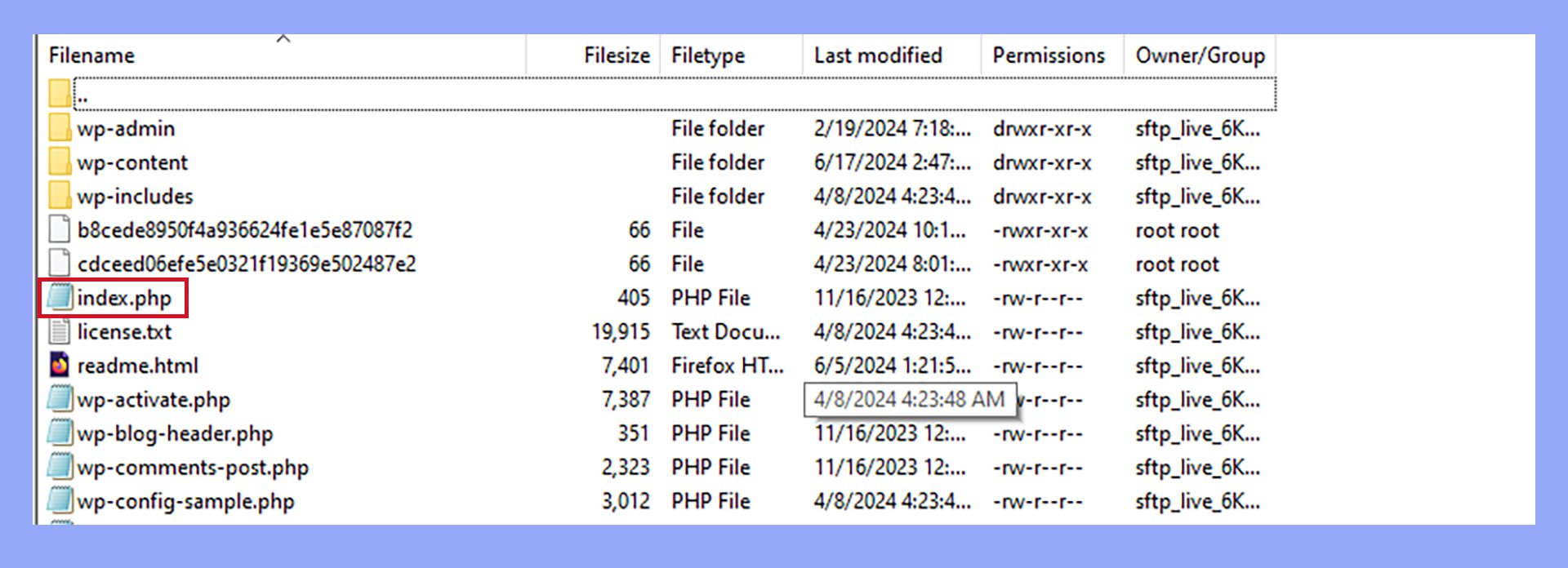
The index.php file is very important in WordPress. It serves as a fallback file. This means it shows content when no other file is available. Think of it as a safety net. It ensures your website never breaks. Every WordPress theme has an index.php file. It acts as the main template file. Without it, your site may not display anything. It connects the database with your website. This shows your posts and pages.
Understanding index.php helps in theme development. Customizing it allows unique designs. It plays a key role in the theme’s functionality. The file is located in the theme’s folder. It is easy to find and edit. Learning about index.php enhances your WordPress skills.
Credit: 10web.io
Core Functions
Index. php in WordPress is crucial for loading and displaying web pages. It acts as a template file, determining the layout and content. As the default file, it guides the site’s appearance whenever a specific template isn’t available.
Routing Requests
WordPress uses index.php to manage all incoming requests. It decides how to handle each request. This file is the gateway to WordPress content. When you visit a page, index.php gets involved. It tells WordPress what to do next. It checks the URL and finds the right content. This process is called routing.
Routing is like a map. It guides requests to the correct place. Without index.php, WordPress wouldn’t know what to show. It helps connect the visitor to the right post or page. It works with other files to display content. It’s a key part of WordPress’s template hierarchy. It ensures the site functions smoothly. It helps WordPress serve the right content every time.
Template Hierarchy
Template hierarchy is a system that decides which template to use. It helps WordPress choose the right design for each page. It works with index.php to select templates. For example, if you visit a blog post, it uses the single.php file. For a category page, it uses category.php. This system organizes templates. It makes sure each page looks good and has the right style. It keeps the website neat and orderly.
Without template hierarchy, sites would look messy. Pages might not match their purpose. This system helps keep everything looking nice. It works with index.php to manage design choices. It helps WordPress decide what template to use. It makes the site easy to navigate. This is important for a clean and functional website.
Interaction With Other Files
The index.php file in WordPress works with many other files. It helps to connect to style sheets. These style sheets make your website look nice. They control colors, fonts, and layouts. The index.php does not change these styles. It only tells the browser where to find them. This makes your website design consistent. Using style sheets also makes updates easier. You change one file, and the whole site updates.
Plugins add extra features to your WordPress site. The index.php file helps them to work smoothly. It ensures each plugin knows what to do. This file acts like a guide. It tells plugins how to interact with your site. With this help, plugins can offer new features. These could be contact forms or social media buttons. Each plugin follows rules set by index.php. This keeps your site running well.
Customization Options
The index. php file in WordPress is a core part of the theme. It displays posts and pages. Customization options allow users to change how content appears. This flexibility helps create unique website designs.
Modifying Default Behavior
The index.php file in WordPress is like a book’s cover. It shows the main page. You can change how it looks. Use the admin dashboard to do this. Add or remove widgets. Change the page layout. Make it look your way. But be careful. Too many changes can break your site.
Using Child Themes
A child theme is like a copy. It helps keep your changes safe. It sits on top of the main theme. This way, updates don’t delete your changes. Create a new folder for it. Use a special file to connect the child to the main theme. Now, you can change the look without worry. It’s a safe way to tweak your site.
Troubleshooting Common Issues
Understanding index. php in WordPress is crucial for troubleshooting common issues. This file acts as a default template for displaying your site’s content. Issues here can affect how your site looks and functions.
Error Messages
Index.php errors can confuse anyone. One common issue is the “Error establishing a database connection”. It means there’s a problem with your database. Check your database details in wp-config.php. Another error might be the “404 not found”. This happens when the page cannot be found. Check if the permalinks are set correctly.
Conflict Resolution
Conflicts in index.php can cause trouble. Plugin conflicts are common. Deactivate all plugins and reactivate them one by one. This helps find the problematic plugin. Theme conflicts can also occur. Switch to the default theme and see if the issue resolves. Always update themes and plugins. Updates fix bugs and improve security.

Credit: www.staging2.whizbangweb.com
Best Practices
Index.php is a key file in WordPress. It helps to load pages. Keeping it secure is vital. Use strong passwords. Keep themes and plugins updated. This helps to protect your site. Avoid using themes from unknown sources. They might contain harmful code.
Install security plugins. They can block unwanted access. Regularly backup your site data. This ensures you can restore if hacked. Monitor the site for unusual activities. This helps catch problems early. Security is important for your site’s safety.
Fast loading is crucial for user experience. Optimize index.php to improve speed. Use caching plugins. They store data to load pages faster. Minimize image sizes. Large images slow down loading. Choose a reliable hosting provider. Good hosts offer better speed.
Limit the number of plugins. Too many plugins can slow down your site. Regularly update WordPress. Updates often improve performance. Check for broken links. They can affect speed. A fast site keeps visitors happy.
Frequently Asked Questions
What Is The Role Of Index.php In WordPress?
Index. php is the default template file in WordPress themes. It serves as a fallback template for displaying content. When no specific template is available, WordPress uses index. php. This ensures that your website content is always displayed. It’s crucial for theme developers and plays a fundamental role in WordPress.
How Does Index.php Affect Site Performance?
Index. php affects site performance by determining how content is displayed. Efficient code in index. php ensures faster loading times. Poorly written code can lead to slow performance. Optimizing index. php is essential for a smooth user experience. Always ensure it’s clean and efficient for better site performance.
Can I Customize Index.php In WordPress?
Yes, you can customize index. php in WordPress themes. Customization allows you to change how content is displayed. Always backup before making changes to avoid issues. Use child themes to keep customizations safe during updates. Customizing helps tailor your website to specific needs and branding.
Is Index.php Necessary For WordPress Themes?
Yes, index. php is necessary for WordPress themes. It’s the fallback template for displaying content. Without it, your site might not display content correctly. Every WordPress theme requires an index. php file. It ensures that all pages have a template to use when specific templates are unavailable.
Conclusion
Understanding index. php in WordPress is crucial. It’s the core file. It helps your site display correctly. Every WordPress site relies on it. Knowing its role aids in troubleshooting. You can fix common site issues. Managing this file keeps your site running smoothly.
It’s a key piece in the WordPress puzzle. Keep it secure and updated. Regularly back up your files. This ensures your site’s safety. With these basics, handle index. php confidently. Your WordPress journey gets easier. Familiarize yourself with its functions.
Your website’s performance will thank you. Stay informed, and keep learning.


