
Have you ever wondered how websites appear so seamlessly on your screen? If you’re looking into hosting your own site, you might have come across the term IIS web hosting.
Understanding this concept is crucial if you’re aiming to make your website live for the world to see. But what exactly is IIS web hosting, and why should you care? Imagine having a powerful tool at your disposal that can enhance your website’s performance and reliability.
IIS, or Internet Information Services, could be that tool. It’s like having a robust engine driving your site, ensuring everything runs smoothly. If you’re curious about how to optimize your web presence and provide a seamless experience for your visitors, stick around. You’re about to uncover why IIS web hosting might just be the secret ingredient you need.
Iis Web Hosting Basics
IIS stands for Internet Information Services. It is a web server from Microsoft. This server helps websites go online. It is used to host websites and apps. Many companies use IIS for their sites. It works well with Windows servers.
IIS supports different programming languages. This includes ASP.NET, PHP, and Python. It is very flexible. You can add features with modules. It has a user-friendly interface. This makes it easy for users. Security is strong with IIS.
It has tools for monitoring and managing sites. IIS is popular for businesses. It is trusted by many for hosting. It provides good performance and reliability. People find it easy to set up and maintain.
Iis Components
The web server is a key part of IIS. It helps to host websites. It lets users see web pages on their browsers. It manages requests from browsers. It sends data back to the users. It keeps websites running smoothly. It ensures pages load quickly. It handles many users at once.
FTP services help move files between computers. It stands for File Transfer Protocol. It is important for sharing files. It lets users upload or download files easily. It is used for website updates. It keeps files safe during transfer. It works with different kinds of files.
SMTP services are for sending emails. SMTP means Simple Mail Transfer Protocol. It makes sure emails are delivered. It checks email addresses before sending. It helps send bulk emails safely. It ensures emails reach the right inbox. It is important for communication.
Setting Up Iis
IIS stands for Internet Information Services. It helps to host websites. First, you need to install IIS on your computer. Open the Control Panel. Find Programs. Click on Turn Windows features on or off. Look for Internet Information Services. Check the box next to it. Click OK to install. Wait for the installation to finish. Restart your computer.
Open the IIS Manager. You will see a list of options. Click on Sites. You can add a new site here. Choose Add Website. Enter a name for your site. Set the physical path. This is where your website files are stored. Choose a binding. This helps connect your site to the internet. Click OK to save your settings. Your site is now ready to use.
Key Features
IIS web hosting provides strong security features to keep websites safe. It has built-in tools to protect against hackers and viruses. Firewalls help block bad traffic. SSL certificates make sure data stays private. Regular updates keep the system secure. Passwords are used to access restricted areas. Admins monitor activity to catch any problems early. These features work together to make the website secure.
Websites need to load quickly. IIS offers great tools for performance optimization. It uses caching to store data for faster access. Load balancing helps distribute traffic evenly. This stops the server from slowing down. Compression reduces file sizes for faster loading. Administrators can tweak settings for even better speed. These features help keep websites running smoothly and fast.
Managing Websites
IIS Web Hosting helps make new websites. It’s useful for beginners. The platform is easy to use and has many features. Users can design their site with simple tools. Templates are available for quick setup. These templates can be customized. Users can change colors and fonts easily. The service supports various types of content. This includes text, images, and videos. Users can add these to their site. It’s important to keep the site looking nice. Good design attracts visitors.
Monitoring a website is crucial. IIS Web Hosting offers tools for this task. These tools help track site performance. Users can see how fast pages load. They can check how many people visit the site. Monitoring helps find problems early. Quick fixes keep the site running smoothly. Alerts can be set up for different issues. This ensures nothing is missed. Users can improve their site with feedback. Regular checks improve site quality. It keeps visitors happy.

Credit: www.youtube.com
Common Challenges
IIS web hosting can face many errors. These include server errors and page load errors. Solving these requires technical knowledge. Sometimes, the server does not respond. Other times, the page does not load properly. This can be due to bad configurations. Fixing this may need a reset or update.
Logs help find problems. They show error codes and messages. This information guides in fixing issues. Regular checks can prevent many problems. Keeping the system updated is crucial. Always ensure you have a backup.
Security is very important in IIS web hosting. Hackers can target websites. They look for weak points. These attacks can steal data or damage the site. Using strong passwords helps protect the site. Always update security patches.
Firewalls add an extra layer of security. They block unwanted access. Regular security scans can detect threats early. Be cautious with user permissions. Only give access to trusted people. This helps in keeping the site safe. Always stay vigilant.
Comparing Iis With Other Servers
IIS and Apache are popular web servers. IIS is easy to use. Windows users find it friendly. Apache works on many systems. Linux users like Apache more. Both are reliable for web hosting. IIS supports ASP.NET applications well. Apache is better with PHP. Security is crucial for both. IIS has Windows-based security. Apache uses modules for safety. Cost can differ. IIS may cost more. Apache is usually free.
Nginx is known for speed and efficiency. IIS is user-friendly for beginners. Nginx handles many requests at once. IIS integrates smoothly with Windows systems. Nginx is great for dynamic sites. IIS supports Microsoft technologies well. Configuring IIS is simpler. Nginx requires more setup knowledge. Both are secure options for hosting. IIS has built-in tools for safety. Nginx uses modules for security. Performance varies with site type. Nginx excels in high traffic. IIS is robust for Windows apps.

Credit: www.youtube.com
Future Of Iis Web Hosting
The future of IIS Web Hosting looks bright. Many businesses use IIS for their websites. It’s known for its reliability. It works well with Windows servers. New updates make it faster and safer. People trust IIS for secure websites. It helps keep data safe from hackers. More features will come soon. Developers will add new tools. These tools make building websites easier. Some people worry about server costs. IIS has options for small businesses. It offers affordable packages. This helps companies save money. Many experts choose IIS for big projects. They like its strong performance. It handles many visitors at once. IIS is great for growing websites. It supports many applications. Developers can build apps easily. This helps make websites better.
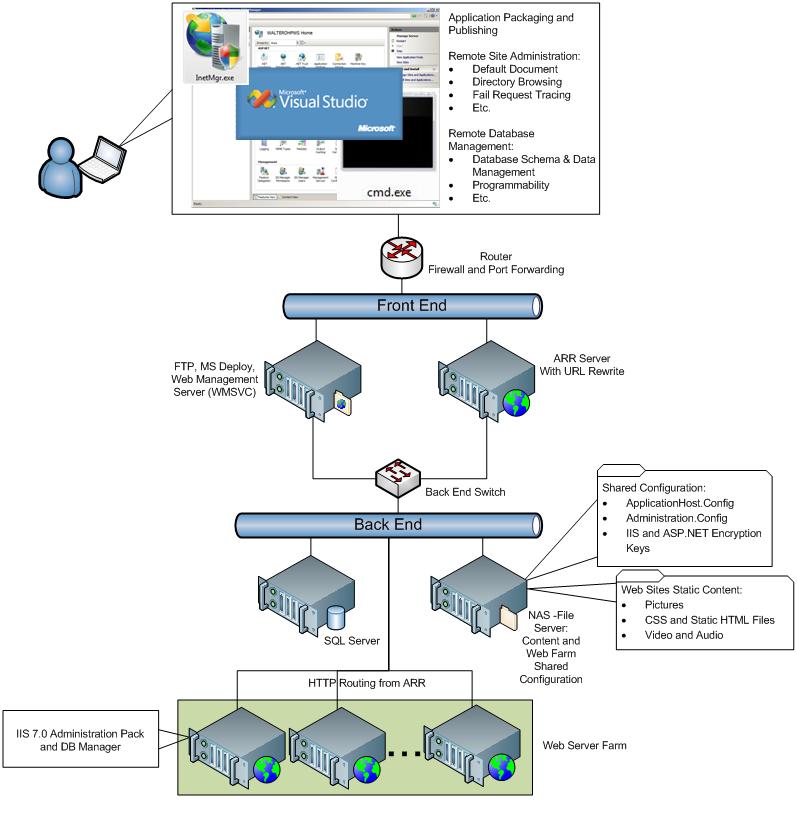
Credit: learn.microsoft.com
Frequently Asked Questions
What Is Iis Hosting?
IIS hosting uses Internet Information Services to serve websites on Windows servers. It supports ASP. NET applications and HTML pages. IIS is reliable, secure, and scalable, making it ideal for businesses needing a robust web hosting solution. It integrates well with Microsoft technologies and offers extensive management tools.
What Is Iis Needed For?
IIS is essential for hosting websites and web applications on Windows servers. It provides a secure, manageable environment for serving HTTP requests, enabling features like authentication, caching, and logging. As a versatile web server, IIS supports various programming languages and technologies, ensuring optimal performance and scalability for web services.
Is Iis A Good Web Server?
IIS is a reliable and robust web server for Windows users. It offers excellent integration with Microsoft services. Many businesses prefer IIS for its security features, scalability, and user-friendly interface. It supports various programming languages, making it versatile for different applications.
How Does The Iis Work?
IIS, or Internet Information Services, is a web server developed by Microsoft. It hosts websites and web applications. It processes HTTP requests, manages security settings, and logs activity. By supporting protocols like HTTP, HTTPS, FTP, and SMTP, it efficiently delivers web content to users.
Conclusion
IIS web hosting offers reliable and secure solutions for websites. It suits both small businesses and large enterprises. Easy setup and user-friendly interface make it popular. Regular updates keep it efficient and safe. Its compatibility with Windows servers adds convenience.
Choose IIS if you need stability and security. It supports multiple applications smoothly. Consider your specific needs before deciding. IIS remains a trusted choice for web hosting. Explore its features to enhance your online presence. Make an informed decision for your hosting needs.


