
Have you ever wondered how your data stays organized and accessible in a complex storage system? Understanding what a Host Storage Domain is can unlock the secret to smoother, faster data management.
Whether you’re managing a small network or a large data center, knowing how Host Storage Domains work can save you time and prevent costly errors. You’ll discover exactly what a Host Storage Domain is, why it matters, and how it can improve your storage setup.
Keep reading to take control of your data like never before.
Credit: docs.oracle.com
Host Storage Domain Basics
Understanding Host Storage Domain Basics is key for managing data in networks. This section breaks down what a Host Storage Domain is. It explains its role, parts, and place in network design. The goal is to make the concept simple and clear.
Definition And Purpose
A Host Storage Domain is a dedicated area for storing data. It connects hosts, like servers, to storage systems. Its purpose is to organize and control data flow. This setup helps improve storage access speed and security. It keeps data management smooth and efficient.
Key Components
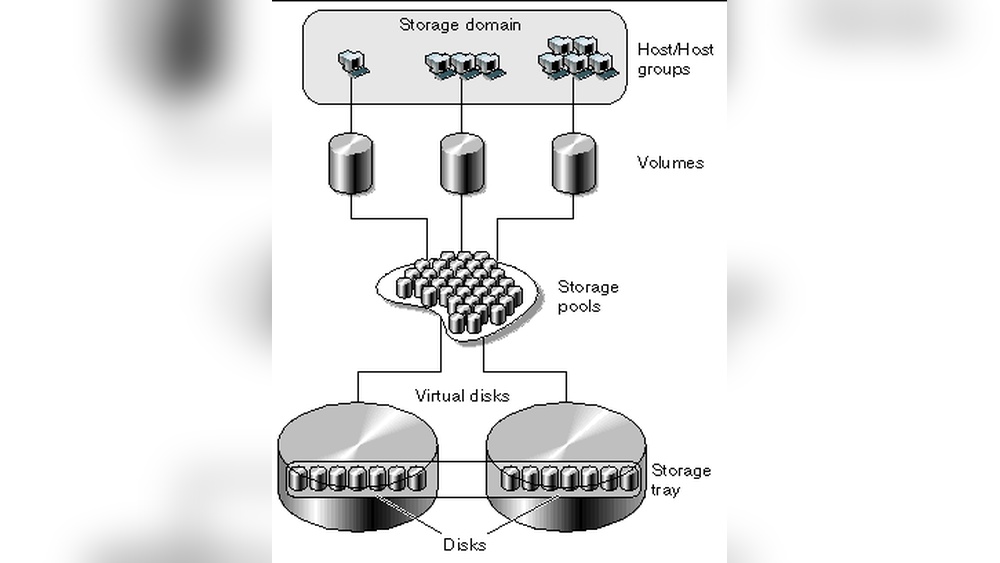
Host Storage Domain includes several main parts. Hosts, which are computers or servers, request data. Storage devices, like disks or arrays, hold the data. Network switches manage the data traffic between hosts and storage. Software controls the connection and data transfer. Each part works together to keep storage reliable.
How It Fits In Network Architecture
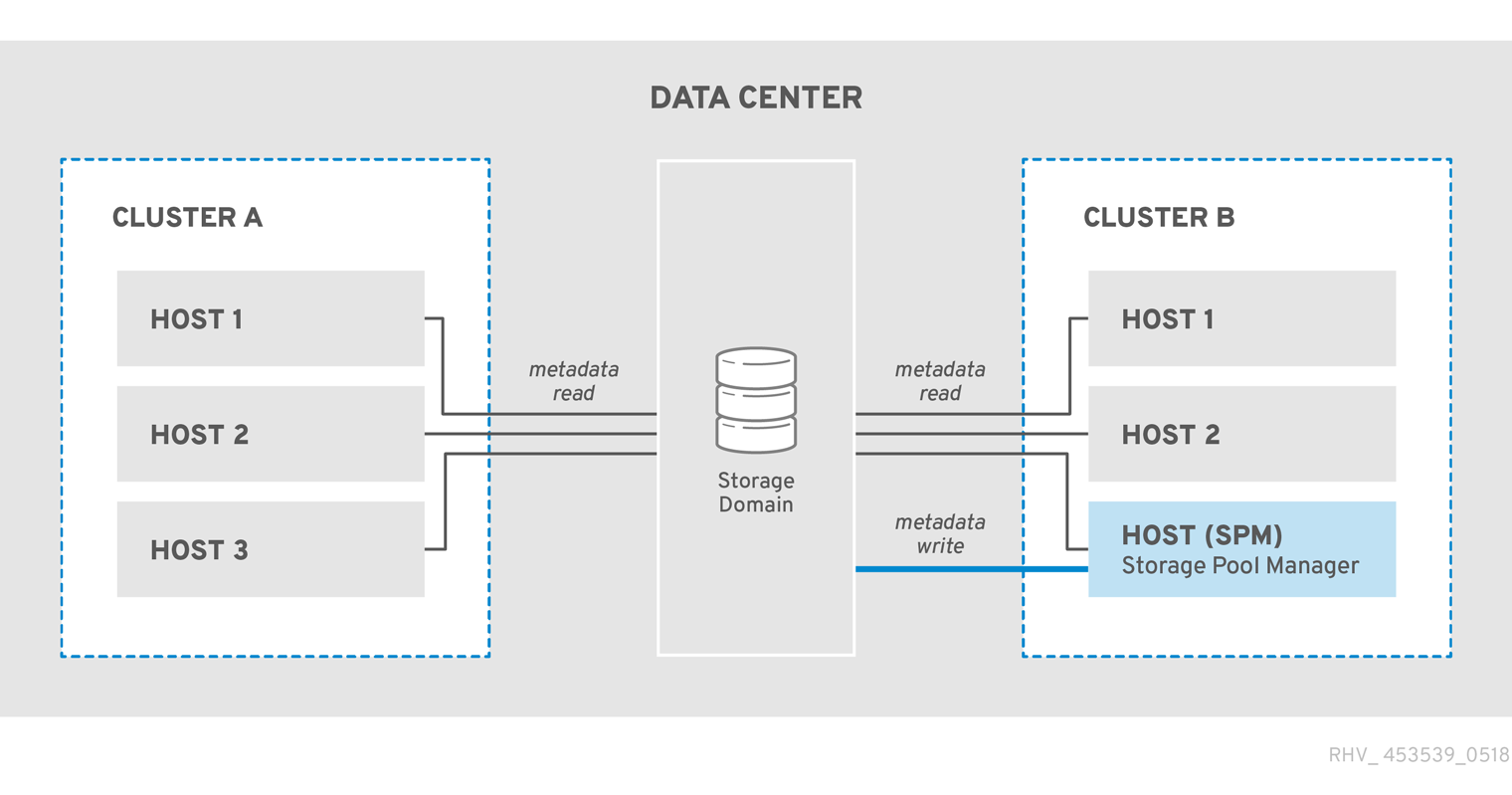
The Host Storage Domain sits between servers and storage in the network. It acts as a bridge for data exchange. This domain reduces traffic on other network parts. It ensures data moves quickly and safely. It supports network efficiency and data integrity.
Types Of Host Storage Domains
Host storage domains organize and manage data storage for computer hosts. They define how storage resources connect and share data. There are different types of host storage domains. Each type has unique features and uses.
Local Storage Domains
Local storage domains store data directly on the host device. This type includes hard drives and solid-state drives inside a server or computer. It offers fast access to data. Local storage is simple but limits sharing with other devices.
Shared Storage Domains
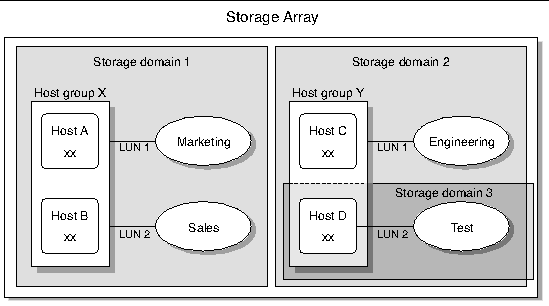
Shared storage domains allow multiple hosts to access the same storage. This setup uses storage area networks (SAN) or network-attached storage (NAS). It improves collaboration and data availability. Shared storage suits businesses with many users or servers.
Cloud-based Storage Domains
Cloud-based storage domains save data on remote servers accessed via the internet. They offer flexibility and scalability. Users can increase storage as needed without buying hardware. Cloud storage is popular for backup and remote access needs.
Benefits Of Using Host Storage Domains
Host Storage Domains offer several key benefits for managing data storage in networks. They provide a clear structure that helps improve system efficiency and security. These domains are designed to streamline storage tasks and improve overall network health.
Using Host Storage Domains leads to better performance, easier management, and stronger protection for your data. These advantages make them a useful choice for businesses and IT teams aiming for reliable storage solutions.
Improved Network Performance
Host Storage Domains reduce network traffic by organizing storage access. This separation helps avoid congestion and speeds up data transfers. The network can handle more requests without slowing down. As a result, users experience faster response times and smoother operations.
Simplified Management
Managing storage within Host Storage Domains is easier due to clear boundaries. IT staff can monitor and control storage resources from a central place. This setup reduces errors and saves time during maintenance. Updates and changes happen more smoothly, with less chance of disruption.
Enhanced Data Security
Host Storage Domains create secure zones for data access. They limit exposure by restricting storage to authorized hosts only. This reduces the risk of unauthorized access and data breaches. Security policies can be applied more precisely, keeping sensitive information safe.

Credit: www.shutterstock.com
Setting Up A Host Storage Domain
Setting up a Host Storage Domain involves several important steps. It ensures that storage resources connect efficiently to hosts. Proper setup improves data access and system performance. This section guides you through the key parts of setting up a Host Storage Domain.
Hardware Requirements
Choose hardware that supports your storage needs. Use reliable servers with enough memory and CPU power. Select storage devices compatible with your server system. Network components must support fast and stable connections. Ensure cables and switches meet the required standards. Power supply should be stable to avoid downtime.
Software Configuration
Install the correct storage management software. Configure the host to recognize the storage domain. Set up zoning or masking for security. Use tools to monitor storage health and performance. Keep software updated to avoid bugs and security risks. Follow vendor instructions carefully during installation.
Best Practices For Deployment
Test the setup in a controlled environment first. Document each step for future reference and troubleshooting. Secure access with strong passwords and user permissions. Monitor storage usage regularly to spot issues early. Backup data before making major changes. Train staff on managing the storage domain properly.
Common Challenges And Solutions
Host Storage Domains face several challenges that can affect performance and reliability. Understanding these common issues helps manage storage more effectively. Solutions exist for each problem to keep systems running smoothly.
Connectivity Issues
Connectivity problems often disrupt access to storage domains. Network failures or poor configurations cause delays or data loss. Using redundant network paths improves reliability. Regularly testing connections helps detect faults early. Proper cabling and hardware also reduce disruptions.
Data Synchronization
Data may become out of sync between hosts and storage devices. This leads to errors or outdated information. Implementing automated synchronization tools ensures data consistency. Frequent checks and backups prevent data conflicts. Clear protocols for syncing reduce human errors.
Scalability Concerns
Expanding storage domains can strain resources and slow systems. Planning for growth avoids sudden performance drops. Using scalable storage solutions allows easy upgrades. Monitoring usage helps forecast future needs. Balanced resource allocation maintains efficiency during expansion.
Credit: docs.redhat.com
Optimizing Your Host Storage Domain
Optimizing your Host Storage Domain improves speed and reliability. It helps your system run smoothly and avoid crashes. Proper optimization saves time and reduces costs. Small changes can make a big difference.
Focus on key areas like performance, maintenance, and monitoring. These steps keep your storage domain healthy and efficient. Let’s explore how to optimize each part.
Performance Tuning
Adjust settings to match your workload. Balance speed and storage capacity carefully. Use caching to reduce data access times. Optimize network connections for faster data transfer. Remove unused files to free up space. Regularly update software to improve performance and security.
Regular Maintenance Tips
Schedule routine checks to find issues early. Clean up old logs and temporary files. Verify backups to avoid data loss. Test hardware components for signs of wear. Keep firmware and drivers up to date. Document changes to track improvements and problems.
Monitoring Tools
Use monitoring tools to watch system health. Track storage usage, input/output speed, and errors. Set alerts for unusual activity or failures. Analyze reports to spot trends and plan upgrades. Choose tools that fit your technical skills and needs. Regular monitoring helps prevent downtime and data loss.
Future Trends In Host Storage Domains
Host Storage Domains are evolving rapidly. New technologies and methods will shape their future. These changes will improve efficiency, speed, and reliability. Understanding upcoming trends helps businesses prepare for better data management.
Integration With Ai And Automation
AI will help manage storage domains more efficiently. It can predict storage needs and fix issues early. Automation will reduce manual work, saving time and money. Systems will self-adjust to improve performance without human help.
Advances In Storage Technology
Storage devices will become faster and hold more data. New materials and designs will improve durability. Flash storage and solid-state drives will continue to grow. These advances will make storage domains more reliable and scalable.
Impact Of Emerging Network Protocols
New network protocols will speed up data transfer. They will reduce delays and increase bandwidth. This will help storage domains handle more data quickly. Better network protocols will support cloud and edge computing needs.
Frequently Asked Questions
What Is A Host Storage Domain In Virtualization?
A Host Storage Domain is a storage area dedicated to a specific host in a virtual environment. It manages data access and storage operations for that host only. This setup improves storage efficiency and isolates host-specific data for better control.
How Does Host Storage Domain Improve Data Management?
Host Storage Domain centralizes storage for each host, making data management simpler and more organized. It helps reduce storage conflicts and enhances performance by assigning dedicated storage resources to individual hosts.
Can Host Storage Domain Enhance Virtual Machine Performance?
Yes, Host Storage Domain can boost virtual machine performance by providing dedicated storage resources. This reduces latency and ensures faster data access, improving the overall efficiency of virtual machines on that host.
Is Host Storage Domain Different From Shared Storage?
Yes, Host Storage Domain differs from shared storage. It is exclusive to one host, while shared storage is accessible by multiple hosts simultaneously. Host Storage Domain offers isolated storage benefits suited for specific host needs.
Conclusion
Host storage domain helps organize and manage data efficiently. It connects servers with storage systems clearly and safely. This setup improves data access and control for businesses. Understanding host storage domains aids in better IT planning. It supports smoother operations and reduces storage issues.
Keeping data organized saves time and resources. Simple and clear, host storage domains matter in technology today.


