
Have you ever wondered how files are transferred between your computer and a web server? If you’re diving into the world of web hosting, understanding FTP is crucial.
FTP, or File Transfer Protocol, is like the digital bridge that connects your local files to your online platform. Imagine being able to effortlessly upload, download, and manage your website files with just a few clicks. Sounds great, right? Understanding FTP can simplify your web hosting experience, making it more efficient and less stressful.
Stick around, and you’ll discover how FTP can transform your approach to managing your website, making it easier than ever to keep your digital presence up-to-date and running smoothly.

Credit: help.ovhcloud.com
Ftp Basics
FTP stands for File Transfer Protocol. It helps in moving files from one computer to another. This is mainly used in web hosting to upload website files. You can use FTP to download files too. It makes managing files easy and fast. Many website owners use FTP to update their sites. It’s a simple tool for web developers.
FTP works through a client-server model. The client is your computer. The server is where your website files are stored. You log in with a username and password. This gives access to your files. You can then upload, download, or edit files. FTP uses two channels: one for sending commands, another for transferring data. This makes file transfer safe and efficient.
Ftp Protocols
FTP stands for File Transfer Protocol. It helps to move files from one computer to another. SFTP stands for Secure File Transfer Protocol. It is safer than FTP. SFTP uses encryption to keep files safe. This means bad people can’t see your files.
FTPS is also known as FTP Secure. It adds security to FTP. FTPS uses SSL to keep files safe. Like a strong lock on a door. Both SFTP and FTPS are better than FTP. They keep your files safe and private.
Setting Up Ftp
Picking the right FTP Client is essential. Popular options include FileZilla and Cyberduck. These programs help you connect to servers. Make sure the client is easy to use. Look for features like drag and drop. This makes file transfers simple.
Setting up FTP Access requires some details. You need a username and password. Often, the server address is needed too. Use the client to enter this information. Ensure you select the correct protocol. Most use FTP or SFTP. Follow the prompts to connect. You will see your files once connected.
Credit: learn.microsoft.com
Ftp In Web Hosting
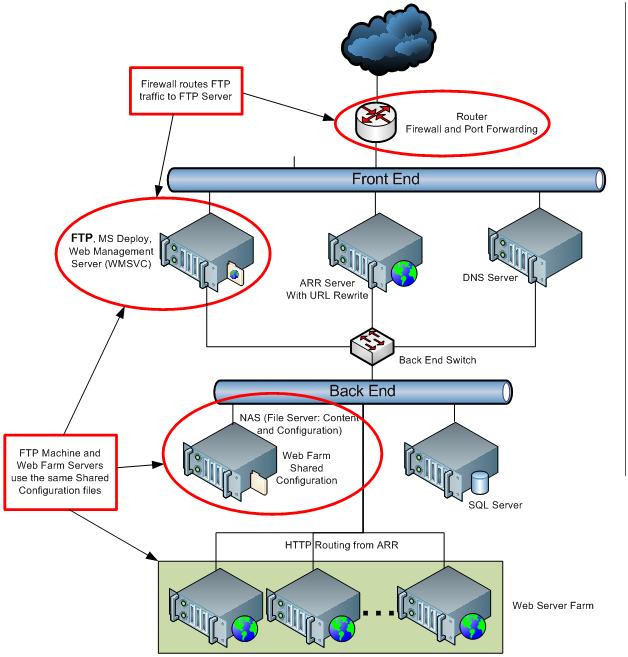
FTP means File Transfer Protocol. It helps move files online. Many use FTP for website management. It is a tool for uploading files. It also helps in downloading files. FTP keeps files organized on a server. This is very important for websites. It helps make changes easily. FTP is like a bridge. It connects your computer to the web server. This is why it is so helpful.
FTP plays a big role in website management. It helps manage files on a website. Uploading and downloading files become easy. This is important for updates. FTP allows quick file transfers. It helps edit or delete files easily. Many website owners use FTP. It is a trusted method.
Security Considerations
FTP, or File Transfer Protocol, allows users to transfer files between their computer and a web server. Ensuring security in FTP involves using strong passwords and enabling encryption protocols. This prevents unauthorized access and protects sensitive data during file transfers.
Common Security Risks
FTP can have security risks. Hackers can steal your data. Passwords sent over FTP are easy to read. This is called plain text transmission. Hackers can see your username and password. This is a big problem. Malware can also be sent through FTP. Your server can get infected. Always use strong passwords and change them often. Protect your data from bad people.
Enhancing Ftp Security
Use SFTP instead of FTP. SFTP is safer. It encrypts your data. Encryption makes data hard to read. Keep your software updated. Updates fix security holes. Limit who can access your FTP server. Only trusted people should have access. Use firewalls to block bad traffic. Firewalls keep hackers away. Always monitor your FTP server. Look for strange activity. This helps catch problems early.

Credit: www.youtube.com
Troubleshooting Ftp Issues
FTP, or File Transfer Protocol, is crucial in web hosting for transferring files between a computer and a server. This protocol simplifies uploading, downloading, and managing files on websites. Troubleshooting FTP issues ensures seamless file transfers, enhancing website functionality and user experience.
Common Problems
FTP connection failures can be frustrating. Often, the server address is wrong. Double-check the URL. Wrong usernames and passwords also cause issues. Ensure they’re correct.
Permissions errors block file uploads. Check folder permissions. Ensure the account has write access. Incorrect settings in FTP client can also lead to problems. Verify all configuration details.
Solutions And Tips
Use stable internet for reliable FTP access. Unstable connections disrupt transfers. Restart your router if needed. Set FTP client to passive mode. It helps with firewall issues.
Update your FTP software regularly. Outdated versions cause bugs. Check firewall settings on your computer. Ensure FTP ports are open. If all else fails, contact your hosting provider for help.
Alternatives To Ftp
Cloud services can be better than FTP. They offer easy file sharing. You can access files anytime and anywhere. Services like Google Drive or Dropbox are popular. They allow secure storage of files. You can also share files with others easily. These services often have apps for phones and computers. This makes file access simple. Files are safe with strong passwords. Updates to files happen in real-time. No need for extra software.
There are other ways to transfer files. Email is common. But, it has size limits. USB drives can hold a lot of files. They are portable and easy to use. Some people use Bluetooth for small files. It’s fast and wireless. Direct file sharing is also possible. This is through peer-to-peer networks. Each method has its own benefits. Choose what suits your needs best.
Frequently Asked Questions
What Is Ftp Web Hosting?
FTP web hosting allows users to upload and manage website files via the File Transfer Protocol. It provides secure access for transferring files between a local computer and the web server. FTP is essential for website maintenance, enabling easy updates, backups, and file management.
It’s widely used for efficient web hosting tasks.
What Is Ftp Used For?
FTP transfers files between computers over a network. It enables uploading, downloading, and managing files efficiently. Users access servers to share large files securely. FTP clients facilitate easy connection and navigation. It’s essential for web developers and administrators to manage website content and backups.
How To Use Ftp On A Website?
To use FTP on a website, install an FTP client like FileZilla. Enter your website’s FTP credentials, including host, username, and password. Connect to the server, then upload or download files by dragging them between your computer and the server’s directories.
Ensure secure connections using SFTP.
Is Godaddy An Ftp?
No, GoDaddy is not an FTP. GoDaddy is a web hosting service that provides FTP access for file management. Users can upload, download, and manage website files using FTP clients.
Conclusion
FTP plays a key role in web hosting. It simplifies file transfers. Users can manage website files easily. FTP makes uploading and downloading quick. This tool enhances efficiency and productivity. Using FTP, hosting becomes smooth. It supports seamless website management.
Understanding FTP benefits hosting users. With FTP, tasks become less complex. This helps even beginners. A reliable tool for web success.


