Have you ever scrolled to the bottom of a WordPress website and noticed the neat little sections filled with extra information or links? These are known as footer widgets, and they can be a powerful tool to enhance your website’s functionality and user experience.
If you’re looking to boost your website’s engagement and make navigation a breeze for your visitors, mastering the art of footer widgets might just be your secret weapon. Imagine transforming that often overlooked space into a versatile area that highlights your most important content, keeps visitors hooked, and guides them exactly where you want them to go.
You’ll discover everything you need to know about footer widgets in WordPress and how they can elevate your site to the next level. Keep reading to unlock the potential of your website’s footer and make every pixel count.
Role Of Footer Widgets
Footer widgets in WordPress make your website look better. They help add extra content at the bottom of your page. You can place text, links, or images there. This area is called the footer. It’s easy to customize with widgets. Widgets let you add features without coding. They are simple and useful tools.
Footer widgets can hold contact info or social media links. You may also add a small menu or a search bar. This makes your site user-friendly. People can find what they need fast. Using widgets in the footer saves time. It also helps visitors see important info easily.
Types Of Footer Widgets
A Text Widget lets you add any text to the footer. It can be simple words or HTML code. You can share a message or add links. It’s a flexible way to enhance your site’s footer. Users often use it for short notes or quotes.
Social media links can connect your site visitors to your profiles. Add icons that link to platforms like Facebook or Twitter. Easy for users to find and follow you. It helps in building your online presence.
Showcasing recent posts in the footer keeps content fresh. Visitors can see the latest updates. It encourages them to explore more. Displaying recent articles increases user engagement. Helps in improving site navigation.
Displaying contact information makes it easy for users to reach you. Include an email address or phone number. You can also add a physical address. Simple contact info builds trust with visitors. It’s a direct way for communication.
Benefits Of Using Footer Widgets
Footer widgets help users find what they need fast. They offer a quick way to jump to important parts of a site. This saves time and makes the site easier to use. Links to key pages in the footer are a common practice. It keeps visitors happy and reduces confusion.
Engaging users is important. Footer widgets can show recent posts or popular articles. People spend more time exploring these options. This keeps them interested. A site with engaging features makes users come back.
Search engines like Google notice footers. Adding relevant links helps with SEO. Footer widgets can improve a site’s rank. They make sure search engines see important content. This leads to more visitors. More visitors mean more success.
Customizing Footer Widgets
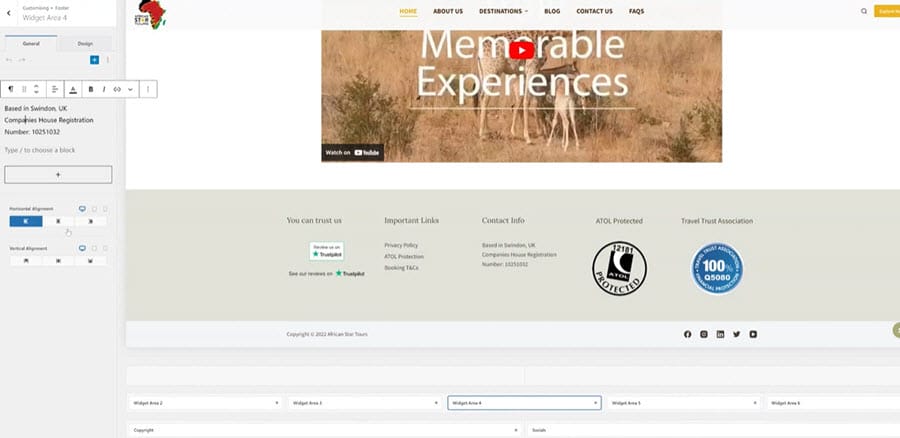
Footer widgets help make websites look better. They are small parts of a website. They are at the bottom of a page. You can change them easily. Use the WordPress Customizer. It is a tool in WordPress. It helps change colors and text. It helps add or remove widgets. Everyone can use it. It’s simple and fun!
Using WordPress Customizer
First, go to the WordPress Customizer. Find the footer section. Choose what you want to change. You can change text and pictures. You can change colors too. Preview changes before saving. Make sure everything looks good. Save when you’re done.
Adding Custom Code
Custom code can change footer widgets. Use HTML or CSS code. This makes widgets look unique. Be careful with code. Wrong code can break things. Ask for help if unsure. Many guides are online. They help with custom code.
Third-party Plugins
Plugins add more features. They make footer widgets better. Many plugins are free. Some plugins need money. Find plugins in WordPress library. Install them easily. Follow the steps to set them up. Plugins make work easier and fun!
Best Practices For Footer Widgets
Footer widgets in WordPress enhance website usability by organizing information at the bottom of the page. Properly structured widgets improve navigation and user experience. They can include links, contact details, or social media icons. An effective footer design helps visitors find essential information easily.
Keeping It Simple
Simple designs make your footer easy to read. Use few colors and fonts. Too much detail can confuse people. Keep your widget neat. Avoid clutter. A simple footer helps visitors find what they need quickly.
Ensuring Mobile Responsiveness
Mobile users are important. Your footer should look good on phones. Test your design on different screen sizes. Make sure everything fits well. Buttons should be easy to click. Keep text easy to read. A responsive footer means everyone can use it.
Prioritizing Important Information
Put important details in your footer. Contact info, social links, and key pages should be easy to find. Use bold text for crucial links. Make sure visitors see what matters first. Arrange information logically. A well-organized footer guides users effectively.
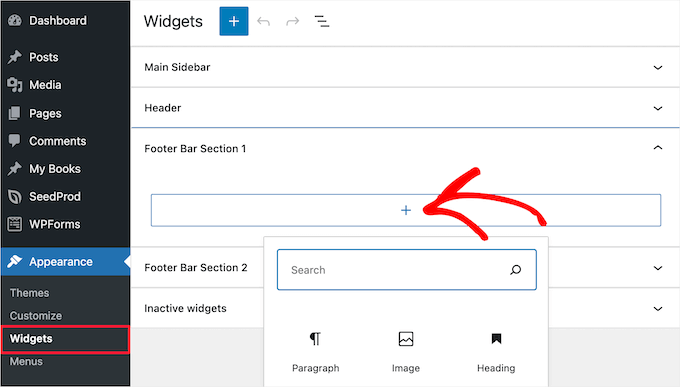
Credit: www.wpbeginner.com
Common Challenges
Footer widgets in WordPress offer customizable spaces at the bottom of your site. They allow adding useful links, social media icons, or contact details. Many users face challenges in positioning and styling these widgets to match their site’s design.
Design Consistency
Keeping design consistency is tough. Different styles can clash. Footer widgets must match the overall look. Using too many colors or fonts can confuse users. Widgets should fit the site’s theme. Consistent design makes the site look professional. Balance is key for a neat appearance.
Overcrowding Issues
Adding too many widgets can clutter the footer. A crowded footer looks messy. Important links may get lost. Users find it hard to locate information. Keep the footer simple. Limit widgets to only essential ones. Less is often more in design.
Technical Limitations
Some themes limit widget options. Customization can be restricted. Users may struggle with code changes. Not all widgets are compatible. Updates can break existing widgets. Technical issues can frustrate users. Choose themes with flexible widget options.
Future Trends In Footer Widgets
Footer widgets in WordPress enhance website design by adding customizable sections at the bottom of pages. Future trends include interactive elements, improved accessibility features, and integration with AI tools for personalized user experiences. These advancements aim to boost engagement and provide valuable information effortlessly.
Interactive Elements
Footer widgets will become more interactive. Users will click and see changes right away. Sliders and toggles will be common. People will enjoy playing with these features. They make the website more fun.
Dynamic Content Integration
Websites will use dynamic content in footers. Content will change based on user actions. This makes each visit unique. Users will see new things each time they visit. It keeps them coming back for more.
Ai And Personalization
AI will help make footers personalized. It will suggest content based on user history. Users will feel special because the site knows them. This adds a personal touch. It makes users happy and keeps them engaged.

Credit: answers.themler.io
Credit: dmjcomputerservices.com
Frequently Asked Questions
What Are Footer Widgets In WordPress?
Footer widgets are customizable elements that appear at the bottom of your WordPress site. They allow you to add various features like social media links, contact information, or recent posts. You can enhance user experience and site navigation by organizing content efficiently in the footer area.
How Can I Add Footer Widgets?
You can add footer widgets through the WordPress dashboard. Navigate to Appearance > Widgets, then select the footer area. Drag and drop desired widgets into the footer section. This allows you to customize your site’s footer with various functionalities, improving engagement and usability.
Why Are Footer Widgets Important?
Footer widgets improve site navigation and user engagement. They provide quick access to important information, enhancing overall user experience. By organizing content in the footer, you can guide visitors effectively, making your site more accessible and functional.
Can I Customize Footer Widgets?
Yes, footer widgets are highly customizable. You can change their layout, content, and style through the WordPress dashboard. This customization allows you to create a footer that matches your site’s design and meets specific user needs, enhancing the site’s aesthetic and functionality.
Conclusion
Footer widgets in WordPress offer great flexibility for your site. They enhance user experience and organize content neatly. Visitors find information quickly, which boosts engagement. These widgets also help in displaying important links. You can add contact details, social media links, or recent posts.
Customization is easy, even for beginners. This feature ensures your website looks professional. Implementing footer widgets can greatly improve your site’s functionality. Experiment with different widgets to see what works best. Your website’s footer can become a powerful tool. Use it wisely for better results.