

Have you ever wondered how websites appear on the internet? If you want to create your own website, understanding what a domain and web hosting are is essential.
These two elements work together to make your site accessible to anyone, anywhere. Knowing the difference between them can save you time, money, and frustration. You’ll discover exactly what domains and web hosting mean, why they matter, and how to choose the right ones for your needs.
Keep reading, and you’ll be one step closer to bringing your online presence to life.

Credit: www.wpbeginner.com
Domain Basics
Understanding domain basics is essential before creating a website. A domain is the address people type to find your site online. It gives your website a unique identity on the internet.
Choosing and managing domains correctly helps build trust and makes your site easy to find. Let’s explore the key points about domains.
What Is A Domain Name
A domain name is the website’s address. It is what users type in the browser to visit your site. For example, example.com is a domain name.
Domains replace long IP addresses with simple words. This makes it easier to remember and share your site.
How Domains Work
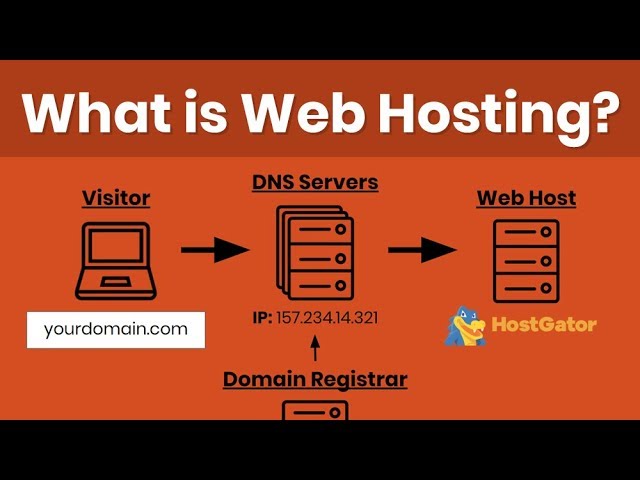
Domains connect to servers where your website files are stored. When someone types your domain, the browser asks a Domain Name System (DNS) for the server’s address.
The DNS finds the right server and loads your website. This process happens in seconds.
Types Of Domain Extensions
Domain extensions are the letters after the dot in a domain name. Examples include .com, .net, and .org.
Extensions show the website’s purpose or location. For instance, .edu is for education sites, and .us is for the United States.
Choosing The Right Domain
Select a domain name that is short, easy to spell, and related to your content. Avoid numbers and hyphens to keep it simple.
Pick a domain extension that fits your website type. A good domain helps visitors find and trust your site easily.
Credit: www.youtube.com
Web Hosting Essentials
Web hosting is a key part of having a website. It makes your site available on the internet. Without web hosting, no one can visit your site. Understanding the basics helps you choose the right service.
What Is Web Hosting
Web hosting stores your website files on a server. This server connects to the internet 24/7. When someone types your website address, the server sends the files to their browser. This process makes your website visible online.
Types Of Web Hosting Services
There are different hosting types to fit various needs. Shared hosting shares space with other websites. VPS hosting offers more control with virtual private servers. Dedicated hosting gives you a whole server to yourself. Cloud hosting uses many servers for better speed and uptime.
How Hosting Works
Your website files live on a server. The server is always connected to the internet. Visitors send requests by entering your site address. The server responds by delivering the site files to their device. This exchange happens quickly to load your website fast.
Key Hosting Features To Consider
Look for reliable uptime to keep your site online. Fast loading speed improves visitor experience. Sufficient storage space holds your website data. Good customer support helps solve issues quickly. Security features protect your site from threats.
Domain Registration Process
Registering a domain is the first step to creating a website. It means choosing and buying the website name you want. This process is simple but important. The domain name is your website’s address on the internet. It helps people find your site quickly.
The domain registration process involves selecting a domain registrar, following steps to register the domain, and adding privacy protection if needed. Each step is easy to follow and helps secure your website’s name.
Finding A Domain Registrar
A domain registrar is a company that sells domain names. Choose a registrar that is trusted and easy to use. Check for good customer support and fair prices. Some popular registrars include GoDaddy, Namecheap, and Google Domains.
Look for features like easy domain management and renewal reminders. A good registrar makes the registration process smooth and secure.
Steps To Register A Domain
Start by searching for your desired domain name on the registrar’s website. The system will tell you if the name is available or taken. If taken, try different variations or extensions like .net or .org.
Once you find an available domain, add it to your cart. Then, provide your contact and payment details to complete the purchase. After payment, the domain is yours for the selected time, usually one year.
Domain Privacy And Protection
Domain privacy hides your personal information from the public database. Without privacy, your name, address, and phone number are visible to anyone. Privacy protection helps keep this data safe and reduces spam or unwanted contacts.
Some registrars include privacy for free. Others offer it as an extra service. Adding this protection is a smart step for online safety.
Credit: blog.templatetoaster.com
Setting Up Web Hosting
Setting up web hosting is the next step after buying a domain name. It means getting space on a server to store your website files. Without hosting, your website cannot be seen on the internet. The process involves choosing a good hosting provider, signing up, and linking your domain to the hosting service. This section explains these steps clearly.
Selecting A Hosting Provider
Choose a hosting provider based on your website needs. Look for reliability, speed, and customer support. Check if they offer easy website management tools. Compare prices but focus on value and features. Some popular types include shared, VPS, and dedicated hosting. Start with shared hosting if your site is small.
Signing Up And Configuring Hosting
Sign up on the hosting provider’s website by creating an account. Pick a hosting plan that suits your website size and traffic. Complete the payment process to activate your hosting. Use the provider’s control panel to configure settings. Upload your website files or install a content management system like WordPress. Set up email accounts linked to your domain if needed.
Connecting Domain To Hosting
Link your domain name to your hosting server to make your website live. Update the domain’s DNS settings with the hosting provider’s name servers. This step tells the internet where to find your website files. The change can take a few hours to 48 hours to work fully. Verify the connection by typing your domain name in a browser. Your website should appear if everything is set correctly.
Managing Domains And Hosting
Managing domains and web hosting is an important part of running a website. It ensures your site stays live and works well. You need to handle tasks like renewing your domain, managing DNS, and solving common issues. These steps keep your online presence stable and secure.
Renewals And Transfers
Domains and hosting services need regular renewal. Without renewal, your website can go offline. Keep track of renewal dates to avoid interruptions. Transferring domains means moving your domain registration to another provider. This can help you find better prices or services. Make sure to follow transfer rules to keep your website active.
Dns Management
DNS connects your domain name to your website’s server. Managing DNS settings controls where visitors go when they enter your domain. You can add or change records like A, CNAME, and MX. Proper DNS setup helps email work and improves website speed. Check DNS settings regularly to prevent errors.
Troubleshooting Common Issues
Problems with domains and hosting are normal. Sites might load slowly or not at all. Common issues include expired domains, wrong DNS settings, and server downtime. Start by checking your domain status and DNS records. Contact your hosting provider if issues persist. Quick action helps keep your site online.
Cost Considerations
Understanding the costs behind domains and web hosting helps you plan your budget better. Expenses vary based on several factors. Knowing what affects these costs saves money and avoids surprises. This section breaks down the main cost points for domains and hosting services.
Domain Pricing Factors
Domain prices depend on the extension you choose. Popular extensions like .com or .net usually cost more. Less common extensions can be cheaper. The registrar you pick also affects the price. Some offer discounts for the first year. Renewals often cost more than initial registration. Premium domains with short or popular names cost extra. Keep in mind, domain privacy protection may add to the price.
Hosting Plans And Pricing
Hosting costs depend on the plan type. Shared hosting is the cheapest option. It suits small websites or blogs. VPS and dedicated hosting cost more but offer better performance. Cloud hosting prices vary by usage. Monthly fees often include storage, bandwidth, and support. Some hosts offer discounts for yearly payments. Choose a plan that fits your website size and traffic.
Hidden Fees To Watch For
Some providers add extra fees not shown upfront. Setup fees may appear during checkout. Charges for backups or SSL certificates are common. Overuse of bandwidth or storage can cause extra costs. Cancellation fees might apply if you leave early. Always read terms carefully to avoid surprises. Ask the provider about all possible charges before buying.
Tips For Beginners
Starting with domain and web hosting can seem hard. Many beginners make simple mistakes that slow them down. Following a few tips can make the process easier and safer. These tips help avoid problems and keep your website running well.
Avoiding Common Mistakes
Choose a domain name that is short and easy to remember. Avoid using numbers or strange characters. Pick a reliable hosting provider with good reviews. Do not go for the cheapest option without checking its features. Make sure to renew your domain and hosting on time. Forgetting to do this can cause your website to go offline.
Best Practices For Security
Use strong passwords for your hosting account and domain registrar. Change passwords regularly to keep your accounts safe. Enable two-factor authentication if available. Keep your website software and plugins updated. Back up your website files and database often. This protects your data in case of errors or hacks.
Resources For Learning More
Many free tutorials and guides are available online. Watch beginner-friendly videos to understand basic concepts. Join forums or groups focused on web hosting and domains. Read articles from trusted websites to stay updated. Practice by setting up a small test website. Learning step-by-step builds confidence and skills.
Frequently Asked Questions
What Is A Domain In Web Hosting?
A domain is your website’s unique address on the internet. It helps users find your site easily by typing the name in a browser.
How Does Web Hosting Work?
Web hosting stores your website files on a server. It makes your website accessible online 24/7 for visitors worldwide.
Why Do I Need Both Domain And Hosting?
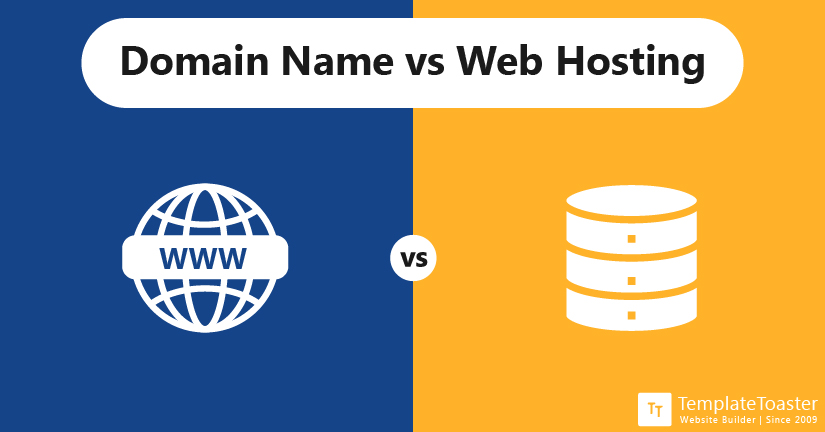
A domain directs users to your website, while hosting stores your website files. Both are essential for an online presence.
Can I Use Free Web Hosting For My Website?
Free hosting offers limited resources and may display ads. It’s suitable for small projects but not for professional sites.
Conclusion
Understanding domain names and web hosting helps you build a website. A domain is your website’s address on the internet. Web hosting stores your website’s files and makes them visible online. Both work together to show your site to visitors.
Choosing the right domain and hosting is important for your website’s success. Keep these basics in mind as you start your online journey. Simple steps lead to a strong web presence. Now, you are ready to create your own website.


