
If you’re thinking about starting a blog, you might have come across the terms “domain” and “hosting” and wondered what they really mean. Understanding these two is key to getting your blog up and running smoothly.
Without the right domain and hosting, your blog won’t be easy for people to find or visit. This article will break down these concepts in simple terms, so you can confidently set up your blog and make it stand out.
Keep reading—you’re just a few steps away from turning your ideas into a live website!
Credit: www.artsycourseexperts.com
Domain Basics
Understanding the basics of domains is key for starting a blog. A domain is the address people type to visit your site. It helps your blog stand out and be easy to find. This section explains what a domain is, how it works, and how to choose the right one for your blog.
What Is A Domain Name
A domain name is the web address of your blog. It looks like www.example.com. This name tells browsers where to find your website. Each domain is unique and cannot be used by others at the same time.
How Domains Work
Domains connect people to your blog online. When typed into a browser, the domain sends a request to a server. The server then shows your website content. This process happens quickly, making your blog visible to visitors.
Choosing The Right Domain
Select a domain that is short, simple, and easy to remember. Use words related to your blog’s topic. Avoid numbers and hyphens to reduce confusion. Check if the domain is available before deciding.

Credit: www.temok.com
Hosting Essentials
Hosting is a key part of running a blog. It stores your blog’s files and makes them available online. Without hosting, your blog cannot be seen by visitors.
Choosing the right hosting service affects your blog’s speed, security, and uptime. Understanding hosting basics helps you pick the best option for your needs.
What Is Web Hosting
Web hosting is a service that stores your website data on a server. This server connects to the internet 24/7. It lets people access your blog anytime.
Your blog’s text, images, and videos live on these servers. Hosting providers manage the hardware and software that keep your blog running smoothly.
Types Of Hosting Services
Different hosting types suit different needs and budgets. Shared hosting is affordable and good for small blogs. You share server space with others.
VPS hosting offers more control and resources. It is ideal for growing blogs with more traffic. Dedicated hosting gives you a whole server. It is best for large blogs needing high performance.
Cloud hosting uses multiple servers. It gives flexibility and can handle sudden traffic spikes easily.
How Hosting Supports Your Blog
Hosting keeps your blog online and accessible worldwide. It ensures fast loading times, which improve user experience. Good hosting also protects your blog from attacks and data loss.
Reliable hosting reduces downtime. Visitors can read your posts anytime without errors. It also supports features like email accounts and databases needed for your blog’s functions.
Connecting Domain And Hosting
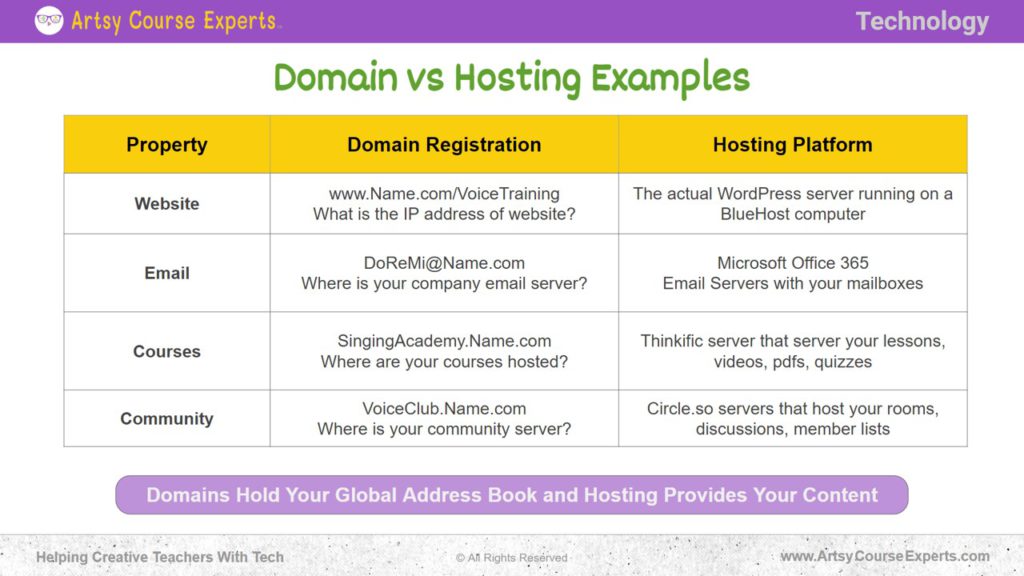
Connecting a domain and hosting is a key step in creating a blog. The domain is your website’s address, and hosting is where your website files live. Both must work together to make your blog visible online. Without linking them, visitors cannot find your site.
This process may seem technical but is quite straightforward. Understanding how to connect your domain with hosting helps you control your blog better. It also ensures your site loads properly for visitors worldwide.
Domain Registration Process
Domain registration means buying your website name from a registrar. You choose a unique name that represents your blog. The registrar holds your rights to this name for a specific time. Registration usually lasts one year and can be renewed.
During registration, you provide your contact details. These are stored in a public database called WHOIS. Choose a domain name that is easy to remember and matches your blog topic.
Linking Domain To Hosting
Linking means telling your domain where your website files are hosted. You do this by changing the domain’s settings at the registrar. You enter the hosting provider’s nameservers into the domain control panel.
Nameservers act like an address book for the internet. After updating nameservers, the domain points to your hosting server. This change can take a few hours to fully work worldwide.
Dns And Its Role
The Domain Name System (DNS) translates your domain name into an IP address. Computers use this IP to find your hosting server. DNS works behind the scenes to connect visitors to your blog.
DNS records include A records, CNAME, and MX records. Each record tells the internet where to send different types of requests. Proper DNS setup ensures your website and emails function correctly.
Selecting Domain And Hosting
Selecting the right domain and hosting is a key step in starting a blog. Your domain is your website’s address on the internet. Hosting is where your website lives online. Both must work well together for your blog to run smoothly. Choosing wisely saves time and money later.
Focus on what fits your blog’s needs. Think about your budget, website size, and expected traffic. The right choices make your site fast, secure, and easy to find. Below are important points to consider and popular services to explore.
Factors To Consider
Pick a domain name that is short, clear, and easy to spell. Avoid complicated words or numbers. Choose a domain extension like .com or .net that suits your blog’s purpose. Check if the domain is available and not trademarked.
For hosting, consider speed and uptime. Your host should keep your site live almost all the time. Look for good customer support that helps quickly. Storage space and bandwidth matter too. These affect how much content you can upload and how many visitors you can have.
Popular Domain Registrars
GoDaddy offers a wide range of domain names and easy tools. Namecheap is known for affordable prices and privacy protection. Google Domains provides simple integration with other Google services. These registrars have clear interfaces for beginners.
Top Hosting Providers
Bluehost is popular for WordPress blogs and good support. SiteGround offers fast servers and strong security features. HostGator provides flexible plans suitable for small to large sites. These hosts have easy setup processes and reliable performance.
Setting Up Your Blog
Setting up your blog is the first step to sharing your ideas with the world. It involves choosing the right tools and making sure everything works smoothly. This process makes your blog ready for visitors and easy to manage.
Installing A Cms
A CMS, or Content Management System, helps you create and manage your blog content. WordPress is the most popular CMS for bloggers. It lets you add posts, pages, and images without coding. Installing a CMS is usually simple. Many web hosts offer one-click installation. After installation, you can log in and start customizing your blog’s look and feel.
Configuring Domain Settings
Your domain is your blog’s address on the internet. Configuring domain settings links your domain to your hosting account. This step ensures visitors reach your blog when they type your web address. You need to update DNS records or nameservers. These settings connect your domain to your hosting server. Check your domain provider’s instructions for details on this setup.
Uploading Content
Once your blog is set up, you can start adding content. Upload posts, images, and other files through your CMS dashboard. Use simple titles and clear text to help readers understand your posts. Keep your images small to load pages faster. Regularly adding new content keeps your blog fresh and interesting for visitors.

Credit: www.bluehost.com
Maintaining Domain And Hosting
Maintaining your domain and hosting keeps your blog live and safe. It ensures visitors always find your site without problems. Regular care avoids unexpected downtime and data loss. Simple steps help protect your online presence.
Renewing Domains And Hosting
Domains and hosting services need regular renewal. Missing renewal dates can make your site go offline. Set reminders before expiration dates. Renew early to avoid service interruptions. Many providers offer auto-renewal for convenience.
Security Best Practices
Secure your domain and hosting with strong passwords. Change passwords often and avoid common words. Use two-factor authentication when available. Keep software and plugins updated. Regular backups protect your data from loss or attacks.
Troubleshooting Common Issues
Slow loading or downtime are common hosting problems. Check server status with your provider first. Clear your browser cache and cookies. Look for DNS errors or expired SSL certificates. Contact support if problems persist for quick help.
Frequently Asked Questions
What Is A Domain In Blogging?
A domain is your website’s unique address on the internet. It helps visitors find your blog easily. Domains end with extensions like. com,. net, or. org. Choosing a good domain name improves your blog’s branding and search visibility.
How Does Hosting Work For A Blog?
Hosting stores your blog’s files on a server accessible online. It ensures your website is live 24/7. Good hosting provides fast loading, security, and uptime. Without hosting, your blog won’t be available to visitors on the internet.
Why Do Bloggers Need Both Domain And Hosting?
A domain gives your blog a web address, while hosting stores your content. Both are essential for making your blog accessible online. Without a domain, users can’t find your site. Without hosting, your site has no place to live on the web.
Can I Start Blogging Without Buying Domain And Hosting?
Yes, free platforms offer subdomains and hosting but limit control and branding. Using your own domain and hosting gives professionalism, customization, and better SEO. Investing in both improves your blog’s growth and credibility.
Conclusion
A domain is your blog’s unique address on the internet. Hosting stores your website’s files safely online. Both are needed to make a blog live and easy to find. Choosing the right domain and hosting helps your blog run smoothly.
Start with simple options that fit your needs and budget. Keep your blog active and updated to attract visitors. Understanding these basics sets a strong foundation for your blogging journey. Simple steps lead to better online presence. You now know what domain and hosting mean for blogging success.


