
Imagine having the power to manage your website with ease, without needing to be a tech wizard. That’s exactly what cPanel web hosting offers you.
If you’re planning to launch a website or seeking a more efficient way to handle your current one, cPanel could be your new best friend. This user-friendly control panel simplifies the complexities of web management, putting control right at your fingertips.
Are you curious about how cPanel can revolutionize your web hosting experience? Dive into this article to discover the secrets behind cPanel web hosting and unlock the potential for a smoother, more effective online presence.
Cpanel Basics
Cpanel is a control panel for web hosting. It helps users manage their websites. With Cpanel, tasks become simple. You can create email accounts and upload files easily. Website management feels easier with it. It is like a dashboard for your website. Everything is in one place. This saves time and effort. Cpanel makes hosting user-friendly.
Cpanel offers many useful features. It includes file management tools. Users can backup data easily. It also provides database management options. Setting up email accounts is quick. Users can check website statistics too. Security tools help keep sites safe. With Cpanel, tasks become faster. It is simple to use. This makes web hosting fun.

Credit: www.gigde.com
Benefits Of Cpanel
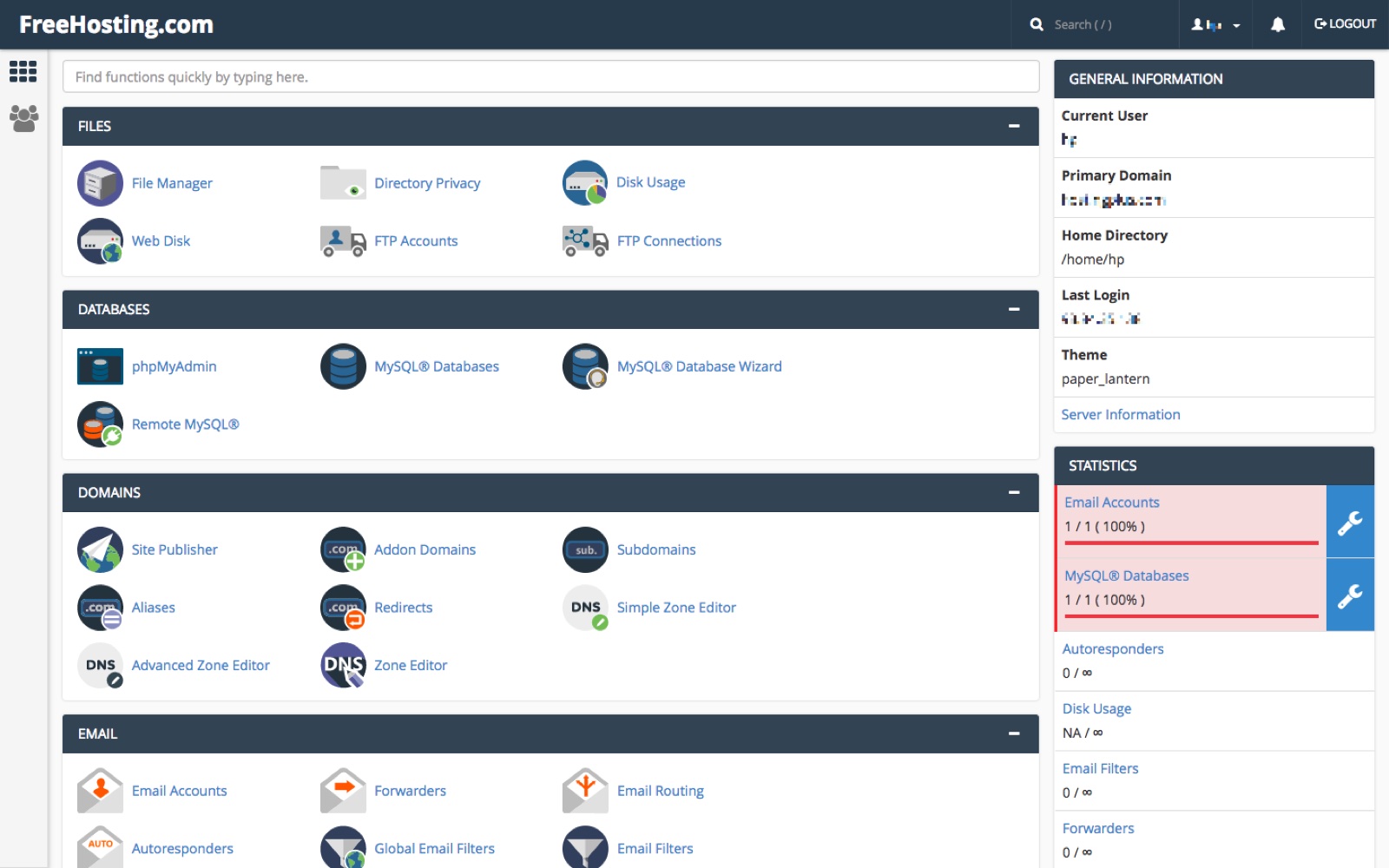
Cpanel is known for its user-friendly interface. It simplifies website management tasks. Icons and menus make navigation easy. You can manage files, databases, and emails. All from one place. Beginners find it easy to use. Even without technical skills. It reduces the time needed to learn web hosting basics.
Cpanel offers many time-saving tools. Automated tasks make life easier. Backup features save data quickly. One-click installs help set up apps fast. Updates are automatic, ensuring security. These tools help in managing websites efficiently. It frees up time for other important tasks. Less time spent means more productivity.
Managing Domains
cPanel makes it easy to manage domains. You can add new domains with just a few clicks. To add a domain, you enter the domain name. Then, cPanel does the rest. Removing a domain is simple too. Find the domain and click remove. This takes it off your list.
Subdomains help organize your site. They are parts of your main domain. For example, blog.yoursite.com is a subdomain. You can create these easily in cPanel. Aliases are like nicknames for your main domain. They point to the same site. This can help with branding. Add aliases in cPanel quickly.
Email Management
Creating email accounts in Cpanel is easy. First, log into your Cpanel account. Find the Email Accounts section. Click on it. Enter a name for your email. Choose a strong password. Click on “Create” to make your email account. You can now send and receive messages.
Protecting your email from spam is important. Cpanel offers tools to help. Use the Spam Filters feature. Set up filters to block unwanted emails. This keeps your inbox clean. Another tool is SpamAssassin. It checks emails for spam signs. Turn it on for better protection.
File Management
Uploading files is easy with cPanel. First, log into your account. Next, find the File Manager tool. Click to open it. You will see a list of your files. To upload a new file, click the “Upload” button. Choose the file from your computer. Wait for the upload to finish. Now, your file is on the server. It is ready to use. This makes managing files simple. Anyone can do it.
Keeping files tidy is important. cPanel helps you organize directories. Make new folders for your files. This keeps things neat. Click “New Folder” to start. Name your folder. Move files into it by dragging them. It’s like using a computer desktop. Organizing files helps find them quickly. No more searching forever. Your work becomes easier and faster. Keep files in order. Stay organized with cPanel.
Security Features
SSL Certificates are like security badges for websites. They keep your info safe. With SSL, data stays private between you and the site. Websites with SSL show a lock icon in the address bar. This icon means your connection is secure. No one can spy on it. SSL also helps websites rank better in search engines. It shows the site is trustworthy and cares about your safety.
Firewalls act like a shield for your website. They block bad traffic from entering. This keeps your site safe from hackers. Protection tools detect unwanted activities. They alert you about any suspicious behavior. These tools help keep your data secure and intact. Using them ensures your site stays healthy and trusted.
Database Management
Cpanel makes creating databases easy and quick. You can use the MySQL Database Wizard. This tool guides you step by step. First, enter your database name. Next, add a user and set a password. Make sure the password is strong. Finally, give your user permissions to access the database. Now your database is ready to use!
Backing up your database is important. Cpanel offers a simple backup tool. Click on Backup Wizard and follow the steps. Choose “Full Backup” or “Partial Backup”. Save the file to your computer. For restoring, use the Restore feature. Upload your backup file. Your database will be restored quickly and safely.
Credit: www.freehosting.com
Software And Applications
Cpanel makes software installation easy. You can install many apps quickly. This helps in managing your website. With a few clicks, apps are ready to use. There is no need for complex steps. Cpanel handles everything in the background. This saves time and effort.
Many add-ons are popular with Cpanel users. These tools help improve your site. Some add-ons enhance security. Others boost site performance. You can explore and choose what suits your needs. Add-ons are easy to install and manage. They provide additional features to your hosting.
Troubleshooting Tools
Error logs show problems on your website. They help you find broken links or missing files. You can see these logs in cPanel. Check them regularly to fix issues quickly. Fixing errors helps your site run smoothly.
Diagnostics tools find what is wrong with your website. They give information about server load and memory use. These tools help in fixing speed problems. cPanel also offers support options. You can get help through chat or email. Getting support fast helps keep your site live.

Credit: www.ovhcloud.com
Choosing A Cpanel Hosting Provider
Choosing the right Cpanel hosting provider is important. First, check the price. You want a plan that fits your budget. Next, look at customer support. Good support helps solve problems fast. Also, check if they offer a money-back guarantee. This is important if you’re not happy with their service. Make sure they have a user-friendly interface. This makes it easy to manage your website. Consider the reliability of the provider. You want your site to be up and running always. Lastly, look at the features they offer. More features mean more options for your site.
| Provider Name | Key Features |
|---|---|
| Bluehost | Free Domain, 24/7 Support |
| HostGator | 99.9% Uptime, Easy Control Panel |
| SiteGround | Daily Backups, Top Security |
Frequently Asked Questions
What Is The Difference Between Cpanel And Web Hosting?
CPanel is a control panel software for managing web hosting services. Web hosting provides server space for websites. CPanel simplifies tasks like file management and email setup, while web hosting ensures website accessibility online. Both work together to maintain and operate websites efficiently.
What Is The Difference Between Cloud Hosting And Cpanel Hosting?
Cloud hosting uses virtual servers for scalable resources, while cPanel hosting uses a control panel for server management. Cloud offers flexibility, while cPanel provides ease of use. Cloud hosting adapts to traffic surges, but cPanel hosting is more straightforward for beginners.
Each suits different needs based on resource and management preferences.
Do I Need Cpanel Hosting?
CPanel hosting simplifies website management for beginners with an intuitive interface. It’s useful for managing domains, emails, and databases. Advanced users may prefer other options for more control. Choose based on your technical skills and needs.
What Is The Point Of Cpanel?
CPanel simplifies website management through an easy-to-use dashboard. Users can manage domains, emails, and databases efficiently. It provides tools for backup, security, and file management. CPanel enhances user experience by offering a centralized platform for hosting tasks. Ideal for both beginners and advanced users, it saves time and reduces complexity.
Conclusion
Cpanel web hosting simplifies website management for users. It offers a user-friendly interface. This makes tasks like email setup and file management easy. Beginners can navigate it without hassle. Advanced users find useful tools too. It supports various applications and scripts.
This enhances website functionality effortlessly. Choosing Cpanel can streamline your web hosting experience. It suits both small and large websites. Reliable and efficient, it’s a popular choice worldwide. Consider Cpanel for a seamless web hosting solution. It combines ease of use with powerful features.
Perfect for anyone looking to manage their website efficiently.


