
Are you new to WordPress and feeling overwhelmed by the different user roles? Understanding these roles is crucial, especially if you’re planning to manage a team or collaborate with others on your site.
One role that often raises questions is the “Contributor” role. What exactly does it entail, and how can it benefit you and your WordPress site? Imagine having a team member who can create engaging content without the risk of accidental site modifications.
The Contributor role is specifically designed for this purpose, offering a perfect balance of access and control. By mastering this role, you can streamline your content creation process while maintaining the integrity of your site. Curious to learn how this can transform your WordPress experience? Dive into the details and discover how the Contributor role can be a game-changer for your website management strategy.
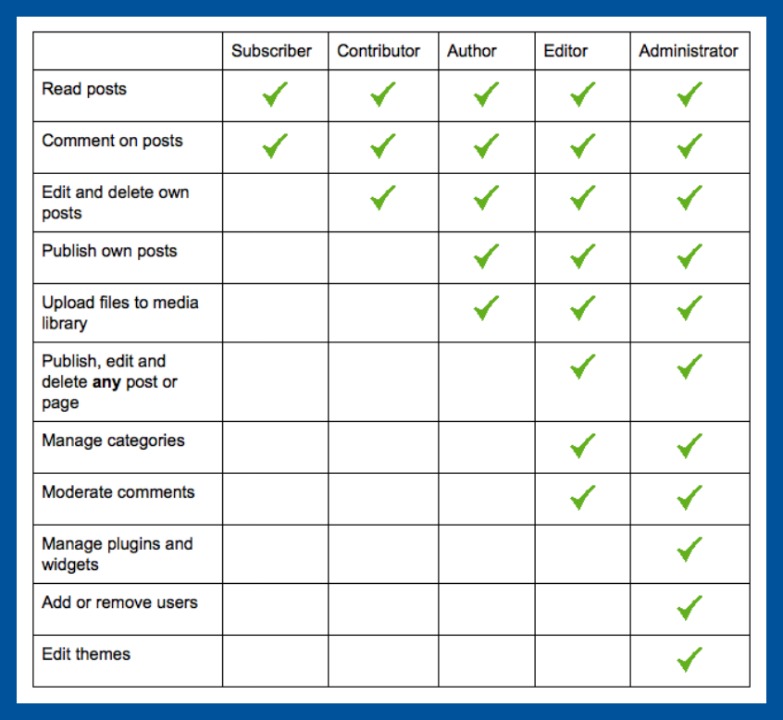
Credit: digitalcommunications.wp.st-andrews.ac.uk
Contributor Role Basics
A contributor role in WordPress has limited power. Contributors can write and edit their own posts. They can’t publish them. Approval from an editor or admin is needed first. This keeps the website safe from mistakes. Contributors can’t upload images or files. They focus on writing content only. This helps maintain a neat media library. Contributors must follow the website’s guidelines. They can’t change important settings. They play a key role in content creation. It’s a great start for new writers. They learn the basics of blogging. With time, they can gain more roles.
Permissions And Limitations
A contributor role in WordPress has specific permissions. They can write and edit their own posts. Contributors cannot publish their posts directly. They need approval from an editor or administrator. This role helps maintain control over content quality.
Contributors can delete their drafts but not published posts. They have no access to media files. Uploading images or videos is restricted. This limits creativity but ensures site security.
Contributors also cannot change any settings. They can’t install plugins or themes. This keeps the site safe from unexpected changes. Understanding these limitations is key for contributors. It helps them work effectively within their role.
Workflow For Contributors
Contributors write and edit content on WordPress. They cannot publish it. Instead, they submit their work for review. Editors or administrators review the submitted content. They decide if it should be published. Contributors need to focus on their writing. They must ensure the content is clear and error-free. They cannot add images or links. This task is for the editors. Contributors can see their own posts. But they cannot change published posts. This helps keep the website consistent. Contributors have a simple dashboard. It shows the status of their posts.
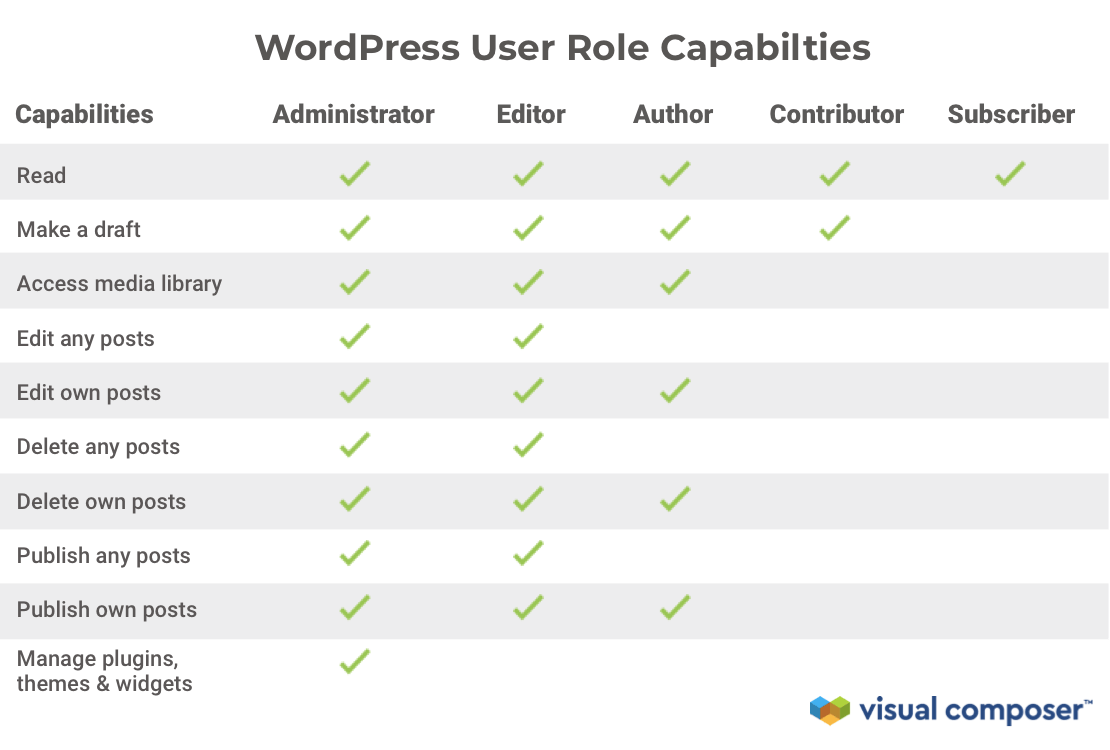
Credit: visualcomposer.com
Publishing Process
Contributors write posts but cannot publish them. They need an editor or administrator to review. After review, the post can be published. This keeps the content quality high. Contributors can see their posts listed on the website. They can edit their drafts anytime. But they cannot delete published posts. This role helps in teamwork. It is safe for beginners.
Contributors cannot add media files. They need help from an editor for this. Their focus is mainly on writing. They have limited access to website settings. This prevents accidental changes. Contributors get feedback from editors. This helps them learn and improve. It’s a good start for new writers.
Collaborating With Editors
Contributors write posts and submit them for review. They can’t publish their own posts. Editors check the content and make changes if needed. Contributors must follow guidelines for writing. This helps editors work quickly. Clear communication is important between contributors and editors. Contributors can suggest ideas to editors. This helps create better posts. Editors give feedback to contributors. Feedback helps improve writing skills. Contributors can ask editors questions. This helps understand editor’s needs. Both work together for the best results. Teamwork is key in writing. Contributors learn from editors. They become better writers over time.
Benefits Of Contributor Role
The Contributor role is important in WordPress. It allows users to write and edit their own posts. But they cannot publish them. This helps in content management. It ensures content is reviewed before publishing. Contributors can focus on writing. They do not worry about other settings. This role is good for teams. Everyone knows their task. It makes the workflow smooth.
Contributors learn from feedback. Editors can guide them. This improves writing skills. It builds teamwork. They feel part of the team. They can also save drafts. This helps in organizing thoughts. Contributors can also view comments. They can respond if needed. This role is perfect for beginners. It gives them experience.
Best Practices For Contributors
Contributors help by writing posts. They create drafts for review. The Contributor Role does not publish content. They need approval first. This keeps the quality high. Contributors should focus on clear writing. Short sentences work best. Use simple words to explain ideas. Be sure to check your spelling.
Always follow the site’s guidelines. This shows respect for the process. Stay open to feedback. It helps you grow as a writer. Contributors should save their work often. This prevents losing changes. The role teaches teamwork and patience. Enjoy the learning journey!
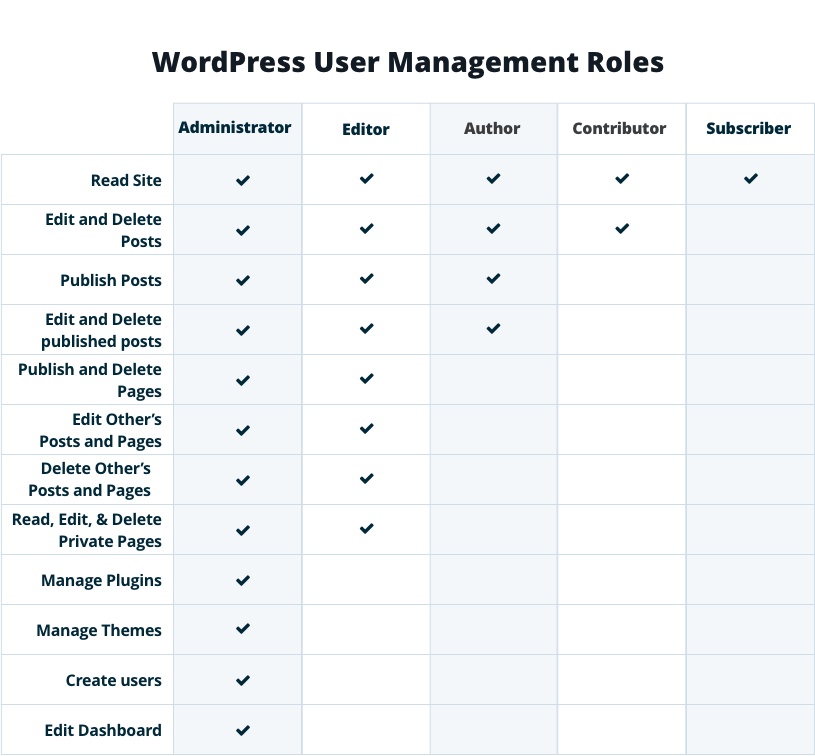
Credit: wpengine.com
Enhancing Contributor Experience
Contributors help create content on WordPress sites. They write and edit articles. But they can’t publish them. This keeps the site safe from mistakes. Editors review the work before it goes live. Contributors focus on writing quality content. This role is great for beginners. It lets them practice and learn. They gain experience without full responsibility.
Contributors can see their drafts. They can also see comments from editors. This helps them improve their writing. They learn what works and what doesn’t. This feedback is very important. It makes them better writers. Contributors can also work in a team. They share ideas and help each other. This makes the job more fun and creative.
Common Challenges
The Contributor role in WordPress has some challenges. One main issue is the limited permissions. Contributors can write posts, but they can’t publish them. This can be frustrating for those who want to see their work live. Another problem is the lack of media upload rights. They cannot add images or videos to their posts. This limits their ability to create engaging content. Also, they must depend on higher roles for publishing. This can slow down the content creation process. These challenges can make the role feel less empowering for creative users.
Contributors often feel a lack of autonomy. They rely on editors for final approval. This might delay publishing. Contributors may also feel less motivated. Their limited role can hinder their creative expression. Understanding these challenges can help in managing expectations. It also aids in improving the WordPress experience.
Future Of Contributor Role
The Contributor role in WordPress is evolving. Contributors will have more ways to help. They can write and edit posts. They can suggest changes. They will not publish. This helps keep content safe.
WordPress is always changing. New tools make it easier. Contributors will use new tools to work faster. They will learn more skills. This will help them grow.
More people will become Contributors. This will make WordPress better. Everyone can help. Many voices make content rich. This is the future. Contributors are important. They help build strong communities.
Frequently Asked Questions
What Does A Contributor Do In WordPress?
A Contributor can write and edit their own posts but can’t publish them. They also can’t upload media files. Once a contributor submits a post for review, an Editor or Administrator must approve and publish it. This role is ideal for guest authors or those new to WordPress.
How Is Contributor Different From Author In WordPress?
A Contributor can write and edit posts but can’t publish them. An Author, however, can publish their own posts. Unlike Contributors, Authors can upload media files. This distinction allows Authors more independence, while Contributors require post approval from Editors or Administrators.
Can A Contributor Edit Published Posts In WordPress?
No, a Contributor can’t edit published posts in WordPress. They can only edit their own drafts. Once a post is published by an Editor or Administrator, only higher roles can make further changes. This limitation ensures content quality and consistency across the website.
How To Assign A Contributor Role In WordPress?
To assign a Contributor role, go to the WordPress dashboard. Navigate to Users, then Add New or select an existing user. In the Role dropdown menu, choose Contributor and save changes. This assignment allows the user to create and edit their own posts without publishing rights.
Conclusion
Understanding the contributor role in WordPress is vital. Contributors can write posts and submit them for review. They cannot publish posts or upload files. This role is great for team collaboration. It helps maintain content quality. Editors review and approve submitted content.
This keeps the website organized and professional. Contributors help expand site content without compromising security. They focus on writing, allowing editors to manage final touches. Clear user roles improve workflow efficiency. Contributors support the site’s growth and creativity. Assign this role wisely for better content management.


