
Have you ever wondered what really makes your WordPress site tick behind the scenes? The secret lies in a small, yet incredibly powerful file known as the “config file.”
Understanding this file can open doors to optimizing your site like never before, making it run smoother, faster, and more securely. You’re not alone if you find this concept a bit daunting. Many WordPress users overlook the config file, missing out on the chance to fine-tune their sites.
But don’t worry; this article is here to guide you through the essentials of the WordPress config file. You’ll learn why it’s important, what it does, and how it can be your ally in managing your website efficiently. So, why not unlock the potential of your WordPress site and become a master of its inner workings? Keep reading to discover how the config file can be a game-changer for you!
Credit: digwp.com
Purpose Of Config Files
Config files are very important for WordPress sites. They help in setting up the database connection. Without them, the website can’t talk to the database. Config files also store important site settings. These include language, URLs, and debug options. Settings are saved here to keep the site running smoothly.
Security is another key role of config files. They hold security keys and salts. These keys protect site data from hackers. Config files also control user permissions. This means who can make changes on the site. They ensure only trusted people have access.

Credit: jetpack.com
Location In WordPress
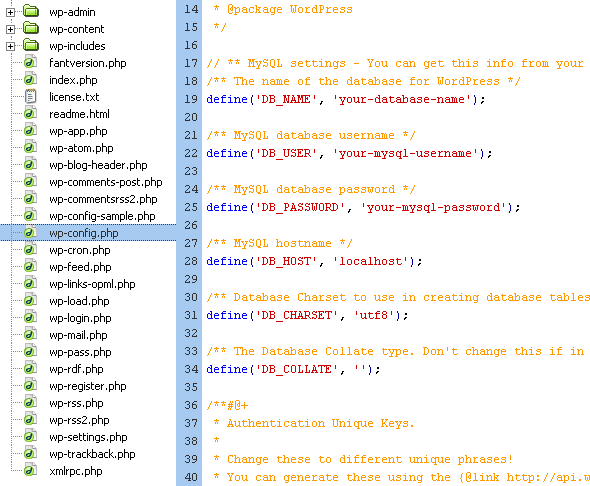
The WordPress config file is important. It is named wp-config.php. This file is usually in the main folder. The folder where WordPress is installed. It helps WordPress connect to the database. It also sets up some settings. To find this file, you need to access your server. Use a program like FTP or a file manager.
This file controls many things. Like database details and security keys. It also manages debugging settings. Be careful when changing it. Mistakes can break your site. Always make a backup first. This way, you can fix problems easily. The file is small but very powerful. It keeps your site running smoothly.
Key Components Of Wp-config.php
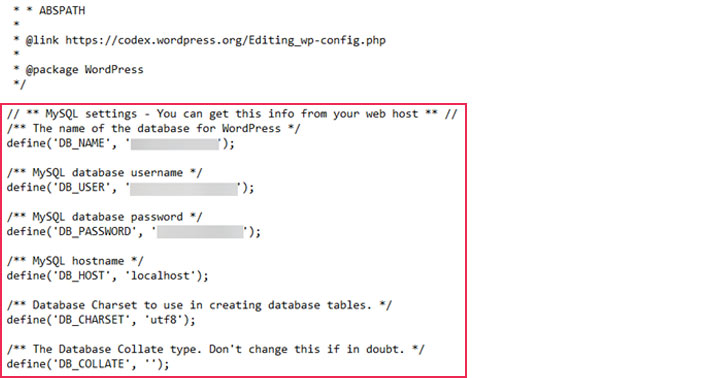
The wp-config.php file holds your database settings. These settings connect WordPress to your database. It includes DB_NAME, DB_USER, DB_PASSWORD, and DB_HOST. These are like keys that unlock your site data. Keep them safe and secret. If they change, update them here.
Authentication keys are very important. They secure your login sessions. There are eight keys and salts. They make your site more secure. It’s good to change them from time to time. This keeps hackers away.
The table prefix helps organize your database. Default is wp_. It’s good to change it. This makes your site safer. It’s harder for bad people to guess.
Debugging options help fix errors. You can turn debugging on or off. Use define(‘WP_DEBUG’, true); to turn it on. This helps find and fix problems. Always turn it off on live sites.
Customizing Wp-config.php
WordPress needs memory to run. Sometimes, it needs more memory. You can increase this in the wp-config.php file. Find the line that says define('WP_MEMORY_LIMIT', '64M');. Change 64M to 128M or more. This will help WordPress run faster. Remember, more memory means less chance of errors.
File permissions decide who can see or change files. In wp-config.php, set them right to keep your site safe. Usually, use 644 for files and 755 for folders. This keeps hackers away. Always check permissions after updates.
Multisite lets you run many sites with one WordPress. You need to change wp-config.php for this. Add define('WP_ALLOW_MULTISITE', true); to the file. This will let you create a network of sites. Multisite is good for big projects.
Security Best Practices
The wp-config.php file is very important. It holds your WordPress settings.
Keeping it safe is a must. Move it one level up from the root directory. This makes it harder
for hackers to access. Another way to protect it is by adding rules in the .htaccess file.
Add this code:
        order allow,deny

        deny from all
WordPress uses keys for security. These are called authentication keys. They help keep your site safe. You can find them in the wp-config.php file. Use the WordPress key generator online. It gives you random keys. Replace the old keys with new ones. This makes it harder for bad people to access your site. Changing keys often is a good idea. It keeps your site safer.
Common Errors And Troubleshooting
Database problems can happen if the config file is wrong. Check if the database name, username, and password are correct. These details must match the ones in your server. A tiny mistake can stop the connection. Sometimes, the host name is not right. It is often “localhost” but not always. Ask your host provider for the right name. Fixing these details will help connect to the database.
The configuration file is very important. WordPress needs this file to work. If it’s missing, WordPress will not start. Check if the file is in the correct folder. It should be in the main folder of your site. If it’s not there, create a new one. Use the sample file WordPress gives. Rename it to “wp-config.php”. Add your database details in it. This will help WordPress start again.
Advanced Configurations
Config File WordPress, commonly known as wp-config. php, holds key settings for your website. It manages database information, security keys, and other crucial configurations. Adjusting it allows you to customize WordPress behavior and enhance site functionality.
Configuring Cache
Caching makes your website faster. It saves data that does not change. This means less work for the server. Use plugins to set up cache. Popular ones are W3 Total Cache and WP Super Cache. These tools help manage cache easily. They store files for quick access. This boosts your website’s speed a lot. Faster websites keep visitors happy. They also rank better on search engines.
Setting Up Ssl
SSL keeps your site safe. It encrypts information between server and user. Let’s Encrypt is a free SSL option. Many hosting services offer SSL. Install SSL to show a padlock in the browser. This means the site is secure. Visitors trust sites with SSL more. Search engines also prefer secure sites. An SSL certificate is vital for online safety.
Credit: qodeinteractive.com
Frequently Asked Questions
What Is The WordPress Config File?
The WordPress config file, known as wp-config. php, is crucial for your website. It contains database details and essential configurations. This file helps connect your WordPress site to its database. It also defines settings like security keys and database table prefix.
How To Locate The Config File?
You can find the wp-config. php file in the root directory of your WordPress installation. Use an FTP client or your hosting provider’s file manager to access it. It’s usually located in the public_html folder, alongside folders like wp-content and wp-admin.
Can I Edit The WordPress Config File?
Yes, you can edit the wp-config. php file to customize your WordPress setup. Use a text editor to make changes. Always back up the file before editing to prevent errors. Editing this file allows you to configure settings like debugging, database prefix, and security keys.
What Happens If The Config File Is Missing?
If wp-config. php is missing, your WordPress site cannot connect to its database. This results in an error message. Recreate the file by uploading a backup or manually creating it. Ensure correct database credentials and settings are included to restore functionality.
Conclusion
Understanding the config file in WordPress is essential. It helps manage settings. Beginners find it crucial for site control. This file influences performance and security. Knowing how to access and edit it saves time. Troubleshooting becomes easier with this knowledge.
You gain control over your site’s behavior. Remember to back up before changes. Mistakes can affect site functionality. Stay cautious while editing. With practice, managing this file becomes simple. This skill supports efficient site management. So, explore and learn more about WordPress config files.
It’s a valuable part of website development.


