
Have you ever wondered why some websites load slower or don’t work properly when you’re connected through a proxy? The answer often lies in something called “Bypass Proxy Settings for These Hosts Domains.”
Understanding this simple yet powerful setting can save you from frustrating delays and improve your online experience. You’ll discover exactly what bypass proxy settings are, why they matter, and how they can make your internet connection smarter and faster. Keep reading, and you’ll unlock the key to smoother browsing tailored just for you.
Bypass Proxy Settings Basics
Understanding bypass proxy settings helps manage internet traffic better. It controls which websites or domains skip the proxy server. This ensures direct connection to certain hosts without proxy interference. Knowing these basics improves network speed and security.
What Bypass Proxy Means
Bypass proxy means skipping the proxy server for some websites. Instead of routing traffic through the proxy, the device connects directly. This avoids delays and proxy rules for those specific sites. It helps access trusted domains faster and without restrictions.
Why Bypass Proxy Settings Matter
Bypass proxy settings reduce unnecessary load on the proxy server. This makes browsing quicker and smoother for selected domains. It also helps access internal or safe websites directly. Networks stay more secure and efficient with proper bypass rules.
Credit: apple.stackexchange.com
Hosts And Domains In Proxy Settings
Proxy settings control how your device connects to the internet. They can route traffic through a server to improve security or speed. In proxy settings, you may see options to bypass proxy for certain hosts or domains. Understanding the difference between hosts and domains helps set these rules correctly. This ensures some websites or services connect directly, without using the proxy.
Difference Between Hosts And Domains
A host is a specific computer or device on the internet. It often appears as a full web address, like www.example.com or mail.example.com.
A domain is a broader term. It covers all hosts under the same main name, such as example.com. This includes www.example.com, mail.example.com, and others.
Hosts point to one exact location. Domains cover many hosts under one name.
How Proxy Affects Hosts And Domains
Proxy settings can treat hosts and domains differently. Bypassing a host means only that exact address avoids the proxy.
Bypassing a domain means all hosts under that domain skip the proxy. This can speed up access to trusted sites.
Using proxy for all traffic can slow some connections. Bypassing helps access local or important sites faster.
Configuring Bypass Proxy Settings
Configuring bypass proxy settings helps control which websites or domains skip the proxy server. This improves speed and access for trusted sites. It also reduces unnecessary traffic through the proxy. Setting these options correctly helps balance security and performance on your network.
Bypass settings are often used in businesses or schools. They allow direct access to specific hosts without proxy interference. This setup is simple but requires careful selection of domains to avoid security risks.
Manual Setup Steps
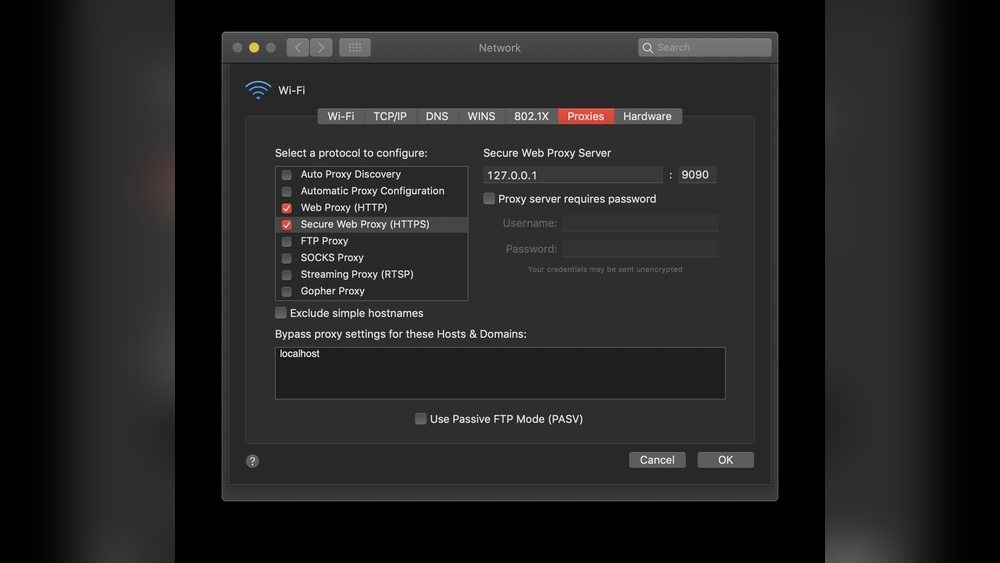
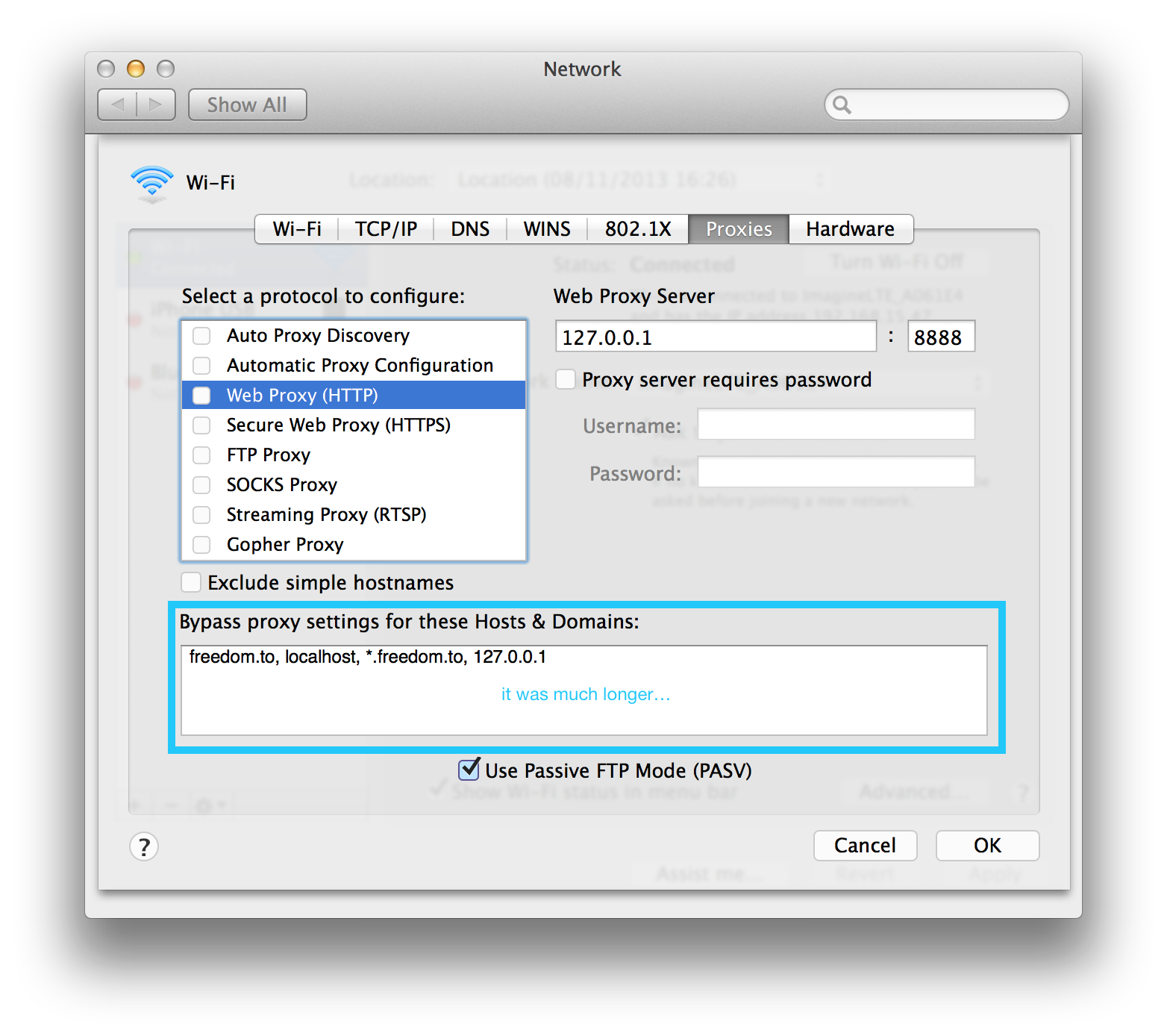
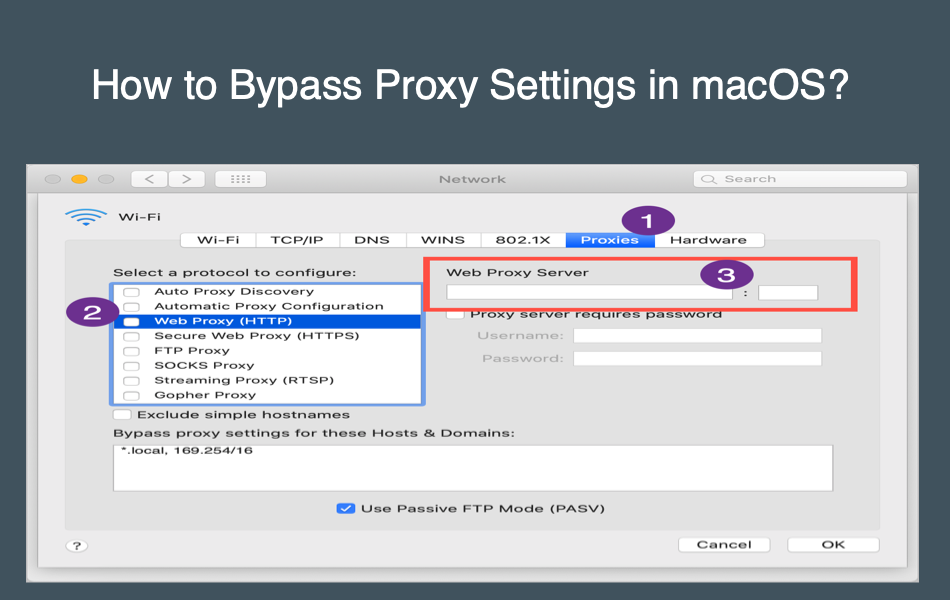
Start by opening your device’s network settings. Find the proxy configuration section. Enter the list of hosts or domains to bypass the proxy. Use a comma or semicolon to separate multiple entries. Save the changes and test by accessing the specified sites. Make sure these sites load directly without the proxy.
Using Wildcards In Domains
Wildcards help cover many domains with one rule. For example, .example.com bypasses all subdomains of example.com. Use an asterisk () before the main domain name. This saves time and reduces errors. It also ensures new subdomains follow the bypass rule automatically.
Common Tools And Interfaces
Most operating systems offer built-in proxy settings. Windows, macOS, and Linux have easy menus for bypass configuration. Browsers like Chrome and Firefox also allow proxy bypass lists. Network tools such as Proxy Auto-Config (PAC) files provide advanced control. These tools suit both simple and complex network environments.
Use Cases For Bypass Proxy
Bypassing proxy settings for certain hosts or domains helps manage internet traffic more efficiently. It allows direct connections without routing through the proxy server. This approach is useful in many situations where using a proxy could slow down or block access. Below are common use cases for bypassing proxy settings.
Improving Network Performance
Bypassing proxy for trusted websites reduces delay in loading pages. It cuts down extra steps in data transfer. This speeds up browsing and data access. It is helpful in offices with heavy internet traffic.
Accessing Local Resources
Local servers and devices often do not work well through proxies. Bypassing proxy settings allows direct communication. This ensures smooth access to printers, file servers, or intranet sites. It keeps local network operations quick and reliable.
Avoiding Proxy Restrictions
Some websites or services block connections through proxies. Bypassing proxy settings lets users reach these sites without issues. It avoids errors caused by proxy restrictions. This is useful for accessing specific content or applications.
Troubleshooting Bypass Proxy Issues
Troubleshooting bypass proxy issues can be tricky. Problems may stop certain websites from loading correctly. It is important to understand common problems and how to test if bypass settings work. Fixing errors quickly helps keep your connection smooth. This section explains how to identify and solve bypass proxy issues effectively.
Common Problems
One common problem is websites still going through the proxy. This causes slow loading or blocked access. Another issue is incorrect domain names in the bypass list. Typos or wrong formats prevent bypass from working. Sometimes, proxy settings do not save properly after changes. Network policies or software conflicts can also cause bypass failures.
Testing Bypass Effectiveness
Testing helps confirm if bypass settings are working. Use a browser to access a bypassed site. Check if the connection avoids the proxy server. You can also use command tools like “ping” or “tracert” to trace routes. If traffic still goes through the proxy, bypass is not effective. Clear browser cache and restart the device before testing again.
Fixing Configuration Errors
Start by double-checking the host or domain names. Use correct formats like “.example.com” for all subdomains. Remove spaces or special characters that do not belong. Save changes and restart your browser or network service. Update proxy software if outdated. Disable conflicting firewall or VPN settings that block bypass. Follow these steps to fix most configuration errors.

Credit: www.autodesk.com
Security Considerations
Security is a key part of using bypass proxy settings for hosts and domains. Changing proxy settings can affect how data travels on the internet. It may expose sensitive information or create weak points for attacks. Understanding these risks helps protect your network and data.
Risks Of Bypassing Proxy
Bypassing a proxy means traffic goes directly to the internet. This skips security checks and filtering. Malicious sites can send harmful data without being blocked. Sensitive information might leak if the connection is not secure. Tracking and monitoring of traffic also become harder. These issues can lead to data theft or network breaches.
Best Practices For Safe Usage
Limit bypass to only trusted hosts and domains. Use secure connections like HTTPS whenever possible. Regularly update proxy and firewall settings to close gaps. Monitor network traffic to spot unusual activity fast. Educate users on safe internet habits and risks involved. These steps help keep your network safer while using bypass proxy settings.
Advanced Bypass Proxy Techniques
Advanced bypass proxy techniques help control which websites or domains skip the proxy server. These methods improve network speed and security by allowing direct access to trusted sites. They also reduce unnecessary traffic through the proxy.
Using these techniques, IT teams can customize settings for better performance. They can automate tasks or combine proxy bypass with other security tools. This section explains two popular advanced methods.
Scripting And Automation
Scripting helps automate proxy bypass rules. Simple scripts can check the website address and decide if it should skip the proxy. This saves time and reduces errors compared to manual settings.
Scripts can run on user devices or network servers. They update proxy rules quickly based on changing needs. For example, a script can bypass proxy for internal company sites only.
Automation lets teams manage many devices easily. It also adapts to new domains without manual changes. Scripts improve efficiency and keep the network running smoothly.
Integration With Vpns And Firewalls
Combining proxy bypass with VPNs and firewalls enhances security. Firewalls control access to websites, while VPNs encrypt data traffic. Together, they create a safer browsing environment.
This integration allows specific domains to bypass the proxy and use a VPN instead. It helps protect sensitive sites from being exposed through the proxy server.
Firewalls can enforce rules that complement proxy bypass settings. This layered approach limits risk and improves control over network traffic. It keeps users safe and data secure.
Credit: www.webnots.com
Frequently Asked Questions
What Does Bypass Proxy Settings Mean For Hosts Domains?
Bypass proxy settings allow specific domains to connect directly. This avoids routing traffic through the proxy server. It improves speed and access for trusted sites.
Why Bypass Proxy For Certain Domains?
Bypassing proxy for trusted domains reduces delays and errors. It ensures direct access to internal or secure websites. This improves user experience and network efficiency.
How To Configure Bypass Proxy Settings?
You configure bypass proxy settings in your browser or system network settings. Add domain names or IP addresses to the bypass list. This directs traffic to those hosts without the proxy.
Which Domains Should Bypass Proxy Settings?
Typically, internal company domains or frequently accessed trusted sites bypass proxy. Avoid proxy for local servers and secure intranet resources. This ensures faster and safer connections.
Conclusion
Bypass proxy settings help you access specific websites directly. This saves time and improves connection speed. You control which domains skip the proxy server. It is useful for trusted sites or internal networks. Setting up bypass rules is simple and effective.
This feature helps balance security and convenience. Understanding how to use it makes browsing smoother. Try adjusting your proxy settings for better performance. It keeps your internet use flexible and efficient.


