
Imagine landing on a blog post that captivates you from the first sentence. You’re eager to learn more about the author behind those compelling words.
This is where an author bio in WordPress becomes crucial. It’s not just a tiny blurb at the end of a post; it’s a bridge connecting you to the person who has crafted the content you’re enjoying. But what exactly is an author bio in WordPress, and why should you care?
Whether you’re a seasoned blogger or just starting out, understanding the importance of an author bio can elevate your credibility and engage your audience on a deeper level. You deserve to know who is sharing their knowledge and insights with you. Dive into this article to discover how a well-crafted author bio can enhance your blog’s authenticity, build trust, and keep your readers coming back for more.
Author Bio Essentials
Purpose of Author Bio: The author bio tells readers about the writer. It builds trust and connection. Readers learn why the author is an expert. This helps in making the content more relatable and credible. A well-crafted bio can increase reader engagement.
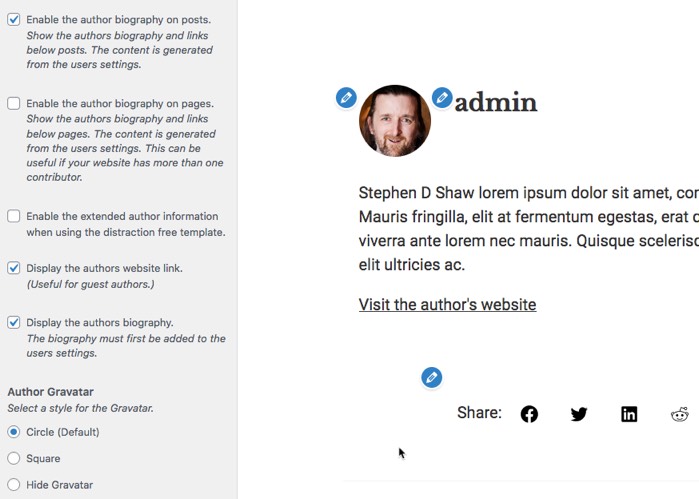
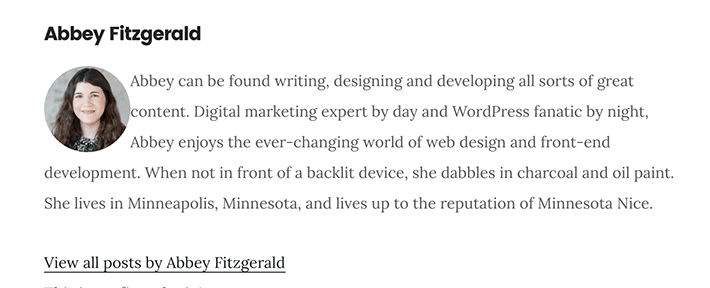
Key Elements to Include: An author bio should have the author’s name. Adding a photo is a good idea. It makes the bio personal. Include a short description of the author’s background. Mention key achievements or skills. Adding a link to the author’s website or social media is helpful. This lets readers find more content by the author.
Credit: www.everywheremarketer.com
Creating An Author Bio
To add an author bio in WordPress, first go to your dashboard. Click on Users in the sidebar. Select Your Profile from the menu. Scroll down to find the Biographical Info section. Write your bio in this space. It’s important to keep it short and interesting.
After writing, click Update Profile to save changes. Make sure your bio appears on your posts. Check by viewing a post you’ve written. If it doesn’t show, you might need a plugin. Plugins can help display your bio.
Keep the bio short and easy to read. Use simple words. Highlight your main skills and interests. Talk about your work and goals. Include a fun fact about yourself. This makes your bio more relatable.
Use a friendly tone. Readers like a personal touch. Avoid using too many big words. Your readers should understand easily. Always update your bio with new information. This keeps it fresh and current.
Customizing Your Author Bio
Plugins make author bio more interesting. Many plugins add extra features. Some plugins let you add social media links. Others allow you to add a photo. This helps readers know the author better.
Plugins also offer more options for design. You can change colors and fonts. This makes the bio look unique. Some plugins even allow you to add awards or achievements.
Always choose plugins that are safe. Check reviews and ratings before using them. This ensures your site stays secure.
Design matters a lot. A good design catches the eye. You can use bold colors. Or choose calm colors. Fonts should be easy to read.
Add spaces for better look. This helps in understanding the bio. Use bullet points for listing achievements. This makes information clear and organized.
Images can make bios more lively. Use a professional photo. This builds trust with readers.

Credit: ultimateblocks.com
Promoting Your Profile
Social media links in an author bio can be useful. Readers can easily visit your profiles. They learn more about you. You can connect with them. They follow your updates. This helps in growing your audience. Adding links is simple. Use icons for clear visibility. Make sure links work properly.
Author bios can show your skills and experience. Share your job role or projects. Tell your story briefly. This helps readers trust your work. They understand your knowledge. Write clearly about your achievements. Use simple words. This keeps your bio easy to read. Readers appreciate quick information.
Impact On Readership
Author bios in WordPress enhance readership by establishing trust and connection. Readers feel more engaged, increasing the likelihood of return visits.
Building Trust With Readers
Readers like to know who writes. An author bio helps with this. It shows the writer’s experience and skills. This builds trust. Readers feel safe when they know more. They want to read more. Trust is key for keeping readers.
Increasing Engagement
An author bio can make readers curious. They might want to comment or ask questions. This means more interaction on your blog. Readers like to connect with real people. They feel their thoughts matter. This makes your blog active and lively. Engagement keeps blogs popular.
Credit: wpengine.com
Common Mistakes
An author bio should not sound like a sales pitch. Avoid bragging too much about your skills. Keep the information simple and genuine. Readers want to know who you are, not just what you sell. Highlight your achievements briefly. This keeps the reader’s trust intact.
Author bios can become outdated fast. Update them regularly to keep them fresh. New achievements should be added. Remove old or irrelevant details. This shows you are active and engaged. Readers appreciate up-to-date information. It makes you seem more reliable and trustworthy.
Frequently Asked Questions
What Is An Author Bio In WordPress?
An author bio in WordPress is a brief section that provides details about the post’s author. It usually includes the author’s name, a short description, and links to their social media or website. This enhances credibility and allows readers to connect with the author personally.
How To Add An Author Bio In WordPress?
To add an author bio in WordPress, navigate to your user profile in the dashboard. Fill in the “Biographical Info” section with relevant details. You can enhance the bio with plugins for more customization options. This ensures your bio appears consistently across your posts.
Why Is An Author Bio Important?
An author bio is important because it builds trust with readers. It provides credibility and a personal touch to your content. A well-crafted bio can increase engagement and help readers connect with the author. This enhances the overall user experience on your website.
Can I Customize My Author Bio?
Yes, you can customize your author bio using WordPress plugins or themes. Plugins offer features like social media links, avatars, and styled layouts. Customizing your bio helps in creating a unique and professional appearance. This improves the overall presentation of your blog posts.
Conclusion
Creating an author bio in WordPress is simple and effective. It adds personality to your content. Readers connect more when they know the writer. A well-crafted bio builds trust. It also boosts your blog’s credibility. Don’t skip adding this important detail.
Make your bio engaging and concise. Highlight your expertise and interests. Use simple language to reach a wider audience. Remember, a strong author bio can enhance your blog’s success. So, take the time to write a good one. It makes a difference in reader engagement.
Keep it fresh and updated. Your readers will appreciate it.


