
Are you managing multiple websites and finding it increasingly challenging to keep everything organized? What if there was a way to streamline your efforts and manage all your sites from one central hub?
Enter WordPress Multisite—a powerful tool that might be the solution you’ve been searching for. Imagine the ease of controlling multiple sites with a single dashboard, saving time and reducing stress. Whether you’re a seasoned developer or a passionate blogger, understanding WordPress Multisite could be a game-changer for your online presence.
Dive in to discover how this feature can simplify your web management and enhance your digital strategy.
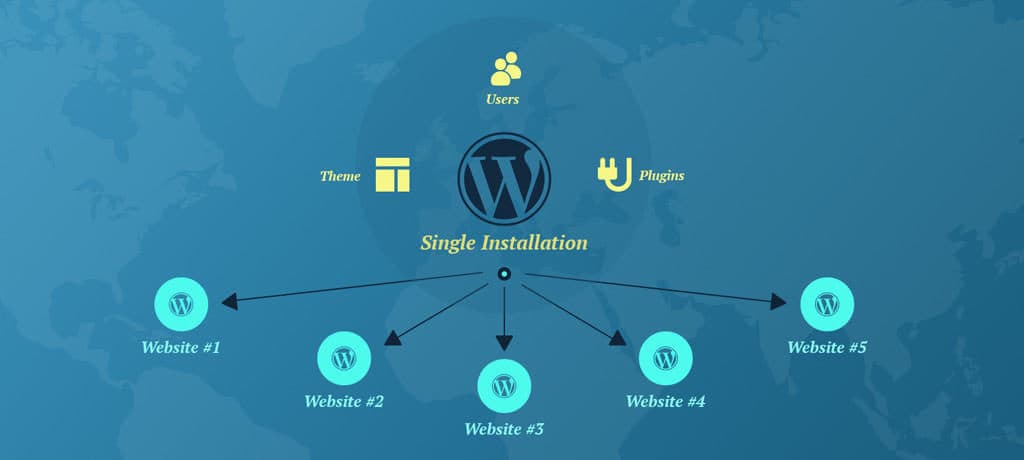
Credit: www.mooveagency.com
WordPress Multisite Basics
A WordPress Multisite is a tool. It lets users create many websites. All sites run from one WordPress install. This saves time. Only one dashboard is needed. Users manage all sites from there. Themes and plugins are shared. Updates are easy. Each site can have its own domain name. But they share the same server. This makes it simple and quick. Multisite is great for schools, businesses, and blogs.
WordPress started in 2003. In 2010, WordPress Multisite was born. It came with version 3.0. Before that, it was a separate tool. Called WordPress MU. MU means Multi-User. Developers made it part of WordPress. They wanted it easier. To manage many sites. Since 2010, it grew. Many updates came. Each one made it better. More features were added. More people use Multisite now. It helps them manage sites smartly.

Credit: roiamplified.com
Setting Up A Multisite Network
Ensure your server supports WordPress multisite. Check if you have administrator access to your WordPress. Back up your site data. Use the latest version of WordPress. Also, make sure your hosting plan supports subdomains or subdirectories. This is crucial for multisite setup.
Open your wp-config.php file. Add define('WP_ALLOW_MULTISITE', true);. Save the file. Now go to your WordPress dashboard. Find the Tools menu. Click on Network Setup. Choose your network type. It can be subdomains or subdirectories. Click Install to proceed. Follow on-screen instructions carefully.
Access the new Network Admin dashboard. Click on Settings. Set up your network title. Provide a valid admin email. Configure registration settings for new sites. You can allow or deny user sign-ups. Set default themes and plugins. Save changes. Your multisite network is ready.
Managing Sites In A Network
Adding new sites is easy. Admins can create sites in minutes. Go to the dashboard. Click on “Add New” under sites. Fill in the site details. Choose a name and title. Click “Create”. Your new site is ready. Each site has its own settings. But the main admin oversees them all.
Manage users from one place. Invite new users easily. Assign roles like admin or editor. Control who can do what. Each user has their own login. Users can only access their assigned sites. This keeps things secure. Admins can remove users too. It’s all simple and clear.
Themes and plugins make sites look good. Admins control them for all sites. Choose a theme for every site. Or let each site pick their own. Enable plugins network-wide. Some plugins might be needed by all. Others can be optional. Keeping themes and plugins updated is key. This helps sites run well.
Advantages Of Using Multisite
A single dashboard manages all sites. No need to log in multiple times. Saves time and effort. Easy to update themes and plugins across sites. One place to control everything. Simple and efficient.
Share themes, plugins, and users. No need to duplicate. Save space and bandwidth. All sites use the same set of tools. Easier to maintain consistency. Reduces costs by sharing resources.
Add new sites quickly. Easy to scale as your needs grow. No need for extra installations. Handle more traffic without hassle. Suitable for businesses of all sizes. Expand with ease.
Challenges And Limitations
Managing a WordPress Multisite comes with hurdles. Site admins face issues with plugin compatibility and theme limitations. Also, network security can become complex with multiple sites.
Security Concerns
Security is a big issue with WordPress Multisite. One hacker can access all sites. Each site shares the same database. A security hole in one site can affect all. Regular updates are crucial. Strong passwords help keep sites safe. Use trusted plugins only. Backup often to avoid data loss.
Performance Issues
Performance can slow with many sites. More sites mean more server load. Shared resources can lead to slow speeds. Large networks need more memory. Good hosting is important. Optimize images for faster load times. Too many plugins can cause lag. Monitor site speed regularly.
Compatibility Considerations
Not all plugins work with Multisite. Some themes may not be compatible. Test plugins before using. Check theme support for Multisite. Updates might break compatibility. Choose plugins carefully. Contact developers for help if needed. Compatibility issues can cause site errors.
Use Cases For Multisite
Schools and universities use WordPress Multisite to manage many sites. Each department can have its own site. This helps keep everything organized. Teachers can share lessons online. Students can access their resources easily. With a single login, everyone can connect. It makes learning more accessible.
Big companies need many websites. Each brand or product might need its own site. WordPress Multisite helps manage them all. The main office controls everything. Local teams can update their own sites. This keeps the brand message consistent. It saves time and effort.
Blogging sites use Multisite to host many blogs. Each blogger gets their own space. They can customize their site. Readers can find all blogs in one place. This makes it easy to discover new content. WordPress Multisite keeps everything simple and neat.
Alternatives To Multisite
A single site installation is simple. It works for one website. You get full control. You can choose your own themes. Also, you can pick your plugins. It’s easy to manage. You don’t need to worry about other sites. Each site is separate. This means fewer problems. It’s a good choice for small projects. Also, for beginners too.
Some tools can help manage many sites. They are not part of WordPress. They help you update all sites at once. This can save time. Some tools are ManageWP and InfiniteWP. They help with backups and security. You can control all sites from one place. This is useful for big projects. Or if you run many sites. But they may cost money. Always check features and prices first.

Credit: kinsta.com
Frequently Asked Questions
What Is A WordPress Multisite?
WordPress Multisite is a feature that allows you to run multiple websites using a single WordPress installation. It is ideal for managing multiple sites from one dashboard. This setup is useful for businesses, universities, or networks needing centralized control over many sites.
How Do I Activate WordPress Multisite?
To activate Multisite, open your WordPress installation’s wp-config. php file. Add the line `define(‘WP_ALLOW_MULTISITE’, true);`. After saving, navigate to Tools > Network Setup in your dashboard. Follow the instructions to complete the setup process.
Can I Use Plugins On Multisite?
Yes, you can use plugins on Multisite. However, plugins must be network-enabled by the super admin. This allows them to function across all sites within the network. Individual sites cannot activate plugins independently unless permitted by the super admin.
Is WordPress Multisite Suitable For Beginners?
WordPress Multisite may not be suitable for beginners due to its complexity. It requires a good understanding of WordPress administration. It’s more suited for users managing multiple sites or networks. Beginners should start with a single site to learn basic WordPress functionalities.
Conclusion
A WordPress Multisite offers a simple way to manage multiple sites. It saves time and effort by providing one dashboard for all. Perfect for businesses or bloggers with many sites. The setup may seem complex at first. But the benefits are worth it.
Users enjoy centralized control and consistent updates. This boosts efficiency and reduces errors. Ready to streamline your site management? A WordPress Multisite might be the solution you need.


