
Have you ever wondered how websites come to life on the internet? Maybe you’re ready to launch your own site but feel overwhelmed by the technical details.
A web hosting control panel might be just what you need. Imagine having a user-friendly dashboard where you can manage all aspects of your website with just a few clicks. You can set up email accounts, monitor your website’s traffic, and even install applications effortlessly.
It’s like having a remote control for your online presence. Understanding what a web hosting control panel is can empower you to take control of your site without needing advanced technical skills. Keep reading, and you’ll discover how this tool can simplify your web management tasks, making it easier to focus on growing your online brand.

Credit: www.webhostface.com
Overview Of Web Hosting Control Panels
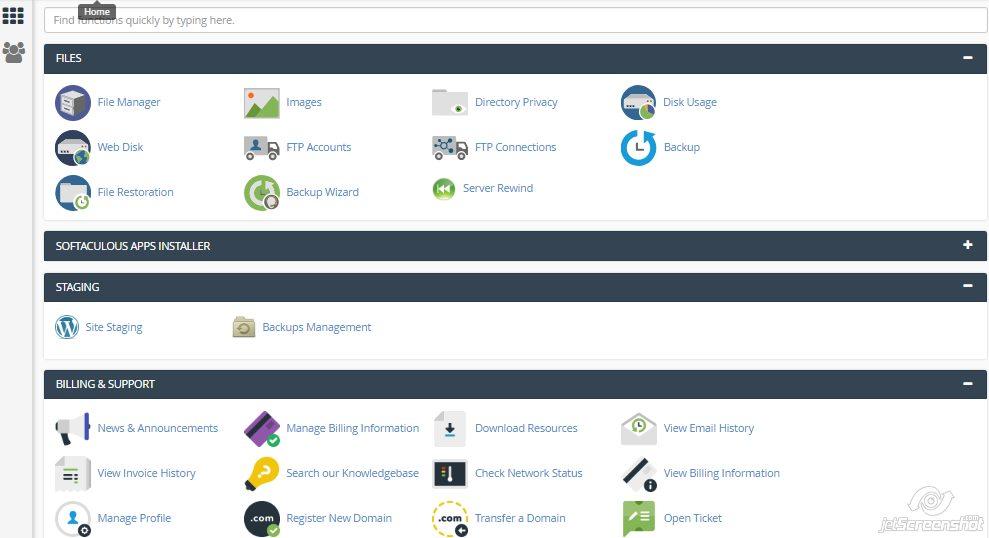
A web hosting control panel helps manage websites easily. It offers a user-friendly interface. You can change settings without coding skills. Common tasks include creating email accounts. Also, managing domains is simple. You can even install software quickly.
Control panels help with security settings. This keeps your site safe. Backing up data is easy too. Most panels have a dashboard. You see site stats and performance. Popular panels include cPanel and Plesk. Each has unique features.
They are essential for website management. Learning these tools saves time. They make web hosting simple for everyone. Understanding them is key for site success.

Credit: en.wikipedia.org
Key Features
A control panel helps you manage your domains easily. You can add new domains and subdomains. Updating DNS settings is simple. Transfer domains with a few clicks. Keep all your domains in one place. This makes everything organized.
Create and manage your email accounts with ease. Set up email forwarding to redirect messages. Use auto-responders for quick replies. Control spam with filters. All tools are in one place. Manage your email smoothly and easily.
Access your website files with a file manager. Upload and download files quickly. Edit files directly on the server. Organize your files in folders. Keep your website data neat and tidy.
Create and manage databases for your website. Use tools to add and remove data. Backup your database for safety. Access your database from the control panel. Keep your website data safe and sound.
Protect your website with strong security settings. Set up firewalls to block threats. Use SSL certificates for secure connections. Manage user permissions with ease. Keep your website safe from harm.
Popular Control Panels
cPanel is a widely used control panel. It helps manage websites easily. Users find it intuitive and simple. It offers many features like file management, email setup, and database management. Website owners can handle tasks without deep technical knowledge. With cPanel, managing hosting becomes efficient and stress-free.
Plesk is another popular choice for web hosting. It works with both Linux and Windows servers. Users can control their websites with ease. Plesk offers a clean interface and many tools. It supports multiple languages and advanced security features. Many web professionals trust Plesk for their hosting needs.
DirectAdmin is known for its simplicity and speed. It is often cheaper than other control panels. Website owners like its straightforward interface. It allows easy user management and supports multiple domains. DirectAdmin is perfect for those who need a lightweight solution.
Webmin is a free and open-source control panel. It is great for those who want flexibility. Webmin supports many modules for different tasks. Users can customize it to suit their needs. It is a good choice for advanced users who like to tinker.
Benefits For Users
Control panels are easy to use. Users can manage websites with simple clicks. No need for coding skills. Interfaces are user-friendly. Navigation is clear and straightforward. Beginners can learn fast. Tasks are performed without confusion.
Control panels help manage resources efficiently. Monitor bandwidth and space usage easily. Allocate resources as needed. Keep track of server performance. Adjust settings with ease. Avoid overuse and downtime. Keep websites running smoothly.
Security is a top priority. Control panels offer strong protection. Access control features are included. Manage permissions and passwords. Protect data from threats. Regular updates are provided. Keep your site secure and safe.
Automation saves time. Schedule backups and updates easily. Tasks can run automatically. No need for manual intervention. Efficiency improves greatly. Users can focus on other important things. Let the system do the work.
Choosing The Right Control Panel
A web hosting control panel is essential for managing server resources and websites. It simplifies tasks like file management, email setup, and security settings. Choosing the right control panel ensures efficient website operation and ease of use for beginners.
Compatibility
Some control panels work only on specific servers. Others work on many types. Check compatibility with your server. This saves time and trouble.
Cost Considerations
Control panels come at different prices. Some are free. Others cost money. Compare prices before buying. Think about your budget. Choose wisely.
User Interface
A good interface makes work easy. Look for a simple design. Complex panels confuse users. Easy panels save time. They help users work faster.
Support And Community
Support is important. Some panels have great support. Others have active communities. Check for helpful resources. This includes forums and guides. They solve problems quickly.
Credit: www.hostinger.com
Future Trends
Web hosting control panels simplify website management. They offer tools for tasks like setting up email accounts and managing databases. Users can easily access features to optimize site performance and security.
Integration With Cloud Services
Web hosting control panels are now adding cloud services. This means you can store more data. Your website can run faster. Cloud services make updates easy. They help in saving costs too. Many people like the flexibility they offer. More and more websites use them.
Ai And Machine Learning
AI helps in making smart decisions. It can fix problems quickly. Machine learning learns from past data. It makes the hosting better. AI can suggest ways to improve websites. It keeps sites safe from attacks. Many hosts use AI for better performance.
Enhanced Customization
Users want more control over their sites. Enhanced customization allows this. You can change how your site looks. You can add special features. Control panels now offer many options. Customization helps in making a site unique. It also makes managing sites easy.
Frequently Asked Questions
What Is An Hosting Control Panel?
A hosting control panel is a web-based interface that allows users to manage server settings and hosting accounts. It simplifies tasks like domain management, email configuration, and website monitoring. Popular options include cPanel, Plesk, and DirectAdmin. These tools enhance user experience by providing a centralized and intuitive platform for server management.
What Is The Control Panel In A Website?
A website control panel is a user-friendly interface for managing site settings, files, and hosting options. It simplifies tasks like email setup, security configuration, and database management. Popular panels include cPanel, Plesk, and DirectAdmin, enhancing website management efficiency and accessibility for users.
What Is The Cpanel Of A Website?
CPanel is a web hosting control panel that simplifies website management. It allows users to manage files, databases, email accounts, and security settings easily. CPanel offers a user-friendly interface, making it accessible for both beginners and experienced users. It is widely used for its efficiency and comprehensive features.
How Do I Open Hosting Control Panel?
Log into your hosting account and locate the control panel link in the dashboard. Click it to open.
Conclusion
Understanding web hosting control panels is important. They simplify managing websites. Users get easy tools. These tools help with tasks like email setup and file management. Control panels also provide security features. This ensures website safety. Many hosting options offer different panels.
Choose one that suits your needs. Good control panels make web hosting easier. They save time and reduce errors. Learning to use them improves site management. With practice, anyone can master these panels. Explore options and find the best fit.
Enhance your website experience with the right control panel.


