

Have you ever wondered what makes a website actually show up on your screen? If you’re thinking about creating your own website or just curious about how the internet works, understanding what a web host and a web domain are is essential.
These two simple concepts are the building blocks of every website you visit. By the time you finish reading, you’ll know exactly how they work together to bring your ideas online. Let’s dive in and clear up the mystery behind web hosting and domains so you can take the first confident step toward your own online presence.
Credit: designtlc.com
Web Hosting Basics
Understanding web hosting basics is key to building a website. Web hosting stores your website’s files on a server. This lets people access your site online anytime. Without web hosting, your website cannot be seen on the internet.
Choosing the right hosting type affects your site’s speed and security. Different hosting options serve different needs. Let’s explore how web hosting works and the main types available.
How Web Hosting Works
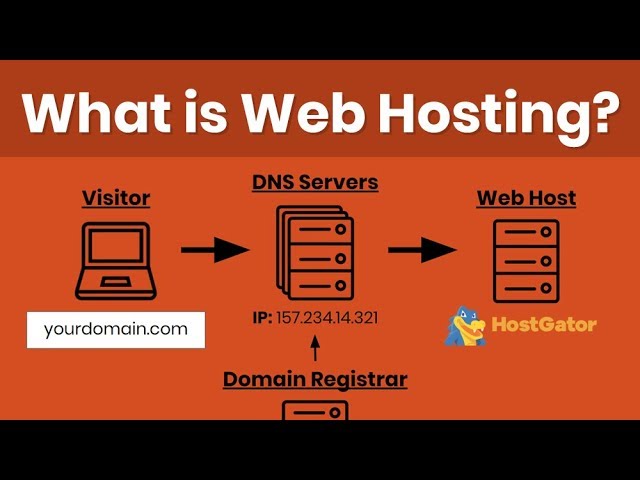
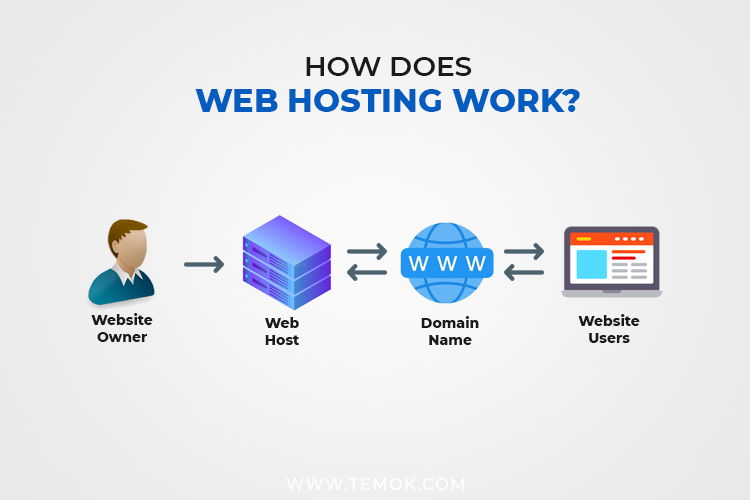
Web hosting connects your website to the internet. When someone types your domain name, the host sends your site files to their browser. Servers store all your images, text, and code. The server’s job is to keep your site online 24/7.
Types Of Web Hosting
There are several hosting types. Each offers different features and costs. Common types include shared, dedicated, and cloud hosting. Your choice depends on your website’s size and traffic needs.
Shared Vs Dedicated Hosting
Shared hosting means many websites share one server. It’s cheaper but slower if traffic grows. Dedicated hosting gives you a whole server. It costs more but offers better speed and security.
Cloud Hosting Explained
Cloud hosting uses many servers working together. It spreads your site data across several machines. This makes your site faster and more reliable. Cloud hosting also handles traffic spikes easily.
Web Domain Essentials
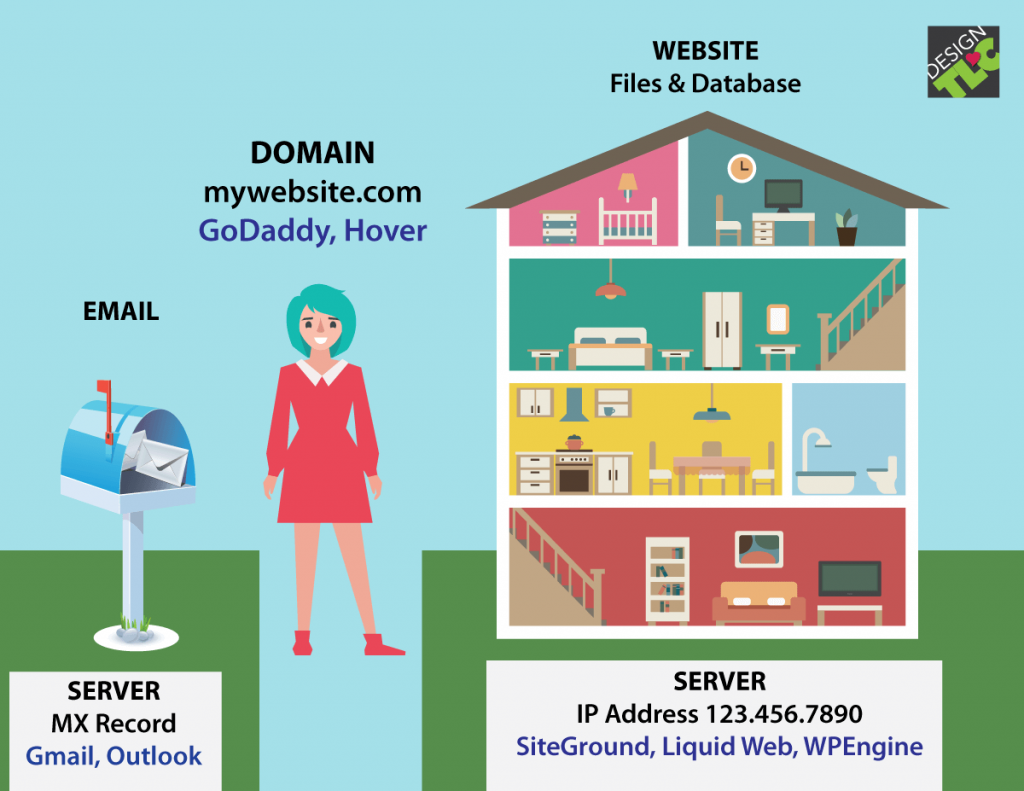
A web domain is the address people type to visit your website. It is a key part of your online identity. Choosing the right domain helps users find you easily. Understanding domains helps you create a strong web presence.
Domains are simple but powerful tools. They connect your website to the internet world. Let’s explore the basics of web domains and how to pick one.
What Is A Domain Name
A domain name is the web address of your site. It tells browsers where to find your pages. For example, example.com is a domain name. It replaces long IP numbers with easy words.
Domain Name Structure
Domain names have parts separated by dots. The main part is the second-level domain, like example. The last part is the extension, like .com. Sometimes, domains have subdomains before the main name, like blog.example.com.
Choosing A Domain Name
Pick a domain name that is short and clear. Use simple words that people remember. Avoid numbers and hyphens to reduce confusion. Think about your brand or topic. Check if the name is easy to spell and say.
Domain Extensions
Domain extensions are the endings like .com, .org, or .net. Each extension has a meaning or purpose. .com is for businesses, .org for organizations. Choose an extension that fits your website’s goal.
Connecting Domains And Hosting
Buying and registering a domain is the first step to create a website. A domain is your website’s address on the internet. It helps visitors find you online easily. Choosing and registering the right domain name is important. This section explains where to register domains, the registration process, costs, and tips for renewal and transfer.
Where To Register Domains
Domains are registered through companies called domain registrars. These companies manage the reservation of domain names. Popular registrars include GoDaddy, Namecheap, and Google Domains. Choose a registrar that offers good support and easy management tools. Check if they provide privacy protection to keep your information safe.
Domain Registration Process
Start by searching for your desired domain name on the registrar’s website. The system will tell if the domain is available or taken. If available, add it to your cart. Next, provide your contact details for ownership records. Complete the payment to finalize the registration. After payment, the domain is yours to use for a set period.
Cost Factors For Domains
Domain prices vary based on extension and popularity. Common extensions like .com or .net cost less. New or special extensions like .tech or .store may cost more. Some domains have higher prices due to demand or exclusivity. Look for hidden fees such as privacy protection or renewal costs. Compare prices before making a purchase.
Renewal And Transfer Tips
Domains must be renewed before they expire to keep ownership. Set reminders to avoid losing your domain. Most registrars offer automatic renewal options. Transferring a domain to another registrar is possible anytime. Check transfer policies and fees before starting. Keep your contact info updated to receive renewal notices.
Credit: www.youtube.com
Buying And Registering Domains
Selecting the right web host is a crucial step for your website’s success. A good web host ensures your site runs smoothly and stays online. It affects your site speed, security, and user experience. Choosing poorly can lead to slow loading times and frequent downtime. Take time to explore key features and compare providers before deciding.
Key Features To Look For
Look for reliable uptime to keep your site available. Fast server speeds improve visitor experience. Storage space and bandwidth must fit your site needs. Security features like SSL certificates protect your data. Easy-to-use control panels help manage your site. Backup options save your information in case of issues.
Evaluating Hosting Providers
Check customer reviews for real user feedback. Test the provider’s website for ease of use. Confirm if they offer the type of hosting you need. Shared, VPS, or dedicated hosting suits different sites. Look for extra services like email hosting or website builders. Verify the company’s reputation and years in business.
Pricing And Plans
Compare prices to find the best value. Watch for hidden fees or high renewal costs. Choose a plan that fits your budget and site size. Monthly and yearly payment options may be available. Free trials or money-back guarantees reduce risk. Avoid plans with too many limits on resources.
Customer Support Importance
Good support helps solve problems quickly. Look for 24/7 availability via chat, phone, or email. Helpful, friendly staff improve your experience. Check if support offers technical help for beginners. Fast response times prevent long site outages. Knowledgeable support ensures your site stays online.
Selecting The Right Web Host
Managing your website online involves more than just owning a domain or hosting service. It requires regular interaction with tools and settings that keep your site running smoothly. Understanding how to use these tools helps you maintain control over your website’s content and performance.
This section covers key aspects like control panels, uploading files, security basics, and scaling your hosting as your site grows. Each step is essential to keep your online presence strong and reliable.
Using Control Panels
Control panels are web-based tools provided by web hosts. They allow you to manage your website easily. You can create email accounts, manage databases, and install software with just a few clicks. Popular control panels include cPanel and Plesk. These panels simplify complex tasks and help beginners navigate website management.
Uploading Your Website
Uploading your website means transferring files from your computer to the web server. You can use File Transfer Protocol (FTP) programs or the file manager in your control panel. Make sure your files are organized and placed in the correct folder, usually called “public_html”. This step makes your website visible online.
Backup And Security Basics
Backing up your website protects your data from loss. Regular backups save copies of your files and databases. Store backups in a safe location outside your server. Security is also crucial. Use strong passwords and update software frequently to prevent hacking. Many hosts offer security tools like SSL certificates and firewalls.
Scaling Your Hosting
As your website grows, you may need more resources. Scaling means upgrading your hosting plan to handle more visitors and data. Options include moving from shared hosting to VPS or dedicated servers. Choose a host that allows easy upgrades without downtime. This keeps your website fast and reliable as traffic increases.
Credit: www.temok.com
Frequently Asked Questions
What Is The Difference Between Web Host And Web Domain?
A web host stores your website files on servers. A web domain is your website’s address online. Both are essential for a website to be accessible on the internet.
How Does A Web Host Affect Website Performance?
A web host impacts website speed, uptime, and security. Good hosting ensures fast loading times and reliable access for visitors.
Why Do I Need A Web Domain For My Website?
A web domain gives your website a unique, easy-to-remember address. It helps users find and visit your site quickly.
Can I Use The Same Web Host For Multiple Domains?
Yes, many web hosts allow hosting multiple domains on one account. This is cost-effective and convenient for managing several websites.
Conclusion
A web host stores your website files and makes them visible online. A web domain is the address people use to find your site. Both work together to get your website on the internet. Choosing the right host and domain helps your site run smoothly.
Knowing these basics makes building a website easier. Now, you can start your online journey with confidence. Simple steps lead to great results.


