
Have you ever wondered what a trackback comment on WordPress is and how it can influence your blog’s performance? You’re not alone.
Many bloggers and website owners are curious about this unique feature that can significantly impact their online presence. Understanding trackbacks is crucial for anyone eager to boost their blog’s visibility and engagement. Imagine a tool that can help you connect with other bloggers, expand your reach, and enhance your content’s credibility.
Sounds intriguing, right? Stick around as we unravel the mystery behind trackback comments, empowering you to leverage them for your WordPress site.
Credit: www.wpbeginner.com
Trackback Comments Explained
Trackback comments help bloggers connect. They notify you when someone links to your post. It is a way to see who is talking about your content. Trackbacks act like a map. They show how your ideas spread.
These comments are useful. They build relationships between bloggers. They encourage sharing and discussions. Trackback comments are visible on your blog. They appear like regular comments. You can manage them easily.
Be cautious with spam. Some trackbacks are not genuine. They can be harmful. Review each trackback carefully. Delete spam to keep your blog clean. Trackbacks help your blog grow. They connect ideas and people.
How Trackbacks Work
Trackbacks help blogs talk to each other. When someone writes a blog post, they can send a trackback to another blog. This tells the other blog, “Hey, I mentioned you!” It’s like a friendly wave. The other blog then shows a small note. This note links back to the first blog. This helps readers find more information. Trackbacks can boost a blog’s reach. They connect ideas across the web. But, they are not always perfect. Sometimes, people misuse them. They send trackbacks just to get attention. This is not nice. Blogs can choose to allow or block trackbacks. They have control over what shows up. It’s like having a choice in friends.
Benefits Of Using Trackbacks
Trackbacks enhance engagement by connecting blogs. Readers can easily find related posts. This keeps them on your site longer. More time on site means better engagement.
Building connections is vital. Bloggers can link to each other. This creates a community. Sharing ideas builds trust. Trust leads to more interactions.
Trackbacks help in boosting traffic. Links attract new visitors. More visitors mean more views. More views can lead to more followers. Followers support your blog.
Trackbacks Vs Pingbacks
Trackback comments in WordPress act as a form of communication between blogs. They notify a blogger when someone links to their post. This allows the original author to know who is talking about their content, fostering interaction and discussion.
Technical Differences
Trackbacks and pingbacks help blogs communicate. Both let one blog tell another, “I mentioned you.” But they work differently. Trackbacks are manual. You must copy the trackback URL and paste it into your blog. Pingbacks are automatic. Your blog software sends them when you link to another blog.
Trackbacks show a short excerpt. They give a summary of what you said. Pingbacks don’t show excerpts. They only show a link. Trackbacks are more personal. You can add a message. Pingbacks are like a notification.
Use Cases
Trackbacks are useful for detailed discussions. Bloggers use them to share thoughts or opinions. Pingbacks are better for quick mentions. They help build connections between blogs. Both help bloggers grow their network. They also improve blog visibility.
Managing Trackbacks On WordPress
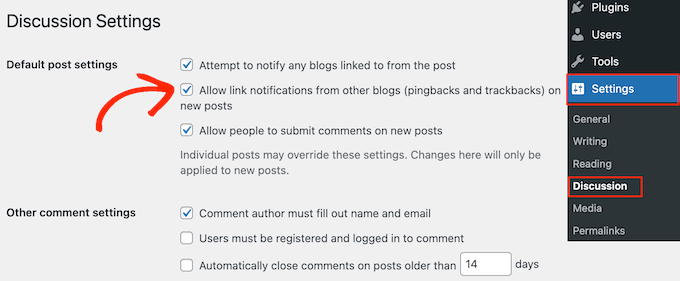
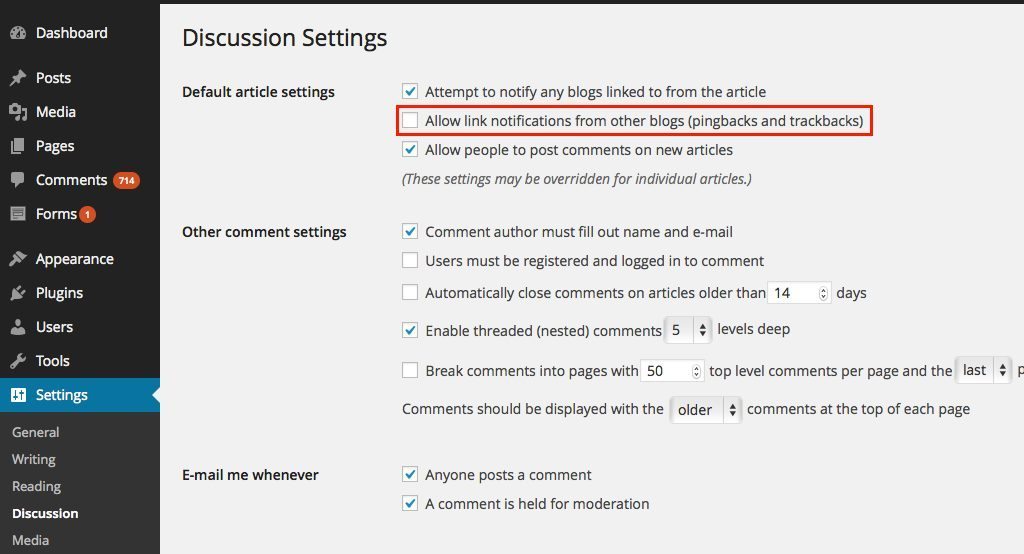
Trackbacks help connect your blog with other blogs. They notify you when someone links to your post. To enable trackbacks, go to your WordPress dashboard. Find the “Settings” menu. Click on “Discussion.” Here, you can check the box to allow trackbacks. This setting helps you stay connected with other bloggers. It also helps in building a community.
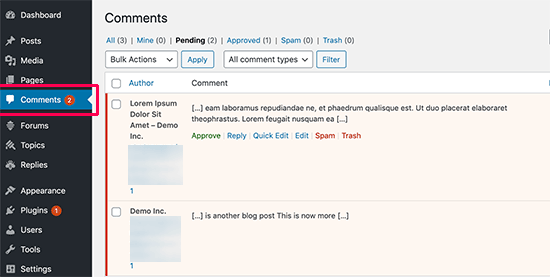
Moderating trackbacks is important. It keeps your blog safe from spam. Always check the source of a trackback. Ensure it is from a trusted site. Sometimes, trackbacks can be fake. They might lead to harmful sites. Delete any suspicious trackbacks. This protects your readers. Also, regularly update your WordPress version. This ensures the best security features are active.
Credit: www.wpbeginner.com
Common Issues With Trackbacks
Trackback comments on WordPress often face issues like spammy links and broken notifications. Many users struggle with unwanted spam, making moderation difficult. Ensuring effective management of trackbacks helps maintain blog integrity.
Spam Prevention
Trackbacks often become a target for spam. Many unwanted comments can flood your site. These spam comments can slow your website. It can also affect your site’s performance. Akismet is a popular tool to block spam. Other plugins can help too. They keep your comments clean and relevant. Always keep your plugins updated. This ensures better spam protection. Regular checks help maintain a healthy site environment.
Troubleshooting Errors
Trackbacks can sometimes fail to work. Errors can stop them from appearing. First, check your WordPress settings. Ensure trackbacks are enabled. If still not working, it might be a plugin conflict. Disable plugins one by one. See if the issue persists. Sometimes, server settings cause issues. Contact your hosting provider for support. They can help fix server-related errors. This ensures trackbacks work smoothly.
Alternatives To Trackbacks
Trackbacks in WordPress let bloggers notify other authors about their posts linking to them. Seeking alternatives? Consider using Pingbacks, which are automatic, or social media sharing plugins for more engagement. These options maintain interactivity without the manual effort of trackbacks.
Social Media Integration
Social media is a great way to share content. Many people use platforms like Facebook, Twitter, and Instagram. These platforms help in spreading your blog posts. They allow readers to share easily. This can bring more readers to your site. It’s important to connect your blog with these platforms. Use plugins to link your blog to social media.
Comment Plugins
Plugins can make comments more interactive. Disqus is a popular option. It helps manage comments better. Jetpack offers another solution. It allows users to comment using social media accounts. These plugins can filter spam. They also make it easy for readers to join conversations. This can lead to more engagement on your blog.
Credit: wparena.com
Frequently Asked Questions
What Is A Trackback In WordPress?
A trackback is a notification sent from one blog to another. It indicates that your post references another post. Trackbacks help bloggers communicate about related content. They also increase interaction and can drive traffic between related blogs.
How Do Trackback Comments Work?
Trackbacks work by sending a notification to the referenced blog. The receiving blog displays a summary of your post. This allows readers to explore related discussions. It’s a way to connect similar blog posts across different sites.
Are Trackbacks Still Relevant Today?
While trackbacks were popular, their relevance has decreased due to spam issues. Many bloggers now prefer using social media or linking directly. However, they can still be useful for connecting niche blogs or communities.
Can Trackbacks Improve Seo?
Trackbacks can potentially improve SEO by creating backlinks. They increase visibility and traffic to your blog. However, quality content and genuine links are more impactful for SEO than trackbacks alone.
Conclusion
Understanding trackback comments on WordPress is important. They help connect blogs. Trackbacks build community. Bloggers can share insights easily. This feature boosts interaction. It enhances engagement. It opens doors to new audiences. Bloggers should know its benefits. They should use it wisely.
Trackbacks can enrich content. They foster connections in the blogging world. Use them to grow your blog network. Trackbacks add value to your site. They are simple yet effective tools. Start using trackbacks today. Enhance your blogging experience. Connect with others.
Engage your readers. Build meaningful relationships.


