
Are you looking to expand your WordPress website without the hassle of creating an entirely new domain? A subdomain might be the perfect solution for you.
Imagine having the freedom to organize your content, launch specialized sections, or test new ideas, all while keeping them seamlessly connected to your main site. This little-known feature can unlock a world of possibilities, helping you grow your online presence with ease.
By the end of this article, you’ll understand what a subdomain in WordPress is, how it works, and why it might be exactly what you need to enhance your digital strategy. Dive in to discover how this powerful tool can transform the way you manage your web content.

Credit: kinsta.com
Subdomain Basics
A subdomain is a part of your main website. It helps in organizing different sections. Subdomains use different URLs. They are like separate parts of a house. For example, blog.yourwebsite.com is a subdomain. It can host a blog. Businesses use subdomains for different services. They keep things organized. They make browsing easy for users.
Subdomains and subdirectories are different. A subdirectory is a folder inside the main domain. It has the same URL. Like yourwebsite.com/blog. Subdomains have their own URLs. They look different from the main domain. Both can help in organizing content. Subdomains are useful for separate sites. Subdirectories are useful for sections of a site.
Creating A Subdomain In WordPress
Start by logging into your hosting account. Navigate to the control panel. Find the subdomains section. Click on it. Type the name of your subdomain. Choose the domain you want to use. Click create. Your subdomain is ready. Now, install WordPress on the subdomain. Follow the steps given by your hosting provider. Always check for errors after installation. Ensure everything is working fine.
Sometimes, settings are hard to find. Double-check your domain name. Ensure it is typed correctly. DNS settings may cause issues. Check them carefully. SSL certificates are important. Ensure they are set up properly. Without them, your site may not be secure. Permissions may block access. Adjust them if needed. Always clear cache after changes. It helps to see the latest updates. Seek help if problems persist.
Uses Of Subdomains
Subdomains help in organizing content better. Each subdomain acts like a new section. You can have blogs on one subdomain. Products can be on another. This makes your site tidy and easy to navigate.
Different audiences can be targeted using subdomains. For instance, a store can have English content on one subdomain. Another subdomain can have Spanish content. This way, each audience gets content in their language. It makes visitors happy.
Subdomains allow separate installations of WordPress. This is useful for testing new features. Each subdomain can run its own theme and plugins. It keeps the main site safe from errors. Developers love this feature.
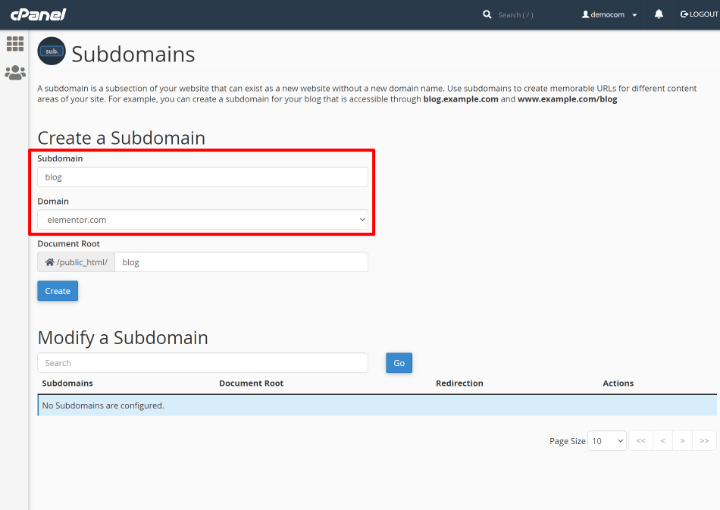
Credit: elementor.com
Seo Implications
Subdomains in WordPress help organize website content separately from the main domain. They create distinct sections, affecting SEO by targeting specific audiences. These sections can improve search rankings by focusing on niche keywords.
Impact On Search Rankings
Subdomains can affect search rankings in different ways. They are treated as separate sites by search engines. This means each subdomain must build its own authority. This could be a challenge for new sites. But it also offers a chance to target different keywords. Remember to use unique content on each subdomain. This avoids duplicate content issues. Linking between your main domain and subdomains can help. It boosts visibility and improves user experience.
Best Practices For Seo
Use clear and descriptive names for subdomains. This helps users and search engines understand the content. Ensure all subdomains are mobile-friendly. Many users browse on phones and tablets. Fast loading times are important too. They improve user experience and SEO. Regularly update content on each subdomain. This keeps it fresh and engaging. Finally, monitor performance using tools like Google Analytics. This helps you make informed decisions.
Managing Subdomains
A subdomain in WordPress acts like an extension of your main domain. It helps organize content under different sections. You can create multiple subdomains for specific topics or categories, improving site structure and user experience.
Maintenance Tips
Regular checks are important for subdomains. Updates keep them secure and fast. Always backup data. This prevents loss during changes. Monitor traffic to know your users. Check links often. Broken links frustrate visitors. Review plugins and themes. These can slow your site. Remove unused ones for better speed.
Security Considerations
Subdomains need strong passwords. Use unique ones for each. SSL certificates protect data. They keep information safe. Limit access to admin areas. Only trusted users should enter. Firewalls block bad traffic. They help keep the site safe. Regular scans find malware. Remove any threats quickly.
Case Studies
Subdomains in WordPress act like separate websites under the same main domain. They help organize content efficiently. Each subdomain can have its own theme and plugins, offering flexibility and customization.
Examples From Popular Websites
Popular websites use subdomains to organize content. For instance, WordPress.com offers blogs using subdomains like blogname.wordpress.com. This helps in managing different sections easily.
Amazon uses subdomains for regional sites. An example is au.amazon.com for Australia. This helps target specific audiences.
Lessons Learned
Subdomains offer a simple way to manage different parts of a site. They help in organizing content for different users. A company can use subdomains for blogs, shops, or support sections. This keeps the main site neat and tidy.

Credit: kinsta.com
Frequently Asked Questions
What Is A Subdomain In WordPress?
A subdomain in WordPress is an extension of your main domain, used to organize and separate different sections of your website. It acts as a unique web address, allowing you to create distinct areas like a blog or store. This helps manage content effectively without affecting the main site’s structure.
How Do Subdomains Benefit WordPress Sites?
Subdomains benefit WordPress sites by providing better organization and management of content. They help in separating different functions, like forums or shops, from the main site. This can improve user experience and site performance, making it easier to handle specific needs without cluttering the primary domain.
Can I Create Multiple Subdomains In WordPress?
Yes, you can create multiple subdomains in WordPress. This allows you to categorize different areas of your website, like news, support, or events. Each subdomain can have its own unique content and design, helping you manage diverse topics efficiently while keeping your main site streamlined.
Is A Subdomain Different From A Subdirectory?
Yes, a subdomain is different from a subdirectory. A subdomain is a separate entity under your main domain, while a subdirectory is a folder within your main domain. Subdomains have distinct URLs and can be used for separate sites, whereas subdirectories share the main domain’s URL.
Conclusion
Understanding subdomains in WordPress is crucial for site management. They help organize content neatly. Subdomains enhance user experience and navigation. They can host different sections of your website. Easy to set up and manage. Subdomains can boost SEO when used wisely.
They offer flexibility for site expansion. You can create separate blogs or stores. Subdomains keep main domains clutter-free. Great for testing and experimentation too. Now, you can decide if subdomains suit your needs. They’re a useful tool for growing your online presence.


