
Imagine visiting a website and being greeted with a page that perfectly captures its essence. This is what a static front page on WordPress can do for your site.
If you’ve ever wondered why some websites feel cohesive and organized right from the start, the answer often lies in their use of a static front page. You might be asking yourself, “What exactly is a static front page, and how can it elevate my WordPress site?
” You’ll uncover how a static front page can transform your website, making it more engaging and user-friendly. You’ll learn how to create a captivating first impression that keeps visitors coming back, making your site not just another URL, but an experience. Get ready to discover how this simple yet powerful feature can become the cornerstone of your online presence. Dive in, and let’s unlock the potential of your WordPress site together.

Credit: wordpress.org
Static Front Page Explained
A static front page shows the same content every time. It’s like a book cover. It doesn’t change with new posts. This is different from a blog page. A blog page shows new stories. People use static pages for homepages. They want a fixed welcome message. It makes their site look neat and tidy.
Setting up a static page is easy. Go to WordPress settings. Choose “Reading.” Pick “Static Page.” Select the page you want. Click save. Now, your visitors see the same page every time. This helps keep the site organized. People find important info quickly. It’s better for business sites. They don’t need frequent updates. Static pages are simple but effective.
Benefits Of A Static Front Page
A static front page gives your site a consistent look. Visitors see the same page each time they visit. This helps in building a strong first impression. It can make your site feel more professional. Many businesses use static pages for this reason.
Customizing a static front page is easy. You can add images, text, and more. This allows you to showcase your best content. Highlight important information right away. It can also help with SEO. Search engines may rank your site better.
A static front page can improve loading speed. Dynamic pages often load slower. A faster site keeps visitors happy. They stay longer and explore more pages. This can lead to more engagement and potential sales.
Setting Up A Static Front Page
First, pick a page to be your front page. This page can be any page you have made. Make sure it’s the one you want to show first. It should be clear and simple for visitors.
Go to your WordPress dashboard. Find the Settings option. Click on Reading. Choose Static Page. Select the page you want as the front. Save your changes to keep your choice.
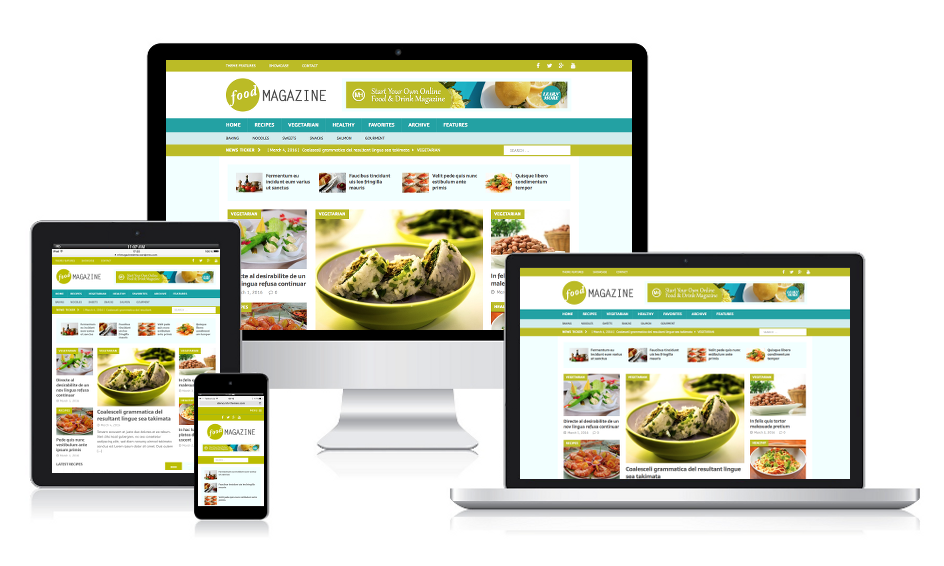
Make the front page look nice. Use themes to change its style. Add images and text that fit your site. Keep it easy to read and navigate. This will help visitors enjoy their time on your site.
Credit: mhthemes.com
Static Vs Dynamic Front Page
A static front page stays the same. It shows the same content every time. A dynamic front page changes often. It shows new posts or updates. Static pages are great for businesses. They want a stable look. Dynamic pages suit blogs. They show the latest news.
Use a static page for important info. Like services or contact details. Dynamic pages work well for updates. Like news or blog posts. Think about your needs. Choose what fits best. Static is good for focus. Dynamic is good for variety.
Common Mistakes And Solutions
Some users pick the wrong page for their front. This can confuse visitors. Always check your selection. Make sure your chosen page is complete. It should have all needed information. Double-check settings in WordPress. This ensures the right page displays first.
Not all themes fit well with static pages. Some themes may break or not show content right. Update your theme regularly. Look for themes that support static pages. Using compatible themes avoids many problems. Check theme reviews before choosing.
A static front page can affect SEO. Ensure it has the right keywords. Static pages should be optimized. Write clear and simple text. Use headings wisely. This helps search engines understand your page. Good SEO boosts your site visibility.
Best Practices For Design
A static front page in WordPress stays unchanged, showing the same content every time someone visits. It provides a consistent look, ideal for business websites or blogs wanting a fixed homepage. Customizing this page helps in establishing a brand identity.
User Experience Tips
User experience is key for a static front page. Make sure all buttons are easy to find. Use clear labels. Keep the design simple. This helps users find what they need quickly. Fast loading times are important. A slow page can frustrate users. They might leave your site.
Visual Consistency
Keep the look of your page consistent. Use the same fonts and colors. This makes the page look neat. Align text and images properly. Use the same style for all headings. Visual consistency makes the page easy to read. It also builds trust with your visitors.
Content Prioritization
Put the most important content at the top. Users see it first. Use headings to break up text. This helps users skim the page. Make sure each section is clear. Highlight key points in bold. This draws attention to important information. A well-structured page keeps users engaged.
Tools And Plugins For Enhancement
WordPress offers several page builders to customize a static front page. These tools help design pages easily. Elementor and Beaver Builder are popular choices. Drag-and-drop features make them user-friendly. They offer pre-made templates. This saves time and effort. Beginners find them helpful. Advanced users enjoy custom options. Building a unique page becomes simple.
SEO plugins improve visibility on search engines. Yoast SEO and All in One SEO Pack are widely used. They guide users to optimize content. These plugins suggest keywords and fix errors. Meta tags and descriptions are easy to add. Rank Math is another good choice. It offers advanced features for better ranking. Simple interface helps in understanding SEO basics.
Website speed matters. Performance tools boost loading times. WP Rocket and W3 Total Cache are effective solutions. These plugins cache pages. This reduces load time significantly. Faster pages make visitors happy. Lazy Load is useful for images. It loads them only when needed. Cloudflare enhances security and speed. Websites become more efficient with these tools.
Credit: www.youtube.com
Frequently Asked Questions
What Is A Static Front Page In WordPress?
A static front page in WordPress is a fixed page that displays as your site’s homepage. Unlike the dynamic default blog feed, it shows consistent content. This feature is ideal for businesses or portfolios wanting to showcase specific information. You can set it up via the WordPress dashboard under Settings > Reading.
How To Set A Static Front Page?
To set a static front page, go to your WordPress dashboard. Navigate to Settings > Reading. Here, select “A static page” option under “Your homepage displays. ” Choose the desired page from the dropdown menu. Save changes to make it your homepage.
This setting helps highlight specific content.
Why Use A Static Front Page?
A static front page offers control over homepage content, enhancing user engagement. It’s ideal for businesses needing consistent information like services or contact details. This setup creates a professional appearance and improves navigation. By highlighting key content, it helps in achieving specific site goals effectively.
Can A Static Front Page Improve Seo?
Yes, a static front page can improve SEO by optimizing specific content. It allows focus on targeted keywords and valuable information. Consistent content helps search engines understand your site’s purpose. Additionally, it enhances user experience, potentially increasing engagement and reducing bounce rates, positively impacting SEO rankings.
Conclusion
A static front page on WordPress offers a polished website look. It helps create a consistent first impression for visitors. Easy to set up, it enhances website control. Your site appears more professional and organized. This boosts user engagement and can improve navigation.
Make sure your content is relevant and updated. Static pages are ideal for highlighting key information. They simplify the user experience. Consider your site’s goals and audience needs. A static front page can be a smart choice. It adds value to your WordPress site without complexity.


