
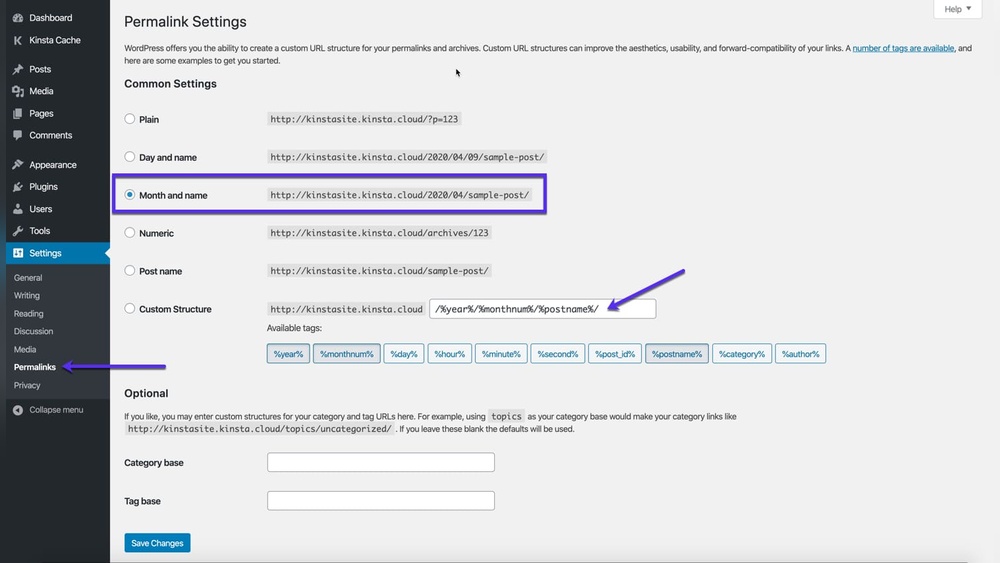
If you’ve ever wondered why your WordPress URLs look the way they do, understanding the concept of a “slug” is key. A slug is the part of your web address that comes after your domain name, like “about-us” in www.yoursite.com/about-us.
It’s more than just a string of words—it plays a big role in making your site user-friendly and boosting your SEO. By mastering how to create and customize slugs, you can make your URLs clear, memorable, and easy for both visitors and search engines to understand.
Keep reading to discover exactly what a WordPress slug is, why it matters, and how you can use it to improve your website’s performance.
Credit: yoast.com
WordPress Slug Basics
Understanding the basics of WordPress slugs is important for managing your website URLs. Slugs create clear and readable web addresses. They help visitors and search engines understand what your page is about. You can customize slugs to improve your site’s SEO and user experience. Below are key points to grasp about WordPress slugs.
Slug Definition
A slug is the part of a URL that identifies a specific page or post. It appears after the domain name. For example, in the URL www.example.com/about-us, about-us is the slug. WordPress usually creates slugs from the page or post title. You can edit slugs to make them shorter or more descriptive.
Slug Examples
For a blog post titled “My First Blog Post,” the default slug is my-first-blog-post. If you have a category named “Recipes,” the slug might be recipes. This would make the URL look like www.example.com/category/recipes. Short and clear slugs help visitors know what to expect on a page.
Slug Location In Urls
Slugs always follow the main domain in a URL. For example, in https://www.website.com/contact, the slug is contact. Slugs can appear after category or tag paths too, such as www.website.com/category/news. They form the last part of the URL that points to a specific content page.
Slug Creation In WordPress
Slug creation in WordPress is a simple yet important step for your website’s URLs. Slugs are the part of a web address that comes after your domain name. They describe the content of a post, page, or category. Creating clear and readable slugs helps visitors and search engines understand your content better. WordPress offers tools to generate and edit slugs easily. Understanding how slug creation works can improve your site’s SEO and user experience.
Automatic Slug Generation
WordPress creates slugs automatically based on your post or page title. It changes all letters to lowercase and replaces spaces with hyphens. Special characters and punctuation are removed to keep the slug clean. For example, a post titled “My First Blog Post” becomes “my-first-blog-post” as the slug. This automatic process saves time and ensures slugs are URL-friendly. However, these default slugs may not always be perfect for SEO or clarity.
Customizing Slugs
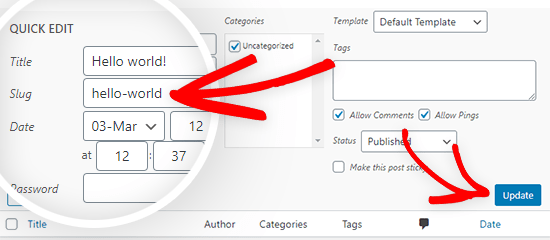
Customizing slugs lets you create shorter, clearer URLs. You can remove unnecessary words or add keywords for better SEO. For instance, instead of “my-first-blog-post,” you might choose “first-blog” to make it simple. Custom slugs improve readability and help search engines rank your page. Keep slugs short and avoid stop words like “and” or “the.” Only use letters, numbers, and hyphens. This keeps URLs clean and easy to remember.
Editing Slugs In Block Editor
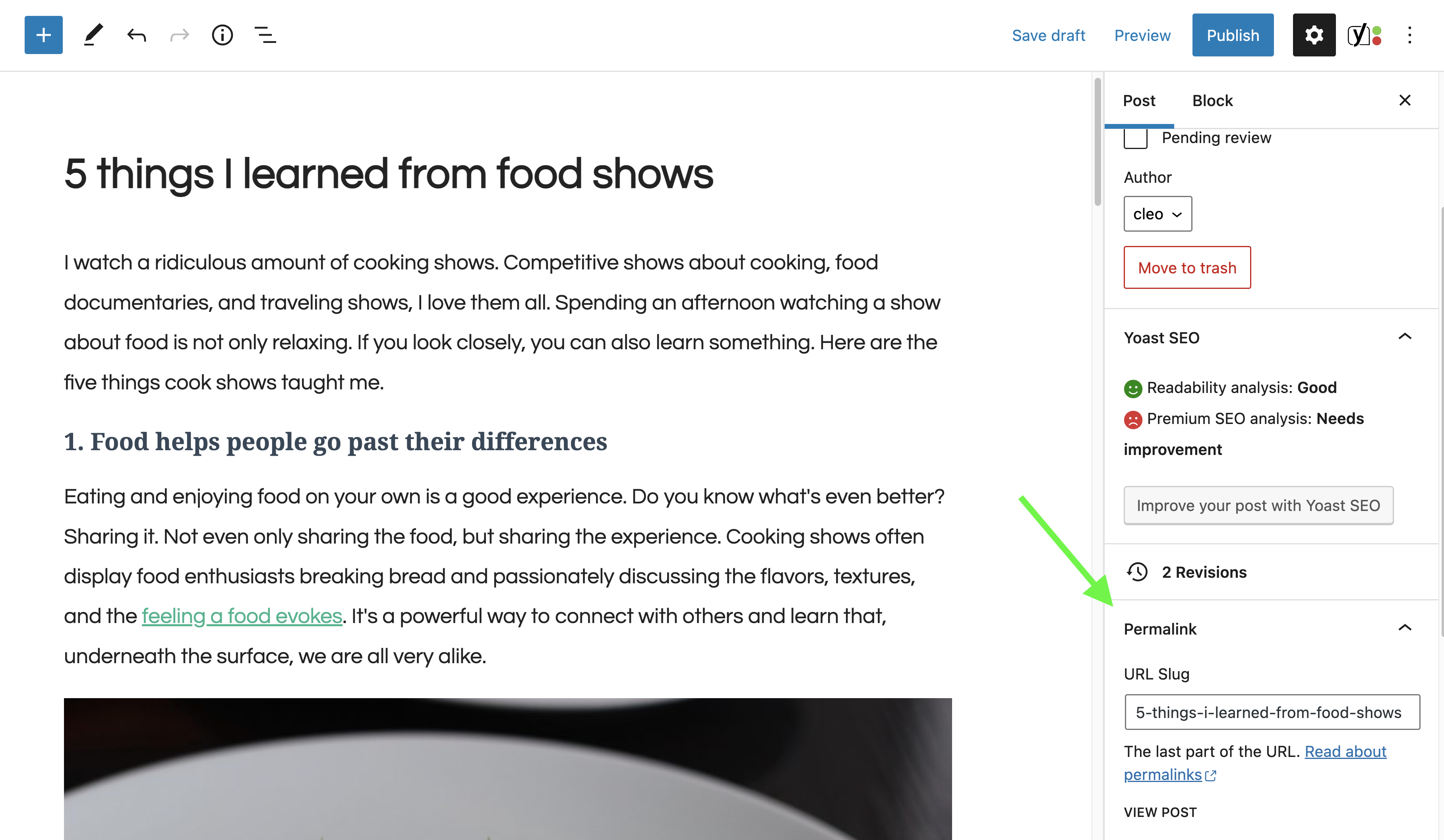
Editing slugs in the WordPress block editor is quick and user-friendly. After creating or opening a post, look for the permalink section in the editor’s settings. Here, WordPress shows the current slug. Click the edit button to change it. Make sure to save your changes before publishing. You can update slugs anytime, even for published content. This flexibility allows you to optimize URLs as your site grows.
Seo Benefits Of Slugs
Slugs in WordPress play a key role in SEO. They shape how search engines and users see your URLs. A clear, well-crafted slug improves site visibility and user experience. Optimizing slugs can boost your website’s search engine rankings and make URLs easier to read and share.
Improved Search Rankings
Search engines use slugs to understand page content. A relevant slug helps your page rank higher for specific keywords. Clear slugs tell search engines exactly what the page is about. This increases the chances of your site appearing in search results.
User-friendly Urls
Simple slugs create clean, easy-to-read URLs. Users trust URLs that clearly describe the page content. A user-friendly URL encourages clicks and shares. This also reduces bounce rates and keeps visitors on your site longer.
Keyword Integration
Including keywords in slugs improves SEO strength. Keywords in URLs signal relevance to search engines. Slugs with targeted keywords match user search terms better. This helps your page attract the right audience and rank well.
Best Practices For Slugs
Slugs play a vital role in WordPress URLs. They make links easy to read and understand. Good slug practices help improve your site’s SEO and user experience. Follow these tips to create clear and effective slugs for your posts and pages.
Keep Slugs Short And Clear
Short slugs are easier to read and remember. Use simple words that describe the content well. Avoid long phrases or unnecessary words. Clear slugs help both users and search engines quickly grasp the page topic.
Avoid Special Characters
Special characters can cause errors or confusion in URLs. Stick to letters, numbers, and hyphens only. Characters like !, @, , and % should be left out. Clean slugs improve link reliability and avoid issues with browsers and servers.
Use Hyphens Instead Of Underscores
Hyphens separate words better than underscores. Search engines treat hyphens as spaces, making keywords easier to identify. Underscores may join words, reducing clarity. Use hyphens to keep slugs user-friendly and SEO optimized.
Common Slug Mistakes To Avoid
Creating effective slugs in WordPress is crucial for SEO and user experience. Many beginners make common mistakes that hurt website visibility and clarity. Avoiding these errors helps keep URLs clean and easy to understand. Here are some frequent slug pitfalls and tips to prevent them.
Overly Long Slugs
Long slugs are hard to read and remember. They confuse visitors and look spammy in search results. Keep slugs short and focused on the main topic. Use only essential words to describe the page clearly.
Keyword Stuffing
Stuffing slugs with too many keywords can harm SEO. It looks unnatural and can trigger search engine penalties. Choose one or two important keywords that match the content. This approach improves readability and ranking.
Using Stop Words
Stop words like “and,” “or,” “the” add no value to slugs. They make URLs longer without improving meaning. Removing these words creates cleaner, concise slugs. This helps search engines and users quickly understand the page.
Credit: www.wpbeginner.com
Slugs For Different Content Types
Slugs play a key role in organizing content on WordPress sites. Different types of content use slugs in unique ways. Understanding how slugs work for each content type helps improve site structure and SEO.
Posts And Pages
Posts and pages are the main content on WordPress. Each has its own slug that forms part of the URL. For example, a blog post titled “Summer Travel Tips” might have the slug “summer-travel-tips”.
Slugs for posts often include keywords to help search engines and users. Pages usually have shorter, clear slugs. You can edit these slugs in the WordPress editor before publishing.
Categories And Tags
Categories and tags group content into topics and themes. Each category or tag has a slug that appears in URLs. For example, a category named “Recipes” might use the slug “recipes”.
These slugs help visitors find related content easily. They also improve search engine indexing by showing topic relevance. Keep category and tag slugs simple and relevant to their names.
Custom Post Types
Custom post types include specialized content like portfolios or products. Each custom post type has its own slug structure. For example, a portfolio item might have the slug “project-name”.
Custom post type slugs help separate different content types on your site. They make URLs clearer and easier to navigate. WordPress allows you to customize these slugs when you register the post type.
Tools And Plugins For Slug Management
Managing slugs effectively enhances your WordPress site’s SEO and usability. Several tools and plugins simplify this task. They help customize, optimize, and control slugs without hassle. Below are some useful options for slug management.
Seo Plugins
SEO plugins like Yoast SEO and All in One SEO help create SEO-friendly slugs. They suggest clear, concise, and keyword-rich slugs. These plugins analyze slug quality and offer improvement tips. They also guide you in avoiding duplicate or confusing slugs. Using SEO plugins improves your website’s search engine rankings.
Slug Editing Tools
WordPress allows manual slug editing in the post or page editor. Some plugins enhance this feature by providing bulk editing options. Tools like Permalink Manager let you change slugs for posts, pages, and custom post types easily. These tools save time and ensure consistency across your URLs. Clear slugs improve user experience and site navigation.
Redirect Plugins
Changing slugs can break existing links and harm SEO. Redirect plugins handle this issue smoothly. Plugins such as Redirection automatically redirect old URLs to new slugs. This prevents 404 errors and maintains your site’s ranking. Redirect plugins track URL changes and manage redirection rules efficiently. They protect your site’s traffic and user trust.
Slug Impact On Website Performance
The slug in WordPress plays a vital role in website performance. It affects how users and search engines perceive and navigate your site. A clear, concise slug enhances the overall efficiency of your website. Poor slug choices can harm readability, user satisfaction, and search engine indexing.
Url Readability
A simple slug makes URLs easy to read and remember. It should describe the page content clearly. Users prefer URLs that tell them what to expect. Clean slugs avoid long strings of numbers or symbols. This clarity can increase the chance of clicks and shares.
User Experience
Good slugs improve navigation and trust. When URLs match the page topic, visitors feel confident. This reduces bounce rates and boosts engagement. Easy-to-understand slugs help users find content faster. They also look professional and organized.
Search Engine Crawling
Search engines use slugs to understand page topics. Keywords in slugs can improve rankings. A proper slug helps bots index pages correctly. Avoid unnecessary words or characters that confuse crawlers. Clean slugs contribute to better SEO and visibility.

Credit: ezseonews.com
Frequently Asked Questions
What Is Slug In WordPress Example?
A slug in WordPress is the URL part after the domain, like “my-first-post” in example. com/my-first-post. It identifies pages or posts clearly.
What Is An Example Of A Slug?
An example of a slug is “my-first-blog-post” in the URL www. example. com/my-first-blog-post. It describes the page clearly and improves SEO.
What Is The Purpose Of A Slug?
A slug breaks down decaying organic matter, recycling nutrients into the soil. It supports plant growth and serves as wildlife food.
What Is A Website Slug?
A website slug is the part of a URL after the domain name. It describes the page content clearly and concisely. Slugs improve SEO by making URLs user-friendly and easy to read. You can customize slugs to enhance search engine rankings and user experience.
Conclusion
A WordPress slug makes URLs clear and easy to read. It shows what the page or post is about. Good slugs help users and search engines understand your content. You can change slugs anytime to improve SEO or clarity. Keep slugs short, simple, and relevant for best results.
Using slugs well improves your website’s visibility and user experience. Remember, a good slug is a small but important part of your site.


