
Have you ever wondered what exactly a site page in WordPress is and why it’s crucial for your website? Whether you’re a seasoned blogger or just starting out, understanding site pages is fundamental to managing your online presence effectively.
Imagine having the power to create and organize content seamlessly while keeping your visitors engaged and informed. With WordPress, site pages offer you this ability, serving as the backbone of your website’s structure. You might be asking yourself, “Why should I care about site pages?
” Well, these pages are not just about displaying information; they play a pivotal role in your site’s navigation and user experience. By mastering the art of site page creation and management, you can elevate your website to new heights, enhancing both your search engine optimization and visitor satisfaction. Stick around to learn how you can optimize your WordPress site pages to attract more visitors and keep them coming back for more.
Site Page Basics
A site page in WordPress is like a digital page in a book. Each page has information or content for visitors. Site pages are different from blog posts. They are often used for static content. Examples include the “About Us” or “Contact” pages. These pages do not change often.
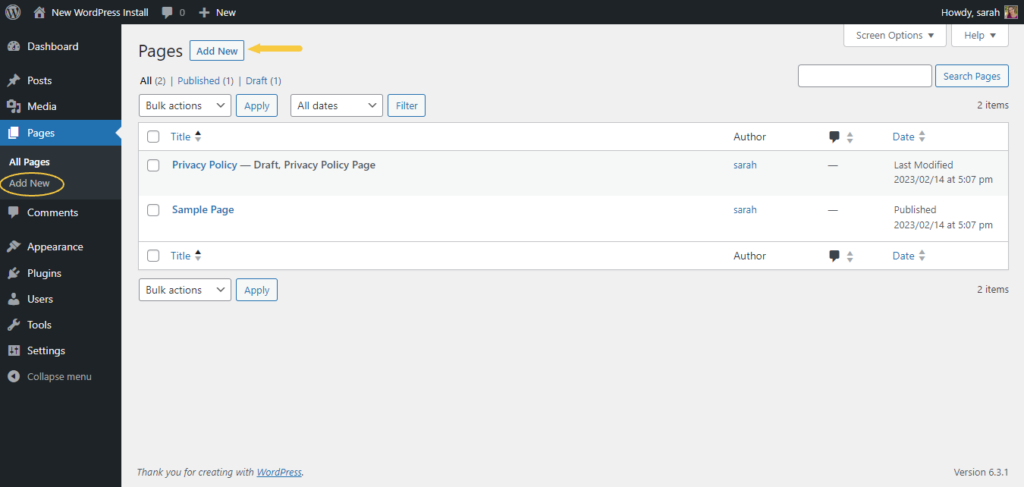
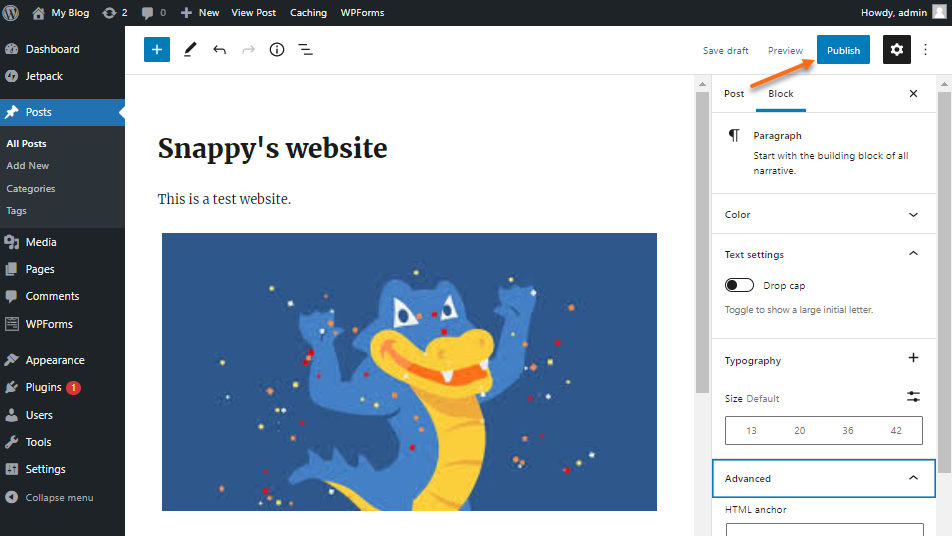
Site pages are easy to create. You use the WordPress dashboard. Click on “Add New” under the pages section. Type your content and click “Publish.” Now, your page is live. Site pages help organize your website. They make it easy for users to find what they need. Keep your site pages simple and clear.
Credit: solidwp.com
Features Of A Site Page
Site pages often have static content. This means the content does not change often. They are used for important information. Examples include contact details or company history. Static pages load quickly. They help users find key details easily.
Site pages are part of the website’s navigation. They help users move around the site. Users can find what they need fast. A menu usually links to site pages. This makes the site easy to explore. Visitors appreciate simple navigation.
Site pages offer customizable layouts. This means you can change how they look. People can add images or videos. They can choose colors and fonts too. This helps match the site’s style. Custom layouts make pages interesting.
Creating A Site Page
First, log into your WordPress dashboard. This is where you start. Look for the menu on the left. Find the “Pages” option. Click on it to open. Now, you see the Add New button. Click it to create a page. This is your first step.
WordPress has a Page Builder. It helps you design pages. You can drag and drop items. Add text and images easily. It is fun to use. It makes your page look nice. Try different layouts. Experiment with colors and fonts. Make your page unique.
Page attributes are important. They help organize your pages. Set a parent page if needed. This makes your site neat. Choose a template for your page. Templates change the look. You can also set the order of pages. This affects how pages are listed.
Differences Between Posts And Pages
Site pages in WordPress serve as static content, like an About or Contact page. Unlike posts, which are timely and often categorized by date, pages are timeless and typically used for information that remains constant. They do not appear in blog feeds, maintaining a more permanent presence on the site.
Content Type
Posts are for blog entries. They show up in a list on your blog. Pages are different. They hold static content like “About Us” or “Contact.” Both can have text, images, and links. But they serve different purposes. Posts are for news or updates. Pages are for important info.
Display And Organization
Posts are shown in order. Newest ones appear first. They can have tags and categories. This helps with sorting. Pages do not follow this order. They are stand-alone. They can be linked in menus. This makes them easy to find.
Seo Considerations
Both posts and pages can rank in search. They need good keywords and links. Posts are shared more often. This can help with traffic. Pages are stable. They have consistent value to readers. Both need attention for SEO success.
Common Uses For Site Pages
The About Us page tells your story. It shows what you do. Many visitors look here first. They want to know who you are. They feel more connected. They trust you more. Your team and values are here. Share your journey. Make it personal and engaging.
Contact Information page helps users reach you. Include phone numbers and emails. Add a contact form too. This page makes it easy for visitors. They find you fast. Clear contact details mean more trust. Keep it simple. Ensure it’s always updated.
Service descriptions explain what you offer. Be clear and simple. List all your services. Describe each one briefly. Use easy words. People need to understand quickly. This helps them choose. Proper details mean more business. Always keep it fresh and relevant.
Optimizing Site Pages
Use keywords in titles and headers. Write short paragraphs. Use alt text for images. Make sure links work. Update content often. These help search engines find your site.
Make sure pages look good on phones and tablets. Use flexible layouts. Images should be adjustable. Text must be easy to read. This improves user experience.
Keep your site fast. Compress images. Reduce file sizes. Use cache to store data. Limit plug-ins. Fast sites keep visitors happy.
Plugins For Enhancing Site Pages
Page builders help create beautiful pages. They offer drag-and-drop features. Users can design without coding skills. Popular options include Elementor and Beaver Builder. These tools make site building easy. Choose a builder with a user-friendly interface. Many builders offer pre-designed templates. Templates save time and effort. Customization is simple and quick. Page builders enhance site appearance. They are perfect for beginners.
SEO tools improve site visibility. They help with keyword optimization. Popular SEO plugins include Yoast and All in One SEO. These tools guide on best practices. They offer suggestions for better ranking. SEO tools are crucial for reaching more people. They help sites rank higher in search results. Use them to check meta tags and descriptions. They make sites more search-friendly.
Performance plugins boost site speed. Fast sites keep visitors happy. WP Rocket and W3 Total Cache are popular choices. These plugins reduce load times. They optimize images and scripts. Improved speed helps with user experience. Performance plugins prevent site lag. They are essential for smooth browsing. Choose plugins that offer easy setup. Fast pages mean better engagement.
Credit: www.hostgator.com
Troubleshooting Common Issues
Slow pages can be very frustrating. Check your internet connection first. Next, clear your browser’s cache. This helps in loading the page faster. Disable plugins one by one to see if they are causing issues. Sometimes, themes can also create loading problems. Try switching to a default theme and see if it helps.
Design issues can make your site look odd. Ensure your theme is updated to the latest version. Outdated themes can cause design glitches. Check if custom CSS is added. Sometimes, it can break your design. Always preview changes before making them live. This helps catch errors early.
Plugins add features but can cause problems too. Deactivate all plugins and then activate them one by one. This helps find the problematic plugin. Keep your plugins updated. Old plugins can conflict with new WordPress updates. Always download plugins from trusted sources to avoid issues.

Credit: www.wpzoom.com
Frequently Asked Questions
What Is A WordPress Site Page?
A WordPress site page is a static content piece. It typically serves permanent purposes like “About Us” or “Contact. ” Unlike posts, pages are not listed by date and are hierarchical. They help organize content on your website, making navigation easier for visitors.
How Do Site Pages Differ From Posts?
Site pages are static and timeless, focusing on permanent content. Posts are dynamic and chronological, suitable for news or updates. Pages form the structure, while posts offer freshness. Both play crucial roles in WordPress, enhancing content delivery and organization.
Can I Customize A WordPress Site Page?
Yes, you can customize WordPress site pages extensively. Use themes, plugins, and page builders for design. Add multimedia, widgets, and forms for functionality. Customization enhances user experience and aligns with your brand’s identity.
Are Site Pages Important For Seo?
Yes, site pages are crucial for SEO. They provide structured content and improve site navigation. Optimize pages with keywords, meta tags, and quality content. Well-structured pages enhance search engine indexing and visibility.
Conclusion
Understanding WordPress site pages is essential for effective website management. These pages help organize content neatly. Easy navigation improves user experience. Users find information quickly. This boosts engagement and satisfaction. Setting up site pages is straightforward. Beginners can handle it with ease.
Consistent updates keep content fresh. This attracts more visitors. A well-structured site page enhances SEO. It supports better search rankings. Better visibility means more traffic. So, take time to plan your site pages. Deliver clear, organized content. Your audience will appreciate it.
And your website will benefit.


