
Imagine having the power to supercharge your WordPress site with dynamic content that’s both flexible and easy to manage. This is precisely what a Repeater Field offers you.
Whether you’re a seasoned developer or a curious beginner, understanding the potential of Repeater Fields can transform how you handle data on your website. Picture this: creating custom post types with endless possibilities, all without the need for complex coding.
Sounds like a dream, right? By the end of this article, you’ll discover how Repeater Fields can elevate your WordPress experience, making your site not just functional, but exceptional. Are you ready to unlock the secrets of this powerful tool and take your website to the next level? Let’s dive in!
Repeater Field Basics
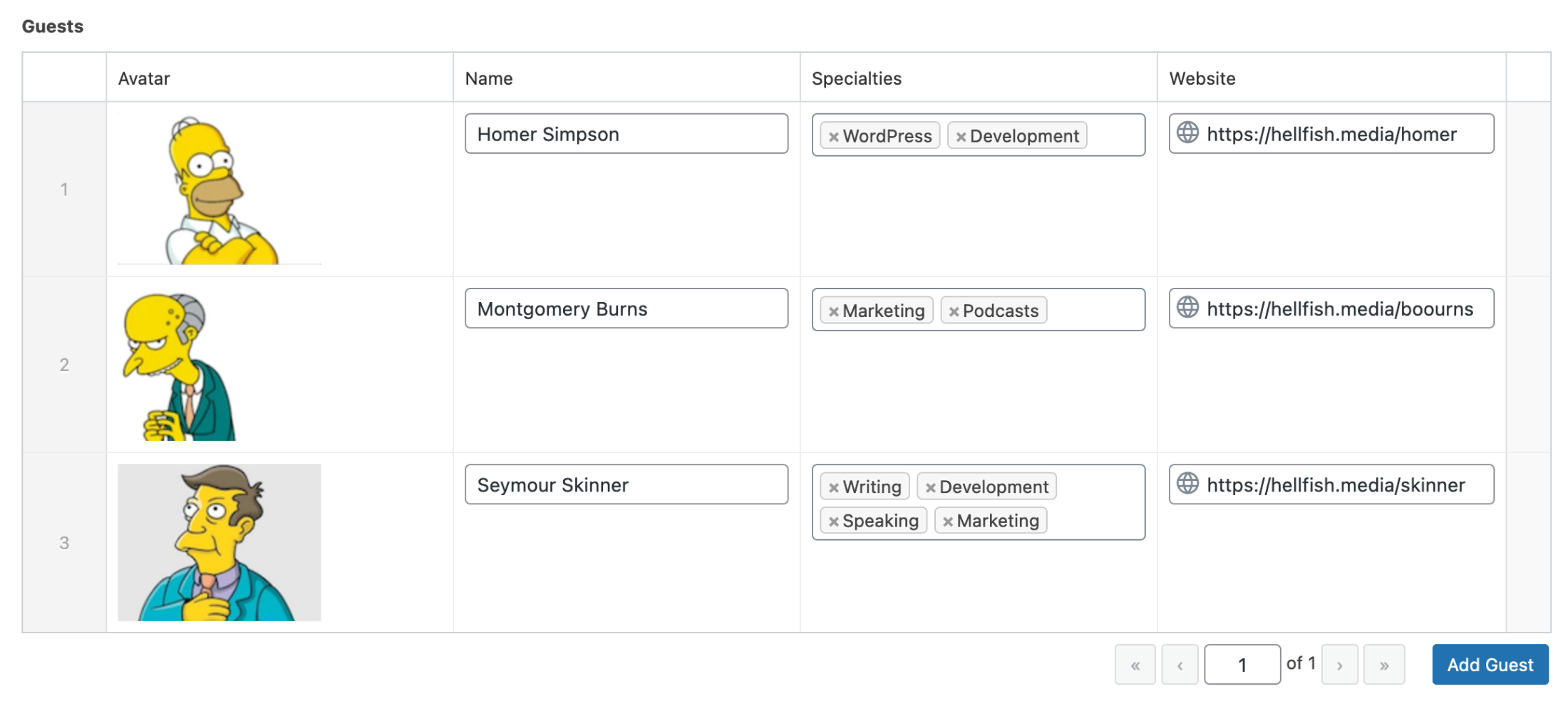
Repeater fields are used in WordPress to manage data. They allow you to add multiple sets of fields. Think of them as a list where each item has similar fields. For example, a team page can have several team members. Each member might have a name, title, and photo. Repeater fields help you easily add or remove these items.
This tool is part of the Advanced Custom Fields plugin. It simplifies the process of managing repetitive data. You can save time and keep your site organized. Many developers find repeater fields helpful. They make it easy to create dynamic content.
Credit: www.advancedcustomfields.com
Key Benefits
Repeater fields make content management very easy. Users can add, remove, or change content quickly. This is helpful for managing dynamic content. No need to write code. Just use the WordPress dashboard. This flexibility saves time and effort. You can create custom layouts easily.
Users enjoy a better experience with repeater fields. They make websites more interactive. Visitors can see varied content without long waits. This makes browsing fun and easy. Users find what they need faster. Simple design keeps them happy and engaged. Websites become more user-friendly.
How To Implement
A plugin helps to add a repeater field. Advanced Custom Fields (ACF) is popular. It is easy to use. Pods is another choice. It is flexible and free. Both are good for beginners. Choose one that fits your needs best. Read reviews before deciding. Make sure it works with your WordPress version.
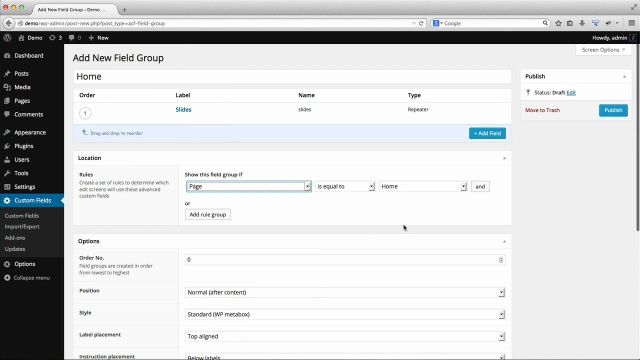
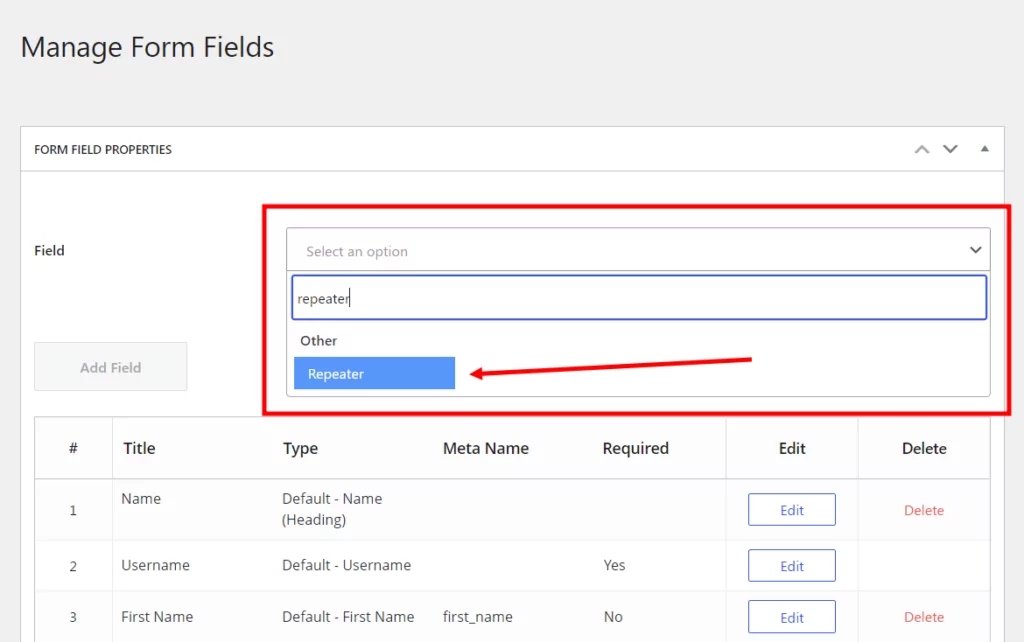
First, install the plugin. Then, activate it. Go to the plugin’s settings. Find the Repeater Field option. Click to create a new field. Name it clearly. For example, “Team Members”. Add sub-fields like name, photo, or bio. Save your changes. Now, the field is ready to use. Add it to your pages or posts easily.
Credit: www.advancedcustomfields.com
Use Cases
Repeater fields in WordPress allow users to create dynamic sets of fields that repeat as needed. They are ideal for adding multiple entries like team members, testimonials, or product features. This tool simplifies content management, saving time and enhancing flexibility without complex coding.
Portfolio Showcases
Repeater fields help display multiple portfolio items. They allow adding images, descriptions, and links easily. Each item can be unique, showcasing different styles or projects. With repeater fields, portfolios become dynamic and engaging. They offer flexibility to update content quickly. Designers can show their work in an organized way. This makes the portfolio look professional and clean. Visitors find it easy to browse through the items.
Custom Testimonials
Repeater fields are useful for adding multiple testimonials on websites. They let you insert quotes, names, and roles effortlessly. Businesses can highlight customer feedback and positive reviews. Each testimonial can be formatted to stand out. It helps in building trust with potential clients. Updating testimonials becomes quick and simple. Websites look fresh and relevant with current feedback. This feature is crucial for maintaining a good online reputation.
Best Practices
Organizing data well is important in WordPress. Repeater fields help to keep things neat. They allow you to store multiple pieces of information under one heading. This makes your page look tidy. Each piece of data is called a field. Fields can be repeated as many times as needed. This way, you can group related data together. It’s like having a list in your notebook. You can add or remove items easily. This keeps everything clear and easy to find.
Speed is crucial for websites. Repeater fields help improve loading time. They store data efficiently. This means the website can load faster. Faster pages make users happy. Happy users stay longer on your site. They might even come back again. Proper use of repeater fields also reduces server load. This can save resources and improve overall performance. Keeping data organized and optimized is key for a smooth experience.
Troubleshooting Common Issues
Sometimes, repeater fields do not show up. This can be due to theme conflicts. Make sure your theme supports repeater fields. Check for any plugin conflicts. Disable plugins one by one. Find if one is causing the issue. Clear your website cache. This helps the fields to update. Ensure your WordPress version is current. Outdated versions might cause problems.
Data might not save in repeater fields. This can be frustrating. Ensure your database has enough space. Lack of space can stop data saving. Check the field settings. Ensure they are correct. You might have set incorrect permissions. This stops data from saving. Increase the PHP memory limit if needed. This helps in saving data properly. Backup your data regularly. This prevents data loss.
Future Of Dynamic Content
Repeater fields in WordPress offer a way to manage dynamic content effortlessly. They allow users to duplicate field groups, enhancing flexibility in content creation. This feature is ideal for creating lists, testimonials, or any repetitive content without coding challenges.
Emerging Trends
Dynamic content is growing in popularity. Websites now have more personalized experiences. Users love content that changes based on their actions. This makes sites more engaging and fun. Developers are using new tools to create this content. These tools help build better websites.
AI and machine learning are also part of this trend. They help understand what users like. This means content is more suited to individual tastes. As these technologies grow, websites will become even smarter. Real-time updates are another trend. They let websites show fresh content instantly. This keeps users interested and coming back for more.
Potential Innovations
Voice-activated interfaces are becoming common. They let users interact without typing. This makes navigating websites easier. Augmented reality is another exciting area. It blends the digital world with the real world. This creates interactive experiences for users.
Content personalization will improve. Websites will better understand what users want. This makes visits more enjoyable. Interactive storytelling is also on the rise. It lets users be part of the story. This keeps them engaged longer. The future looks bright for dynamic content.
Credit: www.cozmoslabs.com
Frequently Asked Questions
What Is A Repeater Field In WordPress?
A repeater field in WordPress allows users to add multiple sets of fields dynamically. It’s a feature commonly used in custom post types. This function is handy for creating flexible content layouts without coding. Users can easily manage content variations, making it a popular choice for developers and designers.
How Do You Use Repeater Fields?
To use repeater fields, install a plugin like Advanced Custom Fields (ACF). Create a new field group and add a repeater field. Inside the repeater, define sub-fields. These can be text, images, or other input types. Save and implement it in your template using PHP code.
Are Repeater Fields Available In Free Plugins?
Yes, some free plugins offer repeater fields, but with limited features. Advanced Custom Fields (ACF) provides a basic repeater in its free version. For more advanced functionalities, consider using the pro version. Always evaluate the plugin’s compatibility with your WordPress setup before use.
Why Use Repeater Fields In WordPress?
Repeater fields enhance flexibility in content management. They allow users to add dynamic, repeatable content sections. This feature minimizes coding needs and improves content organization. It’s ideal for lists, galleries, and custom layouts, providing a user-friendly way to manage complex data structures.
Conclusion
Repeater fields in WordPress make content management easy. They allow repeating blocks of fields without extra coding. This helps in organizing complex data structures efficiently. Developers and users find it helpful for flexible content layouts. It’s a practical tool for websites needing dynamic content.
Understanding its functionality can enhance your WordPress experience. Try it out to see its benefits firsthand. Whether for posts, pages, or custom layouts, repeater fields offer simplicity. They streamline processes, making content updates straightforward. Explore its potential for your WordPress projects.


