
Ever stumbled upon the term “pingback” while navigating through your WordPress settings and wondered what it actually means? You’re not alone.
Understanding pingbacks can unlock new opportunities to connect with other bloggers and enhance your website’s interactivity. Imagine a way to know when someone links to your content, creating a web of connections that boosts your site’s credibility and engagement. Curious about how this little feature can make a big difference?
Stick around to discover how pingbacks work, why they matter, and how they can be a game-changer for your WordPress experience. Your next step in mastering WordPress starts here.
Pingback Basics
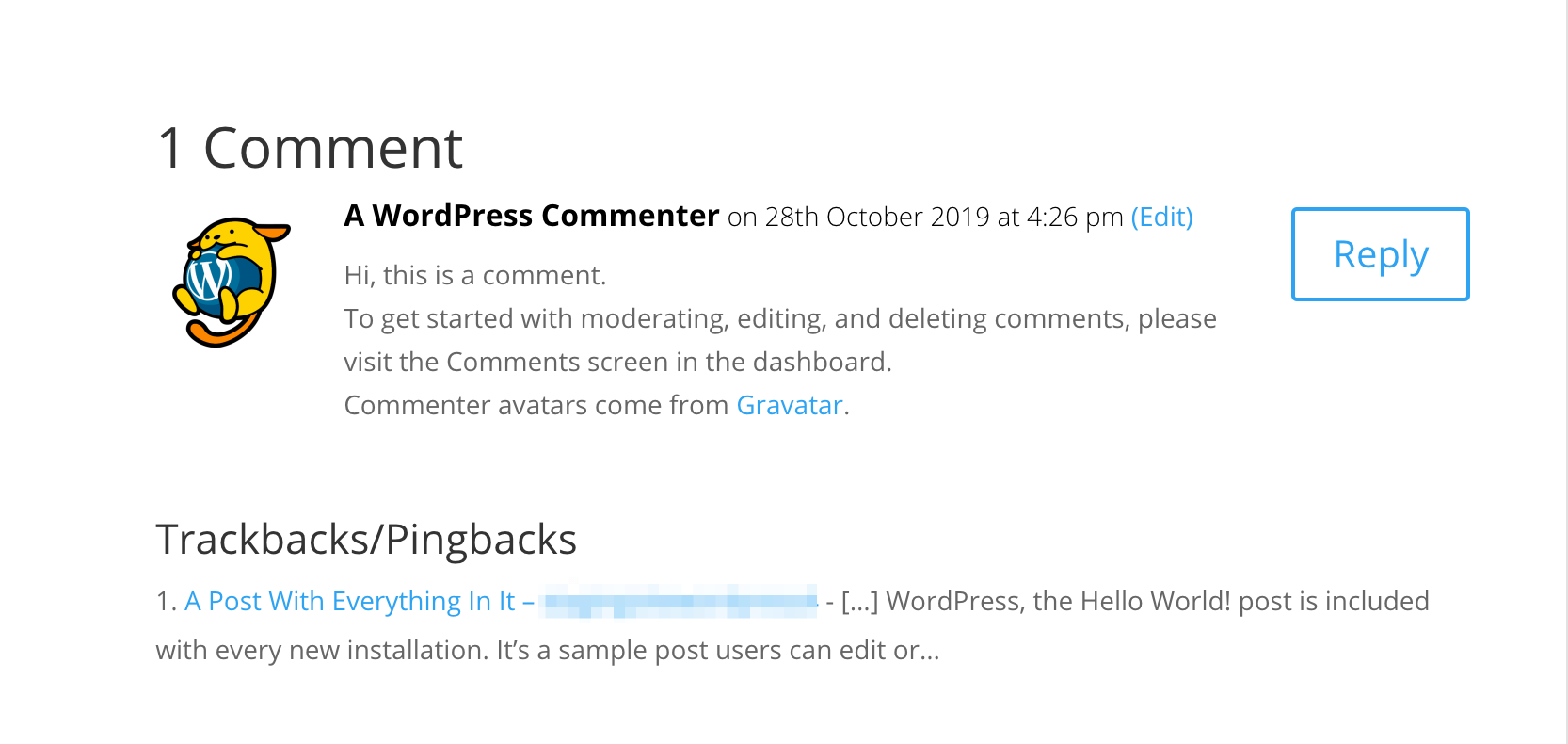
A pingback is a way to know if someone links to your blog. It is an automatic comment that tells you about the link. This is helpful for bloggers. They can track who is linking to their content.
Pingbacks help in building connections between blogs. They create a network of related content. This can increase blog visibility. They also allow easy interaction between bloggers. Readers can discover more content through pingbacks.
Credit: www.wpbeginner.com
Pingback Vs Trackback
Pingbacks and trackbacks help connect blog posts. Pingbacks are automatic. They notify a blog when you link to it. Trackbacks are manual. They require approval before showing up. Pingbacks work well with WordPress. Trackbacks can be used with different platforms. Pingbacks are less visible to readers. Trackbacks show more information.
Pingbacks are easy to use. They save time. Trackbacks allow more control. You can choose what to approve. Pingbacks might not show all details. Trackbacks can be spammy. They need monitoring. Pingbacks are safer. They work automatically. Trackbacks need effort. You must check them often.
Setting Up Pingbacks
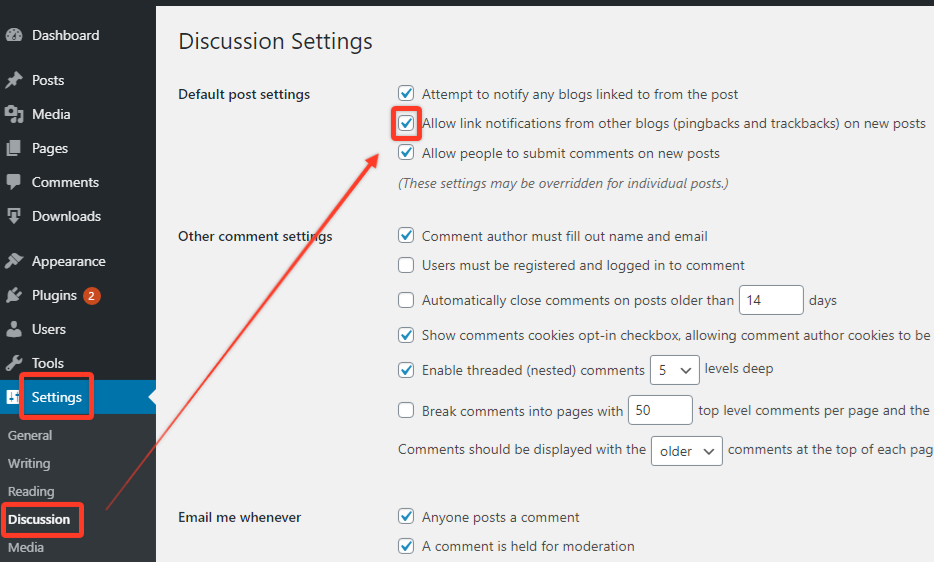
Pingbacks help link your blog to other blogs. They work like digital acknowledgments. To enable them, go to your WordPress dashboard. Find the Settings menu. Click on Discussion. Check the box that says “Allow link notifications from other blogs (pingbacks and trackbacks)”. This allows other blogs to notify you. Make sure to save your changes. Now, your blog is ready to receive pingbacks.
Adjusting settings helps manage pingbacks better. In the same Discussion settings, look for default article settings. Here, you can control how comments and pingbacks are handled. It’s good to review these settings often. This ensures everything works smoothly. Always remember to click save changes after updating settings. This keeps your blog updated.
Managing Pingbacks
Pingbacks let you know when someone links to your content. Moderation is key for managing pingbacks. Check each pingback before approval. This helps keep your site clean. Some pingbacks might be spam. Always be careful. Approve only those that are relevant and genuine. This keeps your site trustworthy.
Spam can be a big problem. Use filters to catch spam pingbacks. Plugins can help with this. They sort spam from real pingbacks. Never let spam clutter your site. Delete spam right away. This keeps your site safe and tidy. Keep an eye on your comments section. This helps stop spam early.
Benefits Of Pingbacks
Pingbacks help your site gain visibility. They show search engines that your content is linked. This can boost your site’s ranking. Links from other sites are a signal that your content is good. Search engines notice this signal. It can lead to more traffic to your site. More traffic means more visitors. More visitors can lead to more engagement.
Pingbacks create links between blogs. These links help bloggers connect. Connections can lead to collaborations. Collaborations can help your blog grow. When others see your links, they may want to visit your site. Visiting your site can lead to new followers. New followers can increase your audience. More audience can make your blog more popular.
Common Pingback Issues
Pingbacks in WordPress notify you when someone links to your content. Common issues include spammy pingbacks, which can clutter your dashboard. Sometimes, pingbacks may not appear due to server settings or disabled features. Ensuring proper configuration helps maintain smooth communication between blogs.
Troubleshooting Problems
Pingbacks sometimes don’t work correctly. Links might not appear as expected. This can confuse readers. Settings may not be correct. Check your WordPress settings first. Make sure pingbacks are enabled. Sometimes, plugins cause problems. Disable plugins one by one. See if the issue is fixed. Themes might also cause trouble. Try changing your theme. This can help solve the problem.
Server issues can affect pingbacks too. Check your server settings. Contact your hosting provider for help. Ensure your website is not blocking pingbacks. This might be due to security settings. Fixing these issues can make pingbacks work again. Always test after each change. This ensures the problem is solved.
Preventing Issues
Keep your WordPress updated. This prevents many pingback issues. Regular updates fix bugs and improve features. Use trusted plugins only. They should be compatible with WordPress updates. Check plugin reviews before installing. Monitor your website for issues. This helps catch problems early. Backup your site often. This protects your data if something goes wrong. Following these steps can help avoid pingback problems.
Pingback Best Practices
Using pingbacks can boost your site’s interaction. They help connect blogs. Always check pingbacks before approving. This ensures quality. Proper linking is key. It keeps your content relevant. Avoid spammy links. They harm your site.
Pingbacks should match your content. Keep them concise. Short links are better. Readers appreciate this. Use pingbacks sparingly. Too many can confuse. Balance is important. Quality over quantity matters. Monitor your site’s pingback activity. Regular checks prevent issues.
Pingbacks notify you when your content is linked. This builds connections. Respond to pingbacks quickly. Timely replies encourage engagement. Every reply shows you care. This boosts your site’s popularity. Acknowledge every pingback. This builds trust. Trust is vital for growth.
Always provide accurate information in your links. This is essential. It keeps readers informed. Correct details enhance credibility. Credibility attracts more visitors. Visitors mean more traffic. More traffic leads to success.
Healthy sites use pingbacks wisely. They avoid spam. Spam can damage your reputation. Regularly update your site. Updates improve security. Security protects your content. Protecting content preserves your site’s integrity.
Monitor pingback sources closely. Identify and block harmful links. Harmful links decrease site health. Clean links boost site health. Ensure all links are valid. Valid links improve user experience. User experience affects site rankings.
Credit: www.wpdownloadmanager.com
Credit: managewp.com
Frequently Asked Questions
What Is A Pingback In WordPress?
A pingback in WordPress is an automated comment that lets you know when another blog links to your post. It helps in building backlinks and fostering communication between blogs. When someone links to your content, you’ll receive a notification, allowing you to approve or deny the pingback.
How Do I Enable Pingbacks?
To enable pingbacks, navigate to Settings > Discussion in your WordPress dashboard. Check the option “Allow link notifications from other blogs (pingbacks and trackbacks)” under the Default Post Settings. This allows you to receive notifications when others link to your content, enhancing engagement.
Are Pingbacks Good For Seo?
Pingbacks can positively impact SEO by creating backlinks, which improve your site’s authority and search rankings. They foster connections and drive traffic between blogs. However, ensure these links are legitimate and relevant to avoid potential SEO penalties from low-quality or spammy sources.
Can I Disable Pingbacks?
Yes, you can disable pingbacks in WordPress by unchecking the “Allow link notifications from other blogs (pingbacks and trackbacks)” option in the Settings > Discussion menu. Disabling this feature stops notifications from other blogs linking to your content, reducing potential spam and unwanted comments.
Conclusion
Pingbacks offer a simple way to connect blogs. They notify you of links. This helps build online relationships. Engage with others in your niche. Respond to pingbacks promptly. This boosts interaction and visibility. Stay informed about your blog mentions. It’s a useful tool for bloggers.
Understanding pingbacks enhances your WordPress experience. It keeps you updated and connected. So, embrace pingbacks in your blogging journey. They make networking easy. Remember, interaction is key in blogging. Keep your connections alive. Happy blogging!


