
Have you ever wondered what a featured image header in WordPress is and why it’s important? You’re not alone.
Featured image headers are the visual highlight of your blog or website, capturing attention and enticing visitors to delve deeper into your content. Imagine browsing online and stumbling upon a page with a captivating image that piques your curiosity—wouldn’t you want to explore further?
That’s the power of a featured image header. It speaks volumes about your content before a single word is read. You’ll discover how to effectively use featured image headers to enhance your site’s appeal and improve user engagement. Stick around to learn how this simple yet impactful element can transform your WordPress site into a visually engaging experience for every visitor.
Credit: wpexperts.io
Featured Image Header Basics
A featured image header is the big picture on top of a page. It helps make the page look nice. Many people use it to grab attention. These images tell a story. They show what the page is about. Picking the right image is important. It should match the content. Good images make the page interesting. They can also help with branding. A strong image can leave a lasting impression.
In WordPress, adding a featured image is easy. Users upload the image in the media library. Then, they set it as the featured image. This process is simple and quick. Once set, the image appears at the top. This makes the page look professional. A good image can make a big difference.
Importance Of Featured Images
Featured images make your blog look better. They grab the reader’s attention quickly. A good image tells a story. It shows what the post is about. It helps readers decide to read more. Images break up the text. This makes the post easier to read. Pictures make the blog more colorful. This keeps readers interested.
Search engines like Google notice images. This can help more people find your blog. Images can improve your blog’s rank in searches. This means more visitors to your site. People also share posts with nice images. This can bring even more readers. So, using featured images is smart. It can make your blog more popular.
Setting A Featured Image In WordPress
A featured image is a key part of your blog. It represents the post. It shows up at the top. It can also show on social media. Choose an image that fits your topic. It should be clear and bright. It grabs attention.
To add a featured image, go to the post editor. Look for the featured image box. Click on ‘set featured image’. Select an image from your media library. Or upload a new one. Click ‘set featured image’. Make sure the image is good quality. Check the size. It should be suitable for your site.
Design Tips For Featured Images
Selecting the right image is crucial. It must be clear and relevant. The image should match the blog theme. Bright colors catch the eye. Avoid cluttered images. Simple images are easy to understand. They should convey the message quickly. Ensure images are high quality. Blurry images look unprofessional. Choose images with a positive vibe.
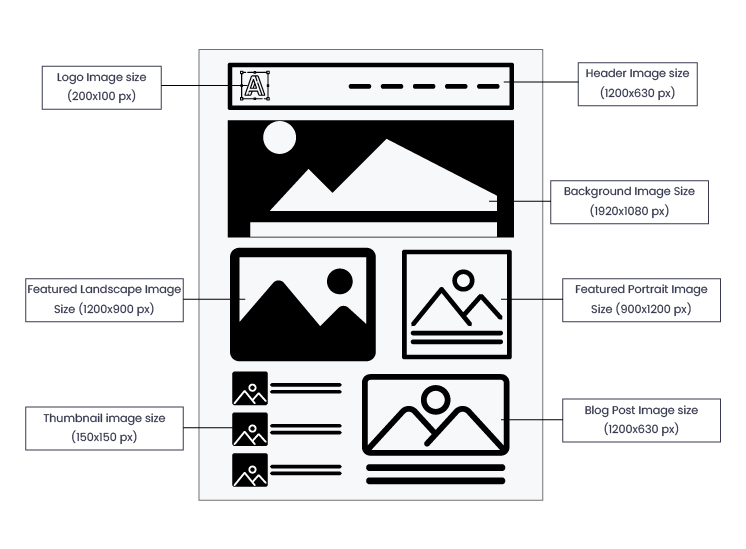
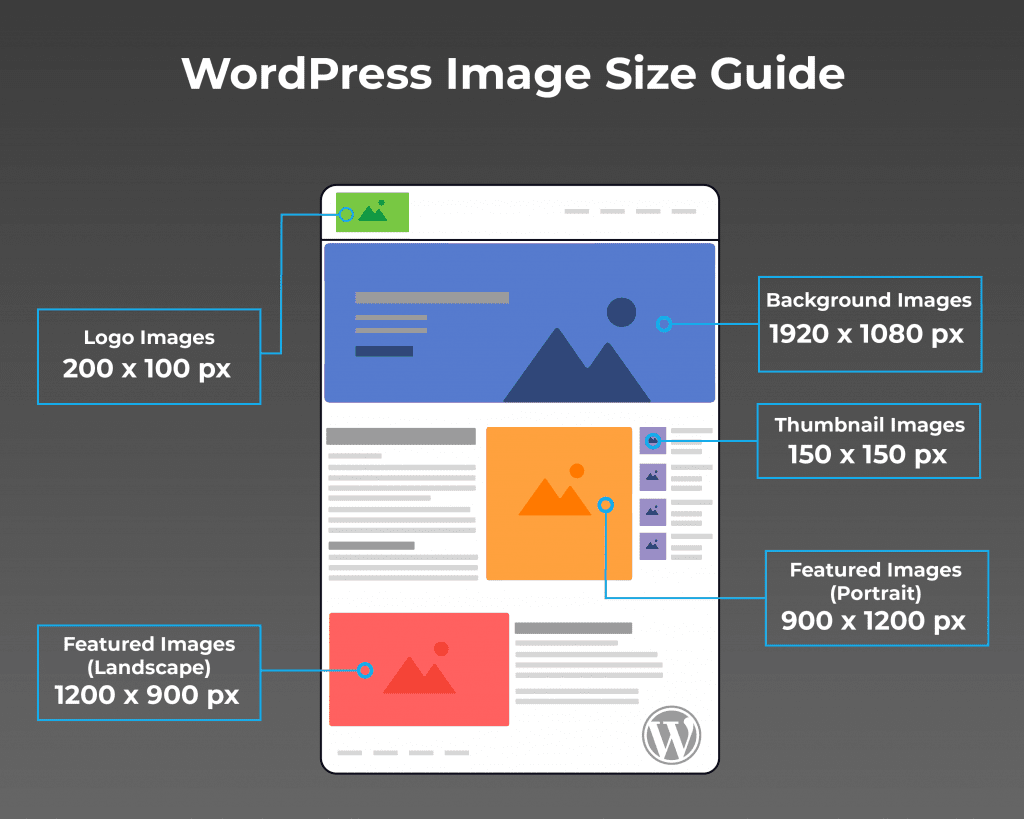
Image size matters. Too large slows the page. Too small may look bad. Aim for balanced dimensions. Consider the theme requirements. Most themes need specific sizes. A common size is 1200×600 pixels. This size fits many themes. Check the theme guide for details. Correct dimensions improve layout. They enhance user experience.
Speed is important. Fast pages keep visitors happy. Compress images to save space. Use tools like TinyPNG or Compressor.io. Reduce file size without losing quality. Choose the right format. JPEGs are often best. They offer a good balance. Use alt tags for SEO. Describe the image briefly. This helps search engines understand content.
Impact On Seo And Engagement
Featured image headers are vital for SEO. They help improve the visibility of your website. Search engines love images. They make your content attractive. People are more likely to click on pages with images. This can boost your website traffic.
Images can also increase user engagement. A good image grabs attention. It can make people stay longer on your page. This reduces your bounce rate. A lower bounce rate is good for SEO. It tells search engines your content is interesting.
Ensure images are high-quality and relevant. Use proper alt text for images. This helps search engines understand them. Alt text also helps people who can’t see the images. A well-chosen image can make a big difference. It can enhance both SEO and user experience.
Credit: enginescout.com.au
Common Issues And Solutions
Featured Image Header in WordPress often causes confusion among users. It represents the main image of a post, enhancing visual appeal. Solutions for common issues include resizing images for better fit and using plugins to optimize loading speed.
Image Not Displaying
Sometimes, the featured image doesn’t show up. This can be due to upload errors. Check if the image file is too large. Large files may not upload properly. Try resizing the image. Ensure the image is in the right format. Formats like JPEG and PNG work well. Also, verify the image is set as a featured image. Sometimes, it’s just not selected. Go to the post settings and set it correctly.
Image Alignment Problems
The image might not align properly. This can make your site look messy. Check the alignment settings. Images can align left, center, or right. Use CSS to adjust it if needed. Sometimes, themes override alignment. Try switching themes if issues persist. Another fix is using a plugin. Plugins help control image placement easily. Some popular ones are WP Smush and Regenerate Thumbnails. They ensure images fit well on your site.
Plugins For Enhanced Image Features
Many plugins can help with image features. Smush is a popular choice. It makes images load faster. Envira Gallery helps create beautiful galleries. NextGEN Gallery is another great option. It offers many layouts. Image optimization is important for speed.
WordPress allows image display customization. Custom CSS can change how images look. Jetpack provides extra tools. It offers lazy loading for images. Image hover effects add interactivity. Experiment with different styles. Make sure images match the site’s theme.
Best Practices For Featured Images
Choose an image that fits the blog topic. Bright colors catch the eye. Images should be clear and not blurry. A good image tells a story. It helps people understand the content better.
Use images that are not too big. Large images take time to load. People don’t like waiting. Fast-loading images keep visitors happy. Images should be high quality but small in size.
Alt text is important for images. It helps search engines know what the image is. Use words that describe the image well. Alt text also helps people who can’t see the image.

Credit: visualmodo.com
Frequently Asked Questions
What Is A Featured Image Header?
A featured image header is a prominent image displayed at the top of a WordPress page or post. It visually represents the content and enhances the blog’s aesthetic appeal. Choosing an eye-catching image is crucial for attracting readers and improving engagement on your WordPress site.
How To Add A Featured Image In WordPress?
To add a featured image, navigate to your WordPress dashboard. Edit the desired post or page, then find the “Featured Image” section on the right. Click “Set Featured Image” and upload or select an existing image from your media library.
Save your changes to update the post.
Why Use A Featured Image Header?
Using a featured image header enhances your WordPress site’s visual appeal and attracts reader attention. It provides a quick visual summary of your content and can improve engagement. Additionally, a well-chosen image can support your site’s branding and make your posts more shareable on social media.
What Size Should A Featured Image Be?
The ideal size for a featured image varies based on your WordPress theme. Generally, a width of 1200 pixels is recommended for optimal display. Check your theme’s documentation for specific size requirements. Consistent image dimensions ensure a cohesive look across your website.
Conclusion
Featured image headers enhance your WordPress site’s visual appeal. They make content more engaging and help attract visitors. Choosing the right image is crucial. It should relate to your content and capture attention. Properly sized images ensure faster loading times.
This improves user experience and SEO. Consistent use of featured images establishes brand identity. It also makes your site look professional. So, select images wisely for better results. Remember, a good image tells your story. Make it count on every post.
Keep experimenting to find what works best for your audience. Your site will thank you.


