
Have you ever wondered how WordPress handles complex functions behind the scenes? If you’ve tinkered with themes or plugins, you might have come across the term “callback.”
It might sound technical, but understanding callbacks can open up a whole new world of customization for your website. Imagine being able to trigger specific actions or functions exactly when you need them, without lifting a finger. That’s the power of a callback in WordPress! You’ll discover what a callback is, how it works, and how you can use it to enhance your WordPress site.
Dive in to unlock the secrets that can transform your site’s functionality and make your WordPress experience smoother and more efficient.
Credit: knowthecode.io
Callback Basics
A callback is a piece of code. It is called by another code. Purpose? To perform a specific action. You tell the program what to do. It listens and acts. Like a helper, it responds when needed.
In WordPress, callbacks are important. They connect actions and functions. When you click a button, a callback runs. It makes things happen. They are used in themes and plugins. They keep your site interactive. Without them, many features would not work. They are essential for dynamic content.
How Callbacks Work
In WordPress, a callback is a function that gets executed after a specific event occurs. These functions allow developers to add custom code to modify or extend WordPress features. Callbacks are crucial for creating dynamic and interactive websites.
Function Structure
A callback is a function. It is called at a specific time. This function is often passed to another function. The main function then executes the callback.
The structure of a callback is simple. It begins with a function name. This name is followed by parentheses. Inside, you place arguments if needed. After, you add curly brackets. Inside these brackets, you write the code.
Execution Flow
Callbacks follow a specific flow. First, the main function runs. It reaches a point where it needs extra tasks. At this point, it invokes the callback. The callback does its job and returns. The main function continues after.
This flow is essential. It allows for flexible code. You can change the callback without changing the main function.
Common Use Cases
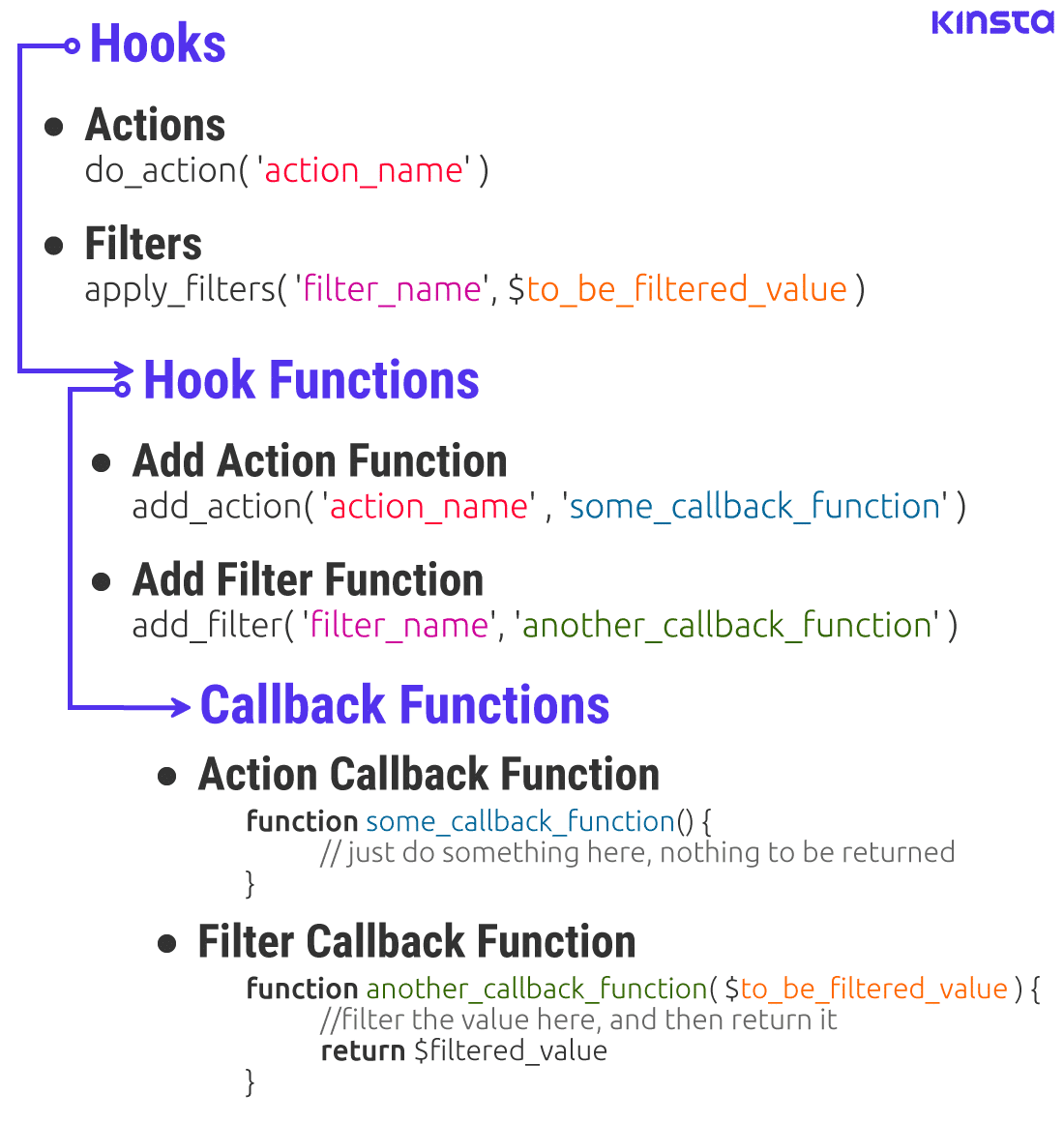
Hooks and filters are tools in WordPress. They let developers change how things work. Hooks can add new features. Filters can change data. This helps make WordPress sites unique.
In theme and plugin development, callbacks are useful. Developers use them to create custom looks. They make plugins do special tasks. This makes websites stand out.
Callbacks also help fix problems. They can improve site speed. This is important for users. With hooks and filters, developers have more control. They can build better websites.
Credit: formidableforms.com
Implementing Callbacks
A callback is a special function. It runs when something happens. In WordPress, callbacks are used often. They help control what happens on the site. To write a simple callback, first, create a function. This function will do something specific. Name it clearly. Next, use the function in WordPress code. This is how it gets used later. Make sure the function works well. Test it many times. Fix any problems you find.
Hooks are important in WordPress. They let you add your code at the right time. Two main types are actions and filters. Actions let you add new code. Filters let you change existing code. To register a callback, use a hook. Use add_action() or add_filter() function. This tells WordPress to use your callback. Always test your hooks. Make sure they work as planned.
Advantages Of Using Callbacks
Callbacks allow you to add features to your site. They let you change how things work. You can use them to make your site unique. Custom themes and features become easier. You don’t need to change the core files. This means fewer errors and issues. Safety is important when making changes. Callbacks help keep your site safe.
With callbacks, you can reuse code. This saves time and effort. You write the code once and use it again. This makes your work faster. Code becomes easier to read and understand. Simple code is less likely to break. Reusable code means less work for you. This is great for busy developers. Everyone loves to save time.
Challenges And Considerations
Debugging can be hard. Callbacks might not work as expected. Errors can hide in the code. Finding them takes time. You need patience. Tools can help you find bugs. They show where the problem is. But, you must know how to use them. Sometimes, you need to check code line by line. This helps find mistakes.
Callbacks can slow down a site. They run extra code. This can make a page load slowly. Users might leave if a page is slow. Optimization is key. You can use tools to check speed. They help find slow areas in the site. Fixing these can help speed up the site. Always keep performance in mind.
Best Practices
In WordPress, a callback is a function triggered by specific events or actions. These functions help developers customize website behavior efficiently. Understanding callbacks is vital for creating responsive and dynamic sites.
Naming Conventions
Always use clear and descriptive names for callbacks. This makes your code easy to understand. For example, use prefixes related to your plugin or theme. This prevents conflicts with other code. Avoid generic names like “my_callback”. Instead, try something like “mytheme_update_settings”. Descriptive names help others know what your callback does. It also helps you remember later. Consistent naming is a good habit.
Security Measures
Security is important in WordPress. Always validate and sanitize user inputs. This keeps your site safe from attacks. Use WordPress functions like esc_html() or sanitize_text_field(). These functions clean data before saving. Also, check user permissions with current_user_can(). This ensures only authorized users can perform actions. Never trust external data. Always treat it with caution. Good security practices protect your site.
Popular Callback Examples
Callbacks in WordPress help make things happen. They are like magic words. These words tell WordPress what to do. For example, they help with menus. They also help with widgets. They make sure everything works well. WordPress uses callbacks to run functions. These functions do special tasks. They can show text. They can change colors. They can even hide things. Callbacks make WordPress smart and efficient.
Plugins use callbacks too. They make plugins work better. Plugins can add new features. Callbacks tell plugins when to start. They also tell them when to stop. This helps keep the website fast. It also keeps it safe. Many plugins rely on callbacks. They help connect plugins with WordPress. Without callbacks, plugins may not work right. Callbacks are important for every site using WordPress.
Credit: kinsta.com
Frequently Asked Questions
What Is A Callback In WordPress?
A callback in WordPress is a function or method executed at a specific point. It’s often used with hooks to modify functionality. Developers use callbacks to customize themes and plugins, enhancing user experience. Understanding callbacks is essential for effective WordPress development.
How Do WordPress Callbacks Work?
WordPress callbacks work by connecting functions to actions or filters. When the event occurs, the callback is triggered. This allows developers to alter or extend WordPress functionality. Callbacks are crucial for creating dynamic and responsive websites.
Why Use Callbacks In WordPress?
Using callbacks in WordPress enables customization without altering core files. They allow developers to extend functionality safely. Callbacks ensure compatibility with updates, maintaining site stability. They are essential for creating tailored user experiences.
Can Callbacks Affect Website Performance?
Yes, callbacks can affect website performance if not used correctly. Inefficient code or excessive callbacks may slow down a site. It’s crucial to optimize callbacks for better performance. Regular testing ensures that callbacks run efficiently.
Conclusion
Understanding callbacks in WordPress enhances your site’s functionality. They allow dynamic responses to actions. Callbacks make code efficient, reducing repetition. This simplifies managing your WordPress site. With callbacks, customizing features becomes easier. This flexibility helps tailor websites to specific needs.
Callbacks are essential for developers and site managers. They improve user experience and site performance. Learning about callbacks is crucial for effective WordPress use. Keep exploring WordPress features to optimize your site. Being familiar with callbacks can streamline your workflow.
It’s a skill worth mastering for any WordPress enthusiast. Stay curious and keep learning.


