
Have you ever wondered why some websites load faster than others? If you’re using WordPress, you might have heard about cache settings, but what exactly are they and why should you care?
Imagine visiting your favorite website and having it load in the blink of an eye. Feels great, right? That’s the magic of caching. With the right cache settings, you can transform your WordPress site into a speedy, efficient marvel. But how do you harness this power?
What do these settings mean for you and your visitors? As you delve into the world of WordPress caching, you’ll discover how it can improve your site’s performance, enhance user experience, and even boost your SEO rankings. Stick around, and you’ll uncover the secrets to optimizing your site like a pro.
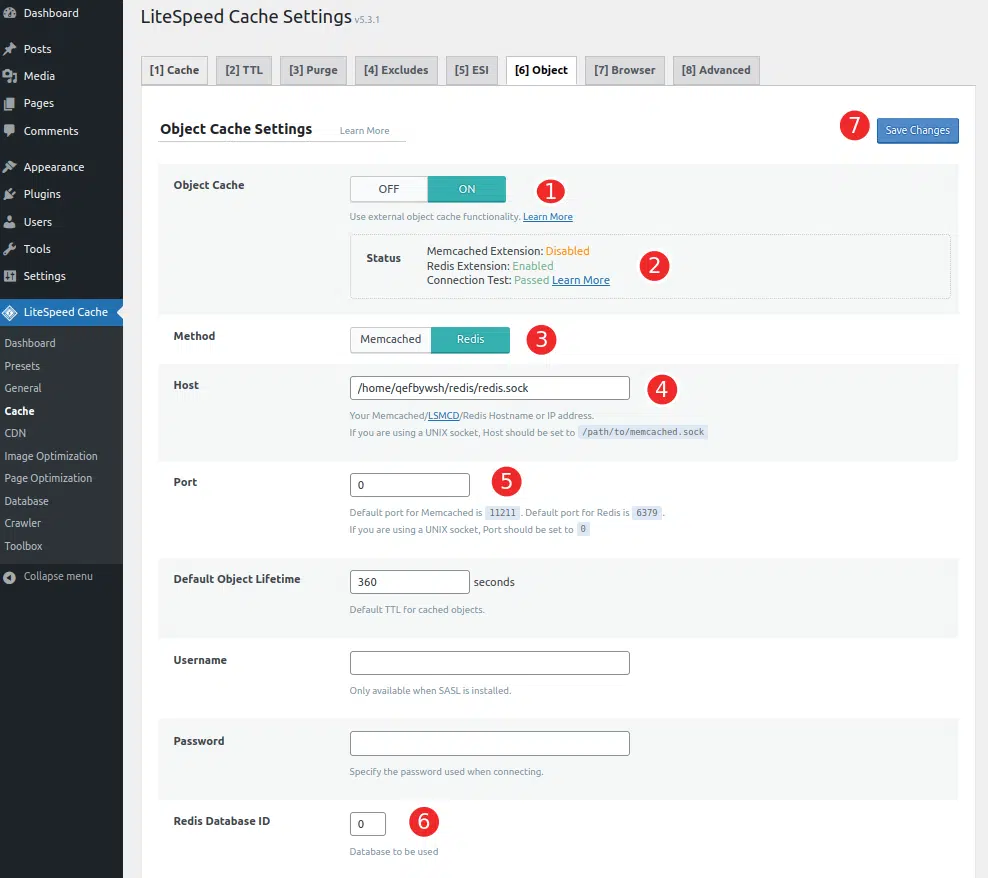
Credit: www.veerotech.net
Basics Of Cache
Cache is like a storage box. It keeps data that you use often. Fast access is the main goal. It saves time. It improves website speed. This is important for users. They want things quickly.
Caching helps reduce load time. It makes websites work better. Less processing power is needed. This means less waiting for users. Server stress is also less. This keeps sites stable. Efficiency is key here. It makes sure everything runs smoothly. User experience improves a lot with caching.
Credit: help.one.com
Types Of Caching In WordPress
Browser caching stores web pages on your computer. This helps load pages faster. The browser saves parts of a website like images and styles. So, next time you visit, it uses saved data. This reduces the time to load pages. Faster browsing experience. Less waiting.
Server-side caching happens on the website’s server. It saves data that doesn’t change often. This helps the server respond quickly. Visitors see pages faster. It reduces server load. Makes websites more efficient. Better speed for everyone.
CDN caching uses servers around the world. These servers store web content. They deliver it to users from the nearest location. This speeds up loading time. It helps global visitors access content quickly. Enhanced browsing for everyone, no matter where they are.
Benefits Of Cache Settings
Cache settings help pages load faster. This means users don’t wait long. Quick load times keep users happy. Fast websites get more visitors. More visitors mean more success.
Cache settings lower the work for servers. They store data to use later. This means servers work less hard. Less work helps the server run better. Better servers support more users.
Users enjoy smooth browsing with cache settings. Pages open without delay. People like quick websites. Happy users come back often. More visits mean more growth.
Configuring Cache Settings
Choosing the right plugin is crucial. It helps speed up your site. Popular options include W3 Total Cache and WP Super Cache. These plugins offer different features. Check for compatibility with your site theme. Some plugins are easy to use. Others might need more setup. Always read reviews before installing.
Cache expiry time decides how long data stays stored. Shorter times mean fresher content. Longer times can improve speed. A balance is important. For most sites, 24 hours is a good start. Some plugins offer automatic settings. This can make your job easier.
Some pages should not be cached. Login pages or checkout pages, for example. Caching these can cause errors. Most plugins allow you to exclude certain pages. Simply enter the page URL in the settings. This keeps your site working smoothly.
Popular WordPress Caching Plugins
W3 Total Cache speeds up your site. It reduces page load times. Users find the site faster. This plugin improves user experience. It also helps in SEO rankings. It caches pages, posts, and feeds. It is easy to use. Install and activate it. Your site becomes faster.
WP Super Cache is a great plugin. It creates static HTML files. Your server serves these files. It is faster than regular WordPress pages. It is easy to set up. Many users trust it. It helps reduce server load. Your site performs better. It is free to use.
WP Rocket is a premium plugin. It boosts your site’s speed. Page loading becomes quick. It offers many features. Cache preloading is included. It is user-friendly. Even beginners can use it. It saves time and effort. It is worth the money. Your site becomes faster.
Common Cache Setting Challenges
Cache conflicts happen when plugins fight each other. Some plugins might not work well with others. This can break your site. WordPress needs the right plugins. Choose plugins that play nice together. Test them before use. This helps avoid problems.
Sometimes, cache does not clear easily. This means old data stays. Users may see outdated info. Clearing the cache fixes this. Use the right tools in WordPress. Some plugins help with this. They clear cache fast. Make sure you use them.
Mobile users need special care. They use different devices. The cache must work for all of them. Some settings only work on desktop. Set cache for mobile too. This ensures everyone sees the right site. Check how your site looks on phones.
Best Practices For Cache Settings
Keep your cache clean. Old cache files can slow down your site. Deleting old cache files helps. Do this regularly. It makes your website faster. Use plugins to help with this task. They make the process easy. Scheduled maintenance is a good idea. Set reminders to clear cache often.
Test your cache settings often. Use tools to see if cache works well. Check load times on your site. Fast load times mean cache is working. Slow load times mean you need to fix it. Adjust settings if needed. Make sure your site runs smoothly.
Watch your site for any changes. Performance can drop if cache is bad. Use performance tools to help. They show how well your site runs. Keep an eye on speed. Check reports for any issues. Fix problems as soon as you find them. This keeps your site fast and healthy.
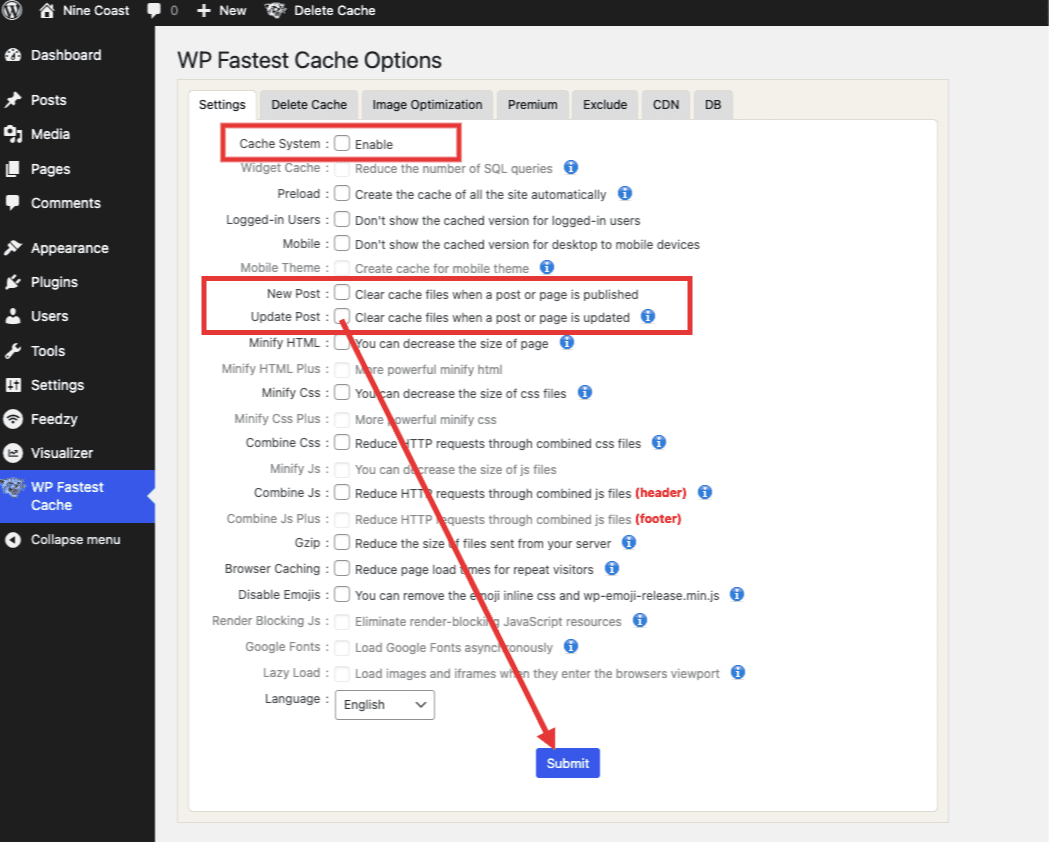
Credit: docs.themeisle.com
Frequently Asked Questions
What Is Cache Setting In WordPress?
Cache settings optimize website performance by storing static files for quick retrieval. This reduces server load and speeds up page loading times. Configuring cache settings involves choosing caching plugins, setting expiration times, and deciding what content gets cached. Proper cache settings enhance user experience and improve SEO rankings.
How Does Caching Affect WordPress Site Speed?
Caching significantly improves WordPress site speed by storing frequently accessed data. This reduces the need for repeated database queries. Faster site speed leads to better user experience and lower bounce rates. Implementing effective caching strategies can enhance your site’s performance and visibility in search engine results.
Why Is Cache Important For Seo?
Cache is crucial for SEO because it accelerates page loading times. Faster-loading pages provide a better user experience and reduce bounce rates. Search engines prioritize speed in their ranking algorithms. Proper caching can improve site visibility and rankings, driving more organic traffic to your WordPress site.
How To Clear Cache On WordPress?
Clearing cache on WordPress can be done via caching plugins. Most plugins offer a simple ‘clear cache’ button in their settings. Regularly clearing cache ensures updated content is visible to users. It prevents displaying stale or outdated information and helps maintain optimal site performance.
Conclusion
Cache settings on WordPress boost your website’s performance. They store frequently accessed data. This reduces server load and speeds up response times. Faster websites enhance user experience. Visitors stay longer and explore more pages. Speed also affects your search engine ranking.
Better ranking means more visibility. You attract more visitors. Choosing the right cache plugin is crucial. It should suit your website needs. Regular updates ensure optimal performance. Always clear cache after making changes. This prevents display errors. Understand your cache settings.
They are key to a smoother website experience.


