

Are you worried about what happens to your emails when you transfer your domain to a new host? You’re not alone.
Moving your website is already stressful, and the last thing you want is to lose important messages or face email downtime. Understanding how email works during a domain transfer can save you headaches and keep your communication smooth. You’ll discover exactly what happens to your emails, the steps you need to take, and how to avoid common pitfalls.
Keep reading to protect your inbox and make your domain transfer hassle-free.
Email Basics And Domain Hosting
Understanding email basics and domain hosting helps clarify what happens to emails during a domain transfer. Both services work closely together to deliver emails to the right place. Knowing their connection can prevent email problems when changing hosts.
How Email And Domain Hosting Connect
A domain name points to a website and email services. It acts as an address for both. Email hosting uses the domain name to send and receive messages. The domain’s DNS settings tell mail servers where to deliver emails.
Changing domain hosts means updating these DNS settings. If not done right, emails might stop arriving. The email system depends on correct domain records. These records include MX records, which direct emails to the host’s mail servers.
Types Of Email Hosting Services
Email hosting comes in different forms. Shared email hosting is common and affordable. It shares server space with other users. Dedicated email hosting offers more control and resources. It suits businesses needing extra security or features.
Some hosts bundle email with web hosting. Others offer email-only services. Popular email hosts include Google Workspace and Microsoft 365. These cloud-based services provide reliable email with extra tools. Choosing the right type affects email during a domain move.

Credit: www.youtube.com
Impact Of Domain Transfer On Emails
Transferring a domain to a new host affects more than just your website. Email services tied to your domain can also experience changes. Understanding these impacts helps prevent disruptions and data loss.
Emails rely on domain settings like DNS records. When these records update during transfer, email flow can pause or change. Planning email management during this process is important.
What Changes During Domain Transfer
The domain transfer moves control of your domain from one registrar to another. DNS records, including MX records, may change. These records tell the internet where to send your emails.
If MX records update, email routing can shift. Old host servers might stop receiving emails. New host servers will start handling them once settings propagate.
Propagation can take hours or days. During this time, emails might get delayed or lost. Some hosts keep old records active temporarily to avoid this.
Common Email Issues Faced
Emails may bounce back or fail to deliver. This happens if MX records are incorrect or missing. Users might also face login problems if email accounts are not set up on the new host.
Another issue is email downtime. Emails may not reach your inbox during DNS update delays. Missing emails or partial data transfer can frustrate users.
Spam filters might activate due to sudden server changes. This can cause legitimate emails to be marked as spam. Proper email setup and verification reduce this risk.
Preparing Email For Domain Transfer
Preparing your email for a domain transfer is a crucial step. This process helps avoid losing important messages or facing downtime. Taking time to prepare ensures a smooth transition to your new host. It protects your emails and keeps communication running without interruption.
Backing Up Existing Emails
Start by backing up all your current emails. Use your email client or hosting control panel for this task. Save copies on your computer or cloud storage. This backup acts as a safety net. If anything goes wrong during the transfer, you will have your emails safe. Do not skip this step. It is essential for email security.
Notifying Users And Stakeholders
Inform everyone who uses the email accounts about the upcoming transfer. Send a clear message explaining the timeline and what to expect. Tell them about possible short disruptions in email service. This helps prevent confusion and lost emails. Keeping users informed builds trust. It also allows them to prepare for any changes.
Email Configuration With New Host
Moving your domain to a new host affects your email service. Setting up email accounts and updating settings is key. This step ensures you keep receiving messages without interruption. Proper configuration avoids lost emails and downtime.
Every new host has its own email system. You must match your old email setup with the new one. This process takes careful attention and correct details. Let’s explore the email setup tasks needed after a domain move.
Setting Up Email Accounts
Create email accounts on the new host exactly like before. Use the same usernames and passwords. This keeps your email consistent and easy to access. Check if the new host offers webmail or other access methods.
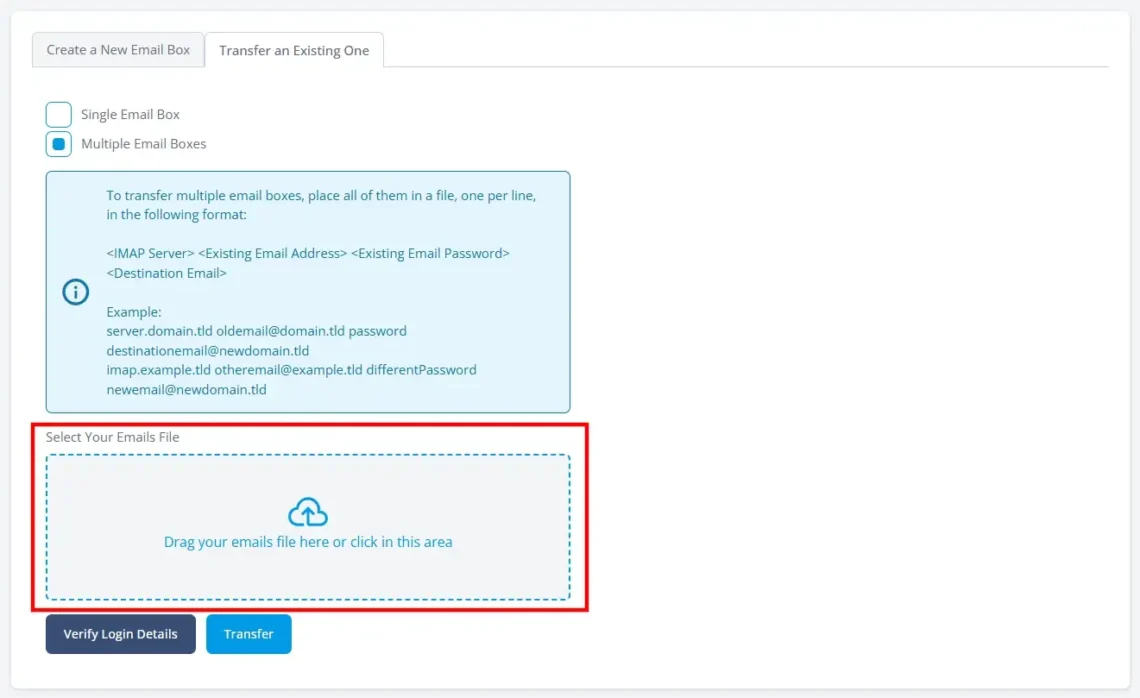
Some hosts allow importing old emails. Ask your new provider about this option. It helps keep your email history intact and handy.
Updating Dns Records For Email
DNS records control where your emails go. Change these records to point to the new host’s mail servers. The most common records are MX, SPF, DKIM, and DMARC. Each record plays a role in email delivery and security.
Update MX records with your new host’s information. This directs emails to the right mailbox. Add or update SPF and DKIM to prevent your emails from being marked as spam.
Verifying Email Delivery
Test your email after setup. Send and receive messages to confirm everything works. Check both webmail and email clients.
Use tools to verify DNS and email settings. These checks ensure no delivery problems exist. Fix any issues quickly to avoid losing important emails.
Avoiding Email Downtime
Transferring your domain to a new host can interrupt your email service. Avoiding email downtime is crucial to keep your messages flowing without gaps. Careful planning and smart steps help maintain smooth email communication during the switch.
Timing The Transfer Properly
Choose a time with low email traffic to start the transfer. This reduces the chance of missing important messages. Start the domain transfer outside business hours or during weekends. Keep your current email service active until the new setup is ready. This overlap ensures no emails get lost during the change.
Using Temporary Email Solutions
Set up temporary email accounts on another service before transferring. Use these accounts to receive urgent messages during the switch. Forward emails from old accounts to temporary ones. This step creates a backup and keeps communication open. Temporary solutions act as a safety net for your email flow.
Credit: www.scalahosting.com
Troubleshooting Email Problems
Transferring a domain to a new host can sometimes cause email issues. These problems happen because email settings and servers change. Knowing how to find and fix these issues helps keep your email working smoothly.
This section explains common email errors after a transfer. It also guides you through simple steps to fix email delivery problems fast.
Common Email Errors Post-transfer
Emails may fail to send or get lost after transfer. One common error is the “SMTP connection failed” message. This means the email server can’t connect properly. Another issue is delayed email delivery. Sometimes emails take hours or days to arrive.
Emails might also bounce back with messages like “Mailbox not found.” This happens if the email account is not set up on the new host. Missing or wrong DNS records often cause these problems. Incorrect MX records are a usual culprit.
Steps To Resolve Email Delivery Issues
First, check your MX records in the DNS settings. They must point to the new host’s mail server. Next, verify your email accounts exist on the new host. Create any missing accounts exactly as before.
Then, test sending and receiving emails. Use webmail or an email client to check. If emails bounce, note the error message. This helps find the problem quickly.
Clear old DNS cache on your computer. This ensures it uses updated server info. You can flush the DNS cache using simple commands.
Contact your new host’s support if issues remain. They can check server settings and logs. Most email problems resolve with these steps.
Tips For Smooth Email Transition
Transferring your domain to a new host can affect your email services. Taking steps for a smooth email transition helps avoid downtime and lost messages. Planning ahead and following simple tips keeps your email working during the switch.
Focus on security and clear communication. These two areas are key to protecting your data and keeping everyone informed. Let’s explore how to handle both effectively.
Maintaining Email Security
Keep your email accounts safe throughout the transfer. Change passwords before starting the move. Use strong, unique passwords for each account. Enable two-factor authentication if your provider supports it. Check that your new host uses secure servers. Avoid sharing login details with others during the process. Back up all important emails before the transfer. This protects your data in case of errors.
Communicating Changes Effectively
Inform everyone who uses your email about the change. Send clear instructions on when and how the switch will happen. Notify your team, clients, and partners in advance. Provide contact details in case of issues. Remind people to save important emails before the move. Keep updates simple and easy to understand. Regular communication reduces confusion and missed messages.

Credit: ferdy.com
Frequently Asked Questions
What Happens To My Emails When Transferring Domains?
Emails linked to your domain remain on the old host until DNS changes propagate. If you don’t migrate email data, you risk losing messages.
Will I Lose Old Emails After Domain Transfer?
No, old emails stay on the original server unless you delete or migrate them. Backing up emails before transfer is crucial.
How To Keep Email Service Active During Domain Transfer?
Update MX records promptly with your new host. Coordinate DNS changes carefully to minimize email downtime during the transfer process.
Can I Migrate Emails To A New Hosting Provider?
Yes, most hosts offer email migration tools or manual options. Migrating ensures all emails move safely without data loss.
Conclusion
Transferring a domain to a new host can affect your emails. Plan the move carefully to avoid losing messages. Backup your emails before starting the transfer. Update your email settings after the domain switch. Check with your new host about email support.
Keep your old host active until everything works. Test your email thoroughly once the transfer finishes. Taking these steps helps keep your emails safe and working. Stay patient; the process may take some time. Your emails will stay connected with good preparation.


