
Imagine visiting your favorite website, only to find it has moved, and you can’t locate it. This frustration is what your visitors might experience if you change your WordPress URL without careful planning.
But why would you change your URL, and what really happens when you do? You’re about to discover the essential steps and potential pitfalls of updating your WordPress URL. This knowledge not only ensures a smooth transition but also protects your search engine rankings and user experience.
By understanding the process, you can avoid common mistakes that might sabotage your website’s success. Let’s delve into the intricacies of changing your WordPress URL, so you can make informed decisions that benefit your online presence. Stay with me as we explore how this seemingly simple change can have a profound impact on your website. You won’t want to miss these crucial insights!
Reasons For Changing Url
Rebranding is a fresh start for your website. You may change your WordPress URL to match a new name. This helps users find you easily. A new URL can make your site look modern. It attracts more visitors. It’s important to keep old visitors informed. Update them about the change.
HTTPS is secure. It protects data and builds trust with users. Changing your URL to include HTTPS is smart. It shows your site is safe. Search engines prefer secure sites. This can improve your ranking. It makes your site more reliable. Users feel safe browsing your pages.
Sometimes, you need a new domain. Changing your URL helps with this. A new domain can be shorter. It can be easier to remember. It may better fit your site’s theme. Ensure the old and new domains are linked. This helps retain your audience. Keep your content fresh and relevant.
Preparation Steps
Always keep a backup of your website. It’s like saving important files. Use plugins for easy backup. Store the backup safely. Cloud storage works best. This ensures your site is safe if something goes wrong.
Inform your users about the change. This keeps them from getting lost. Send a newsletter or post on social media. Let search engines know too. Use Google Search Console for this. It helps your site stay visible. Ensure all your links are updated. This way, everyone finds the new site easily.
Changing Url In WordPress Settings
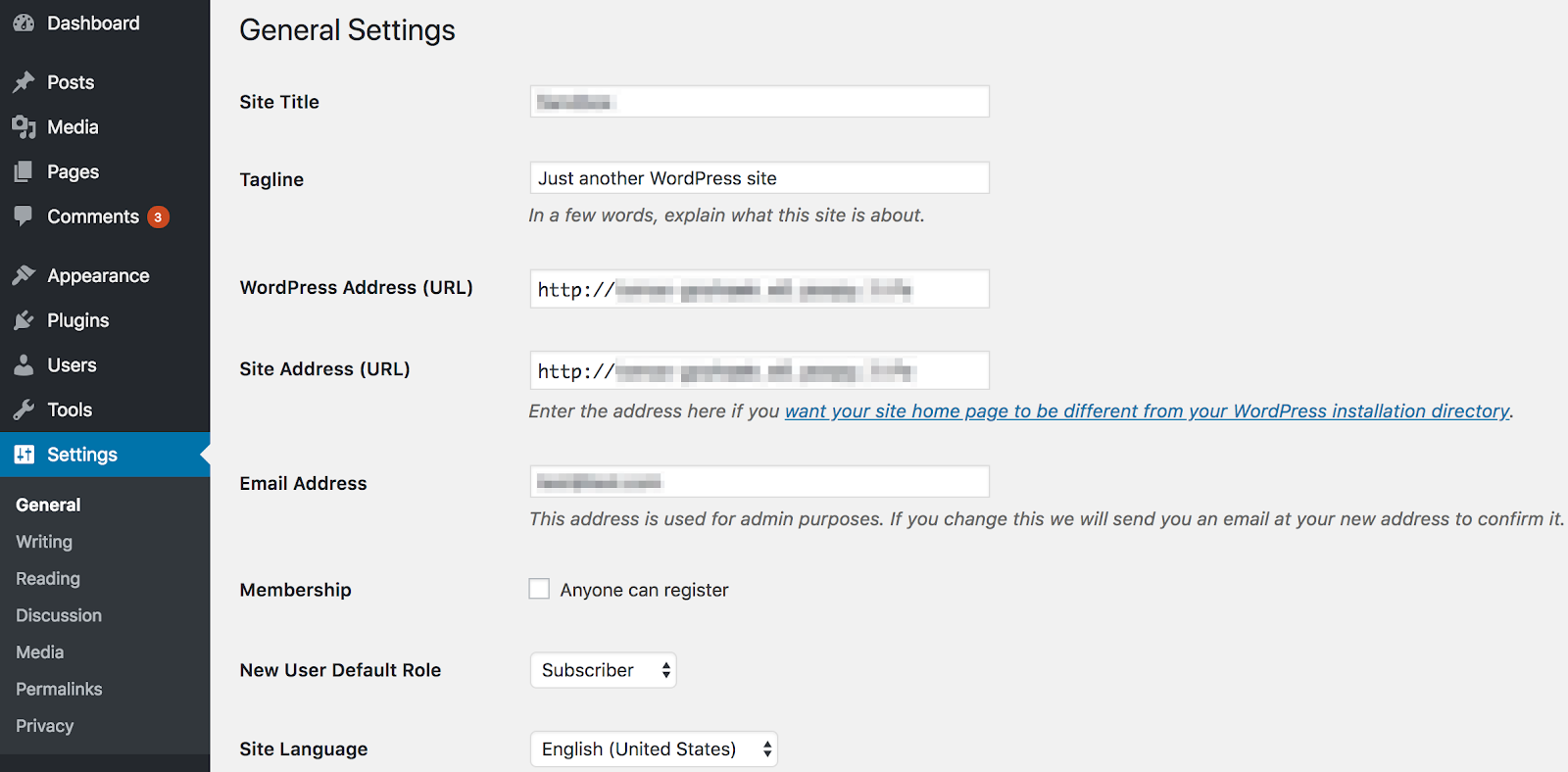
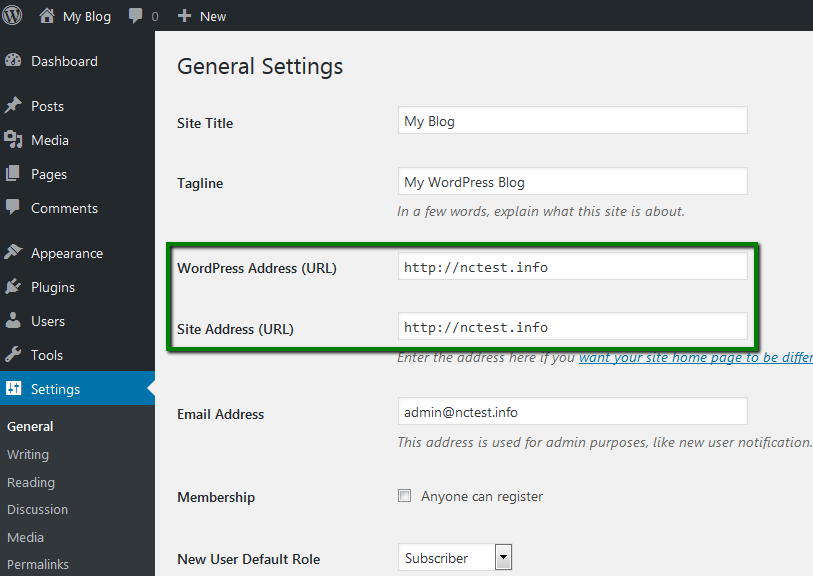
First, log into your WordPress dashboard. Use your username and password. Find the left menu. Click on Settings. It’s near the bottom. You will see many options. Choose General. This is where you change the URL.
You will see two fields: WordPress Address (URL) and Site Address (URL). These fields show your current URL. You can change them. Enter the new URL in both fields. Make sure it’s correct. After changes, click Save Changes. Your site will update with the new URL.
Credit: wpengine.com
Database Updates
Changing your WordPress URL needs database updates. Use phpMyAdmin to do this. First, log into your hosting account. Look for phpMyAdmin in the control panel. Click it to open.
In phpMyAdmin, find your WordPress database. Click on it. Look for the table named wp_options. Click it to open. You will see a list of options. Find siteurl and home options.
Click the edit button next to these options. Change the URLs to your new site URL. Double-check your changes. When done, click Save. Now your site URL is updated. This change is crucial for your website.
Make sure to backup your database before doing this. Backups can save you from mistakes. Your website needs proper care. Make changes carefully.
Handling Permalinks
Changing a WordPress URL needs a permalinks update. This keeps your site working well. Navigate to the Settings in your WordPress dashboard. Click on Permalinks. Choose a structure you like. Save changes. Regenerating helps to refresh links. It ensures all are correct. Broken links can be annoying. They lead to 404 errors. This process helps avoid them.
After changing URLs, check for broken links. Use tools like Broken Link Checker. This tool scans your site. It finds any broken links. Fixing these is important. Broken links hurt your site’s reputation. Users may leave if links don’t work. Regular checks help maintain your site’s health. Update or remove bad links quickly. This keeps your site friendly. Everyone likes a site that works smoothly.
Updating Media And Internal Links
A search and replace plugin helps update links fast. It scans the whole site. Finds old URLs. Replaces them with new URLs. This tool is easy to use. Saves time and effort. Many plugins are free. Some have extra features. Always back up your site first. This keeps your data safe.
Manual updates can be slow. Check each link one by one. Go to your media library. Update image URLs. Fix links in posts and pages. This needs focus. Take breaks if needed. It ensures all links work. You will feel happy with the results.
Search Engine Considerations
Changing your WordPress URL needs a new sitemap submission. Search engines use sitemaps to find pages. It tells search engines about your site structure. Update your sitemap quickly. Submit it to Google Search Console. This helps search engines find your pages. Faster indexing means better visibility. Your site’s rank can improve.
Setting up 301 redirects is important. Redirects send visitors to new URLs. They are permanent changes. This prevents broken links. Broken links can harm your site’s rank. Use plugins to set up redirects easily. They help keep your traffic steady. No lost visitors. No lost rankings. Save your site’s reputation.
Common Issues And Fixes
Mixed content warnings happen when some items are not secure. This can confuse your visitors. They might see warnings in their browser. Images and scripts are often the problem. To fix this, check the URLs. Make sure they all start with “https://”. Use plugins like Really Simple SSL. They help scan and fix mixed content. Always update your links. Check them when you change your site.
Redirect loops make a page reload forever. This can frustrate visitors. Check your .htaccess file. Look for too many redirects. Remove or fix them. Also, check your WordPress settings. Ensure the site URL is correct. Sometimes plugins can cause loops. Disable them one by one. Test the site each time. Find the one causing the loop. Then update or remove it.
Monitoring Post-change Performance
Google Analytics is your friend. It helps you see changes. Check your site’s traffic daily. Look for any drops or spikes. You can find where visitors come from. Are they still finding your site easily? This tool shows you details. Pay attention to bounce rates. A high rate might mean users are lost. Time on page is important. It shows if users stay longer. Check your conversion rates too. Are people still signing up or buying?
SEO Impact must be checked. Your site’s URL change might affect rankings. Use tools to see your site’s position. Are you still on the first page? Keywords are crucial. Make sure they are still working. Update them if needed. Backlinks are also important. Ensure they are still valid. Broken links can hurt your site. Monitor the site’s load time. A slow site can push users away.

Credit: wpmarmite.com
Credit: www.namecheap.com
Frequently Asked Questions
How To Change WordPress Url Safely?
Changing your WordPress URL safely involves updating it in the settings. Navigate to the WordPress dashboard, go to ‘Settings’, then ‘General’. Update the ‘WordPress Address (URL)’ and ‘Site Address (URL)’. Ensure you backup your site before making changes to avoid any issues.
Will Changing Url Affect Seo Ranking?
Changing your WordPress URL can affect your SEO ranking. It may result in broken links and loss of traffic. To minimize impact, implement 301 redirects from old URLs to new ones. This helps search engines update their index and maintain your site’s ranking.
Can I Revert WordPress Url Changes?
Yes, you can revert WordPress URL changes. Simply go back to the ‘General Settings’ in your WordPress dashboard and update the URLs to their previous state. Ensure you clear your cache and check for any broken links to restore functionality.
What Are Common Issues After Changing Url?
Common issues include broken links, inaccessible admin panel, and loss of traffic. These issues often arise due to improper redirection or missing updates in the database. Ensure you update all references to the new URL in your database and set proper redirects.
Conclusion
Changing your WordPress URL affects your site’s visibility. Search engines need time to update. Visitors may face temporary access issues. Make sure to update internal links. Redirects help maintain traffic flow. Regular backups can prevent data loss. Check plugin settings for compatibility.
Monitor site performance closely. Fix broken links promptly. Keep users informed about changes. These steps ensure a smooth transition. Your site stays accessible and secure. Adapt to new changes confidently. A well-planned approach helps maintain site integrity. Stay vigilant and proactive.
Your website’s success depends on careful management.


