
Imagine waking up one morning, ready to check the latest updates on your website, only to find that it’s vanished into thin air. Panic sets in as you realize your web hosting has expired.
This scenario is more common than you might think, and it can have serious consequences for your online presence. Whether you’re running a personal blog or a bustling e-commerce site, understanding what happens when your web hosting expires is crucial.
We’ll delve into the immediate effects, potential data loss, and the steps you can take to ensure your website stays live and thriving. Stick around to discover how you can protect your digital footprint and keep your online endeavors running smoothly.

Credit: www.web.com
Immediate Effects Of Expired Hosting
Your website will not be visible online. Visitors will see an error message. This means lost traffic and potential customers. Revenue drops if your site is for business. It can affect your brand’s reputation.
Emails linked to your domain stop working. Important messages will bounce back. You might miss crucial emails. This can cause communication problems. It’s stressful for businesses relying on emails.
You can’t access your site files. This includes images, texts, and databases. Backup files become important in this situation. Without backups, data might be lost forever. This can lead to extra costs for recovery.
Impact On Website Visitors
Your website may not load. Visitors see error pages. This can be confusing. They might think your site is gone. They may not try to visit again. Frustration grows quickly. Users prefer smooth experiences. A non-working site annoys them.
Visitors stop coming. Search engines notice this. Your site drops in rankings. Less visibility means less traffic. Regular visitors might forget your site. New visitors can’t find you. Traffic loss affects your site growth.
Your site seems unreliable. Trust begins to fade. People may talk about it. Word spreads fast. A bad reputation can stick. Building trust takes time. Losing it happens quickly. Keeping your hosting active is important.
Consequences For Seo
Your website’s ranking can fall quickly. Search engines may see your site as unreliable. They prefer websites with consistent uptime. Frequent downtime sends a negative signal. This affects trust and credibility.
Visitors might not return. Losing traffic impacts your visibility. Less visibility means fewer clicks. Rankings drop. Your site’s position in search results falls. This hurts your business goals.
Search engines need to crawl your site. Expired hosting blocks this action. If crawlers can’t access your pages, indexing stops. Your content becomes invisible. This means search engines won’t show your site in results.
Broken links lead to errors. These issues confuse search engines. Missing pages harm your site’s performance. All this affects the user experience. Users leave, reducing engagement.
Financial Implications
After web hosting expires, data recovery can be expensive. Hosting companies may charge high fees. These fees are for restoring old data. New hosting plans may also cost more. Some files might be lost forever. This can be frustrating and costly.
An expired website can lead to lost revenue. Customers cannot visit your site. They might go to competitors instead. Sales can drop quickly. A broken site means no online sales. It’s like closing a store.
Steps To Mitigate Risks
Expired web hosting risks losing website data and accessibility. Regularly monitor hosting plan renewal dates. Set reminders to renew before expiration.
Monitoring Hosting Renewal Dates
Keep track of hosting renewal dates. Use a calendar or reminder app. Set alerts weeks before expiry. This helps avoid sudden website shutdowns. Always know when your hosting needs renewal. Check renewal dates regularly. This keeps your website running smoothly.
Backup Strategies
Always backup your website data. Use cloud services or external drives. Regular backups are very important. This protects your data from loss. In case of hosting issues, you can restore quickly. Keep backups safe and updated. Make it a routine to backup weekly.
Communication With Hosting Provider
Stay in touch with your hosting provider. Ask about renewal options. Discuss flexible payment plans. Confirm your contact information. This ensures you receive important notifications. Providers can help with renewal reminders. Good communication prevents unexpected surprises.

Credit: infinitydomainhosting.com
Reactivating Expired Hosting
Start by reaching out to your hosting provider. They can guide you. Explain the situation clearly. Ask about renewal options. Check if there are any penalties for expired accounts. Understand the process for reactivation. Ask them about your data. Make sure your website data is safe. Clarify the cost involved in renewal. Discuss possible discounts or offers. Ensure you get all the details needed.
Once hosting is renewed, check your website. Ensure all files are intact. Look for missing data. Fix any broken links. Test the website speed. Ensure your site is working smoothly. Check all functions are active. Verify emails linked to the site. Ensure your website is secure. Monitor it for any issues. Keep regular backups moving forward. Ensure your site remains active to avoid future problems.
Preventing Future Expirations
Web hosting expiration can lead to website downtime and data loss. Protect your site by renewing on time. Regularly check hosting plans to avoid disruptions and ensure seamless online presence.
Automated Renewal Options
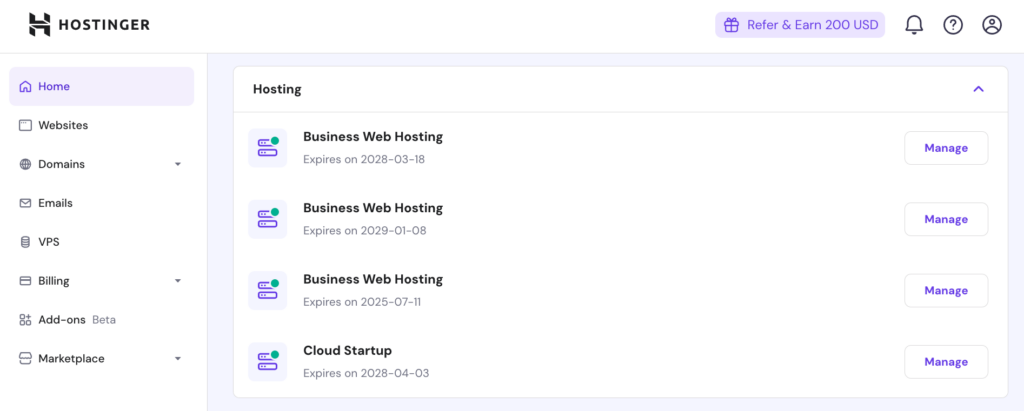
Setting up automated renewal can save your website. This option renews your hosting automatically. You won’t worry about forgetting. Check if your hosting provider offers this. It is usually found in account settings. You might need to enable it manually. Use a valid credit card or payment method. Make sure funds are available. Keep your email updated to receive notifications. This helps prevent issues.
Regular Hosting Reviews
Reviewing your hosting plan is important. Check if it meets your needs. Hosting requirements can change over time. Assess your website’s performance regularly. Look for slow loading times. Also, check if the plan offers enough storage. Compare with other providers. You might find a better deal. Stay informed about hosting trends. This helps you make smart choices. Always keep a backup plan ready.
Credit: www.hostinger.com
Frequently Asked Questions
What Happens If You Don’t Renew Hosting?
Failing to renew hosting results in website downtime. Your site becomes inaccessible, affecting visitors and SEO rankings. Data might be lost if hosting provider deletes files. You risk losing your domain if not renewed promptly. Regular renewal avoids these issues and ensures continuous online presence.
What Happens If My Website Domain Expires?
Your website becomes inaccessible if your domain expires. Visitors won’t reach your site, impacting traffic. You may lose ownership, and someone else could register it. Renew promptly to avoid these issues.
What Happens If Your Web Host Goes Out Of Business?
Your website may go offline temporarily. Backup your data regularly to ensure quick migration to a new host. Contact your domain registrar to retain domain ownership. Choose a reliable hosting provider with good customer support for future needs. Stay informed about industry news to anticipate potential issues.
What Happens When My Hosting Expires On Godaddy?
Your website becomes inaccessible when your hosting expires on GoDaddy. You risk losing data and files. Renew promptly to avoid website downtime and potential loss of information.
Conclusion
Web hosting expiration can cause serious issues for your website. Your site goes offline. Visitors can’t reach you. Data may get lost. Renewing your hosting plan is essential. Keep track of renewal dates. Avoid disruptions by acting promptly. Regular backups ensure data safety.
Maintaining hosting prevents downtime. Protect your online presence. Stay proactive and informed. A little attention saves a lot of trouble. Ensure smooth operations with timely actions. Your website’s health depends on it. Make hosting management a priority. Maintain continuous online visibility.
Secure your site’s future today.


