
You’ve taken the exciting step of creating your own WordPress site. Whether it’s a blog, a business platform, or a personal portfolio, your site is your digital footprint in the vast online world.
But how do you ensure it stands out and functions at its best? Imagine your WordPress site as a powerful engine. To keep it running smoothly, you need to know the essentials. This isn’t just about design or content; it’s about understanding the core elements that make your site efficient, secure, and user-friendly.
You’ll discover the critical aspects every WordPress site owner should master. You’ll learn how to optimize performance, safeguard your data, and enhance user experience. This knowledge will not only empower you but also give you the confidence to make informed decisions about your site. Ready to unlock the full potential of your WordPress site? Keep reading to uncover the insights that will transform your online presence.
Credit: www.wpzoom.com
Essential Plugins
WordPress site owners should know essential plugins for better site performance. These tools improve security, speed, and SEO. Select plugins wisely to enhance user experience and manage content efficiently.
Seo Optimization Tools
Every site needs SEO tools to appear in searches. Plugins like Yoast SEO help with keywords. They also help with meta descriptions and tags. Another tool is Rank Math. It offers easy tips for better content. These plugins make pages rank higher.
Security Enhancements
Keeping your site safe is crucial. Plugins like Wordfence protect against hacks. They scan for malware and block threats. Another option is Sucuri. It offers a strong firewall. These tools keep unwanted users away. Security is key for trust.
Performance Boosters
Fast sites keep visitors happy. Plugins like WP Super Cache speed up loading times. Another choice is W3 Total Cache. It reduces server load. Both plugins help pages load quicker. Speed is important for user experience.
Backup Solutions
Backups save your data. Plugins like UpdraftPlus create backups easily. They store files safely. Another plugin is BackupBuddy. It offers scheduled backups. These tools prevent data loss. Backups keep your site secure.
Credit: www.bluehost.com
Website Security
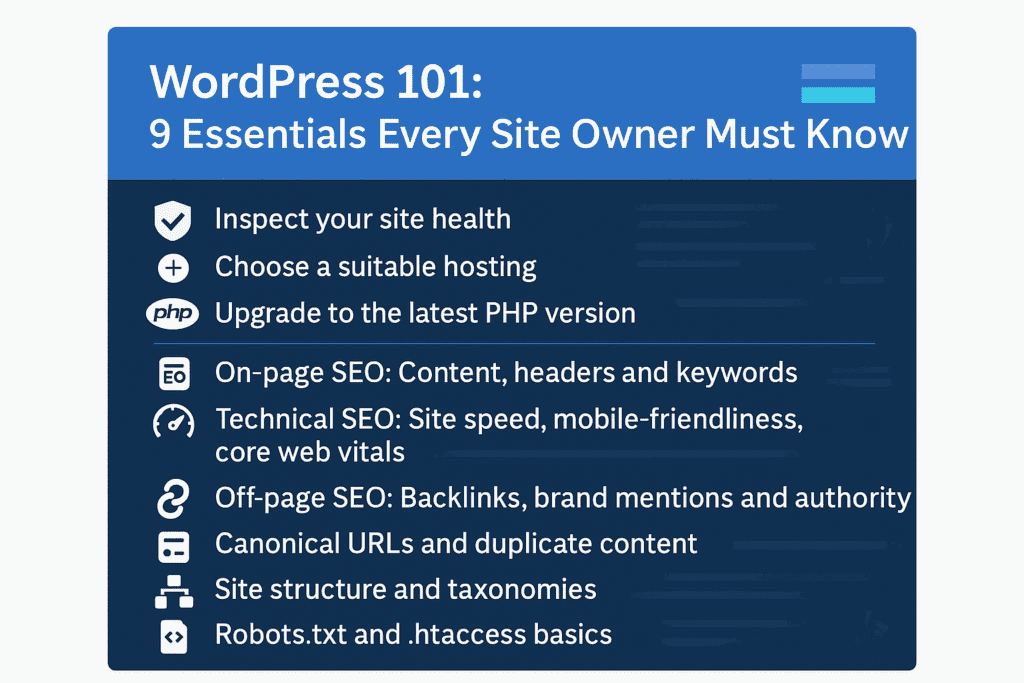
WordPress sites face many threats. Hackers can steal data. They use malware to harm your site. Phishing tricks users into giving personal info. These threats can cause a lot of damage. Sites may crash or lose visitor trust. It’s important to know these dangers.
Use strong passwords. They make it hard for hackers to get in. Update plugins and themes regularly. Old versions may have security holes. Install a firewall to block attacks. Limit login attempts to keep out bad guys. Always back up your site. This keeps your data safe.
Use tools to monitor your website. They check for any strange activity. Alerts warn you of possible threats. Set up email or text notifications. This way, you act quickly. Keep an eye on login attempts. Watch for any unusual traffic. This helps you stay safe.
Seo Best Practices
Choosing the right words is key. Keywords help search engines find your site. Start by listing words related to your topic. Use tools like Google Keyword Planner. Search for words with low competition. Long-tail keywords are longer phrases. These can be easier to rank for. Make sure your keywords fit naturally into your content.
Optimize each page on your site. Use your chosen keywords in titles. Add them to headings and body text. Don’t forget meta descriptions. They tell search engines what your page is about. Use alt text for images. This helps search engines understand your pictures. Internal links guide users to other parts of your site. They are useful for keeping visitors engaged.
Links from other sites boost your site’s ranking. Backlinks are important. They show search engines your site is trustworthy. Reach out to other site owners. Ask for links to your content. Create high-quality content others want to share. Guest blogging is a good way to build links. Write for other sites. Include a link back to yours.

Credit: www.linkedin.com
Performance Optimization
Caching helps your site load faster. It saves data temporarily. Visitors see pages quickly. Use plugins like W3 Total Cache. They make caching easy. Memory caching speeds up access. It stores data in RAM. This reduces server load. Browser caching is important. It stores files on the user’s device. Faster loading for repeat visitors.
Large images slow down websites. Compress images to make them smaller. Tools like TinyPNG help a lot. Use the right image format. JPEGs for photos. PNGs for graphics. Always use alt text. It helps search engines understand images. Also helps those with visual impairments. Smaller images mean faster load times.
Faster sites keep visitors happy. Reduce HTTP requests. Fewer requests mean faster loads. Combine CSS and JavaScript files. This helps speed up the site. Use a content delivery network (CDN). It distributes content globally. Visitors get content from nearby servers. Lazy loading images can help. They load as users scroll down. This speeds up initial load times.
Regular Maintenance
Keeping plugins and themes up-to-date is vital. Updates fix bugs and improve security. Outdated plugins can break a site. They may also have security holes. Check for updates weekly. Always backup your site first. This keeps your data safe. A backup is your safety net.
Your WordPress database stores all your data. Over time, it gets cluttered. Cleaning it speeds up your site. Remove old drafts and spam comments. Delete unused plugins and themes. Use a plugin to help with this. It makes the task simple. A clean database is a happy database.
A content audit checks your site’s health. Find and fix broken links. Update old posts with new information. Ensure all content matches your brand. A good audit boosts your site’s quality. It also improves user experience. Happy users return more often.
User Experience
Websites should look great on all devices. Phones, tablets, and desktops. This is called responsive design. It adjusts layout based on screen size. Text, images, and buttons should fit well. A site that looks good everywhere keeps users happy. It also improves search engine ranking.
Good navigation helps users find what they need. Menus should be easy to see. Links should be clear. Use simple words for menu items. A search bar is helpful too. Easy navigation means visitors stay longer. This can lead to more engagement and conversions.
Websites need to be accessible for everyone. This includes people with disabilities. Use alt text for images. Ensure buttons are easy to click. Text should be readable. Screen readers help blind users. Accessibility improves user experience. It also shows you care about all visitors.
Content Management
Crafting content that grabs attention is key. Use simple words. Keep sentences short. Images and videos make content lively. They catch eyes. Ask questions in your text. It makes readers think. Stories are powerful. People love stories. They remember them.
A content calendar helps a lot. It organizes posts. Plan topics for the month. Set dates for each post. This avoids last-minute rush. Schedule posts in advance. WordPress has tools for this. They save time and effort. Consistency is crucial. Stick to your schedule.
Analytics show what’s working. They tell which posts get views. Use this data to improve. Focus on popular topics. It boosts site traffic. Track visitor actions. See where they click. Adjust your strategy based on these insights. Always aim to improve.
Legal Compliance
Privacy policies tell users how data is used. Every site needs one. It builds trust. Users feel safe. Personal data is important. Protect it well. Explain what data is collected. Tell why it’s needed. Always be clear. Make it easy to read.
Cookies track user actions. Websites must inform users. Cookie notices are essential. They show transparency. Users should know what cookies do. Give them choices. Let them accept or deny. Keep it simple. Use plain words.
GDPR protects user data. It applies to many sites. Understand its rules. Follow them strictly. Other regions have laws too. Each law has requirements. Stay updated. Always comply with data laws. This avoids trouble. Keeps site safe.
Frequently Asked Questions
How Do I Secure My WordPress Site?
Securing your WordPress site is crucial. Start by using strong passwords and installing security plugins. Regularly update your WordPress, themes, and plugins. Backup your site frequently and limit login attempts to prevent unauthorized access. Consider using SSL certificates for encrypted connections.
What Plugins Should I Install?
Plugins enhance functionality. Essential plugins include Yoast SEO for optimization, Akismet for spam prevention, and Wordfence for security. Backup plugins like UpdraftPlus are vital. Choose reputable plugins and regularly update them. Consider your site’s needs for additional plugins to improve performance and user experience.
How Can I Improve Site Speed?
Improving site speed boosts user experience and SEO. Optimize images and use caching plugins like W3 Total Cache. Minimize CSS and JavaScript files. Consider using a Content Delivery Network (CDN) and choose a reliable hosting provider. Regularly monitor and analyze site performance.
Why Is Regular Backup Important?
Regular backups protect your data from loss due to hacking or server issues. Use plugins like UpdraftPlus for automated backups. Store backups in secure locations. Backups ensure quick recovery and minimize downtime. Plan a backup schedule to fit your site’s activity level.
Conclusion
Owning a WordPress site brings many responsibilities. Regular updates ensure security. Strong passwords protect sensitive data. Backups guard against data loss. SEO improves visibility and attracts visitors. Plugins enhance functionality but require careful selection. Responsive design caters to mobile users.
These aspects keep your site running smoothly. Learning these basics helps you manage your site effectively. With practice, navigating WordPress becomes easy. A well-maintained site boosts user experience and trust. Keep these tips in mind for success. Your WordPress site deserves the best care.
Now, you’re ready to make your site shine.


