
If you’ve ever dabbled with WordPress, you’ve likely stumbled upon a file called “admin-ajax.php.” It’s a small yet mighty part of the WordPress ecosystem, but what exactly does it do?
Understanding its role can unlock new possibilities for your website’s functionality and performance. Imagine having the power to enhance user interactions without ever refreshing the page. Sounds intriguing, right? By diving into the world of admin-ajax. php, you’re taking a step towards optimizing your website and providing a smoother user experience.
Let’s unravel the mystery together and explore how this file can be a game-changer for your WordPress site.
Role Of Admin Ajax In WordPress
Admin Ajax is a powerful tool in WordPress. It helps websites talk to the server without reloading. This makes sites faster and smoother. Forms can submit without refreshing. Pages can update in real-time.
Ajax makes tasks easy. Users get a better experience. Developers use it for custom features. It handles complex data requests. It is very important for dynamic websites.
It can perform many actions. Like saving data or retrieving information. Admin Ajax is often used for live searches. It can load more posts or products. All without clicking ‘refresh’.

Credit: deliciousbrains.com
Core Features Of Admin Ajax
Admin Ajax in WordPress helps with background tasks. It makes websites run smoothly. Users don’t have to wait long. It sends data to the server without reloading the page. This feature is very useful for live search. Users type, and results appear quickly.
Admin Ajax also helps with form submissions. Forms send information without making users wait. This is important for user experience. Another feature is auto-saving. While writing, changes save automatically. This protects user work. No need to worry about lost data.
Enhancing Website Interactivity
WordPress Admin Ajax PHP is a powerful tool. It helps in making websites interactive. It allows users to send data to the server. This happens without reloading the page. This makes the website faster and smoother.
Ajax stands for Asynchronous JavaScript and XML. It is used in WordPress to handle requests. These requests are for adding and removing data. It is also used for updating information. This process is simple and quick. Users enjoy a better experience.
Developers use Ajax for various tasks. It can be used for form submissions. It is also used for loading more content. Another use is for updating user profiles. It makes these tasks efficient. Websites become more dynamic and interactive.
Admin Ajax And Asynchronous Requests
WordPress Admin Ajax helps in sending and receiving data. Ajax stands for Asynchronous JavaScript and XML. It allows web pages to update without reloading. Asynchronous requests are important for smooth website performance. They help gather data from the server without making users wait. Admin Ajax is a key player in handling these requests efficiently. It makes sure operations run in the background. This keeps the user experience seamless and fast.
Using Admin Ajax, developers can create dynamic features. These features respond quickly to user actions. Live search and real-time notifications are examples. Admin Ajax is crucial for websites needing quick updates. It is a powerful tool for maintaining interaction without delays. Admin Ajax is vital for modern web applications. It enhances user engagement and satisfaction.
Security Considerations
WordPress Admin Ajax PHP is a powerful tool. It handles many tasks. It is important to keep it secure. Hackers might try to attack it. They can cause problems. Always update your WordPress. Use strong passwords. This helps keep your site safe.
Limit access to admin-ajax.php. Only allow trusted users. This reduces risks. Use security plugins. They provide extra protection. Backup your site often. This way, you can restore it if needed.
Understand your site’s security settings. Make sure they are correct. Monitor your site for any changes. If something seems wrong, fix it quickly. Keeping your site secure is important. It helps protect your data and users.

Credit: www.malcare.com
Performance Impact
WordPress Admin Ajax PHP helps in loading tasks without reloading the page. This makes websites work faster. But it can make the server busy. Too many requests at once can slow things down.
Each request uses some of the server’s power. If many people visit the site, the server works harder. It can lead to slow page loading. Sometimes, the server might even crash.
Using it wisely is important. Developers should manage requests smartly. They can make it work better. This keeps the site fast and responsive.
Common Use Cases
WordPress Admin Ajax is a helpful tool. It makes websites interactive. Users can submit forms without reloading the page. This saves time and keeps visitors happy. It’s used for loading more posts on a blog. Users can see more content without clicking. This makes browsing smoother and faster.
The tool also helps in handling user votes or likes. Users can click a button, and the site updates instantly. It’s important for sites with many users. This ensures smooth and fast operations. Developers love it for creating dynamic features. They can add new content easily. This keeps websites fresh and engaging.
Troubleshooting Admin Ajax Issues
Admin Ajax can sometimes have problems. These problems slow your site. This can cause a bad user experience. It’s important to know what causes these issues. Incorrect plugins are a common cause. Plugins might not work well together. This causes conflicts. As a result, your website might break.
To fix problems, check each plugin. Deactivate them one by one. This helps find the troublesome plugin. Another step is updating all plugins. Updates fix bugs. They make plugins work better. Also, check your theme. Outdated themes can cause conflicts too. Use the latest versions.
If problems continue, seek expert help. Experts can dig deeper. They solve complex issues. Always backup your site before making changes. This keeps your data safe. Troubleshooting can be easy if done carefully.
Alternatives To Admin Ajax
Fetch API is a modern tool. It is easier and faster. Fetch API is used for simple tasks. It works well with JSON data. Many developers like it for its simplicity.
REST API is another option. It is very powerful. REST API can handle large data. It is used for complex tasks. Many websites prefer REST API.
GraphQL is becoming popular. It is used for flexible queries. GraphQL can fetch data quickly. Many tech companies use it now.
JSON-RPC is also useful. It is a remote procedure call. JSON-RPC is simple and effective. It works well for many applications.
Socket.IO is good for real-time updates. It is used in chat apps. Socket.IO can send data fast. It keeps users updated.
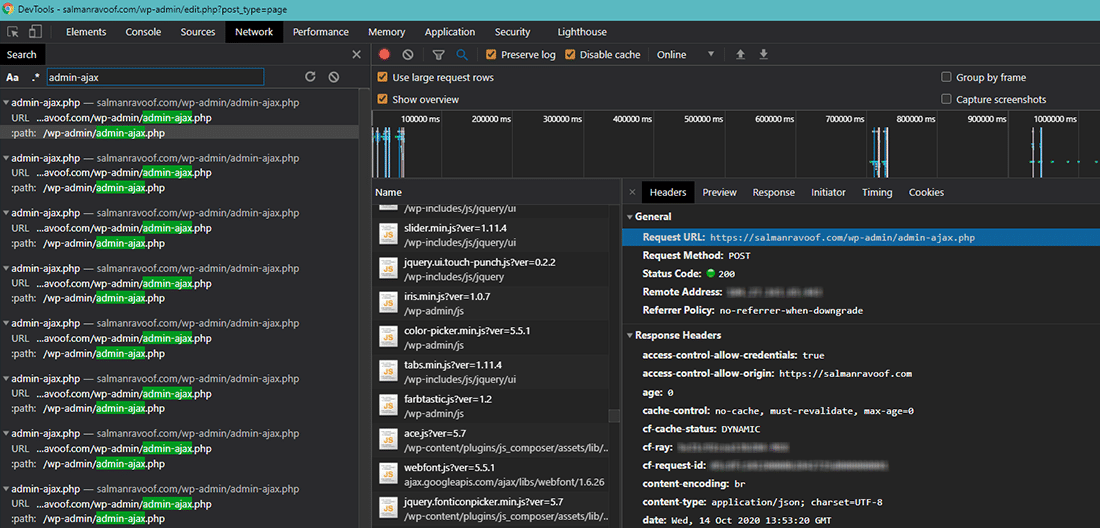
Credit: kinsta.com
Frequently Asked Questions
What Is WordPress Admin-ajax.php Used For?
WordPress admin-ajax. php handles asynchronous requests. It’s used to improve website performance and user experience. This file processes AJAX requests, enabling dynamic content updates without page reloads. Developers use it to create interactive features, enhancing functionality and efficiency in WordPress sites.
How Does Admin-ajax.php Impact Site Speed?
Admin-ajax. php can affect site speed if overused. Excessive AJAX requests may slow down server response times. Proper optimization and minimizing unnecessary requests help maintain performance. Efficient coding practices ensure admin-ajax. php enhances user experience without compromising speed.
Can Admin-ajax.php Cause Security Issues?
Yes, admin-ajax. php can pose security risks if improperly configured. Vulnerabilities arise from insufficient validation and sanitization. To ensure security, implement proper access controls and validation checks. Regular updates and audits help protect against potential threats and maintain site integrity.
How To Optimize Admin-ajax.php Performance?
Optimize admin-ajax. php by reducing requests and improving code efficiency. Use caching techniques to minimize server load. Limit AJAX calls to essential functions and ensure scripts are lightweight. Regularly monitor performance and adjust as needed for better site responsiveness.
Conclusion
WordPress Admin Ajax PHP simplifies backend tasks. It speeds up website processes. It enables dynamic content without full page reloads. This boosts user experience. Efficient and smooth. Developers can create more interactive features. It offers real-time updates. Handy for form submissions, notifications, and data fetching.
It reduces server load. This enhances performance. No need for complex coding skills. It’s a powerful tool for developers. Better functionality, better websites. Understanding its role helps manage WordPress sites effectively. Keep exploring its possibilities. Your site’s potential is limitless with the right tools.
Stay informed, stay ahead.


