
Have you ever wondered what makes your WordPress site visible to the world? The answer lies in web hosting.
If you’re looking to enhance your online presence or simply understand the backbone of your website, grasping the concept of web hosting is crucial. Imagine your website as a house; web hosting is the land it sits on. Without it, your site can’t exist on the internet.
By understanding web hosting, you unlock the potential to optimize your website’s performance and reliability. Dive into this article to discover how web hosting impacts your WordPress site and how you can leverage it to boost your online success.
Basics Of Web Hosting
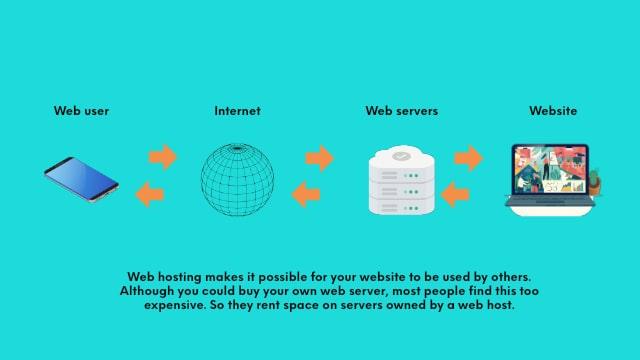
Web hosting lets your website be seen online. Think of it as renting space on the internet. Servers store your site files. When someone visits, they access these files. Hosting ensures your site is reachable always. Without it, your site won’t exist online.
Shared hosting is like sharing a computer with others. It’s cheap but can be slow. Dedicated hosting means you have your own computer. It’s fast but costs more. VPS hosting is in between. You share but get more control. Cloud hosting uses many computers. It’s flexible and can handle more visitors.

Credit: www.bluehost.com
WordPress Hosting Explained
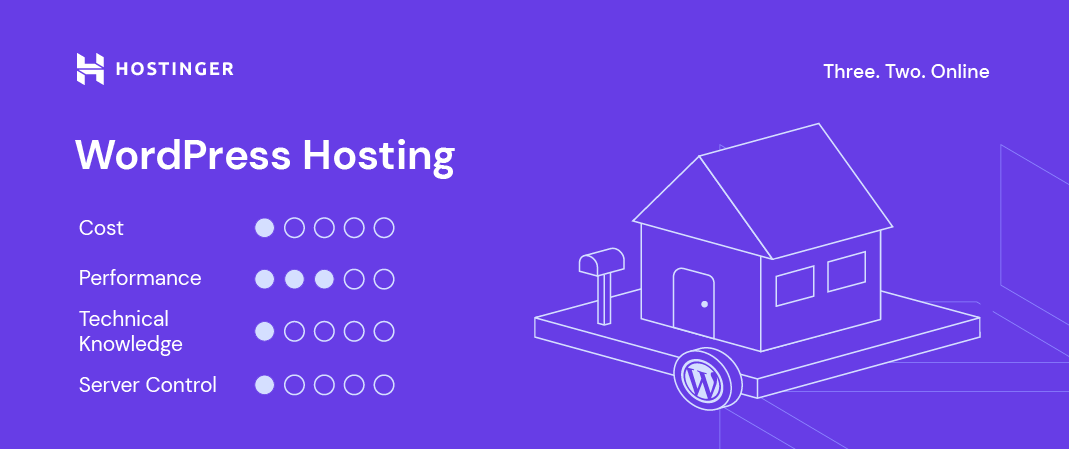
Web hosting is like renting a space. Your website lives there. WordPress hosting is a special space. It is made just for WordPress sites. This makes it faster and safer. Regular hosting is like a shared room. WordPress hosting is like a private room. It has special tools. These tools help your site run better.
WordPress hosting has many perks. It offers automatic updates. This keeps your site fresh. It provides strong security. This keeps bad people out. It gives you good support. Experts help you fix problems. Your site works better and loads faster. Visitors have a good time. They stay longer.
Choosing The Right Web Hosting
Picking the right web hosting is very important. It affects how your WordPress site works. Speed is a big factor. A fast website keeps visitors happy. Check the uptime guarantee. This shows how often your website stays online. Look for a host with at least 99% uptime.
Storage space matters too. Ensure there is enough space for your files. Customer support is crucial. Choose a host that offers 24/7 help. It’s important when you face issues. Cost can vary a lot. Compare prices but don’t go for the cheapest. Consider all factors before deciding.
Different providers offer different services. Some focus on speed. Others offer more storage. Compare providers based on your needs.
| Provider | Speed | Storage | Support |
|---|---|---|---|
| Provider A | Fast | 500 GB | 24/7 |
| Provider B | Medium | 200 GB | Business Hours |
| Provider C | Slow | Unlimited | 24/7 |
Managed Vs. Shared WordPress Hosting
Managed hosting offers a lot of benefits. Your site gets automatic updates. This keeps your site secure. Backups happen daily. You never lose important data. Experts are available for support. They help you solve problems fast. This hosting often provides better speed. Your website loads quickly.
Shared hosting is cheaper. It costs less than managed hosting. Many websites use one server. This saves money. Setup is simple. Even beginners can do it. Shared hosting offers basic support. You get help when needed. Space and resources are limited. It’s best for small sites.
Performance And Security In Hosting
Web hosting for WordPress ensures your site runs smoothly and stays secure. It affects speed and data protection. Choose reliable hosting to improve your site’s performance and safety.
Speed Optimization
Web hosting affects how fast your site loads. A faster site keeps visitors happy. Choose hosting that offers high-speed servers. Use Content Delivery Networks (CDN) to deliver content quickly. Optimize images and scripts. This helps your site load faster. Use caching to store data temporarily. This reduces load time. Fast sites improve user experience. They also rank better on search engines.
Security Measures
Security is crucial for web hosting. Protect your site from hackers. Use SSL certificates to secure data. Regular backups keep your data safe. Firewalls block harmful traffic. Strong passwords protect your accounts. Update software regularly. This fixes security holes. Choose hosting with 24/7 support. They help if there is a problem. Security keeps your site safe and trustworthy.
Credit: www.hostinger.com
Cost Implications Of Hosting
Web hosting in WordPress involves costs for server space, domain registration, and maintenance. Expenses vary based on your needs. Understand these factors to manage your website efficiently.
Budget-friendly Options
Web hosting can be affordable. Shared hosting is a good choice for beginners. It costs less than a coffee every month. Cloud hosting offers flexible pricing. It adjusts based on your needs. Free hosting exists but has limits. Sometimes ads appear on your site. Cheap hosting works well for small blogs. It’s a smart start.
Premium Hosting Costs
Premium hosting has higher costs. You get more features. Managed WordPress hosting is one option. It handles updates for you. Dedicated hosting offers a server just for your site. It’s fast and reliable. VPS hosting is another choice. It has more control and security. Premium options cost more but offer better performance.
Migrating To WordPress Hosting
Backup your site before starting. It keeps your data safe. Use a plugin for backup. Export your site’s content. This includes posts and pages. Import content to WordPress. Use WordPress import tools. Install needed plugins. Set up your theme. Check site settings. Ensure everything works well.
Some sites experience downtime during migration. This can be frustrating. Links may break. Images might not load. Plugins might cause issues. Themes could look different. Solve these problems with patience. Use support forums for help. Keep trying until it works.
Credit: www.godaddy.com
Future Trends In WordPress Hosting
Web hosting in WordPress provides the essential space for your website on the internet. As trends evolve, hosting services become more efficient and secure. These improvements ensure faster website performance and better user experiences.
Emerging Technologies
New tools help websites run faster. They make things smooth. Cloud hosting is popular now. It saves data in many places. This makes websites load quick. Artificial intelligence is a smart helper. It finds problems fast. Fixes them too. Blockchain keeps data safe. It stops bad guys from stealing. All these tools change hosting.
Predicted Changes
More people will use mobile devices. Hosting needs to be ready. Websites must look good on phones. Green hosting will grow. It uses less energy. Saves the planet. Prices may drop. More companies will join the hosting game. Competition will lower costs. New security tools will come. They keep sites safe from hackers. Hosting will change a lot in the future.
Frequently Asked Questions
What Is Web Hosting In WordPress?
Web hosting in WordPress provides server space for your website files. It ensures your WordPress site is accessible online. Choose a reliable host for better performance, security, and support. Many hosts offer features like one-click WordPress installation and automatic updates.
Do I Need Web Hosting For WordPress?
Yes, web hosting is essential for WordPress. It provides the server space to store your website files and ensures your site is accessible online. Without hosting, your WordPress site cannot function on the internet. Choose a reliable hosting provider for optimal performance and security.
What Is The Difference Between Normal Hosting And WordPress Hosting?
Normal hosting provides general web space for any website platform. WordPress hosting is optimized specifically for WordPress sites, offering enhanced performance, security, and features tailored for WordPress users. It often includes pre-installed plugins, automatic updates, and specialized support for WordPress-related issues.
What Is Meant By Web Hosting?
Web hosting provides storage space for websites on servers, enabling online accessibility. It involves renting server resources to publish content on the internet. Hosting services vary in features, including bandwidth, storage, and security, catering to diverse website needs. Reliable web hosting ensures fast loading times and smooth user experience.
Conclusion
Understanding web hosting in WordPress is crucial. It helps your site run smoothly. You need the right plan. It influences speed and security. Consider your site’s needs carefully. Choose a host that fits. Look for reliability and support. Cost matters too, but balance it.
A good host ensures better performance. Your visitors will appreciate it. Take time to research. Make an informed decision. With the right hosting, your WordPress site can thrive. Enjoy building your site with confidence.


