
Have you ever stumbled upon the term “TTL” while exploring web hosting options and wondered what it really means? You’re not alone.
Understanding the technical jargon associated with web hosting can feel overwhelming, especially when you’re trying to ensure your website runs smoothly and efficiently. TTL, or Time to Live, is a crucial aspect that can significantly impact how your website performs.
Imagine having the power to control how long your website information stays fresh and accessible for users worldwide. Sounds intriguing, right? You’ll discover the ins and outs of TTL, why it matters to your web hosting experience, and how mastering it can give you an edge in managing your online presence. Dive in and equip yourself with the knowledge you need to make informed decisions for your website’s success.
Ttl Basics
TTL stands for Time To Live. It is a setting in web hosting. TTL tells how long data stays in a cache. This helps speed up websites. When data is cached, it loads faster. Every piece of data has a TTL. Once TTL ends, data refreshes. New data is fetched. This cycle repeats. TTL is measured in seconds. A short TTL means quick updates. A long TTL means slower updates. Choosing the right TTL is important. It affects website performance.
Webmasters decide TTL settings. They choose based on needs. Some sites need fast updates. Others prefer stability. TTL settings can be changed. Adjusting TTL can help if issues arise. Understanding TTL is key for web hosting. It balances speed and freshness.

Credit: www.fortinet.com
Role Of Ttl In Dns
TTL stands for Time to Live. It is important for DNS. TTL tells how long to keep data. This helps computers know when to update info. A short TTL means data updates fast. A long TTL saves bandwidth. TTL is measured in seconds. Common values are 300 or 3600 seconds. This affects how fast websites load. A short TTL can make sites load quicker. It helps when changes happen often. Long TTL is good for stable data. It reduces server load. Choosing the right TTL is important. It balances speed and resources.
Impact On Website Performance
TTL, or Time to Live, impacts website performance by determining how long data is cached before refreshing. Short TTLs may lead to frequent data retrieval, slowing down sites. Longer TTLs reduce server requests, enhancing speed and reliability. Balancing TTL settings is crucial for optimal web hosting performance.
Speed And Accessibility
TTL stands for Time to Live. It is crucial for website speed. A shorter TTL makes sites load quickly. This means users access content faster. A longer TTL may slow down access. Web hosts often adjust TTL for better performance. This helps with user satisfaction. Fast sites keep visitors happy. Slow sites may lose them.
Load Balancing
TTL affects how servers handle traffic. Proper TTL settings help with load balancing. This means spreading traffic across multiple servers. Balanced load prevents server overload. Overload can crash a website. Crashes mean downtime for users. Downtime frustrates visitors and owners. Good TTL ensures stability. Stability makes sites reliable.

Credit: easydns.com
Ttl And Seo
TTL, or Time to Live, in web hosting defines how long DNS information is stored in cache. Lower TTL values allow quicker DNS updates, while higher values reduce server load. Understanding TTL can help optimize website performance and improve search engine rankings by ensuring timely updates.
Crawling Efficiency
TTL stands for Time To Live. It helps search engines know when to check a webpage. Short TTL means more frequent checks. This makes search engines visit your site often. Long TTL means less frequent checks. Search engines visit your site less. It affects how quickly changes appear in search results.
Indexing Implications
TTL impacts indexing. Short TTL allows quick updates. Pages get indexed faster. Long TTL might delay updates. This affects how fast new content shows up. Balancing TTL is important. It helps manage search engine visits. It ensures efficient indexing and visibility.
Ttl Configuration In Web Hosting
TTL stands for Time To Live. It controls how long information stays. This setting is important in web hosting. It affects caching and DNS. Short TTL means frequent updates. Long TTL saves resources.
Correct TTL values help web performance. They ensure fresh content. Balancing TTL is key. Too short can lead to slow sites. Too long might show old data. Choose wisely for best results.
People often set TTL too short. This causes unnecessary server load. Another mistake is setting it too long. Users may see outdated pages. Understanding needs is crucial. Adjust settings based on site activity.
Misconfigured TTL can lead to slow loading. It can affect user experience. Always review settings regularly. This ensures optimal performance. Keep an eye on traffic patterns.
Ttl Best Practices
Choosing the right TTL (Time To Live) value is very important. TTL affects how often data updates. Short TTLs are great for changing data. They update quickly. Long TTLs work for static data. They help reduce server load.
High traffic websites need special care. Shorter TTL can help here. It ensures fresh data for users. But, it can also increase server requests. Balancing is key. Too short can mean too many requests. Too long might mean old data.
Monitoring Ttl Changes
TTL means Time To Live. It is important for web hosting. Monitoring TTL changes helps websites work better. Tools and techniques can help. These tools show how TTL changes. They make it easier to understand.
Tools And Techniques
Some tools show TTL changes clearly. They help you track and understand. Popular tools include DNS lookup and traceroute. These tools are easy to use. They give quick results. Using them is simple and helpful.
Interpreting Results
Results show TTL values. A small number means less time. A large number means more time. This helps in understanding how a website works. Changes in TTL affect website speed. Faster websites are better for users. Results should be checked often.
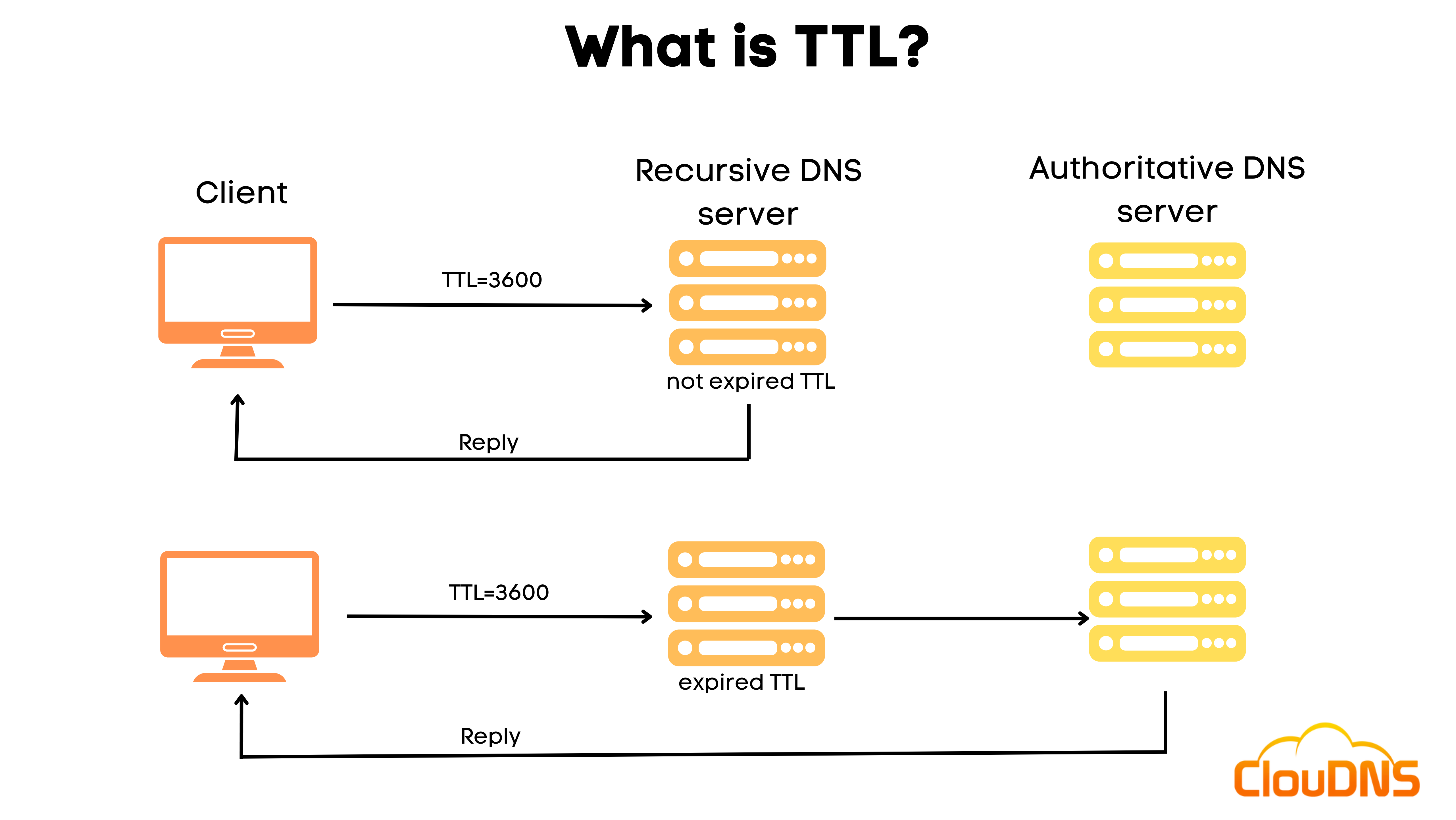
Credit: www.cloudns.net
Frequently Asked Questions
Is Higher Or Lower Ttl Better?
Higher TTL is better for stable content, reducing server load, and improving site speed. Lower TTL suits dynamic content, ensuring frequent updates and accuracy. Choose based on your content type and update needs. Optimize TTL settings for balanced performance and freshness.
What Is Ttl In Web Hosting?
TTL in web hosting stands for Time To Live. It determines how long DNS information is cached. Shorter TTLs allow quicker updates but increase server requests. Longer TTLs reduce requests but delay changes. Adjust TTL based on your site’s needs for optimal performance and efficiency.
What Does Ttl 15 Minutes Mean?
TTL 15 minutes indicates data or cache expiry after 15 minutes. It helps manage server load and update frequency.
What Is The Recommended Ttl For A Website?
The recommended TTL for a website is typically 3600 seconds (1 hour). This setting balances performance and resource usage effectively. Adjust TTL based on your website’s update frequency and traffic needs to optimize user experience and server load. Always monitor and tweak settings to suit your specific requirements.
Conclusion
TTL, or Time to Live, plays a crucial role in web hosting. It dictates how long data stays valid. Short TTL ensures frequent updates. Longer TTL means less server load. Balance is key. Understand your needs for better performance. This helps manage traffic efficiently.
Faster responses boost user experience. Optimize TTL settings for better site speed. It’s essential for caching strategies. Keep your website reliable and speedy. Learn and adjust TTL for your hosting goals. With the right TTL, enhance your site’s efficiency. A small detail, but it makes a big difference.


