
Are you feeling overwhelmed by the endless options on your WordPress dashboard? You’re not alone.
Many users find themselves puzzled by the “Categories” tab. But what if I told you that mastering this feature could transform your website from a cluttered mess into a streamlined experience for your readers? Imagine a site where visitors effortlessly find the content they crave, leading to more engagement, shares, and loyal followers.
Intrigued? Stick around as we dive into how the Categories tab can become your secret weapon in organizing your content and boosting your site’s performance.
Credit: www.wpmapspro.com
Purpose Of The Categories Tab
The Categories Tab in WordPress helps organize posts. It groups content into different topics. This makes it easy for readers to find related posts. Visitors can click a category to see all posts in that group. It helps keep the website tidy and clear.
Site owners can add, edit, or delete categories. This keeps the content fresh and relevant. Using categories wisely boosts user experience. It also helps with search engine optimization. Search engines can understand the site’s structure better. This can improve the site’s visibility online.
Organizing Content
The Categories tab in WordPress helps in organizing posts. It lets you group related content together. This makes finding posts easier. Users can see posts in one category. They don’t need to search the whole site. Grouping also helps in managing content. You can update or change posts in one category. This keeps your site tidy and organized.
Categories improve user navigation. A clear category structure guides visitors. They quickly find what they want. It reduces confusion. Users enjoy a smooth browsing experience. This enhances site engagement. Visitors stay longer. They explore more pages. A well-organized site attracts more users. It boosts user satisfaction.
Creating Categories
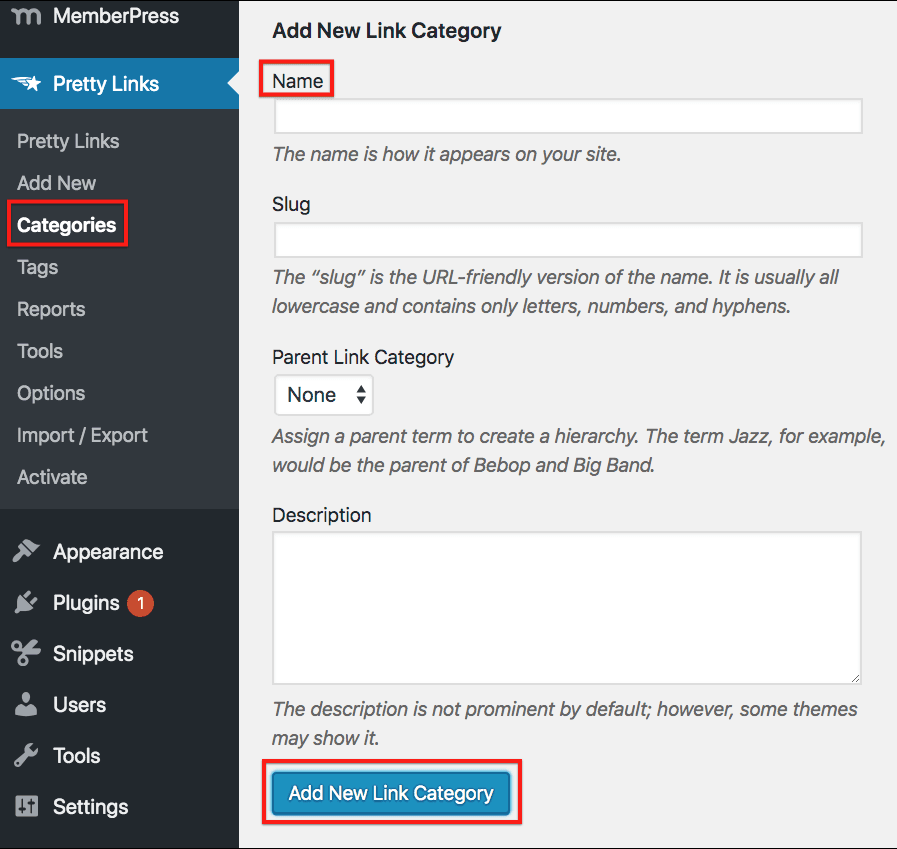
Click on the Categories tab in your WordPress dashboard. Find the Add New Category section. Type the name of your category in the Name box. Write a short description if you want. This helps your readers understand better. Click the Add New Category button to save it.
Go to your post editor in WordPress. On the right, see the Categories box. Select the category that fits your post best. If you don’t have a category, make a new one. Remember to click Save to keep your changes. This helps your readers find related posts easily.
Credit: prettylinks.com
Managing Categories
Categories help organize your blog. You can change a category name. Do this by clicking on the category tab. Find the category you want to change. Click “Edit.” Write the new name in the box. Save your changes. This helps keep your blog neat. Categories must match the content. This makes it easy for readers to find posts. Use simple words for category names. Make sure they describe the posts well. This helps your readers understand.
Too many categories can confuse readers. Remove the ones you don’t need. Go to the categories tab. Find the category you want to remove. Click “Delete.” Confirm your choice. This keeps your blog tidy. Only keep useful categories. This helps readers find what they need. Fewer categories mean less mess. It makes your blog easier to navigate. Clean categories improve reader experience.
Categories Vs. Tags
Categories help group posts into main topics. They are broad labels. Tags are more specific details. They describe parts of a post. Categories give structure to your site. Tags provide extra info about the content. Both improve navigation. They help users find related posts. Think of categories as a book’s chapters. Tags are like the index at the back. Each has a role in organizing content. Use both for better site management.
Use categories for broad topics. They define main areas of your site. Tags are for specific details. They highlight key points in a post. Use categories sparingly. Too many can confuse users. Tags can be numerous. They help users find related posts quickly. Use tags to emphasize important words. Both enhance user experience.

Credit: docs.themeisle.com
Impact On Seo
The Categories tab in WordPress helps organize posts, improving site structure and user navigation. Better organization enhances SEO by making content easier for search engines to index. This can lead to increased visibility and higher search rankings.
Improving Search Visibility
Using the Categories tab in WordPress can help boost search visibility. It organizes content into specific groups. This makes it easier for search engines to understand your site. Properly categorized posts are easier for users to find. This can lead to more organic traffic. Readers will spend more time on your site. This can improve your SEO ranking. A well-structured site is favored by search engines. It helps them crawl and index your pages efficiently.
Avoiding Duplicate Content
Duplicate content can harm your site’s SEO. The Categories tab helps avoid this issue. It organizes posts under specific labels. This prevents the same content appearing in multiple places. When you use categories correctly, each post has a unique URL. It helps search engines identify and rank content properly. It reduces the chance of penalties from search engines. A clean, organized site boosts your SEO performance. Users find what they need without confusion.
Common Mistakes
The Categories tab in WordPress helps organize blog posts. Many users mistakenly ignore it, leading to cluttered content. Proper use improves navigation and enhances the user experience.
Overusing Categories
Using too many categories can confuse readers. Too many choices are bad. Each category should serve a clear purpose. Aim for fewer, more meaningful categories. This helps in better site navigation. Visitors find content quicker. It also improves site structure. A good structure is easy to follow. Keep categories simple and direct.
Mislabeling Posts
Mislabeling posts can mislead readers. A post about dogs should be in the “Pets” category. Wrong labels send readers away. They expect certain content in each category. Mislabeling also affects search engines. Search engines use these labels to rank content. A good label helps with better ranking. Always double-check your labels.
Best Practices
The Categories tab in WordPress helps organize your posts. It groups similar content, making navigation easier for users. By categorizing, you improve site structure and enhance user experience, which can boost SEO.
Keeping Categories Simple
Simple categories help readers find content easily. Use clear names for categories. This helps users know what to expect. Avoid using too many categories. This can confuse users. Aim for no more than 10 categories. Fewer categories make navigation easy. Categories should be broad, not too specific. Group similar topics together. This keeps your site neat and tidy.
Regularly Reviewing Categories
Review categories every few months. It helps keep your site updated. Remove unused categories. This prevents clutter. Update category names if needed. Make sure they match the content. Add new categories if new topics appear. This keeps your site relevant. Proper review ensures a smooth user experience. Categories should always reflect your current content.
Frequently Asked Questions
How Do Categories Work In WordPress?
Categories in WordPress help organize posts into specific topics. They make it easier for users to find related content. You can assign multiple categories to a post and create hierarchical structures. This enhances site navigation and improves SEO by helping search engines understand your site’s content structure.
Can I Customize Category Pages In WordPress?
Yes, you can customize category pages using themes or plugins. Many themes offer settings to change the layout or style. Plugins can add features like custom headers or sidebars. Customizing category pages improves user experience and SEO by making pages more engaging and relevant.
Why Are Categories Important For Seo?
Categories improve SEO by structuring content into relevant topics. This helps search engines understand your site’s organization. Well-organized categories increase user engagement by making it easier to navigate the site. They also help in targeting specific keywords, boosting the site’s visibility on search engines.
How Do I Add A New Category In WordPress?
To add a new category, go to Posts > Categories in your dashboard. Enter the category name and slug. You can also choose a parent category if needed. Adding categories helps organize your content and enhances navigation, making your site more user-friendly and SEO optimized.
Conclusion
The Categories tab in WordPress simplifies content organization. It helps users find related posts easily. This boosts user engagement and keeps readers on your site longer. Proper use of categories also improves search engine optimization. Your site becomes more discoverable, attracting more visitors.
Organize posts logically for a better user experience. Keep categories clear and relevant to your content. Regularly update and review them for best results. A well-organized site reflects professionalism. It shows you care about your readers’ experience. Use the Categories tab wisely to enhance your WordPress blog.


