
Ever stumbled across the term “sticky” while customizing your WordPress site and wondered what it really means? You’re not alone.
Understanding the concept of “sticky” in WordPress can significantly enhance the way you manage your website’s content. Imagine having the power to highlight your most important posts, keeping them front and center for your audience. This simple yet powerful feature can transform your website’s user experience, ensuring that your visitors engage with the content that matters most to you.
Curious about how this works and how it can benefit your site? Stick around as we delve into the details, unraveling the mysteries of “sticky” posts in WordPress and how you can leverage this feature to captivate your audience.
Sticky Posts In WordPress
Sticky posts stay at the top of your blog. New posts don’t push them down. They are marked as important. Sticky means they stick to the front page. This helps readers see them first. Only you decide which posts are sticky.
Sticky posts highlight important content. They guide readers to key information. Announcements or updates can be sticky. This ensures everyone sees them. Sticky posts make sure content is not missed. Especially in busy blogs.
Bloggers use sticky posts for better visibility. They control what readers see first. Important stories stay at the top. This builds engagement. Sticky posts help in sharing vital news. They boost reader focus on specific posts.
Creating Sticky Posts
Sticky posts stay at the top of your blog. They don’t move down. New posts won’t push them away. It’s like pinning a note on a board. Other notes go below it.
Using The WordPress Dashboard
Log in to your dashboard. Find the post you want. Click on edit. Look for the visibility option. Choose stick to front page. Save your changes.
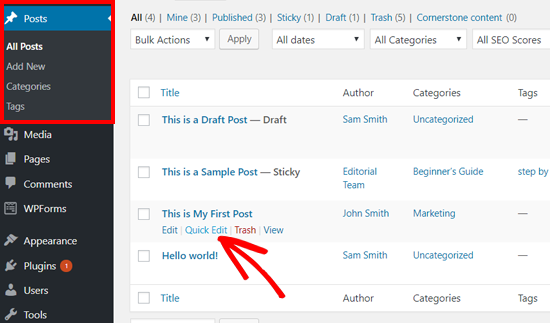
Setting Sticky Posts Via Quick Edit
Find your post list. Click on quick edit. Look for make this post sticky. Check the box. Save your changes.
Customizing Sticky Posts
Sticky posts remain at the top of your blog page. Some themes handle sticky posts well. Others might need tweaks. Always check theme settings. Theme options often include sticky post display. Adjust settings if needed. Sticky posts help highlight important content.
Custom CSS can change how sticky posts look. Use CSS to make them stand out. Add borders or background colors. CSS helps make posts more visible. Add CSS in the customizer. Always preview changes before saving. CSS makes posts more attractive.
Plugins offer extra features for sticky posts. They can add animations or effects. Some plugins change post order. Choose plugins wisely. Read reviews before installing. Plugins expand post options. Always keep plugins updated. This ensures security and performance.
Credit: www.wpbeginner.com
Sticky Posts And Seo
Sticky posts can help keep important content at the top. This can be good for SEO. Search engines notice these posts more. They see them as important. But too many sticky posts can confuse search engines. It is best to use sticky posts wisely. They should highlight your best content.
Choose key posts to make sticky. This helps with visibility. Keep your sticky posts updated. Old posts might lose value. Use clear titles and descriptions. Search engines like this. Limit sticky posts to one or two. This keeps the site clean.
Troubleshooting Sticky Posts
Sticky posts might not show correctly. Sometimes, they disappear from the top of the list. Wrong settings can cause display problems. Themes might not support sticky posts. Plugins conflict with sticky settings, making posts vanish.
Check your settings first. Ensure the sticky option is ticked. Update your theme. Some themes need updates to support sticky posts. Disable plugins one by one. This helps find conflicting plugins. Contact support if issues persist. They can provide specific guidance.

Credit: www.kadencewp.com
Alternatives To Sticky Posts
Featured Posts Widgets help show important posts. They make posts stand out on your site. You can choose which posts to feature. This helps visitors find them easily. Widgets are easy to use. They can be placed on different parts of the page. This makes your site look neat and organized. Changing featured posts is simple. It keeps your site fresh and updated.
Categories and Tags help organize posts. They group similar posts together. Visitors can find related posts quickly. Categories are broad topics. Tags are more specific. Using both makes navigation easy. It improves user experience. This also helps in SEO. Search engines find your posts faster. It improves your site’s visibility.

Credit: blog.hubspot.com
Frequently Asked Questions
What Does ‘sticky’ Mean In WordPress?
In WordPress, ‘sticky’ refers to a post that stays at the top of your blog. It ensures important content remains visible to visitors. This feature is useful for highlighting announcements or popular posts. You can set a post as sticky through the WordPress editor settings.
How Do I Make A Post Sticky?
To make a post sticky, go to the post editor in WordPress. In the ‘Publish’ section, select ‘Edit’ next to ‘Visibility’. Check the ‘Stick this post to the front page’ option. Save your changes and the post will remain at the top of your blog.
Can I Unstick A Sticky Post?
Yes, you can unstick a post by reversing the sticky option. Go to the post editor, find the ‘Visibility’ settings, and uncheck the ‘Stick this post’ option. Save the changes, and the post will return to its normal position based on publish date.
Do Sticky Posts Affect Seo?
Sticky posts themselves don’t directly impact SEO. They can enhance user experience by highlighting important content. Keeping key posts visible might increase engagement and reduce bounce rates. Ensure sticky posts are relevant and updated to improve user interaction and site ranking.
Conclusion
Sticky posts in WordPress offer great visibility. They keep important content at the top. This feature helps guide your audience effectively. It’s easy to set up in the WordPress customize section. With sticky posts, your key messages stay front and center.
This ensures your readers see them first. For bloggers, it’s a handy tool to highlight essential updates. Make sure to use it wisely. Keep your blog organized and engaging. Sticky posts can enhance user experience. Happy blogging!


