
Have you ever wondered what web hosting really means? You might have heard the term tossed around while setting up your website or browsing online, but do you truly understand its significance?
Picture this: your website is like a dream home. Web hosting is the land on which it stands—without it, your site simply cannot exist on the internet. Imagine having a brilliant idea for a site that could captivate thousands, but without proper hosting, it remains invisible to the world.
You will learn the ins and outs of web hosting and why it is a crucial step in making your online presence felt. Whether you’re a seasoned webmaster or just starting your digital journey, understanding web hosting can unlock the potential of your website. So, stay with us as we unravel the mysteries of web hosting and guide you to make informed decisions that could transform your online experience.

Credit: www.hostinger.com
Web Hosting Basics
Web hosting means storing and serving websites on the internet. It involves renting space on a server to keep your website files. This service ensures your site is accessible to users worldwide.
Definition And Importance
Web hosting lets you put your website on the internet. It’s like renting a space online. Websites need a server to live on. Hosting companies provide this space. Without hosting, websites can’t be seen by anyone. It’s very important for every website.
How It Works
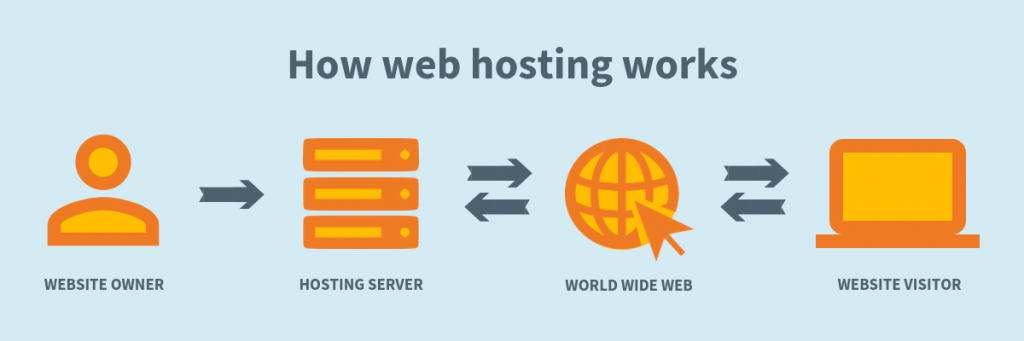
Web hosting works through servers. These servers store website files. When someone types your web address, the server sends files to their computer. This makes the website appear on their screen. Hosting can be shared or dedicated. Shared means many websites use one server. Dedicated means one website uses one server. This affects speed and performance.

Credit: www.znetlive.com
Types Of Web Hosting
Shared hosting is like living in a big apartment. Many websites share one server. It’s cheap and great for beginners. But, if one site gets busy, others might slow down. It’s simple and easy to use.
VPS hosting is a step up. It stands for Virtual Private Server. You get a part of a server all to yourself. It’s like having your own room. Costs more than shared hosting. But it’s faster and more secure.
Dedicated hosting gives you a whole server. No sharing with others. It’s like owning a house. Best for big websites. Offers top performance and security. It’s the most expensive type. Good for websites with many visitors.
Cloud hosting uses many servers. Your site can handle lots of visitors. It’s like having many houses. If one server fails, others help out. It’s flexible and can grow with your needs. Costs depend on usage.
Factors To Consider
Choosing web hosting means thinking about the cost. Some hosts are cheap. Others can be expensive. It’s important to balance price and features. Sometimes, cheap hosting lacks features. Paying more can give better quality. Always check if the price fits your budget.
Web hosting must be fast. Slow websites are bad for users. Speed affects how people see your site. Fast sites make users happy. Some hosting gives better speed. Others might be slow. Choose a host that offers good performance.
Keeping a website safe is important. Good hosting has strong security features. Bad hosting might not protect well. Some hosts offer free security tools. Others charge extra. Always check what security features are included.
Having help when needed is crucial. Good hosts provide strong customer support. Bad support can be frustrating. Some hosts offer 24/7 help. Others have limited hours. Good support makes fixing problems easy.
Credit: www.layerhost.com
Choosing The Right Provider
Think about what your website needs. A small blog might need less space. A big online store needs more power. Consider how many visitors you expect. More visitors might need a stronger server. Check your budget. Some services are cheaper. Others offer more features at a higher cost. Decide if you need extra help. Some hosts offer 24/7 support. Others may not have this option. Look at security features. Protecting your website is important.
Many companies offer web hosting. Compare their prices. Some have low costs but fewer features. Others might cost more but offer better support. Look at the uptime guarantee. This shows how often the site might be down. A higher uptime is better. Check customer reviews. Happy customers mean good service. Try to find a balance between cost and features. A good web host can make your website run smoothly.
Common Challenges
Web hosting can face downtime, causing sites to be unavailable. This happens due to server failures or maintenance. Such issues can affect website traffic and user experience. No one likes a site that doesn’t load. Hosting providers often have uptime guarantees. But, problems can still occur. Regular monitoring helps detect downtime. Quick fixes are crucial. Downtime can lead to lost customers. Businesses should choose reliable hosting services. Backup systems reduce downtime risks. Always check hosting reviews. Pick a host with good support.
Scalability allows websites to grow. Some hosting plans limit scalability. This can restrict site growth. Websites need more resources as they expand. Traffic spikes can overwhelm small plans. Flexible hosting solutions support growth. Look for hosts offering easy upgrades. Scalability ensures smooth user experience. Avoid plans with rigid limits. Check bandwidth options before choosing. Sites should handle increased visitors. Choose plans that grow with your needs. Hosts should offer scalable resources. This ensures a site can handle more traffic.
Future Trends In Web Hosting
Web hosting uses lots of energy. This can harm the earth. Green hosting is good for the planet. It uses wind and solar power. This helps save energy. It also helps keep the air clean. Many companies are now choosing green hosting. They want to help the earth. Saving energy also saves money. So, it’s smart and good.
AI and automation make web hosting easy. They help fix problems fast. AI can watch servers all the time. It can see problems before they get big. This keeps websites running well. Automation can also help with updates. It can make sure everything is up to date. This means less work for people. More time for other things.
Frequently Asked Questions
What Do You Mean By Web Hosting?
Web hosting is a service that stores and makes your website accessible online. It involves renting server space from a provider. Hosting ensures your site’s data is available for users on the internet. This service is crucial for website performance and accessibility.
What Is A Web Host Example?
A web host example is Bluehost, which offers reliable and affordable hosting services for websites. They provide features like domain registration, email accounts, and WordPress support. With 24/7 customer service, Bluehost is ideal for individuals and small businesses starting their online presence.
What Are The 3 Types Of Web Hosting?
The three types of web hosting are shared hosting, VPS hosting, and dedicated hosting. Shared hosting is cost-effective, sharing server resources. VPS hosting offers more control with virtual private servers. Dedicated hosting provides exclusive server use, ideal for high-traffic websites.
Choose based on your budget and technical needs.
Can I Run My Website Without Hosting?
A website needs hosting to be accessible online. Hosting stores your site’s files on a server, enabling internet access. Without hosting, your website cannot be viewed by users or function properly. Consider options like shared hosting or cloud hosting for efficient site management and accessibility.
Conclusion
Web hosting is crucial for a successful website. It stores your site’s data online. Choosing the right host impacts your site’s speed and reliability. Think about your needs before selecting a plan. Shared hosting suits small sites. Bigger sites might need dedicated servers.
Evaluate storage, bandwidth, and support options. Good hosting enhances user experience. It can boost your site’s performance. Consider security features too. A secure host protects your data. The right web hosting choice helps your site flourish. Keep your website goals in mind as you decide.


