
Have you ever wondered what Jetpack in WordPress actually does? If you’re managing a WordPress site, you’re probably seeking ways to enhance its performance and security while also making it more appealing to your visitors.
This is where Jetpack steps in. It’s like a Swiss Army knife for your website, offering a suite of tools that can elevate your WordPress experience. Imagine having the power to boost your site’s speed, protect it from threats, and engage your audience, all with a single plugin.
Intrigued? Keep reading to discover how Jetpack can transform your WordPress site into a high-performing, secure, and user-friendly platform.
Credit: kinsta.com
Jetpack Features
Jetpack helps keep your site safe. It offers protection against hacks. It scans for malware and fixes it. Backup options are also available. Your data stays secure. Security is very important for websites.
Jetpack makes your site faster. It has a CDN for images. This helps them load quickly. Caching features also speed up pages. A fast site gives visitors a better experience. Users enjoy sites that load fast.
Jetpack offers many design options. You can choose from themes. Customize site layout easily. It allows for creative design. Your site can look unique. Good design attracts more visitors.
Jetpack helps with marketing. It connects to social media easily. Share your posts with one click. Use analytics to track visits. Understand what your audience likes. Marketing tools help grow your site.
Security Enhancements
Jetpack guards your website against brute force attacks. It uses strong protection layers. These layers block unwanted login attempts. Your site stays safe. Hackers can’t guess passwords. They get stopped before they cause harm. Your site remains secure.
Jetpack scans for malware. It checks each file. This keeps your site clean. Detects threats early. Stops them from spreading. Keeps your site healthy. No harmful code goes unnoticed. Your site stays safe and reliable.
Jetpack monitors your site’s uptime. Alerts you if it goes offline. Quick notifications help you act fast. Fix issues without delay. Keep your site running smoothly. Visitors can access your site anytime. No more unexpected downtime.
Performance Boost
Jetpack helps make images load faster. It automatically reduces the image size. This process is called Image Optimization. Smaller images mean quicker load times. Quicker sites keep visitors happy and engaged.
Lazy Loading delays the loading of images. Images only appear when users scroll down. This saves bandwidth and speeds up the site. Visitors get a smooth browsing experience.
Jetpack uses a Content Delivery Network (CDN). A CDN stores website data across many locations. Visitors get data from the nearest server. This makes the site faster and more reliable. A faster site keeps visitors returning.

Credit: m.youtube.com
Design Customization
Jetpack offers a wide selection of themes and templates. These can change the look of your site. Pick a theme that fits your style. Templates can help with layout. They make the site easy to navigate. Both options are simple to use. They bring a fresh design to your page.
Custom CSS lets you tweak site appearance. You can change colors. Adjust fonts. Make pages unique. It’s perfect for personal touches. Easy to learn and apply. Custom CSS makes your website stand out. It gives a personal touch to each page.
Widgets add features to your site. Sidebars hold these widgets. You can choose what to show. Add a calendar. Show recent posts. Display social media links. Sidebars keep content organized. They enhance user experience. Widgets make your site interactive.
Marketing Tools
Jetpack in WordPress enhances website functionality with features like security, performance optimization, and analytics. Users can manage social sharing, monitor site stats, and back up data effortlessly. This tool simplifies website management while ensuring reliable protection and smooth performance.
Seo Tools
Jetpack offers SEO tools for WordPress sites. It helps improve your site’s visibility on search engines. You can easily add keywords to your content. It also provides sitemaps to help search engines understand your site. These tools are simple and effective. They are designed for beginners. No need to be an expert in SEO. Jetpack makes it easy for anyone.
Social Media Integration
Jetpack connects your site with social media. Share posts automatically to Facebook, Twitter, and more. No need to copy and paste links. It saves time and effort. You can schedule posts too. It keeps your audience engaged. Social media is key for marketing. Jetpack makes it simple.
Email Marketing
Email marketing is important. Jetpack offers email subscription features. Visitors can sign up easily. You can send newsletters to subscribers. Keep them updated with your latest posts. Jetpack makes managing email lists easy. No complicated steps. Just simple and effective tools. Ideal for growing your audience.
Analytics And Insights
Jetpack shows how many visitors come to your site. It tracks page views every day. You can see which posts are popular. This helps you understand your audience better. You can find what interests them.
Jetpack measures user interactions. It shows how long visitors stay. You can check bounce rates. It tells if people leave quickly. Comments and shares also matter. These metrics show if people like your content.
Jetpack gives performance data. It checks loading speed. Slow sites lose visitors. Jetpack helps improve site speed. Faster sites keep people happy. Reports show areas to fix.
User Experience
Jetpack enhances WordPress by offering features like site security, backups, and performance optimization. Users enjoy improved site functionality and easier management. Simplifying tasks, it helps maintain a seamless user experience.
Mobile Optimization
Jetpack makes your site look good on phones and tablets. It helps your website load quickly on mobile devices. Speed is important for users. A fast site keeps visitors happy. Jetpack also adjusts your site’s layout automatically. This ensures it fits well on any screen size. No need to worry about different devices. Your content will always look neat and tidy.
Content Recommendations
Jetpack suggests similar posts to readers. This keeps them engaged on your site. By showing related posts, visitors stay longer. They explore more content. It’s an easy way to increase page views. Readers find more of what they like. This improves their experience on your site.
Related Posts
Adding related posts is simple with Jetpack. It does the work for you. No need to manually link posts. This feature is automated. It saves time and effort. Readers can easily discover more content. This encourages them to read more. It boosts your site’s overall engagement.
Pricing And Plans
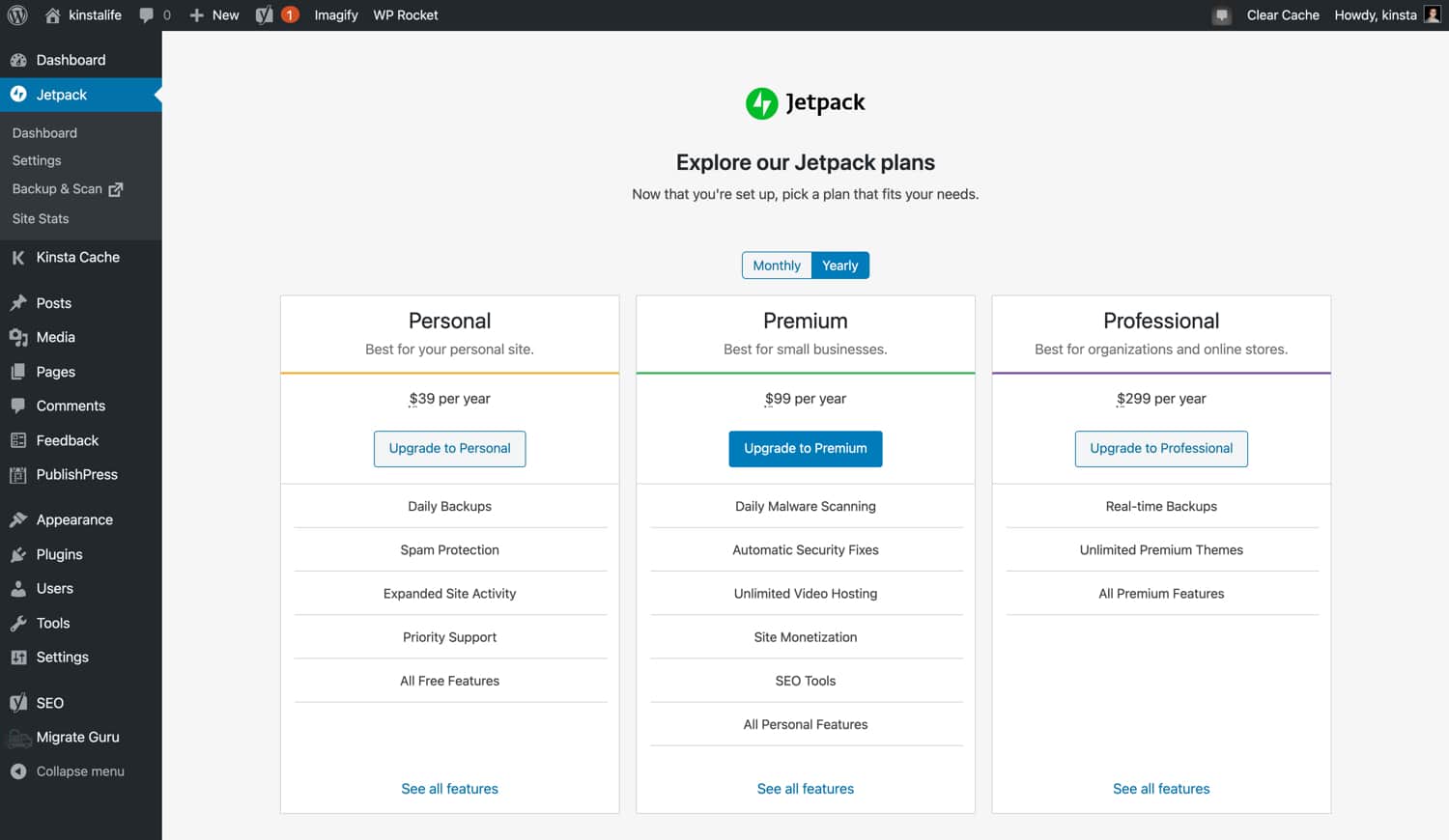
Jetpack offers both free and paid plans. The free plan provides basic features. These include simple security and performance tools. Paid plans offer more features. Advanced security, backup, and priority support are included. Each plan meets different needs. Costs vary by features and levels.
The premium plans have extra features. Daily backups, spam protection, and SEO tools are available. You also get video hosting and Google Analytics integration. These features help make your site better. They are not in the free plan.
Choosing the right plan depends on your needs. For small sites, the free plan is good. Bigger sites may need more. Paid plans have extra features that help. Think about your site’s size and goals. This helps in picking the right plan.
Getting Started
Install Jetpack by searching for it in the WordPress plugin directory. Click Install and then Activate. Connect to a WordPress.com account for more features. Follow the simple steps on the screen. It’s easy to set up.
After installing, go to Jetpack Settings. Choose features you need. Enable Site Stats to track visitors. Turn on Security to protect your site. Use Performance tools to speed up your site. Adjust settings as per your needs.
If Jetpack doesn’t work, check your internet connection. Ensure your WordPress is updated. Disable other plugins to find conflicts. Look at the Jetpack support page for help. Follow guides to fix common problems.

Credit: www.youtube.com
Frequently Asked Questions
What Is Jetpack In WordPress?
Jetpack is a comprehensive plugin for WordPress users. It offers features like security, performance optimization, and site management. With Jetpack, you can enhance your site’s functionality without needing multiple plugins. It integrates smoothly with WordPress and provides tools for monitoring site traffic and backups.
How Does Jetpack Improve Website Security?
Jetpack enhances website security by providing real-time backups, malware scanning, and protection against brute force attacks. It also offers downtime monitoring to alert you about site issues. Additionally, Jetpack provides spam filtering to keep your site free from unwanted content and comments, ensuring a safe user experience.
Can Jetpack Boost WordPress Site Performance?
Yes, Jetpack can significantly boost your site’s performance. It offers features like image and video optimization, which reduce loading times. Jetpack’s content delivery network (CDN) speeds up the delivery of your static files. Additionally, its lazy loading feature helps improve page speed by loading images only when needed.
Does Jetpack Offer Seo Tools?
Jetpack provides basic SEO tools for WordPress sites. It helps in optimizing your site for search engines by improving social media integration and offering sitemap generation. Jetpack also supports title customization and meta descriptions, enhancing your site’s visibility on search engines and improving your overall SEO strategy.
Conclusion
Jetpack in WordPress offers many useful features for your site. It enhances security, ensuring your site stays protected. You can also enjoy improved site performance, making pages load faster. The plugin helps with backups, so you never lose data. It simplifies site management, even for beginners.
With its analytics, understanding your audience becomes easier. Sharing content on social media is seamless too. All these features make Jetpack a valuable tool. Consider it for a better WordPress experience. It’s a solid choice for those seeking efficiency and ease.


