
Have you ever scrolled to the bottom of a website and noticed a section filled with crucial links and information? This often-overlooked area is known as the footer, and in WordPress, it plays a pivotal role in enhancing your site’s functionality and user experience.
Understanding what a footer means in WordPress can transform how visitors interact with your site and how effectively your content engages them. Imagine being able to guide your readers smoothly, provide essential information at their fingertips, and even boost your website’s SEO.
You’re about to discover how this seemingly simple component can become a powerhouse of possibilities for your website. Ready to unlock the secrets of the WordPress footer and make it work wonders for you? Let’s dive in!
Credit: www.wpbeginner.com
Role Of Footer In WordPress
A footer appears at the bottom of your website. It helps with navigation. Links to important pages can be found here.
It often includes contact information and social media links. Many websites use it for site maps. This helps visitors find pages easily.
Footers are also great for branding. You can add your logo. Some footers have copyright notices and legal information.
WordPress offers many ways to customize your footer. Widgets can be added. Choose what fits your needs. A good footer makes your website look professional.
Design Elements
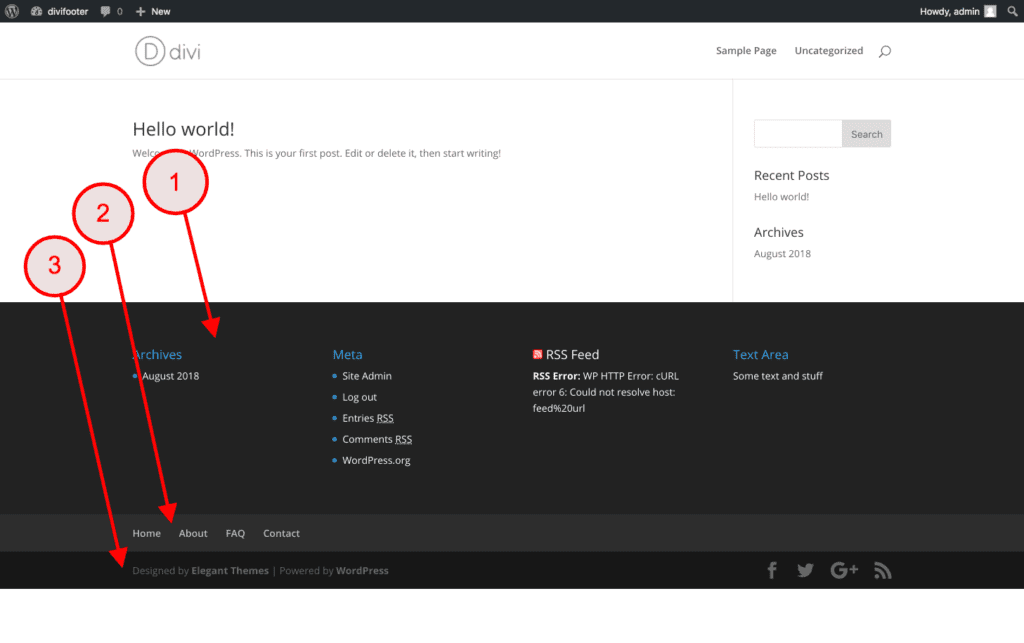
Footers in WordPress offer many layout options to enhance design. You can choose from simple to complex styles. Some layouts have multiple columns. Others use a single, wide strip. You can add widgets to your footer. These can be text, links, or images. Use a layout that matches your website’s style.
Color schemes play a big role in footers. They can match your site’s theme. Or, they can stand out with bold colors. Choose colors that are easy to read. Dark text on a light background works well. You can also use your brand colors. This makes your site look more professional. Always test your colors to ensure they look right.
Content Elements
Footers hold essential links on a website. These links help visitors find important pages. Common links include Home, About Us, and Contact. Some footers also have links to Privacy Policy and Terms of Service. This helps users navigate easily. It’s like a map for the website.
Contact information is often found in the footer. You might see an email address or phone number. Sometimes, businesses include their physical address. This makes it easy for visitors to reach out. It’s a way to connect.
Footers usually show copyright notices. This tells who owns the content. It often includes the year and the company name. It’s a simple way to protect work. It shows the site is up-to-date.
Credit: kinsta.com
Customization Techniques
A WordPress footer refers to the section at the bottom of a webpage. It often contains links, copyright notices, and contact information. Customizing this area can enhance navigation and branding.
Using WordPress Customizer
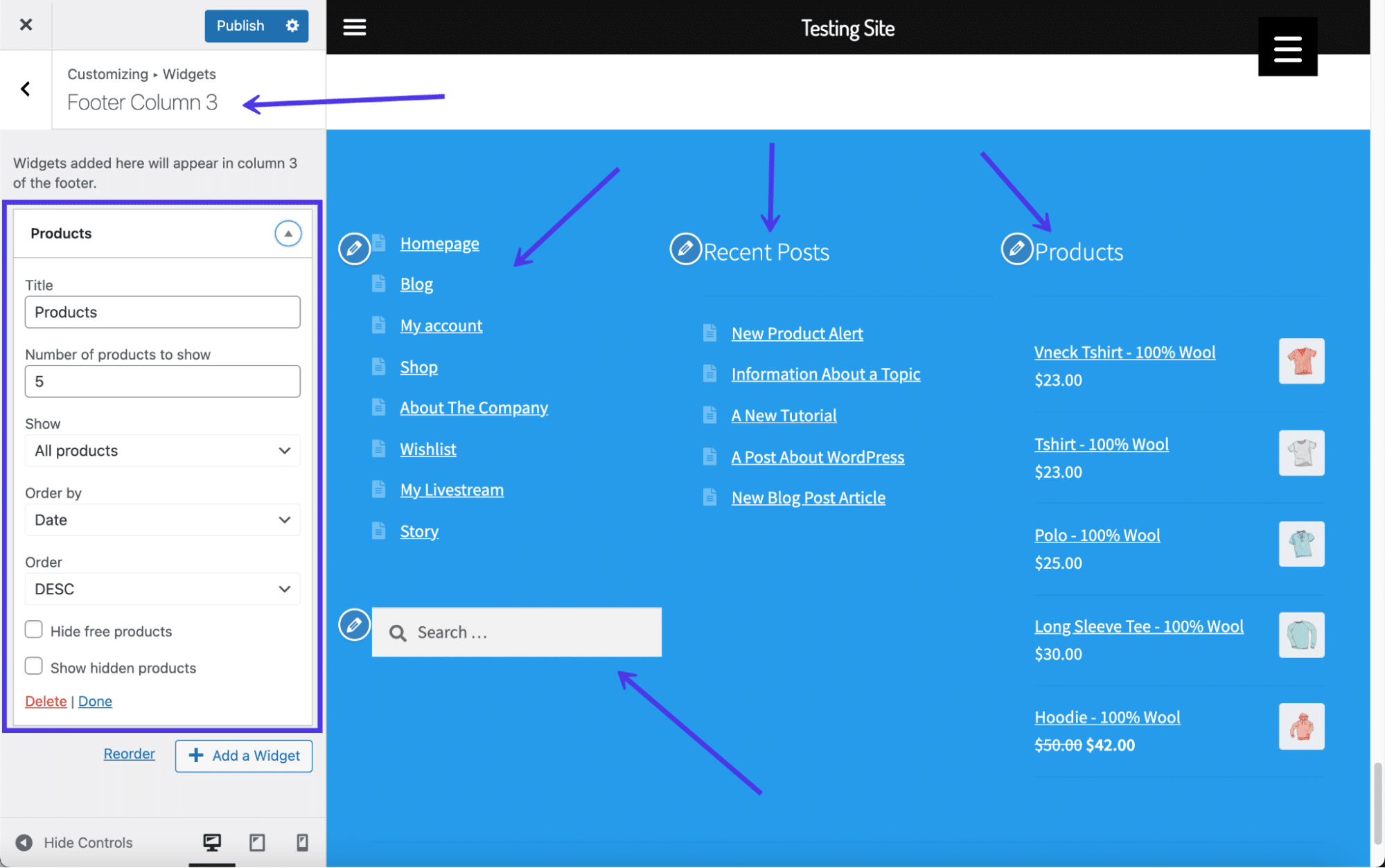
The WordPress Customizer is a powerful tool. It helps change the website footer. You can adjust colors, fonts, and layout. Preview changes live. This makes customization easy and quick. Ensure your footer matches your site style.
Adding Widgets
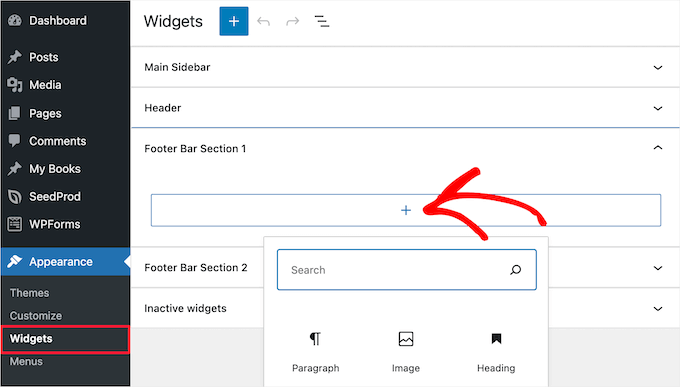
Widgets enhance the footer’s functionality. You can add social media icons, links, or text. Drag and drop widgets easily. Choose the right widget for your needs. Widgets add extra features to your footer. Keep it simple and organized for easy navigation.
Custom Code Insertion
Custom code offers advanced footer design options. Use HTML or CSS to style your footer. Add unique features like custom links or scripts. Place code carefully to avoid errors. Ensure your code is clean and efficient. This technique suits advanced users.
Seo And Footer
A footer in WordPress helps users find important links easily. It often includes links to popular pages like Contact, About, and Privacy Policy. These links improve site navigation. Users find what they need faster. Search engines like Google also notice these links. They help in indexing your site.
Including keywords in the footer boosts SEO. Keywords tell search engines what your site is about. Use relevant words related to your content. Place them naturally. Avoid stuffing. This helps your site rank better in search results. Make sure the footer is clean and organized.
Credit: www.mrkwp.com
Best Practices
A footer in WordPress is the section at the bottom of a webpage. It often contains important links, copyright information, and contact details. Customizing the footer enhances site navigation and user experience.
Balancing Content
Balance in the footer is key. Keep important links visible. Avoid cluttering with too many links. Use a simple design. Make contact information easy to find. Include social media links if needed. Add a brief site description. Highlight essential legal info. Keep everything clear and simple. Balance can improve user experience.
Maintaining Consistency
Consistency in design is vital. Use the same font and colors. Match the site’s overall look. Align text properly. Consistency builds trust. Users feel more comfortable. Keep the layout uniform. Ensure links are styled similarly. Regular updates help. A consistent footer enhances the site’s credibility.
Frequently Asked Questions
What Is A Footer In WordPress?
In WordPress, a footer is the bottom section of a webpage. It typically contains important links, copyright information, and contact details. The footer is consistent across all pages of a website, providing easy access to essential information for visitors. Customizing the footer enhances website navigation and branding.
How Do I Edit The Footer In WordPress?
To edit the footer in WordPress, go to the Appearance menu. Then, select the Widgets or Customize option. You can add, remove, or modify footer elements here. Some themes might offer additional footer settings or require editing footer. php for advanced customization.
Why Is A WordPress Footer Important?
A WordPress footer is crucial for user navigation and SEO. It provides essential information and links for visitors. Additionally, a well-designed footer can enhance brand visibility and site credibility. Including important links in the footer also helps search engines index your site better.
Can I Add Widgets To My WordPress Footer?
Yes, you can add widgets to your WordPress footer. Go to the Appearance menu, then select Widgets. Drag and drop desired widgets into the footer widget area. This allows you to display various elements like recent posts, social media links, or contact information.
Conclusion
Understanding the footer in WordPress is crucial for site design. It helps organize important links and information. A well-crafted footer enhances user experience. It also supports SEO efforts. Don’t overlook this vital part of your website. Customize it to align with your brand.
Keep it clean and simple. User-friendly design is key. With these tips, you can improve your WordPress footer. Your website will look professional and inviting. Ensure it provides value to your visitors. A small change can make a big difference.
Happy designing!


