Ever find your WordPress site running slow or not showing the latest updates? You might be dealing with a cache issue.
When you hear the term “flush cache WordPress,” you’re stepping into a world that can dramatically improve your website’s performance. Imagine opening your closet and finding a clean, organized space where you can instantly see everything you need. Flushing your cache is like giving your website that kind of refresh.
It clears out the clutter and makes way for the new. By understanding how to flush the cache in WordPress, you’ll ensure your site runs smoothly, making it more appealing to visitors and search engines alike. Curious about how this simple action can transform your website experience? Read on to discover the ins and outs of flushing your WordPress cache and unlock the secrets to a faster, more efficient site.
Credit: www.hostpapa.com
Importance Of Caching In WordPress
Caching makes websites faster. It saves the website’s data. This data is reused. It reduces load times. Faster sites mean happier visitors. Search engines love speed. Faster sites rank better. Better ranking brings more visitors. More visitors can mean more success. Caching reduces server load. Servers work less and live longer.
Flush cache means clearing old data. Old data can slow down sites. Clearing makes sites fresh. Fresh sites are fast. Fast sites are good. Sometimes updates don’t show. Flushing can help. It shows new changes. Flushing keeps sites clean. Clean sites work well.
Understanding Cache In WordPress
Cache helps websites load fast. There are different types of cache. Browser cache stores files on your computer. This makes pages open quicker. Server cache keeps data on a web server. It helps manage site traffic. Object cache saves database queries. This reduces load time. Page cache stores entire web pages. It speeds up access for visitors. Opcode cache keeps PHP code ready for use. This helps sites run smoother.
Cache improves site speed. Fast sites keep visitors happy. Slow sites lose users. Cache reduces server load. This helps sites handle more visitors. It saves bandwidth too. Less data means faster loading. It also helps with SEO. Search engines like fast sites. Good cache can improve search rankings. Cache is key for good performance. It helps sites run efficiently.
Signs You Need To Flush Cache
A website that loads slowly can frustrate visitors. They might leave before the page finishes loading. This can hurt your site traffic. It’s important to have a fast site. A slow website often needs a cache flush. This helps clear old data. Fresh data can then load quickly. Websites with many images or videos may face this issue more. Regular cache flushing can help keep things running smoothly. Always aim for a fast website experience.
Seeing old information on your site can confuse users. They might wonder if your site is up to date. Flushing the cache ensures that new content appears. This is crucial after updating a page. A cache can store old versions of a page. This makes the new content not show immediately. Ensure your visitors see the latest content. A cache flush can solve this problem easily. Keep your website content fresh and current.
Credit: themelooks.com
Steps To Flush Cache In WordPress
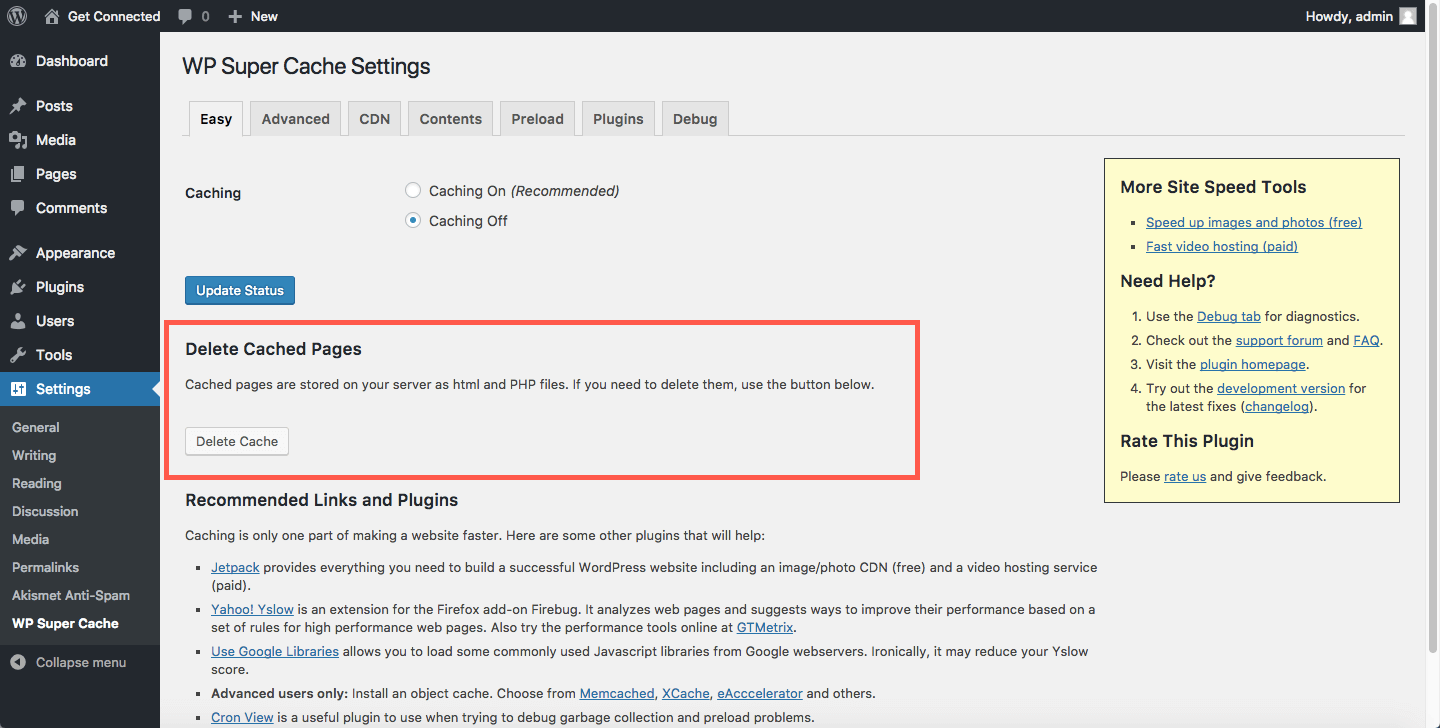
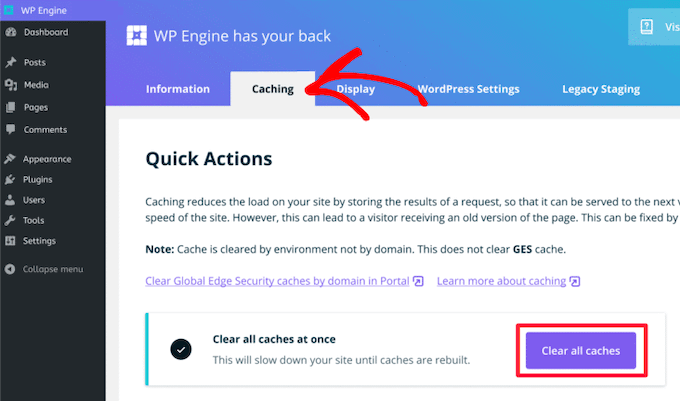
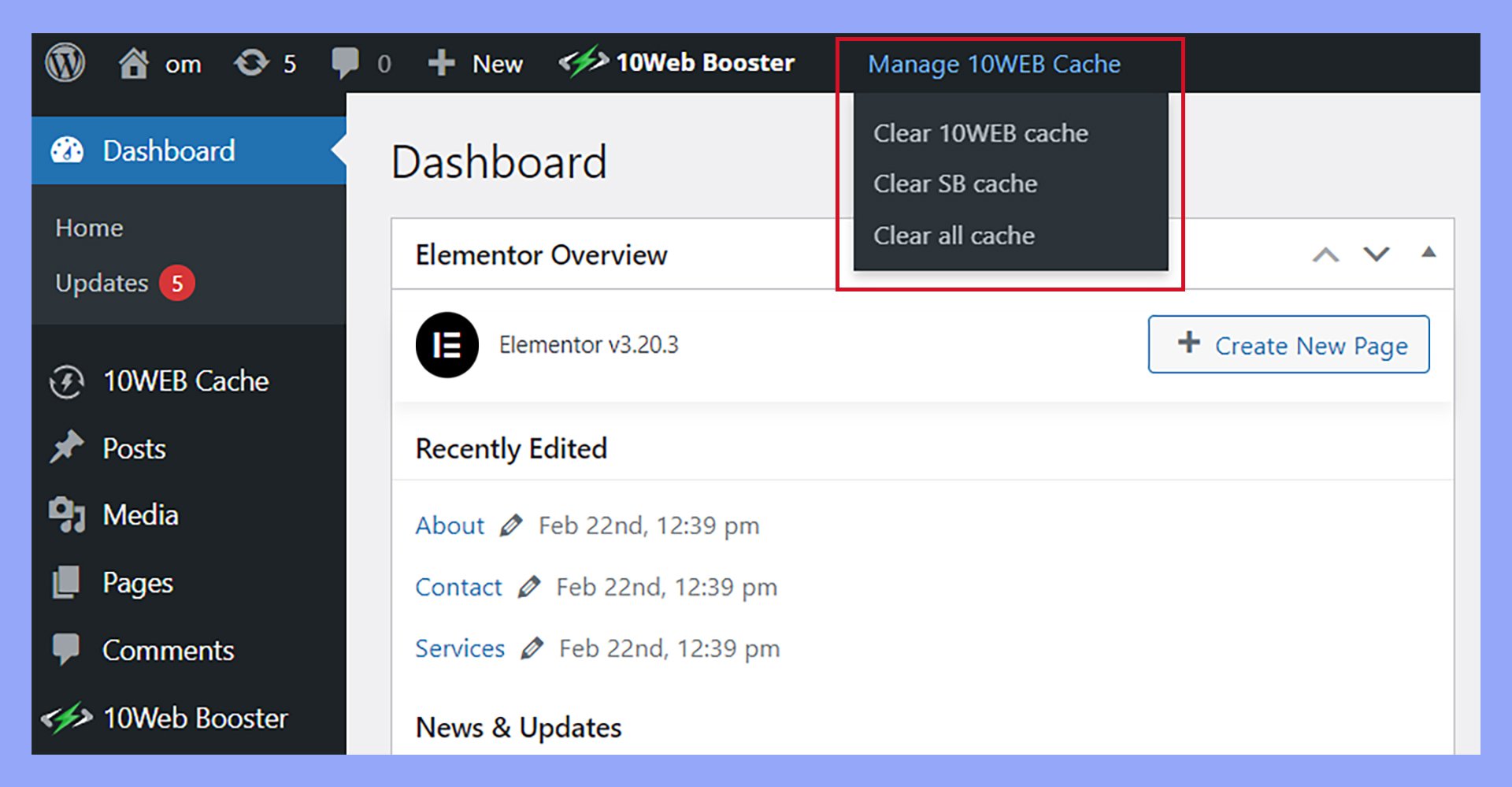
Plugins make it easy to clear cache in WordPress. Many plugins offer this feature. WP Super Cache and W3 Total Cache are popular choices. Find the cache clearing option in the plugin settings. Click it to flush the cache. This will help your site show fresh content to visitors. Always check if the cache is cleared. This ensures changes are visible.
Sometimes, clearing cache manually is needed. This involves accessing your server. You can use FTP or cPanel for this. Navigate to the cache folder. Delete the files inside. This will clear the cache. Be careful not to remove important files. Manual clearing helps when plugins don’t work. Always back up your data before trying this method.
Popular Caching Plugins
Caching plugins make WordPress faster. They store data temporarily. This helps websites load quickly. Some plugins have unique features. They may offer easy setup. Others might give advanced options. You can choose based on your needs.
Plugins often support browser caching. This saves data on a user’s device. Another key feature is compression. This reduces file sizes. Smaller files load faster. Some plugins provide image optimization. This improves website speed. Look for plugins that fit your goals.
Users find caching plugins helpful. Websites load faster. This improves the visitor’s experience. Many users notice better performance. Faster sites can lead to more visits. Some plugins are easier to use. Beginners like simple interfaces. Advanced users prefer more options. Choose a plugin that fits your skill level.
Common Issues And Solutions
Sometimes, the cache doesn’t clear as expected. This can slow down your website. It might show old content. Try using a plugin to help. Some plugins can clear the cache for you. Check your plugin settings. Make sure they are correct. If the plugin isn’t working, update it. Outdated plugins can cause problems. If issues persist, contact support for help.
Error messages can be confusing. They often look like a code. Don’t panic. Read the message carefully. It might tell you what’s wrong. Sometimes, a simple refresh can fix it. Clear your browser cache too. This can solve many issues. Check your internet connection. A poor connection can cause errors. If errors continue, seek expert advice.
Best Practices For Cache Management
Flushing the cache in WordPress clears stored data, ensuring website updates display correctly. This action helps maintain optimal performance and prevents outdated content from showing to visitors. Regular cache management is key to a smooth user experience and efficient website operation.
Regular Cache Maintenance
Regular cache maintenance keeps your website fast. It helps in improving site speed. Clear cache to remove old data. This frees up space and avoids issues. A slow site can frustrate visitors. They might leave without exploring. Frequent cache checks ensure smooth operation.
Choosing The Right Tools
Selecting the right tools is crucial. Many tools can manage cache. Some are easy to use. Others may need technical skills. Look for tools with good reviews. They should be reliable and efficient. Popular ones often have more support. Choose based on your site’s needs. A good tool makes cache management simple.
Credit: 10web.io
Frequently Asked Questions
What Is Cache Flushing In WordPress?
Cache flushing in WordPress removes stored data to ensure users see the latest content. It clears temporary files, like scripts and images, stored for quick access. This helps in loading updated versions of your website’s content. Regular cache flushing improves site performance and resolves display issues.
Why Should You Flush WordPress Cache?
Flushing WordPress cache ensures users see up-to-date content. It resolves any display errors caused by outdated cache files. This process can enhance site speed and performance. Regularly flushing your cache helps maintain an optimal user experience. It ensures your website’s content is correctly rendered and displayed.
How Often Should You Flush Cache In WordPress?
Flushing your WordPress cache depends on your site’s activity. For high-traffic sites, consider flushing it weekly. Content-heavy sites with frequent updates might require more regular cache flushing. For less active sites, monthly flushing may suffice. Regular maintenance ensures your site displays the latest content efficiently.
Can Cache Flushing Improve Website Speed?
Yes, cache flushing can improve website speed by removing outdated files. It ensures that users access the latest versions of your content. This process helps enhance loading times and overall performance. By keeping your cache fresh, you provide an optimal browsing experience for visitors.
Regular cache maintenance is essential for speed.
Conclusion
Clearing your WordPress cache boosts site speed and performance. It removes outdated content, ensuring visitors see the latest updates. Regular cache flushing helps resolve website errors and display issues. This practice keeps your site running smoothly for users. Remember, a fast site improves user experience.
And it can positively impact your SEO rankings. So, make cache flushing a regular habit. Your website will thank you for it. Stay proactive with cache management for better site health. Keep your WordPress site efficient and user-friendly. Simple steps lead to significant benefits.
Enjoy a well-functioning website.