
Imagine your WordPress site as a bustling city. Every click, every visit, and every update is like a car on its streets.
Over time, the streets get crowded, and the city slows down. That’s where clearing your cache comes in. It’s like giving your city a fresh start, removing unnecessary clutter and boosting performance. When you clear your cache, you aren’t just tidying up.
You’re ensuring your visitors experience a faster, smoother journey through your site. But why is this important for you? Well, a slow website can frustrate users, leading them to click away before they even see what you have to offer. Clearing your cache can be the difference between keeping your audience engaged or losing them to the competition. Discover how this simple action can transform your WordPress site and keep your visitors coming back for more. Dive into the details and unlock the secrets of a speedy, efficient website.
Benefits Of Clearing Cache
Clearing cache makes your site faster. Old data is removed. Fresh content is shown to visitors. It helps in reducing errors. Site performance becomes better. Visitors enjoy a smoother experience.
Pages load quickly after clearing cache. Less waiting for users. They see pages at once. Speed is important for users. They stay longer on fast sites. It helps in keeping visitors happy.
Cache clearing improves user experience. Less confusion for visitors. They find information easily. Smooth navigation is important. Visitors return to sites they like. Good experience makes them come back.
Types Of Cache In WordPress
Browser cache saves files on your computer. This makes websites load faster. Images, scripts, and stylesheets are stored locally. This reduces the need to download them again. Clearing it helps if you see old content. Your browser will fetch new data from the server.
Server cache stores web pages on the server. It helps in delivering content quickly to users. This reduces server load and speeds up site performance. Clearing server cache might be needed after updates. It ensures that users see the latest version of your site.
Plugin-based cache uses WordPress plugins. These plugins create static versions of your pages. This reduces load time and server requests. Popular plugins include WP Super Cache and W3 Total Cache. Clearing plugin-based cache often helps after changes. It ensures all changes are visible to your visitors.
Common Scenarios For Cache Clearing
Clearing your cache is crucial after updating a theme or plugin. Old cache can show outdated content. This might confuse users. New updates often bring changes. These changes need to be visible. Clearing cache ensures users see the latest version. It helps avoid errors and improves user experience.
When you change your site content, clear the cache. Fresh content might not appear immediately. Users could see old images or text. Cache clearing guarantees updates are visible. This keeps your site accurate and current. Visitors will see your latest information without delay.
Cache clearing is useful for solving problems. Errors often hide because of old cache. Clearing cache can fix these errors. It refreshes the site and removes hidden bugs. This is a simple way to check if issues persist. Often, clearing cache resolves minor glitches and problems.
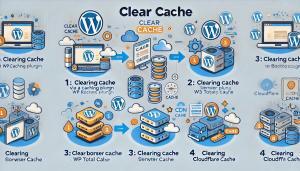
Credit: www.wpfastestcache.com
Steps To Clear Cache
Caching plugins help speed up your WordPress site. They store parts of your site so it loads faster. Some popular plugins are W3 Total Cache and WP Super Cache. To clear the cache, go to the plugin settings. Find the option to clear or delete cache. Click it. Your site will now be fresh and up-to-date.
Your browser saves website files. This is called cache. It helps sites load faster next time. Clear it by going to your browser settings. Look for clear browsing data. Select cache, then hit clear. Your browser will now fetch fresh data.
Servers also save cache. This helps in faster loading. To clear it, access your server settings. Look for cache options. Choose to clear server cache. This ensures your site shows recent changes. Ask your host if you need help.
Tools For Cache Management
Clearing your cache on WordPress speeds up your site. It removes outdated files, improving load times. Regular cache clearing ensures users see the latest content. Optimize your website’s performance effortlessly by managing cache effectively.
Popular Caching Plugins
WordPress has many caching plugins. These plugins help to make your site faster. Some popular ones are W3 Total Cache and WP Super Cache. They save website files. This makes loading quicker. They are easy to set up. Many people use them.
Hosting Provider Tools
Hosting providers also offer cache tools. They can speed up your site. Some good ones are SiteGround and Bluehost. They have built-in cache features. These help manage cache without extra plugins. This makes things simple.
Browser Developer Tools
Browsers have tools to clear cache. These are for developers. They help in testing websites. You can find them in settings. They are easy to use. Just click and clear. This helps see changes quickly.
Potential Downsides
Clearing your cache on WordPress can lead to slower website loading times temporarily. Previous user settings might reset, causing slight inconvenience. Some plugins or customizations may require reconfiguration after cache clearing.
Temporary Increase In Load Times
Clearing your cache can slow down your website. It removes stored data. Your site needs to reload everything. This takes time. Visitors might see a delay. Pages load slower. This can be frustrating. Speed matters for users. Nobody likes waiting. It’s temporary but noticeable.
Loss Of Cached Data
Cached data helps your site run smoothly. It saves bits of info. When cleared, these bits disappear. Your site must gather data again. This can affect performance. Some settings might reset. Users may notice changes. Regular clearing can be bothersome. It’s important to balance. Cache helps with speed and efficiency.
Best Practices
Regular cache cleaning keeps your website running fast. A fast site is good for users. It also helps your site rank better in search engines. Slow sites can make users leave. Nobody likes waiting for pages to load. So, clean your cache often. It makes a big difference.
Always backup your data before clearing the cache. Sometimes, clearing cache can cause problems. With a backup, you can restore your site. A backup keeps your data safe. It’s like a safety net. Better safe than sorry.
Check your site’s performance after clearing the cache. Use tools to see how fast it is. Look for any issues or errors. Fix them quickly if you find any. A smooth site makes users happy. They will visit more often. Happy users mean a successful website.

Credit: wordpress.com
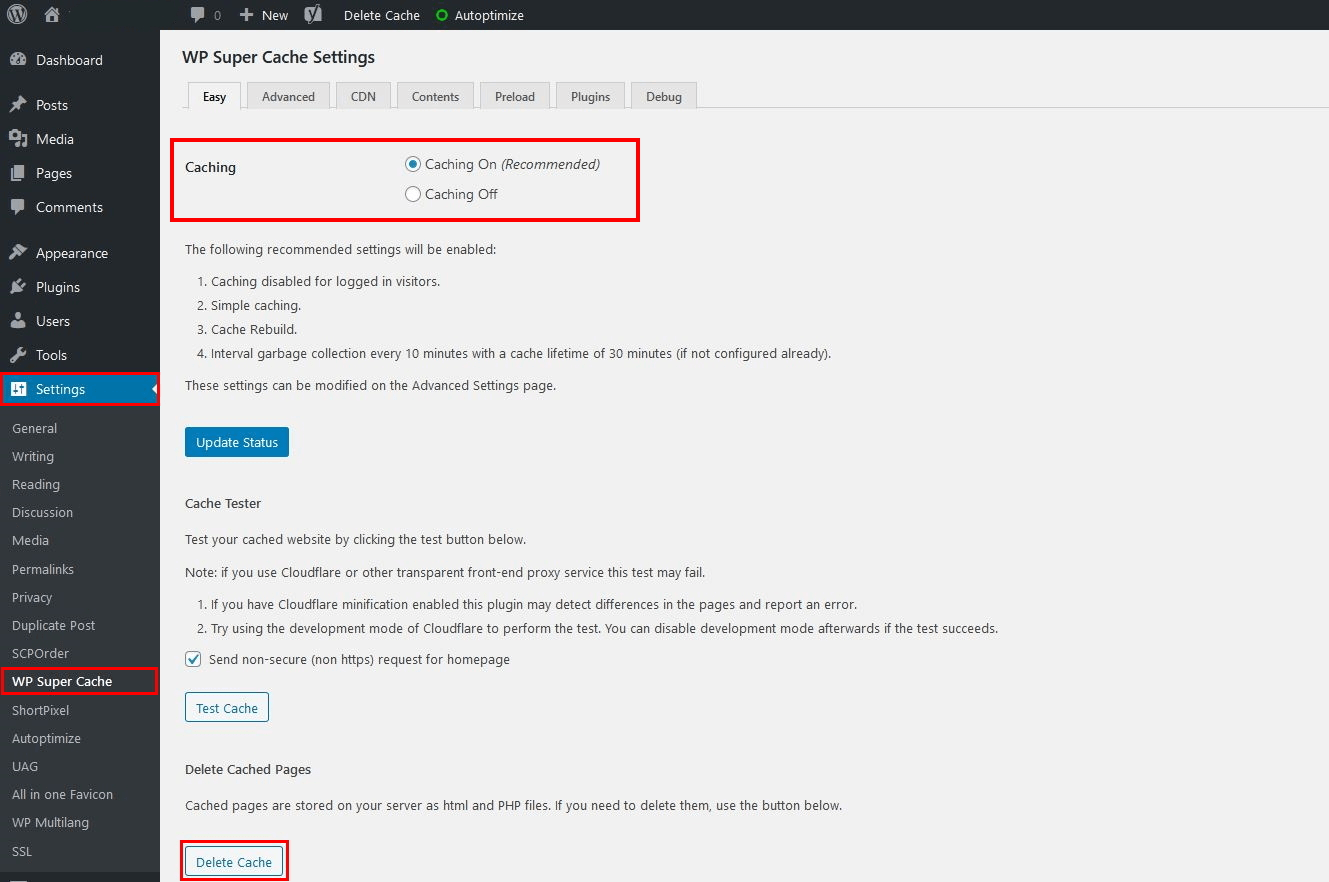
Credit: www.ionos.com
Frequently Asked Questions
Why Clear Cache On WordPress?
Clearing cache on WordPress improves site speed and performance. It removes outdated stored data, ensuring users see the latest content. This helps prevent issues with plugins and themes, and enhances overall user experience by delivering faster, more responsive pages. Regular cache clearing can also aid in troubleshooting site problems.
How Does Cache Affect WordPress Performance?
Cache stores data to speed up site access. However, outdated cache can slow down WordPress, causing performance issues. Clearing cache ensures the latest data is used, enhancing speed and reliability. Regular maintenance keeps your website running smoothly and efficiently, providing users with a better browsing experience.
Is Clearing Cache Safe For WordPress?
Yes, clearing cache is safe and beneficial for WordPress. It refreshes stored data, ensuring users see current content. This process improves site speed and prevents potential conflicts with plugins or themes. Regular cache clearing is a recommended practice for maintaining optimal site performance and user satisfaction.
How Often Should I Clear Cache?
Clearing cache depends on your website’s activity. Regularly updated sites benefit from frequent cache clearing. Weekly or monthly clearing ensures efficient performance and up-to-date content delivery. Monitoring site speed and user experience can help determine the best cache clearing frequency for your WordPress site.
Conclusion
Clearing your cache on WordPress boosts site performance. Pages load faster. Users enjoy a smoother experience. Regular cache clearing can prevent display issues. It helps keep your site updated. Visitors see the latest content. Search engines favor fast-loading sites. This can improve your SEO ranking.
Managing cache is simple. Use plugins for easy cache control. Keep your site fresh and efficient. Regular maintenance ensures the best results. Embrace caching as part of your routine. Your site will thank you. Your users will, too.


