
When you’re planning to build a website, one of the first questions that comes to mind is, “What does a WordPress website cost?” It’s an important question because budgeting correctly can make or break your online venture.
Knowing the cost upfront helps you avoid unexpected expenses that could lead to unnecessary stress. You might be wondering if a WordPress site is within your reach or if it will stretch your budget thin. You’ll discover the various factors that influence the cost of a WordPress website.
By the end, you’ll have a clear understanding of what to expect and how to plan effectively. Let’s dive into the details and uncover the true cost of bringing your WordPress website to life.
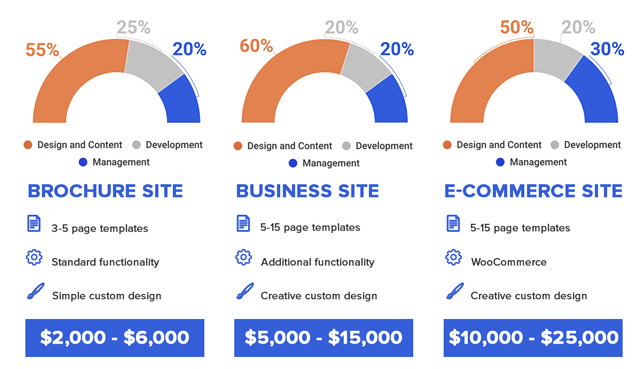
Credit: thewhitelabelagency.com
Factors Influencing WordPress Costs
Choosing a domain name is important. It usually costs between $10 to $15 per year. Some premium domains may cost more. Costs depend on the domain’s popularity. Protecting your domain is essential.
Hosting keeps your site online. Shared hosting is cheap. It costs around $5 to $10 monthly. Dedicated servers are pricey. They offer more control and speed. Prices can be over $100 monthly.
Free themes are available. Paid themes offer more features. Prices range from $30 to $100. Customization can cost more. Some designers charge hourly rates. Costs vary based on changes needed.
Plugins add features to your site. Many are free. Premium plugins offer advanced tools. Prices start at $15. Some plugins require yearly fees. Choose plugins based on your needs.
Basic WordPress Setup Costs
WordPress offers many free themes. These themes are easy to use. They come with basic features. But free themes may lack customization. Paid themes offer more features. They often include support. You can adjust them to fit your needs. Paid themes can cost between $20 and $100. Choose a theme that fits your budget and goals. Paid themes are often more secure. They get regular updates. Free themes might not have regular updates.
Plugins add features to your site. Some plugins are free. Others cost money. Free plugins are good for basic needs. Paid plugins offer more functions. They can enhance your site. Popular paid plugins cost around $15 to $50. Consider what features you need. Some plugins help with SEO. Others improve security. Choose plugins that help your site grow. Paid plugins often come with support. They might offer regular updates. Free plugins might not include all features.
Advanced Customization Expenses
Custom designs make a website look special. These designs can be expensive. Designers charge based on the complexity of the work. A simple design might cost less. A detailed one costs more. It’s like drawing a simple house versus a castle. Prices vary a lot. Some designers charge per hour. Others ask for a flat fee. They might ask for $500 or even $5,000. It depends on your needs.
Developers make the website work well. Their skills are important. They fix bugs and add features. Developer charges can also vary. Some developers charge by the hour. This could be $50 or even $150 per hour. Others offer a project price. They may charge $1,000 or more for a big project. Choosing the right developer is important. It affects the quality of your website.
Maintenance And Updates
Keeping your website safe is important. Security plugins can help. Some are free, but others cost money. Backups are like saving a copy of your work. You need these in case something goes wrong. Free backup plugins exist, but paid ones offer more features. These costs vary and can add up over time.
Websites need regular updates to work well. Updates fix bugs and add features. Plugins and themes need updates too. Many updates are free but need time to manage. You might pay someone to do this if you can’t. Keeping everything updated keeps your site running smoothly.
Additional Costs To Consider
A WordPress website cost includes hosting and domain fees. Themes and plugins can add extra expenses. Custom design and development might also raise the total cost. Keep these in mind when budgeting your project.
Seo Tools And Services
SEO tools help websites rank higher. Higher ranks mean more visitors. Free tools are available. Paid tools offer extra features. These include keyword tracking and competitor analysis. Professional services cost more. Experts optimize your site for search engines. Costs vary based on expertise. Some charge hourly rates. Others have monthly packages.
E-commerce Features
E-commerce features include online shopping carts. They allow buyers to purchase products. Payment gateways process transactions. Costs depend on the type of gateway. Some charge per transaction. Others have monthly fees. Security is crucial. SSL certificates protect data. They can be expensive. Ensure your site is safe for users.
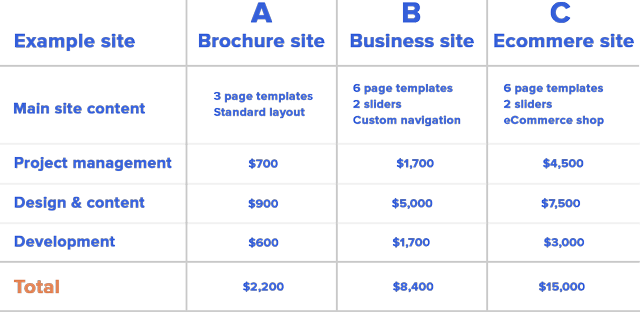
Credit: thewhitelabelagency.com
Budgeting For A WordPress Site
Creating a WordPress site can fit any budget. Start with a basic plan. This includes hosting and a free theme. Choose affordable plugins for extra features. Free plugins are a good start. Buying a premium theme can add costs. But it gives a unique look.
DIY approach saves money. Learn to make changes on your own. Hiring a developer can be pricey. But it saves time and adds expertise. Balance is key. Spend where it matters most.
List your site’s needs. Decide on must-have features first. Make sure your site is easy to use. A good design helps visitors stay longer. Write clear goals. It helps in spending wisely. Focus on what brings value.

Credit: cmsminds.com
Frequently Asked Questions
How Much Does A Basic WordPress Website Cost?
A basic WordPress website typically costs between $100 to $500. This includes the domain, hosting, and a simple theme. Additional features or customizations can increase the cost. It’s a budget-friendly option for beginners and small businesses.
What Factors Influence WordPress Website Pricing?
Several factors influence WordPress website pricing, including design complexity, plugins, and hosting. Custom themes and advanced functionalities also raise costs. Maintenance and support services add to the overall expense. Each factor contributes to the final price.
Is WordPress Free To Use?
WordPress software is free to download and use. However, you’ll need to pay for hosting, domain, and premium themes. Additional costs may include plugins and professional services. While the software is free, building and maintaining a site involves expenses.
Can I Build A WordPress Site For Free?
You can build a WordPress site for free using WordPress. com. However, it comes with limitations like ads and limited customization. Upgrading to paid plans offers more features and control. Free options are suitable for personal blogs or small projects.
Conclusion
Understanding WordPress website costs helps you plan better. Consider your needs and budget. Costs vary with features, hosting, and design. Basic sites cost less; complex sites demand more. Compare options wisely. Review hosting, themes, and plugins. Good planning saves money.
Think long-term benefits. Invest in quality design and support. Your website reflects your brand. Make it user-friendly and secure. Regular updates matter. Keep content fresh and engaging. Remember, a website is a valuable asset. Choose wisely for lasting success.


