
Have you ever felt overwhelmed while organizing content on your WordPress site? You’re not alone.
Navigating the myriad of posts can be a daunting task, especially when you’re eager to present your content in the most effective way possible. Here’s where categories step in as your organizational ally. They’re not just labels; they’re powerful tools that can dramatically enhance user experience and SEO performance.
Imagine a well-organized library where each book is neatly shelved according to its genre. This is what categories do for your website. Curious to learn how this simple feature can make your site more intuitive and engaging? Let’s unravel the magic of WordPress categories and how they can transform your website into a user-friendly haven.
Role Of Categories In WordPress
Categories help organize posts. They make content easy to find. Visitors can click on a category to see related posts. This helps them navigate your site. Categories also improve site structure. A clear structure helps search engines understand your content. This can boost your search visibility.
Using categories wisely is important. They should be broad but relevant. Avoid too many categories. This can confuse users. Stick to main topics. This keeps your site tidy. Use subcategories if needed. They can further organize your content.
Organizing Content
Categories help group similar posts together. They create a clear structure for your blog. Each category acts like a folder for your content. This makes it easier to find related posts. You can assign a post to one or more categories. This helps readers explore your site better.
Categories improve the way users navigate your website. They serve as a guide for readers. With categories, visitors can easily locate specific topics. This boosts their experience on your site. Good navigation leads to more time spent on your site. It encourages readers to explore more content. Categories are key in making your site user-friendly.
Improving User Experience
Categories help users find content quickly. They act like labels for your posts. This makes it easy to find what you need. Users can click on a category to see related posts. This saves time and effort. It’s like having a guide for your site.
More engagement happens with clear categories. Users explore more posts. They spend more time on your site. This can lead to more comments and likes. It’s a simple way to keep visitors coming back. Categories make your site interesting and fun.
Seo Benefits
Boosting Visibility: Categories help users find content easily. Search engines love organized sites. Better organization means better search rankings. Categories group related posts together. This boosts site visibility. Users stay longer when they find what they need. Longer visits improve site credibility. Search engines notice this. They rank your site higher.
Improving Site Hierarchy: Categories create a clear structure. This helps both users and search engines. A well-structured site is easy to navigate. Users find content without fuss. Search engines understand your site’s layout better. They index your pages correctly. This improves your site’s SEO performance. Better indexing leads to better search results.
Creating Categories
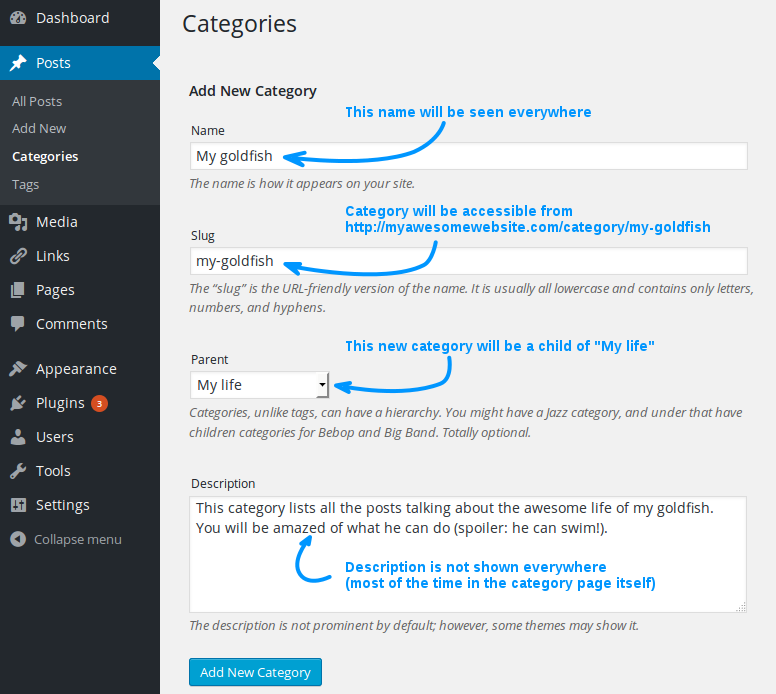
Categories help organize posts in WordPress. They make it easy to find related content. Follow these steps to add categories.
Steps To Add Categories
- Go to your WordPress dashboard.
- Click on Posts.
- Select Categories.
- Enter a name for your category.
- Fill in a slug (URL-friendly version).
- Choose a parent category, if needed.
- Add a description. This is optional.
- Click Add New Category.
Best Practices
Keep category names simple. Use clear and short words. Limit the number of categories. Too many can confuse users. Use parent categories for better structure. This helps in organizing sub-categories. Regularly review categories for relevance. Remove outdated ones.

Credit: taxopress.com
Managing Categories
Categories in WordPress help organize posts. You can easily edit a category. Click on the category name. Change the name or description. Press the save button. Deleting a category is simple. Select the category you want to remove. Click the delete button. Be careful! This action cannot be undone.
Sometimes categories need merging. This helps streamline your site. Choose the categories you want to combine. Use the merge option. This will unite them into one category. All posts will move to the new category. Check your site for any changes. Merging makes content easier to find.
Customizing Category Pages
Make your category pages look unique. Choose the right colors and fonts. This helps your page stand out. Use themes or plugins for easy design. A simple layout is best. Keep it clean and clear. This makes it easy to read. Avoid clutter and too many elements. Less is more.
Descriptions tell what the category is about. They are important for users. They also help search engines. Write short and clear descriptions. Use simple words. This helps all visitors understand. Keep it interesting. Make it match your category. This keeps the user engaged. Good descriptions improve visibility.
Credit: www.sitepoint.com
Common Mistakes To Avoid
Organizing posts with categories in WordPress helps users find content easily. Common mistakes include using too many categories or not assigning them correctly, which can confuse visitors and hurt SEO. Ensure each category is clear and relevant to improve navigation and user experience.
Overusing Categories
Too many categories can cause confusion. Users might struggle to find content. Keep your category list short and clear. Use only essential categories. This helps in organizing your content better. Aim for simplicity. It aids in better site navigation. Fewer categories mean easier browsing.
Ignoring Keywords
Ignoring keywords can hurt your site’s visibility. Use important keywords in your categories. This boosts your site’s searchability. It helps users find your content faster. Choose keywords that match your post’s topic. This enhances the relevance of your content. Good keyword use improves SEO. It helps in attracting more visitors. Always focus on what your audience searches for.
Tools And Plugins
Categories in WordPress help organize posts, making content easy to find. They group related posts, enhancing user navigation. Efficient use of categories improves the site’s structure and search engine visibility.
Popular Plugins
WordPress plugins make your site work better. Some plugins help with SEO. Others help with security. Yoast SEO is a favorite. It helps with keywords and meta tags. Wordfence protects your site from hackers. WooCommerce helps you sell things online. These plugins are easy to use.
Advanced Features
Some plugins offer advanced features. Jetpack helps with site speed and analytics. Elementor lets you design pages. You can create pretty pages with it. Akismet fights spam. It keeps your comments clean. Plugins can make your site faster. They can also make it safer.

Credit: taxopress.com
Frequently Asked Questions
What Is The Purpose Of Categories In WordPress?
Categories in WordPress help organize content for easy navigation. They group similar posts together, improving user experience. By categorizing content, visitors can quickly find related posts. It also aids in SEO by structuring site content. Categories create a logical hierarchy, enhancing site architecture.
How Do Categories Affect Seo?
Categories improve SEO by structuring content logically, making it easier for search engines to crawl. They help create a clear site architecture, enhancing user navigation and engagement. Organized content is more likely to rank higher. Additionally, relevant categories can increase keyword relevance, boosting visibility.
Can I Change A Category Name?
Yes, you can change a category name in WordPress anytime. Simply go to the Categories section in the dashboard. Edit the category you want to change. Update the name and slug as needed. Changes won’t affect your existing posts, maintaining content organization.
How Many Categories Should I Use?
Use a reasonable number of categories to maintain organization. Typically, 5 to 10 categories are effective for most sites. Too many categories can confuse users and dilute SEO efforts. Ensure each category is distinct and relevant, enhancing content discoverability and user experience.
Conclusion
Categories play a crucial role in organizing content on WordPress. They help readers find what they need easily. By grouping related posts, categories improve site navigation. This enhances user experience significantly. Search engines also benefit from well-structured categories. This boosts your site’s SEO performance.
Proper use of categories keeps your website tidy and efficient. It makes managing content much simpler for you. Remember, clear categories make a big difference. They connect your content seamlessly. Start organizing your WordPress site today. See the positive impact on your readers and SEO.


