
Are you ready to take your first step into the digital world by starting your own web hosting? The idea might seem daunting, but with the right information, you can easily transform your dream into reality.
Picture this: your website up and running, accessible to millions around the globe. It’s an exciting prospect, isn’t it? But before you dive in, you might be wondering what exactly you need to get started. This article is designed to guide you through the essentials of web hosting, breaking down complex concepts into simple, actionable steps.
By the end of this read, you’ll have a clear roadmap to kickstart your web hosting journey with confidence. Let’s unravel the mystery and empower you to make informed decisions. Ready to get started? Let’s dive in!
Choosing The Right Hosting Type
Shared Hosting is a popular choice for beginners. It’s like sharing a room with friends. Everyone uses the same space and resources. It is cheap and easy to use. But, it can be slow if too many people use it at once.
VPS Hosting gives you more control. It’s like having your own room in a shared house. You get more space and privacy. This type is faster and more secure than shared hosting.
Dedicated Servers offer you the entire house. You have complete control over everything. It’s very fast and secure. But, it can be expensive. Only big websites need this kind of hosting.
Cloud Hosting uses many computers at once. It helps your website run smoothly even with lots of visitors. It is flexible and reliable. You only pay for what you use. Great for growing websites!
Selecting A Reliable Hosting Provider
Reputation and Reviews are very important. Choose a provider with good reviews. Check what others say. Look for trust signals. Happy customers are a good sign. A well-known provider is usually safe.
Customer Support should be available 24/7. Problems can happen anytime. Fast help is important. Good support makes things easy. Check if they have live chat or phone support. Emails can be slow.
Uptime Guarantees mean your site stays online. Downtime is bad for business. Providers promise a certain uptime. Look for 99.9% or higher. It shows reliability. Your site should be always accessible.
Understanding Domain Names
Domain registration is the first step in hosting. It is like naming your house. You need a unique name for your website. Without a registered domain, people can’t find your site. Many companies offer domain registration services. Choose one that fits your needs. Look for good prices and support.
Picking the right domain name is very important. It should be easy to spell. Think about your audience. A short name is better. Keep it simple and memorable. Avoid confusing words. Your domain name represents your brand. Make sure it matches your business.
Domain privacy protection keeps your details safe. This service hides your personal information. Without it, anyone can see your name and address. This can lead to spam or unwanted calls. Most registrars offer privacy protection. It’s a small fee for peace of mind. Protect your privacy with this feature.
Credit: www.inmotionhosting.com
Essential Hosting Features
Choosing the right storage is key for web hosting. More files need more storage. Think about your website’s size. Some hosts offer unlimited storage. Check the bandwidth too. It affects how fast your website loads. High traffic sites need more bandwidth. Low bandwidth can slow down your site.
A good control panel helps manage your website. It should be easy to use. cPanel and Plesk are popular choices. They offer many features. Look for a panel with security tools. It should support updates and backups. A simple interface is best for beginners.
Email hosting keeps your messages safe. It allows custom domain emails. This looks professional. Look for spam protection features. Some hosts offer unlimited email accounts. Make sure it supports IMAP and POP3. This helps you access emails on any device.
Security Considerations
SSL Certificates keep data safe. They protect information between servers and browsers. Websites with SSL show a padlock icon. This makes users feel safe. Google likes sites with SSL. These sites rank better in searches. Encrypting data is important. It stops hackers from stealing. SSL is a must for any website.
Data can get lost or damaged. Backups are vital. They save copies of your data. This helps in emergencies. Use cloud storage for backups. It’s easy and safe. Regular backups protect your website. They help in recovering lost data. No worry about losing important files.
Firewalls act as shields. They protect websites from attacks. Firewalls block harmful traffic. They keep threats away. Install firewall software on your server. This helps in keeping data secure. Firewalls are essential for security. They guard your site 24/7.
Credit: www.inmotionhosting.com
Website Building Tools
Content Management Systems are software that help create websites. They make it easy to add text and images. Popular systems include WordPress and Joomla. These tools are user-friendly. Even beginners can use them. No need to know coding.
Website builders offer a simple way to create websites. They have drag-and-drop features. This means you can move items around easily. Examples are Wix and Squarespace. Templates are available to choose from. You can customize them to fit your needs. It’s quick and straightforward.
Custom development involves coding from scratch. It offers flexibility and creativity. Developers use languages like HTML, CSS, and JavaScript. This method is best for unique website needs. It can be more time-consuming. But it provides a tailored experience.
Cost And Budgeting
Starting web hosting needs money. You must buy a domain name. This costs around $10 to $15 per year. You also need a hosting plan. This can cost between $3 to $10 per month. Setting up a website can be expensive. Keep some money aside for extra costs.
Monthly bills are important. Hosting companies often charge monthly. Watch out for renewal fees. These can be higher than starting costs. You might need extra services. This could be security or tech support. Always plan for these expenses.
Spending wisely is smart. Good hosting offers great features. Look for speed and support. Compare different plans. Choose one that suits your needs. Check reviews online. Happy users mean good service.
Credit: verpex.com
Scalability And Growth Potential
Flexible Plans are important for web hosting. Start with a small plan. As your site grows, you can change plans. Hosting companies offer different plans. Choose what suits your needs best. Make sure plans fit your budget.
Upgrade Options help your site grow. As traffic increases, upgrades are necessary. Hosting providers offer many upgrades. Upgrade your bandwidth or storage easily. Your site will perform well.
Handling Traffic Spikes is crucial. Traffic can increase suddenly. Your site should handle this. Choose a host with good resources. They offer tools to manage spikes. Keep your site running smoothly.
Frequently Asked Questions
What Is Required To Host A Website?
To host a website, you need a domain name, web hosting service, and website files. Choose a reliable hosting provider for better performance. Ensure your site is mobile-friendly and secure. Regularly update content and monitor for issues. Optimize for search engines to improve visibility.
How Do You Start Your Own Web Hosting Company?
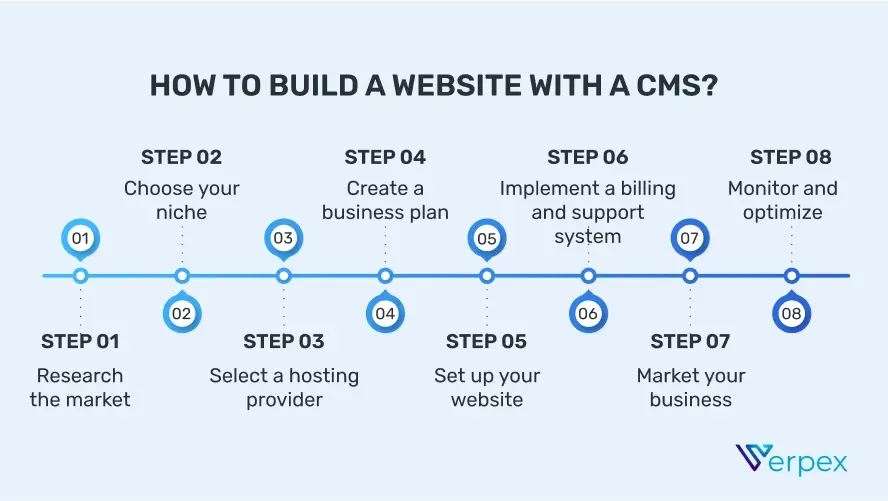
Research the market and choose a niche. Acquire necessary hardware and software. Set up servers and a secure network. Develop a user-friendly website. Implement marketing strategies to attract clients.
Is Web Hosting Profitable?
Web hosting can be profitable with effective marketing and quality service. Demand for online presence is growing. Offering reliable hosting, competitive pricing, and excellent customer support can attract customers. Focus on niche markets to maximize profitability. Scalability and efficient resource management are key to sustaining profits.
Can You Host A Website On Your Own Computer?
Yes, you can host a website on your own computer. Install web server software like Apache or Nginx. Ensure your computer is always on and has a stable internet connection. Keep in mind, using your computer as a server may not be ideal for high-traffic websites.
Conclusion
Starting web hosting requires the right tools and knowledge. Begin with a reliable hosting provider and a domain name. Choose a plan that suits your needs. Ensure your website is user-friendly and secure. Use a control panel to manage your site easily.
Regular backups are crucial to prevent data loss. Don’t forget to optimize your site for speed and performance. Stay updated with the latest web hosting trends. This foundation will help your website thrive. Happy hosting!


