
Have you ever wondered what happens behind the scenes when you click on a website? Or how your favorite blog is always just a click away?
The answer lies in a crucial service known as web hosting. Understanding web hosting can open up a world of possibilities, whether you’re planning to launch your own website or simply curious about how the internet functions. In this guide, we’ll demystify web hosting, breaking it down into simple terms so you can grasp its importance and potential.
By the end of this article, you’ll see how web hosting is not just a technical necessity but a key player in the success of any online presence. Ready to unlock the secrets of the web? Let’s dive in and explore what web hosting really means for you.
Credit: www.hostinger.com
Web Hosting Basics
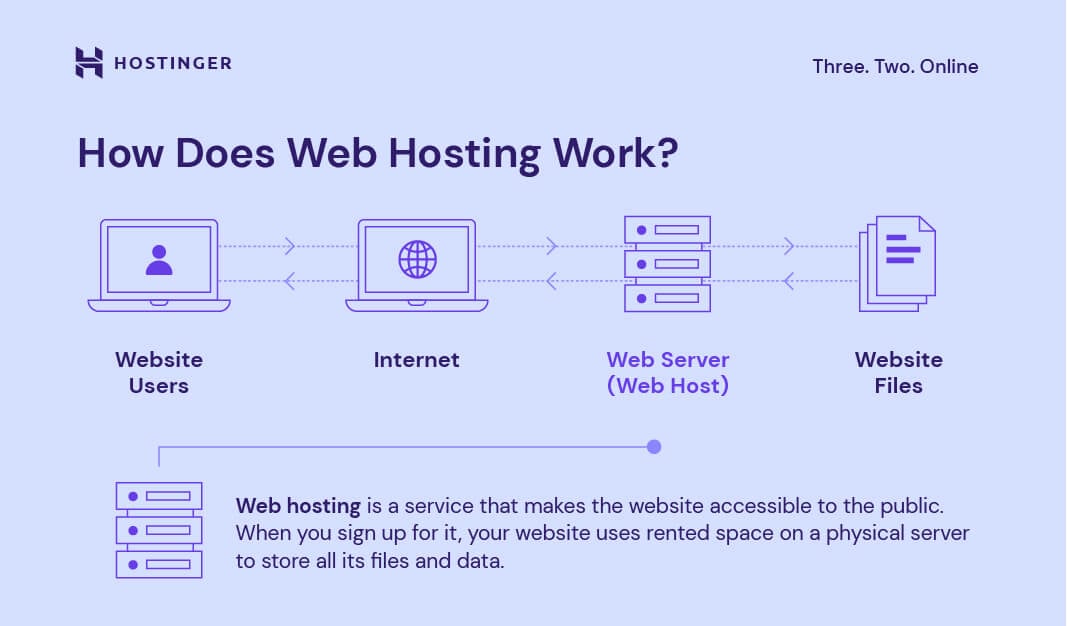
Web hosting is a service. It lets you put a website on the internet. Hosting companies store your site’s files. They make sure everyone can see your site. It’s like renting space. But for your website. You pay to keep it online.
Web hosting is very important. It keeps your website live. People can visit anytime. Without hosting, your site won’t be online. Hosting also helps with speed. And security. It makes sure your site works well. A good host can make your site fast. And safe. This is crucial for visitors. They need quick and secure access.
Types Of Web Hosting
Shared hosting is like sharing a big house. Many websites live on one server. This makes it cheap for users. It’s good for small websites. Resources are shared among all sites. Your site’s speed may slow down if others use too much. Easy to set up and manage. Perfect for beginners in web hosting.
VPS stands for Virtual Private Server. It’s like having your own apartment in a big building. You get dedicated space. Better control than shared hosting. Offers more resources and flexibility. Ideal for growing sites. Costs more than shared hosting. Provides better security and performance.
Dedicated hosting means you have the whole building. Only your website lives on the server. Offers maximum control and power. Best for large sites with high traffic. Very secure and fast. Costs more than VPS and shared hosting. Provides full customization options. Requires technical knowledge to manage.
Cloud hosting is like flying in the sky. Websites use many servers in a network. Offers high scalability and flexibility. Resources are spread across servers. Good for sites with changing traffic needs. Costs depend on usage. Provides reliable uptime and fast load times. Easy to expand as your site grows.
How Web Hosting Works
Web hosting involves a powerful computer called a server. This server stores all the files of your website. It shares these files with people on the internet. When someone types your website’s address in their browser, the server sends the files to their computer. This allows them to see your website.
Servers work all the time. They keep your website online 24/7. They have strong hardware and internet connections. This ensures your website loads quickly. Without a server, your website cannot be seen by others.
A domain is your website’s name. It is like an address on the internet. Hosting is where your website lives. The domain points visitors to the hosting server. This is how they find your website. Think of a domain as a signpost. Hosting is the house where your site lives. Together, they make your site visible.
Choosing A Web Host
Choosing a web host is important. First, check the price. Some hosts are cheap, others are costly. Next, look at the speed. Fast hosting makes your site load quickly. Security is vital too. Good hosts protect your site from hackers. Also, check the support. You need help when things go wrong. Uptime is another factor. Choose a host with high uptime. It means your site is always online. Finally, read reviews. They show what others think of the host. These factors help you choose the best host.
| Provider | Features |
|---|---|
| Bluehost | Reliable, good support |
| HostGator | Affordable, easy to use |
| SiteGround | Great security, fast speed |
| DreamHost | High uptime, good features |
Setting Up Your Hosting
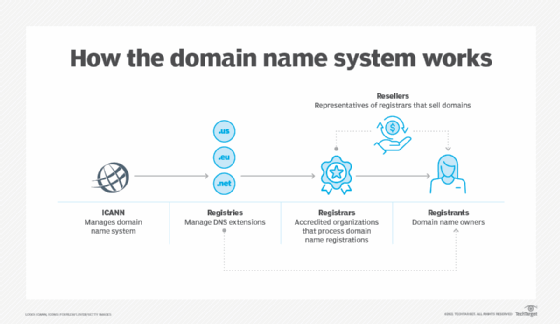
First, you need a domain name. This is your website’s address. Think of a name that is easy to remember. It should match your business or idea. Use a domain registrar to buy it. Some popular registrars are GoDaddy and Namecheap. Prices can vary. It’s like renting a space online. Your domain is unique to you.
After buying a domain, set up your hosting account. This is where your website lives. Choose a hosting provider like Bluehost or HostGator. They give you space on the internet. Log in to your account to start. You need to connect your domain to your hosting. This step makes your site visible. Adjust settings like email and security. Keep your site safe and fast. Always save changes when done.

Credit: www.godaddy.com
Managing Your Web Hosting
Web hosting means storing and managing your website files on a server. This service allows your site to be visible online. Choosing the right web hosting ensures your site runs smoothly and loads quickly for visitors.
Control Panel Features
The control panel helps manage your website easily. You can create email accounts, check website stats, and manage files. It also lets you install software. Popular control panels include cPanel and Plesk. They offer user-friendly interfaces. Users can handle tasks without technical skills. Control panels also include security features. These protect your website from threats. Backup options keep your data safe. A good control panel saves time and effort.
Performance Monitoring
Performance monitoring ensures your website runs smoothly. It checks site speed and uptime. Slow sites lose visitors. Monitoring tools help you track issues. They alert you when problems occur. This helps fix issues fast. Monitoring keeps your site healthy. Regular checks improve user experience. Tools like Google Analytics help in tracking. They provide valuable insights. Monitoring tools are essential for web hosting success.
Common Hosting Issues
Websites need to stay online. Downtime happens when they go offline. This can upset visitors. It can also hurt businesses. Reliability is key for web hosting. Companies promise uptime. But sometimes they can’t keep their promises. Server overload can cause downtime. Maintenance can also make websites go offline. Choosing a good host helps reduce downtime. Regular checks help ensure uptime. Backups are crucial during downtime.
Websites face security threats. Hackers might try to break in. Viruses can harm data. Good hosting includes security measures. Firewalls help protect sites. SSL certificates keep data safe. Regular updates are important. Weak passwords can be a risk. Strong passwords help keep sites secure. Hosts offer backup solutions. These can save data if attacked. Always check a host’s security features.
Credit: www.techtarget.com
Future Trends In Web Hosting
Green hosting uses less energy. It helps the planet. This type of hosting uses renewable energy. Solar and wind power are common choices. Many companies now choose green hosting. They want to reduce their carbon footprint. This helps the environment in big ways.
AI makes web hosting faster. It helps with tasks like server management. This saves time and effort. With AI, websites can be smarter. Automation helps with updates and backups. It keeps sites safe and current. Many hosting companies now use AI. It makes their services better.
Frequently Asked Questions
What Is Meant By Web Hosting?
Web hosting is a service that stores and serves website files on the internet. It allows users to access your site online. Hosting providers offer various plans including shared, VPS, and dedicated servers. Reliable hosting ensures fast load times and security for your website.
What Is An Example Of A Web Host?
An example of a web host is Bluehost. It offers reliable hosting services, including shared and dedicated options. Bluehost provides 24/7 customer support, making it a popular choice for beginners and professionals. Their plans include domain registration, website building tools, and email hosting, enhancing your website’s performance and security.
What Are The 3 Types Of Web Hosting?
The three types of web hosting are shared hosting, VPS hosting, and dedicated hosting. Shared hosting involves multiple websites on one server. VPS hosting offers a virtual private server for each user. Dedicated hosting provides an entire server for a single website, ensuring maximum control and resources.
Can I Run My Website Without Hosting?
Running a website without hosting is impossible. Websites need servers to store and deliver content online. Hosting provides these servers, making your site accessible to users. Consider using web hosting services for reliable performance and support.
Conclusion
Understanding web hosting is crucial for online presence. It stores your site’s files. Makes your site accessible on the internet. Various types exist. Shared hosting is affordable. VPS offers more control. Dedicated hosting provides exclusive resources. Cloud hosting is flexible.
Each has its benefits. Choose based on your needs. Consider your budget. Think about future growth. Web hosting is foundational for websites. It impacts speed and reliability. Research carefully before deciding. A well-hosted site enhances user experience. Drives success in the digital world.
Start your journey with the right host.


