
Are you dreaming of launching your own website but don’t know where to start? Wondering what essential elements are needed to make your WordPress.com site a success?
You’re not alone. Many individuals and businesses are eager to tap into the power of WordPress. com, yet they often feel overwhelmed by the details. Imagine having a clear roadmap that guides you through each step, making the process not only easy but enjoyable.
You’ll discover the must-have components for building a standout WordPress. com site. You’ll learn how to effortlessly set up your site and ensure it captures attention, resonates with your audience, and achieves your goals. Whether you’re looking to create a personal blog, a professional portfolio, or an online store, understanding these key elements will give you the confidence to move forward. Get ready to transform your vision into reality with ease and excitement.
Credit: wordpress.com
Choosing A Domain
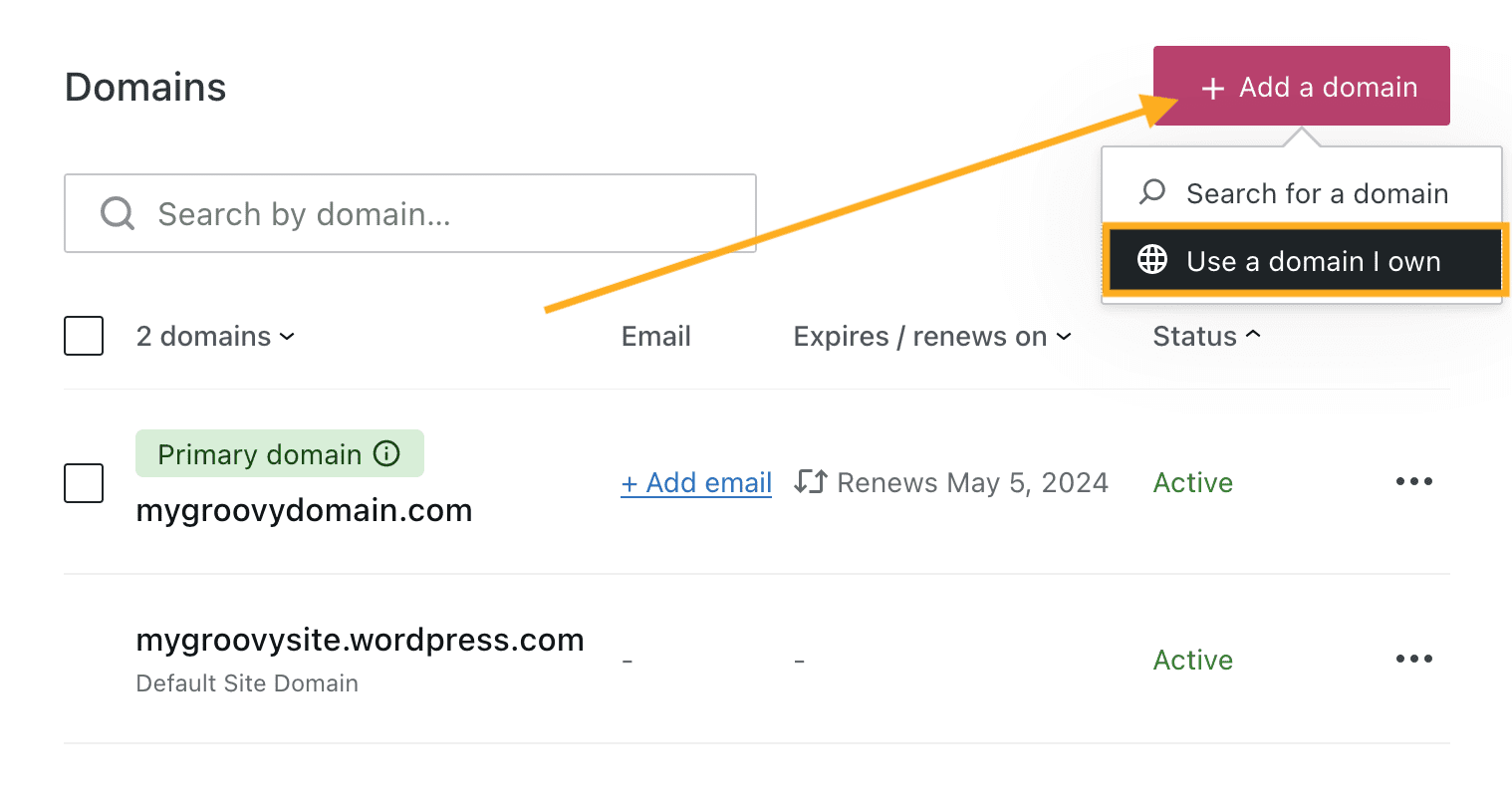
A good domain name is short and easy to remember. Avoid long names that are hard to spell. Simple names work best. Think of words people use every day. Check availability before you decide. It’s important. Use keywords that describe your site. This helps people find it. Choose a name that stands out. Make sure it’s unique and clear. Consider your audience and what they like. Make it meaningful to them. A good domain is like your online address. It guides people to your site.
Registering a domain is simple. First, search for the name you want. You must see if it is free. Many sites help you check this. Once you find a name, buy it through a domain registrar. Follow their steps. They will guide you. Pay for your domain. Prices can differ. Some domains are cheaper. Others cost more. You must renew your domain each year. Keep track of renewal dates. It’s easy to forget. A good domain is your site’s name on the web.
Selecting A Plan
Choosing the right plan for a WordPress. com site depends on your needs. Consider storage, customization, and support features. Evaluate these elements to make an informed decision.
Free Vs Paid Plans
Choosing between free and paid plans is important. Free plans offer basic features. They are good for beginners. You get a simple website. But it has limited customization. No personal domain name. Ads appear on your site. Limited storage space. No e-commerce features.
Paid plans offer more features. You can use a personal domain name. Ads are removed. More storage is available. Better customer support. E-commerce features are included. Paid plans are for serious users. They help you grow your site. You can choose different levels of paid plans. Each offers unique benefits.
Features Of Each Plan
| Feature | Free Plan | Paid Plan |
|---|---|---|
| Customization | Limited | Advanced |
| Domain Name | Not Available | Available |
| Ads | Present | Removed |
| Storage | Limited | More Space |
| Support | Basic | Priority |
| E-commerce | Not Available | Included |
Customizing The Design
A theme changes the look of your site. It affects colors, fonts, and layout. Many themes are available on WordPress.com. Some are free, while others cost money. Choose a theme that matches your site’s purpose. For a business site, choose a professional theme. For a personal blog, select something fun and light. Look for themes with good reviews. This helps ensure quality and support.
The Customizer tool is very useful. It helps you change your site easily. You can adjust colors and fonts with a few clicks. Add a logo to make your site unique. Preview changes before saving them. This way, you can see how your site looks. You can also arrange widgets with the Customizer. Widgets add features like search bars or calendars. Experiment with different settings. Find what works best for your site.

Credit: wordpress.com
Essential Plugins
SEO helps people find your site. Yoast SEO is popular. It helps with keywords. All in One SEO is another choice. Both are easy to use. They guide you step by step. You can improve your site ranking.
Keeping a site safe is crucial. Wordfence protects from hackers. It scans for malware. iThemes Security is also good. It blocks bad users. Both plugins offer free versions. They help keep your site secure.
A fast site is important. WP Super Cache speeds up the site. It stores pages in cache. W3 Total Cache is another tool. It improves page load time. Both plugins are easy to install. They help make your site faster.
Creating Content
Writing a blog post is fun. Start with an interesting title. Make it short and catchy. Use simple words to tell your story. Write in a way that everyone can understand. Add pictures to make it more engaging. Use headings to break your text. This helps in reading. Keep sentences short. Readers like that. Make sure to check your spelling. This makes your post better.
Pages are different from posts. They stay in one place. Use pages for important information. Like contact or about us. Make a new page by clicking “Add New”. Write a clear title. Use easy words. Add pictures if needed. This makes the page nice. Check for mistakes. Readers like clean pages. Save and publish when done.
Managing Media
Adding images makes your site look good. Use the media library to upload pictures. Click the “Add” button to start. Choose files from your computer. You can add many images at once. Make sure your images are clear. They should not be too big. Big images can slow your site. You can also edit images. Change size or add text. This helps make your images fit better.
Videos can make your site interesting. Use the embed tool to add them. Find the video link. Copy the link. Paste it in the “Add Media” section. Your video will appear on the site. Check if the video works. You can add videos from many places. YouTube is popular. Videos should be short and clear. They help people understand your content better.
Enhancing User Experience
Simple menus help users find things easily. Clear labels guide users. Organized menus are important for a good site. Users should not feel lost. Easy-to-understand menus improve user experience. Short menus are better than long ones.
Widgets add extra features to sites. Sidebars help users find important info. Choose widgets that fit your site needs. Sidebars can show recent posts. Well-placed widgets improve site functionality. Users appreciate helpful sidebars.
Credit: wordpress.com
Site Maintenance
WordPress.com sites need regular updates. Updates keep your site safe. They fix bugs and add new features. Always update themes and plugins. Check for updates each week. It helps keep your site running smoothly. Use a test site first. This way, you can see if an update breaks anything.
Backups are like a time machine for your site. They save your site’s data. This is important if something goes wrong. You can use WordPress.com tools for backups. Or use plugins like Jetpack. Save backups off-site too. Store them in places like Google Drive or Dropbox. Check your backup plan often. Make sure it works.
Analyzing Performance
Site Stats help you know your site visitors. You can see how many people visit. You can also see which pages they like. This helps you understand what is popular. Traffic sources show how visitors find your site. They may come from search engines or social media. Check which posts get most views. This tells you what to write more about. Use this info to make your site better.
Third-party tools give more detailed data. Google Analytics is a popular choice. It shows how long visitors stay on your site. It can also show the path they take. This helps you know what works well. You can see where visitors leave. This tells you where to improve. These tools are helpful for deep insights.
Monetizing The Site
Ad programs help make money on a WordPress.com site. WordAds is a popular choice. It allows ads on your site. More traffic means more earnings. Google AdSense is another option. It places ads based on your content. It is important to follow their rules. Ads should match your site’s look. This keeps visitors happy.
Affiliate marketing earns money by promoting products. You share links to products you like. When someone buys, you get a small fee. Amazon Associates is a common program. It offers many products to promote. Clear product information builds trust. Try to choose products that fit your site’s theme. This keeps readers engaged.
Frequently Asked Questions
What Is Needed To Start A WordPress.com Site?
To start a WordPress. com site, you need an account on WordPress. com. Choose a suitable plan that fits your needs. Select a domain name and customize your site using themes and plugins. Ensure you have quality content ready to publish and engage your audience.
How Do I Choose A WordPress.com Plan?
Choosing a WordPress. com plan depends on your site’s goals. Evaluate features like storage, e-commerce support, and customization options. Compare plans to match your budget and needs. Start with a basic plan and upgrade as your site grows.
Can I Use Custom Plugins On WordPress.com?
Using custom plugins on WordPress. com is limited. Only Business and eCommerce plans allow custom plugins. Other plans offer built-in features and plugins. Evaluate your site’s needs before choosing a plan to ensure plugin compatibility.
How To Customize WordPress.com Themes?
Customizing WordPress. com themes is straightforward. Select a theme from the library and use the customizer tool. Adjust colors, fonts, and layout to match your brand. Add widgets and menus to enhance functionality and user experience.
Conclusion
Creating a WordPress. com site is simpler than it seems. Start with a strong theme. Choose plugins that enhance your site’s functionality. Focus on content. Quality content engages visitors and boosts SEO. Regularly update your site. This keeps it fresh and relevant.
Use images wisely. They make your site visually appealing. Remember, a user-friendly design keeps visitors coming back. Keep learning. WordPress offers endless possibilities. Take small steps. Your site will grow and evolve. Enjoy the process of building your online space.
It’s a journey worth taking.


