
Are you ready to dive into the world of WordPress site development but unsure where to start? You’re not alone.
Many aspiring developers share your excitement and curiosity, but they often wonder about the essential tools and skills needed to create a successful WordPress website. Imagine having the ability to bring your ideas to life, reaching audiences worldwide, and building a digital presence that’s not only attractive but also functional.
In this guide, we’ll break down everything you need to kickstart your WordPress development journey. From key software and plugins to fundamental coding skills, we’ll ensure you have the right foundation to turn your vision into reality. Stick with us, and you’ll soon see how easy and rewarding it can be to develop your own WordPress sites.
Essential Tools
Developers need a good text editor to write code. Popular choices include Visual Studio Code and Sublime Text. They help find errors quickly. Syntax highlighting makes the code easy to read. A text editor is a must-have tool for developers.
Use a local development environment to test websites offline. Tools like XAMPP and Local by Flywheel are popular. They let you run WordPress on your computer. This way, you can make changes without affecting the live site.
To upload files, use an FTP client. Tools like FileZilla make this easy. They help transfer files from your computer to the server. This is important for site updates and fixes.
A version control system like Git tracks changes. It helps manage different versions of your code. This tool is important for teamwork. It ensures everyone works on the latest code.
Hosting And Domains
Picking the right web host is crucial. Your site needs a safe home. A host stores your site files. It lets people see your site. Consider reliability. A good host keeps your site running. Think about speed. Fast hosts make your site load quickly. Check support. A helpful host solves problems fast.
A domain name is your site’s address. It’s what people type to find you. Choose a name that is easy to remember. Make sure it fits your site. Check if the name is available. You can’t use a name someone else owns. Register the name through a domain registrar. This is like buying the name. It gives you the rights to use it.
WordPress Installation
Manual installation means doing steps by yourself. First, download the WordPress package. Unzip it to your computer. Next, use an FTP client to upload files to your server. Create a database using your hosting control panel. Remember the database name. Now, open the wp-config.php file. Fill in your database details. Save and close the file. Go to your website URL. Follow the on-screen instructions to finish the setup. This method gives you more control. But it can be tricky for beginners.
One-click installers are easy. They save time and effort. Find the installer in your hosting panel. Popular tools are Softaculous and Fantastico. Click on the WordPress icon. Choose your domain name. Click “Install”. Wait a few minutes. Your WordPress site is ready. This method is simple. It’s best for beginners. You don’t need technical skills.
Theme Development
Picking a solid theme framework is crucial. It sets the base for your site. Many developers use popular frameworks. They offer flexibility and support. Choose one that suits your needs.
Consider its features and compatibility. Some frameworks are better for beginners. Others require more coding skills. Think about your skill level. This choice will impact your site’s look and function.
Customizing themes makes your site unique. Start with simple changes. Like colors and fonts. Adjust the layout to fit your style. Use the theme editor for easy tweaks.
Advanced changes need coding. Use HTML, CSS, and PHP for deeper edits. Always test changes before going live. This ensures your site works well.
Plugin Development
Building a website needs essential plugins. These plugins help with tasks. Security plugins keep the site safe. SEO plugins help people find your site. Backup plugins save your data. Caching plugins make your site fast. Install these plugins for a strong site.
Sometimes, you need a special plugin. You can make your own. First, learn basic PHP. This is a coding language. Next, understand WordPress hooks. Hooks let you add features. Then, use WordPress Codex. It is a guide for developers. Test your plugin well. Make sure it works fine.
Security Practices
Developing WordPress sites requires strong security practices. Protect your site by using secure passwords and updating plugins regularly. Install a reliable security plugin to monitor threats and ensure data safety.
Securing WordPress Installations
Securing WordPress is very important. Always use strong passwords. Change them often. Never share them. Install security plugins. These plugins protect your site. Keep WordPress updated. Updates fix security bugs. Disable unused themes and plugins. They can be risky. Use trusted themes and plugins only.
Regular Backups
Backups save your work. Make them often. Use backup plugins. Store backups safely. Cloud storage is a good option. Backups protect against data loss. They help in emergencies. Test your backups regularly. Ensure they are working. This is important for safety.
Performance Optimization
Caching makes your site load faster. It saves time by storing copies of pages. Visitors get these copies quickly. They don’t have to wait. Popular caching plugins like W3 Total Cache are helpful. They are easy to use. They improve speed a lot. Visitors like fast sites. They stay longer on them. Search engines like fast sites too. They rank them higher. This is good for your site.
Images need to load fast too. Large images slow down sites. Use smaller image sizes. Compress images without losing quality. Tools like TinyPNG help with this. Use the right image format. JPEG for photos. PNG for graphics. Alt text is important too. It helps search engines. It tells them what the image is about. Visitors with slow internet will thank you. They’ll see images faster.
Credit: www.wpbeginner.com
Seo And Analytics
Developing WordPress sites requires understanding SEO and analytics to enhance visibility and performance. Basic tools like Google Analytics help track visitor behavior. SEO plugins improve search engine rankings, making sites more accessible.
Seo Plugins
WordPress sites need strong SEO. Plugins help with this task. Yoast SEO is a popular choice. It helps with keyword optimization. All in One SEO Pack is another option. Both plugins offer easy setup. They guide you through steps. Choose the one you like best. These tools improve site visibility. Better visibility means more visitors.
Integrating Analytics
Tracking visitors is important. Google Analytics is the tool for this. It shows who visits your site. You see where they come from. You learn which pages they like. This data helps improve your site. Install a plugin like MonsterInsights. It connects Google Analytics to WordPress. Now, you can view stats in your dashboard. This makes tracking easy. Use this information wisely. It helps make better decisions.
Testing And Debugging
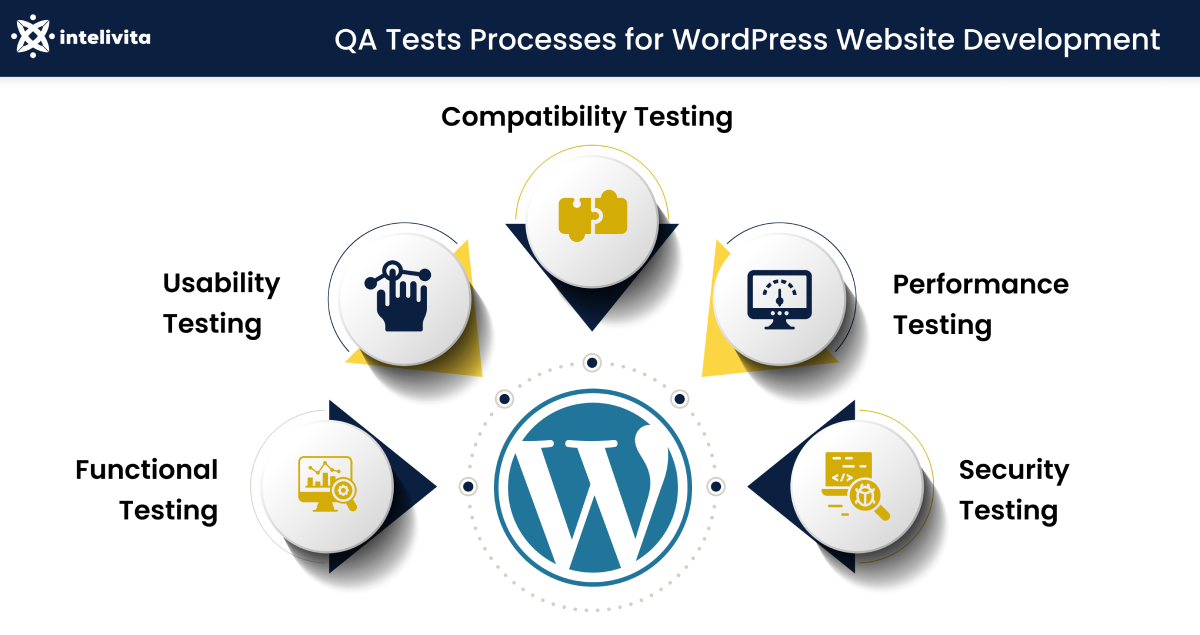
Testing and debugging ensure a smooth WordPress site experience. They help find errors and fix problems quickly. Developers use tools to check code and improve functionality.
Debugging Tools
Debugging tools help find and fix errors in WordPress sites. Error logs show problems in code. Debugging plugins are useful. They find problems fast. Use tools like Query Monitor. It shows database queries and hooks. Xdebug helps with PHP debugging. It shows where errors happen. Firebug is great for JavaScript and CSS errors. It works in browsers. Debugging tools save time and effort. They make sites run smoothly. Keep your site error-free. Fix issues before users see them.
Cross-browser Testing
Websites look different on each browser. Cross-browser testing checks site appearance. BrowserStack is a tool for this. It shows sites on multiple browsers. Selenium is another option. It automates browser tests. Use LambdaTest for real browser testing. Test sites on Chrome, Firefox, Safari, and others. Ensure all users see the site correctly. Fix display issues early. Make your site look good everywhere. Keep users happy with consistent design.
Credit: www.intelivita.com

Credit: wordpress.org
Frequently Asked Questions
What Tools Are Needed For WordPress Development?
To develop WordPress sites, you’ll need a reliable web hosting service, a domain name, and WordPress software. Additionally, a code editor like Visual Studio Code is helpful for customizations. Plugins and themes enhance functionality and design. Familiarity with HTML, CSS, and PHP is beneficial for advanced customizations.
How Do I Choose A WordPress Theme?
Choosing a WordPress theme depends on your site’s purpose and aesthetic preferences. Look for themes that are responsive, SEO-friendly, and customizable. Check reviews and ratings for user experiences. Consider premium themes for advanced features and dedicated support. Always preview themes on different devices before finalizing your choice.
Is Coding Necessary For WordPress Sites?
Coding isn’t mandatory for basic WordPress sites. WordPress offers a user-friendly interface with drag-and-drop builders and customizable themes. However, coding knowledge in HTML, CSS, and PHP can enhance customization and troubleshooting. Advanced features may require coding expertise. Beginners can start without coding and learn progressively.
What Plugins Are Essential For WordPress?
Essential plugins for WordPress include Yoast SEO for optimization, WooCommerce for e-commerce, and Wordfence for security. Jetpack offers site analytics, while Elementor provides page-building tools. Always choose plugins from reputable sources and keep them updated. The right plugins depend on your site’s needs and functionality requirements.
Conclusion
Starting a WordPress site involves several key steps. Choose the right hosting service first. Pick a domain name that fits your brand. Install WordPress with ease. Select a theme that matches your style. Add essential plugins for functionality. Customize to suit your needs.
Focus on responsive design. Ensure your site loads quickly. Secure your site with necessary measures. Regular updates keep things running smoothly. Engage with users using interactive elements. Monitor site performance regularly. Practice SEO for better visibility. Start building today. Create something unique and valuable.
Your WordPress site can grow with you.


