
Are you thinking about creating a website using WordPress? You’re in the right place.
You’ll discover everything you need to get started with building your own site. Whether you’re launching a blog, an online store, or a portfolio, WordPress offers flexibility and ease of use. Imagine having a website that stands out, attracts visitors, and grows your online presence.
You can achieve this without needing to be a tech genius. We’ll guide you through the essentials, from choosing the right hosting to selecting themes and plugins that make your site shine. Stay with us as we uncover tips and tricks to make your WordPress journey smooth and successful. By the end, you’ll feel confident in your ability to craft a website that truly represents you and your vision. Let’s dive in and unlock the potential of WordPress together.
Choosing A Domain Name
A domain name is your website’s address. It needs to be unique. Think about a simple, easy-to-remember name. Avoid long words. Use short phrases. This helps people find your site quickly. Make sure it reflects your site’s purpose. Choose a name that matches your content. A good domain name can help your site stand out. Use keywords related to your topic. This helps with search engines. Do not use numbers or hyphens. They can confuse people. Check availability first. Many names are already taken. Use a domain registrar to buy your domain. Popular ones are GoDaddy and Namecheap. Compare prices before buying. Some names cost more than others. A good domain is important for success.
Selecting A Hosting Provider
Picking the right hosting provider is crucial. A good host makes your site fast and safe. Consider a provider that offers 24/7 support. This ensures help is available any time. Check if they have a user-friendly control panel. This helps manage your website easily. Look for providers with one-click WordPress installation. This makes setup simple and quick. It’s important to check the storage and bandwidth offered. This affects how much content you can have and how many visitors your site can handle. Think about the price too. Some hosts offer affordable plans that fit your budget. Always read reviews. This gives you an idea of their reputation and reliability. A good host is the backbone of your WordPress site.
Installing WordPress
Begin by choosing a web hosting service. This is where your website will live. Some popular hosts include Bluehost and SiteGround. Next, get a domain name. This is your website’s address, like www.example.com. You can buy these from GoDaddy or Namecheap.
After securing hosting and a domain, access your hosting control panel. Look for the WordPress installer, often called a one-click install. Click it to start. Follow the easy steps. Fill in details like your site name and email.
Once installed, login to your WordPress dashboard. Use the username and password you created. From here, you can start building your site. Add pages, choose a theme, and install plugins to enhance features. Enjoy creating your website with WordPress!
Picking A WordPress Theme
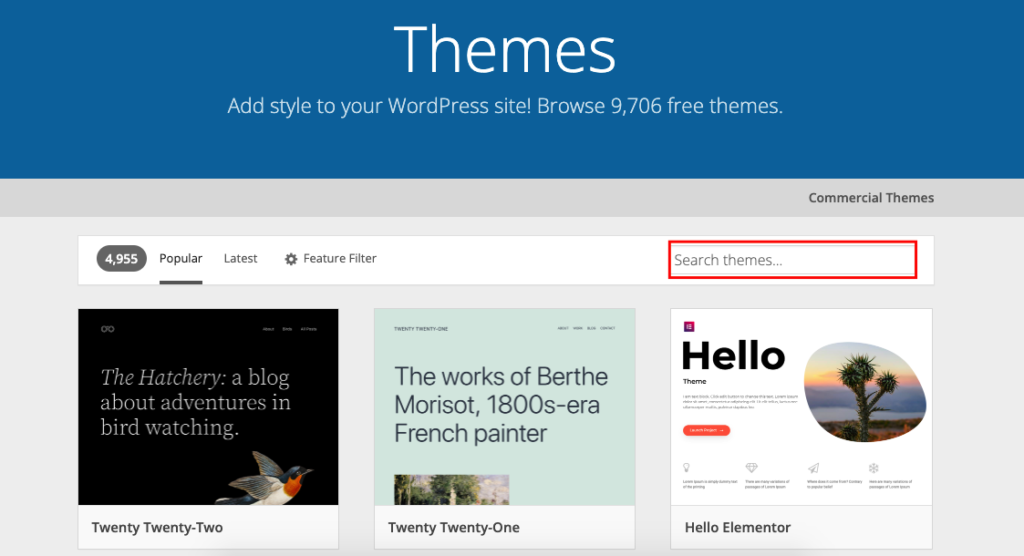
Choosing the right WordPress theme is very important. A theme decides how your site looks. It also affects how it works. You need to find a theme that fits your website’s style. There are many themes you can pick from. Some are free, others cost money.
Look for a theme that is easy to use. A good theme should also be mobile-friendly. This means it looks good on phones and tablets. Check if the theme updates often. This keeps your site safe and running well. Always read reviews before picking a theme. Reviews tell you if people like it.
Try different themes to find the perfect one. Don’t rush your choice. A great theme makes your website better.
Essential Plugins
SEO plugins help your site rank better in search engines. They guide you in choosing the right keywords. They also suggest improvements for your content. Yoast SEO is a popular choice. It offers many helpful tips.
Security plugins protect your site from hackers. They block harmful attacks. They also scan your site for threats. Wordfence Security is widely used. It provides strong protection. Regular updates keep your site safe.
Performance plugins make your site load faster. Faster sites keep visitors happy. These plugins optimize images and files. They also manage caching. WP Rocket is a top option. It boosts speed effectively. A fast site helps in user experience.
Credit: www.elegantthemes.com
Designing Your Website
Choose a theme that fits your style. Themes change how your site looks. Customize colors and fonts easily. Add your own images. Make your site unique and fun.
Menus help visitors find things. Create a menu with links to pages. Keep it simple. Use clear words. Make sure people can navigate easily.
Widgets add extra features. They go on sidebars or footers. Choose widgets that help your site. Add social media links or a calendar. Keep it neat and organized.
Creating Content
Writing blog posts is fun. Use simple words. Short sentences are best. Keep ideas clear. Write about things you like. Share stories and tips. Ask readers questions. This keeps them thinking. Bold important words. This helps readers find key points. Use paragraphs to break up ideas. It makes reading easy.
Pages are for key info. Home page is the start. Add an About page. Tell who you are. Have a Contact page. Let people reach you. Use clear titles for each page. Keep text short. Use headings for easy reading. Put links to other pages. This helps people find things.
Media makes a site interesting. Add pictures to your posts. Use videos to show more. Make sure media is clear. Use a good size for images. Not too big. Not too small. Add captions to explain pictures. This helps readers understand. Use media that fits your topic. Keep it simple.
Credit: wedevs.com
Configuring Settings
Permalinks are important. They make web addresses clean and simple. Go to the Permalinks settings. Choose the Post name option. It helps with SEO. Search engines like clean URLs. Users understand them better too.
Check your site’s General Settings. Add the site title. Write a catchy tagline. Set your site’s URL. Make sure the email address is correct. It helps you get notifications. Choose your time zone. It affects when posts are published.
Reading settings control the homepage. Choose a static page or your latest posts. Set how many posts to show. Writing settings help you post. Use a default post category. Choose a default post format. These settings make posting easy.
Launching Your Website
WordPress makes it easy to start a website. You need hosting and a domain name. Hosting is where your website lives. A domain is your website’s address. Choose a domain that is easy to remember.
You can buy hosting and domain from many companies. Some companies offer free domain with hosting. Look for a plan that fits your needs. Once you have these, install WordPress on your hosting. It’s simple and fast.
After installing, select a theme for your site. Themes decide how your site looks. There are many free themes available. Pick one that suits your style. Customize it to make it yours. Add plugins for extra features. Plugins help you add contact forms, social media links, and more.

Credit: www.geeksforgeeks.org
Maintaining Your Website
WordPress needs updates. They keep the site safe and fast. New updates fix bugs. They improve features. Always update plugins. Themes need updates too. Check for updates weekly.
Backups protect your data. Save copies of your site. Use backup plugins. Store backups in a safe place. Make backups daily. They help if something breaks. Restoring is easy with backups.
Site speed matters. It affects user experience. Use tools to check speed. Fix slow pages. Fast sites rank better. Check for broken links. They hurt performance. Monitor your site often.
Frequently Asked Questions
What Tools Are Needed For WordPress Website Creation?
To create a WordPress website, you’ll need a domain name and web hosting. WordPress software is free to download and install. Consider using a theme and essential plugins to enhance functionality and appearance. A basic understanding of WordPress features will help streamline the setup process.
Can I Create A WordPress Website For Free?
Yes, you can create a WordPress website for free using WordPress. com. However, it has limitations like domain name restrictions and limited customization. For more control and features, consider self-hosting WordPress. org, which requires purchasing a domain and hosting plan.
How Much Does It Cost To Build A WordPress Site?
Building a WordPress site can be cost-effective. Basic costs include domain registration and hosting, typically $5-$15 per month. Additional expenses may include premium themes, plugins, and professional services. The total cost depends on your site’s complexity and customization needs.
Do I Need Coding Skills For WordPress?
No, coding skills are not required to create a WordPress website. WordPress is user-friendly and offers drag-and-drop builders. Themes and plugins provide customization without coding. However, basic HTML and CSS knowledge can be helpful for advanced customizations.
Conclusion
Creating a website with WordPress is straightforward. Start by choosing the right hosting plan. Pick a domain name that reflects your brand. Install WordPress and select a theme that suits your style. Customize your site using plugins and widgets. Add content that engages your audience.
Keep your design clean and easy to navigate. Ensure your site is secure and regularly updated. Focus on SEO to improve visibility. With these steps, you’re ready to build a strong online presence. Dive in and start creating today. Your WordPress website awaits!


