
Ever wondered where exactly your virtual host serves its web pages from? You’re not alone.
Many people setting up their first website or diving into web development face this question. Understanding the directory from which your virtual host serves web pages is crucial. It’s the foundation that determines how your web content is accessed and displayed.
If you’ve ever found yourself confused about where your files should go or how they’re accessed, you’re in the right place. You’ll discover clear, straightforward insights here. Get ready to eliminate your doubts and streamline your web hosting process. Dive in, and let’s unravel this essential aspect of web hosting together!

Credit: www.interserver.net
Virtual Hosts And Their Importance
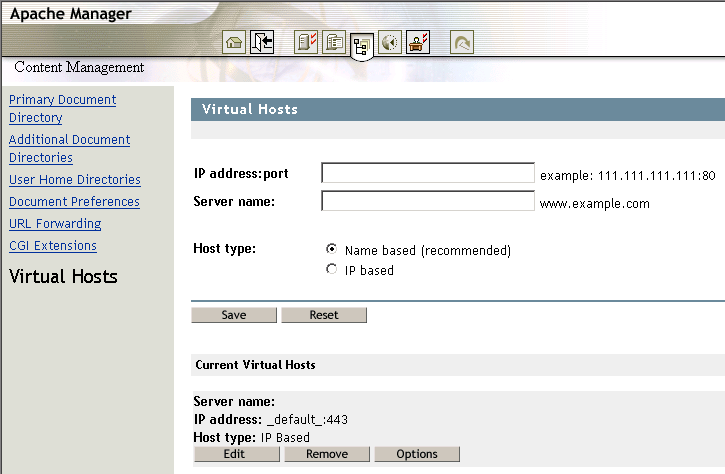
Virtual hosts are like special doors on a web server. Each door leads to a different website. These doors make it possible to run many sites on one server. Each website has a unique address or domain name. The virtual host uses this address to find the right site.
Virtual hosts help save money and resources. They let you host multiple sites without needing extra servers. This setup is good for small businesses and personal websites. It’s also easy to manage and configure. For each site, you set a different directory. This directory holds all the files for that site.
Default Directory Structure
Virtual hosts serve web pages from a specific directory. This directory is where your web files live. Each virtual host has its own folder. This helps in keeping files organized. It also makes it easy to manage different websites.
For most systems, this folder is under a main directory. The common path is /var/www/. In this folder, each website has its own subdirectory. Naming these folders correctly is important. It helps in easy identification and access.
Hosting many websites? Use separate folders for each. This ensures that files do not mix up. It keeps each website’s files safe and secure. It’s like having different boxes for different toys.
Configuring Directory Paths
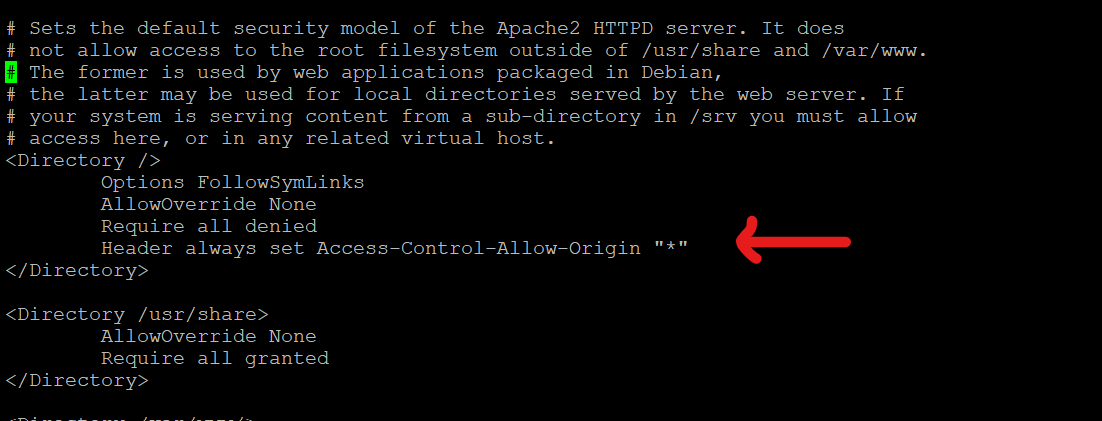
Apache uses a configuration file to set paths. The file is called httpd.conf. You can find it in the Apache folder. Inside, there’s a section for Virtual Hosts. You need to set the DocumentRoot. This tells Apache where to look for web files. It should point to the folder with your site files. Make sure this path is correct. Apache will serve pages from here.
Nginx uses a file named nginx.conf. This file is in the Nginx directory. You need to find the server block inside it. Look for the line that says root. This line sets the directory for your web pages. The folder path must be correct. Nginx will serve content from this folder. Check the path carefully. Make sure it matches your site files.
Credit: medium.com
Common Directory Naming Conventions
Web servers use directories to store web pages. A common directory name is “htdocs”. This name is short for “HTML documents.” Some servers use “www” as their directory. This stands for “World Wide Web.”
Another common name is “public_html”. This means the files are public. Everyone can see them. Some servers might use “wwwroot” too. It is a root directory for web files.
These names help organize files. They keep web pages easy to find. Using standard names is a good practice. It makes server management easier. And it helps in finding files quickly.
Security Considerations
Virtual hosts serve web pages from a specific directory on the server. Choosing a secure directory prevents unauthorized access. Regularly update permissions to maintain security.
Permissions And Access Control
Setting the right permissions is crucial. Only authorized people should access files. Files should not have world-write permissions. This keeps web pages safe. Use groups to manage access. This makes it easier to control who can see what. Always check permission settings. This helps prevent unwanted changes.
Avoiding Directory Traversal
Directory traversal is a big risk. Hackers can reach files they shouldn’t. Use input validation to stop this. Check user input carefully. Do not let users enter dangerous paths. Use secure coding practices. This reduces the risk of directory traversal. Keep software updated. Updates fix security holes. This makes servers safer.
Customizing Directories For Multiple Sites
Different websites need their own folders. These folders are called directories. A directory keeps the website’s files safe. Each site needs its own directory to work well. This helps to keep files neat and tidy. It also makes it easy to find files later.
An alias is a nickname for a directory. It helps to find files quickly. A redirect moves users to another page. It is like a map for the web. Redirects help users find the right page. Both are useful for managing websites.
Troubleshooting Directory Issues
Many people face issues with directory paths. These paths tell the server where to find files. An incorrect path can lead to errors. One common problem is the 404 error. This means the server can’t find your page. Always check the path for spelling mistakes. Another issue is permissions. Make sure your files are readable by the server.
Sometimes, the server configuration is wrong. Ensure your virtual host is set up correctly. If not, the server might point to the wrong directory. Use a default directory to avoid this mistake.
Logs are like a diary for your server. They tell you what happened. Look for error messages in the log. These messages can help you find the problem. Notice any patterns in the errors. They might show a bigger issue. Logs show timestamps too. This tells you when an error happened.
Check the access logs. They show who visited your site. You might find unauthorized access. If you see this, check your security settings. Always keep logs for some time. They help you in future troubleshooting.
Credit: www.novell.com
Best Practices For Directory Management
Virtual hosts use directories to serve web pages. Each host needs its own directory. This keeps files organized and easy to find. Always name directories clearly. This helps everyone understand their purpose. Use simple names like “site1” or “blog”.
Keep directory structures consistent. Use the same layout for each project. This saves time and reduces confusion. Store images, scripts, and stylesheets in separate folders. This makes files easier to manage.
Check directory permissions. Only allow trusted users to access them. This keeps files safe from harm. Regularly back up directories. This protects important data from being lost. Always be careful with directory management. It ensures smooth website performance.
Frequently Asked Questions
Where Can I Find A Virtual Host File?
Find the virtual host file in the server’s configuration directory. Common locations are `/etc/httpd/conf. d/` for Apache on Linux or `C:Program FilesApache GroupApacheconf` on Windows. Access requires appropriate permissions. Always back up files before making changes to avoid issues.
What Is A Virtual Host In A Web Server?
A virtual host allows multiple websites to run on a single web server. It helps organize domains efficiently, using shared resources. This setup improves server management and reduces costs by hosting multiple domains on one server. Virtual hosts are essential for handling diverse web applications and sites effectively.
What Is The Default Virtual Host File For Apache?
The default virtual host file for Apache is typically located at `/etc/apache2/sites-available/000-default. conf`. It configures the default website settings and can be modified to suit specific needs. Ensure you have appropriate permissions to edit this file for customization.
Where Are Apache Virtual Host Logs Stored?
Apache virtual host logs are stored in the “/var/log/apache2/” directory on Linux systems. Each virtual host usually has its own log files, named “access. log” and “error. log”. You can configure log file paths in the virtual host configuration file using the “CustomLog” and “ErrorLog” directives.
Conclusion
Understanding the directory for virtual hosts is crucial. It determines where web pages are stored. This location impacts how visitors access your content online. Proper configuration ensures smooth website operations. It helps in organizing files and improving site management. A clear directory path enhances site performance.
It also aids in troubleshooting issues quickly. Make sure your server setup is correct and efficient. This will ensure your website runs smoothly and visitors have a great experience. Keep learning and adapting to new technologies. This knowledge empowers you in managing your virtual host effectively.


