
Are you ready to transform your website into a dynamic hub of engaging content? Imagine having the power to customize every corner of your digital space to perfectly suit your brand and audience.
With WordPress, this isn’t just a dream—it’s a reality. This powerful platform offers a wide array of page types that you can add to make your site more interactive and user-friendly. But what exactly can you create, and how can each page enhance your site’s performance?
By the end of this article, you’ll discover the diverse pages you can add using WordPress, each designed to captivate your visitors and elevate your online presence. Let’s dive in and uncover the possibilities waiting for you!
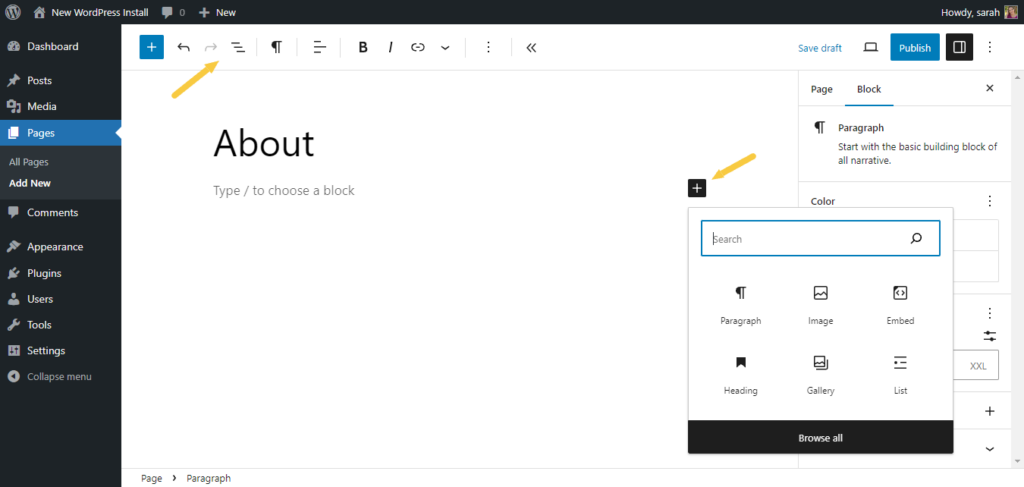
Credit: solidwp.com
Home Page
A welcome page is the first thing visitors see. It makes them feel at home. A good welcome page tells your story. It shows what your site is about. A welcome page should be simple. Easy to read. It should have clear links. Links that help visitors find what they need. Use images that grab attention. Images that make people curious. Keep the text short. Not too many words. People like to scan. They don’t want to read a lot. Make sure the page loads fast. Visitors don’t like to wait. They leave if it takes too long.
Include your logo on the welcome page. It builds trust. Show your contact info. People might have questions. They might want to reach you. A welcome page is important. It can make visitors stay. Or leave. So, make it good.
About Page
Every about page shares a story. This story is about your journey. It tells others about your goals and dreams. Share your past and present achievements. Highlight key moments that shaped you. Let people know why you started. Introduce your team and their roles. Explain the purpose of your site. Use clear and simple words. Make the story engaging and easy to follow.
Include a brief history. Provide contact information. Add links to social media. Share your mission statement. Highlight values important to you. Use images or videos to show your work. Ensure the page is easy to navigate. Structure it well for quick understanding.
Contact Page
Explore the versatility of WordPress by adding a contact page to your site. This page allows visitors to reach out easily. Enhance user experience by integrating various plugins for forms, maps, and social media links.
Essential Information
The contact page must have your business name and address. Include a phone number where people can reach you. Add an email address for more contact options. Ensure all details are correct and easy to read.
Incorporating Contact Forms
Contact forms make it easy for users to reach you. They should be simple and clear. Ask only for essential information like name, email, and message. Keep the form short to encourage more responses.
Blog Page
Explore various pages to enhance your WordPress site. Add contact forms, galleries, and blogs for engaging content. Customize each page to fit your brand and improve user experience.
Engaging Content Ideas
Creating a blog page with engaging content keeps readers interested. Write about everyday topics like food, travel, or hobbies. Share stories that are easy to read and fun. Use pictures to make posts more attractive. Ask readers questions to get their thoughts.
Incorporate SEO best practices to help your blog rank higher. Use keywords that people search for. Keep sentences short and simple. This helps both readers and search engines understand better. Use headings and bullet points to break up text. It makes content easier to read.
Services Page
A services page shows what you do best. It shares your skills with others. Each service should have a clear name. This helps visitors understand quickly. Add a short description for every service. Keep it simple and clear. Use bullet points for easy reading.
Tell how each service helps. This builds trust. Show how you can solve problems. Mention the time it takes to finish. Include the price, if possible. Adding photos can make it more interesting. It helps people see your work.
Let people know why they should choose you. Make it easy for them to contact you. Add a form or your email. This way, they can ask questions or hire you.

Credit: wordpress.org
Portfolio Page
A portfolio page is essential for sharing your work. It helps people know your skills. You can add photos or videos of projects. This shows your talent. Clients love seeing examples before hiring.
Visual appeal attracts more visitors. Use bright colors and clear images. Make sure everything looks nice. Add some cool graphics to impress. Keep it simple but attractive. People love pages that look good.
Testimonials Page
Add a testimonials page with WordPress to showcase customer feedback. This builds trust and enhances credibility. Easily display reviews and ratings in a user-friendly manner.
Building Trust
A testimonials page is important for your website. It helps build trust with new visitors. When people see positive reviews, they feel safer. They know others had a good experience. This makes them more likely to use your service. Adding real customer testimonials is key. Choose reviews that tell a story. Make sure they are honest and clear.
Displaying Reviews
Reviews should be easy to read. Use simple language and clear fonts. Highlight the best parts. This catches the reader’s eye. You can show reviews with names and photos. This adds a personal touch. Video testimonials are also powerful. They show real emotions. Keep videos short for easy viewing.
Privacy Policy Page
A Privacy Policy Page is important. It helps follow the law. Many countries have rules. Websites must show what data they collect. This page explains it. Visitors feel safe. Websites stay out of trouble.
Protecting user data is key. People want their info safe. A Privacy Policy Page tells users their rights. It explains how data is stored. It also shows how it is used. This builds trust.
404 Error Page
A 404 error page signals a broken link or missing content. In WordPress, create custom pages to engage visitors and retain interest. Consider offering helpful navigation links, site search, or a contact form to guide users back to your main content smoothly.
Maintaining User Engagement
A 404 Error Page appears when a page is missing. It can be frustrating for users. To keep them happy, add links to other pages. Provide a search bar to help users find what they need. Friendly messages make users feel welcome. Humor can make them smile. Adding a fun image or cute animation can keep users interested.
Creative Design Ideas
Creative designs can make a 404 page special. Use bright colors and fun fonts. Add an interactive element like a game or quiz. Design the page to fit the website’s theme. If your site is about food, add food images. If it’s about travel, add travel pictures. Make sure the design is simple and easy to understand.
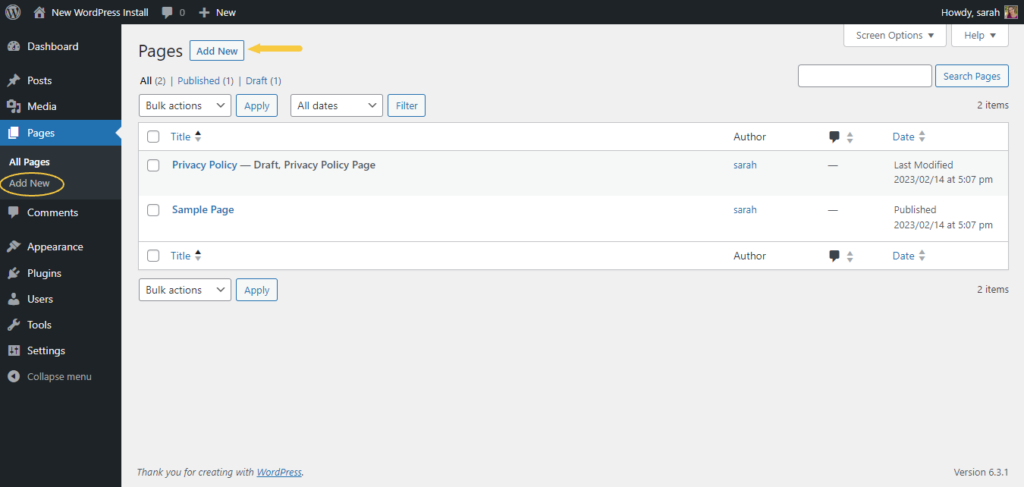
Credit: solidwp.com
Frequently Asked Questions
What Are Essential Pages For A WordPress Site?
Essential pages for a WordPress site include a Home page, About Us, Contact, and Blog. These pages enhance user experience and improve site navigation. They provide crucial information about your business, services, and updates, helping visitors engage effectively with your content.
How To Create A Contact Page In WordPress?
Creating a contact page in WordPress is simple. Use plugins like WPForms or Contact Form 7. These plugins help you build customizable forms. Add fields like name, email, and message to facilitate communication. Ensure your contact page is easy to find and user-friendly.
Can WordPress Have A Landing Page?
Yes, WordPress can have a landing page. Use themes or plugins like Elementor to design visually appealing pages. Landing pages are ideal for marketing campaigns. They guide visitors to specific actions, improving conversions and engagement rates for your site.
What Is The Purpose Of A Blog Page?
A blog page serves as a platform for sharing updates, insights, and stories. It helps engage with your audience, improve SEO, and establish authority. Regularly updated blog content can attract more visitors and boost your site’s visibility in search engines.
Conclusion
WordPress offers many page options for your website. Each page serves a unique purpose. Blogs engage visitors and share insights. Contact pages help users reach you easily. Portfolio pages showcase your work creatively. About pages tell your story and build trust.
Adding testimonials can boost credibility. E-commerce pages support online sales smoothly. Customize your WordPress site to fit your needs. Explore different page types and enhance user experience. Your website can grow and thrive with the right pages. Start building today and watch your online presence expand.
Keep experimenting and refining your content strategy.


