
Have you ever felt overwhelmed by the different roles in WordPress? You’re not alone.
Navigating through WordPress roles can be like trying to solve a jigsaw puzzle without the picture on the box. Understanding what these roles can do is crucial for anyone managing a WordPress site. Whether you’re a beginner or have been using WordPress for a while, knowing who can do what on your site saves time and prevents headaches.
Imagine effortlessly delegating tasks without worrying about someone accidentally breaking your site. By diving into the specifics of WordPress roles, you’ll gain the clarity and confidence needed to run your website smoothly. Ready to demystify WordPress roles and take control? Let’s dive in!
Administrator Capabilities
Administrators manage the entire site. They can do almost anything. They can install and delete plugins. They can change themes. They have access to all settings. They can even delete the site if needed. They control users too. They add, edit, and remove users. They assign roles to each user.
Administrators have the power to assign roles. They decide what others can do. They can make someone an editor. They can make someone a contributor. They choose who can see what. They make sure the site is safe. They protect the content. They keep everything running smoothly.
Credit: www.freelancermap.com
Editor Privileges
Editors have full control over content. They can write and edit posts. They can also delete posts if needed. Editors can manage pages too. This role is crucial for content management. Editors can also approve posts written by others. They ensure content quality stays high.
Editors can create and edit categories. They help organize content better. Tags can also be managed by editors. Tags make searching easier. Editors can add new tags to posts. They can also remove tags if they don’t fit. This helps in maintaining a clean and organized site.
Author Permissions
Authors can write and publish their own stories. They have the power to add images and videos. Authors cannot edit other people’s work. They can only change their own. This keeps their personal content unique and secure. Authors can also view all the posts they have written. This helps them keep track of their work. They can update their stories anytime they want. Authors enjoy the freedom of creating content. Their creativity shines through their words.
Authors can see comments on their posts. They can reply to these comments. This helps them engage with their readers. Authors cannot delete other people’s comments. They can only manage their own. This maintains the integrity of the content. Authors can approve comments for publication. This ensures that positive interactions are highlighted. Managing comments helps authors connect with their audience. It builds a strong community around their stories.
Contributor Access
Contributors can create drafts for blog posts. They write their ideas and stories. After writing, they save their work. But they can’t publish it. A higher role must approve. This keeps the blog safe. They learn from feedback. It helps them grow as writers.
Contributors have limited power. They can’t edit published posts. They can’t delete them either. Only admins or editors can do this. This keeps content safe. Contributors focus on writing only. This simplifies their job. It lets them hone their skills. They learn to create good content.
Subscriber Rights
Subscribers have limited access on WordPress sites. They can view all posts. They can also read comments. Subscribers cannot edit or publish posts. They have basic permissions. Subscribers can also manage their own profiles.
Profile Management
Subscribers can edit their profiles. They can change their username and password. They can add a profile picture. Subscribers can update their email address. They can also change their display name. They can make their profile personal. Subscribers have control over their information.
Commenting On Posts
Subscribers can comment on posts. They can share their thoughts. They can ask questions. Subscribers can also reply to other comments. Comments can be valuable. They help build community. Subscribers can engage with content. They can interact with authors.

Credit: theadminbar.com
Custom Roles
Custom roles let you control who can do what on your site. Creating custom permissions helps manage tasks easily. You can decide what each person can see or edit. For example, let someone add posts but not delete them. Another person might manage comments but not change settings. This keeps your site safe. Everyone does their job without messing up others’ work.
Adjusting role capabilities fine-tunes what users can do. You might want to give more power to a trusted person. Or remove some abilities if needed. It’s like giving keys to your house. Only give keys to people you trust. This way, everyone helps without causing trouble. Your site runs smoothly. All tasks are done by the right people.
Role Hierarchy
WordPress has many user roles. Each role has its own importance. The Administrator role is the most powerful. Administrators can change site settings. They can add or delete users.
Next is the Editor role. Editors can publish and manage posts. They can edit other users’ posts. The Author role is below Editors. Authors can write and publish their own posts.
Choose roles wisely. Too many Administrators can be risky. Editors should be trusted team members. Authors need less access.
Use plugins for role management. These tools make it easy. You can change permissions with a few clicks. Keep roles organized. It helps the site run smoothly.
Security Implications
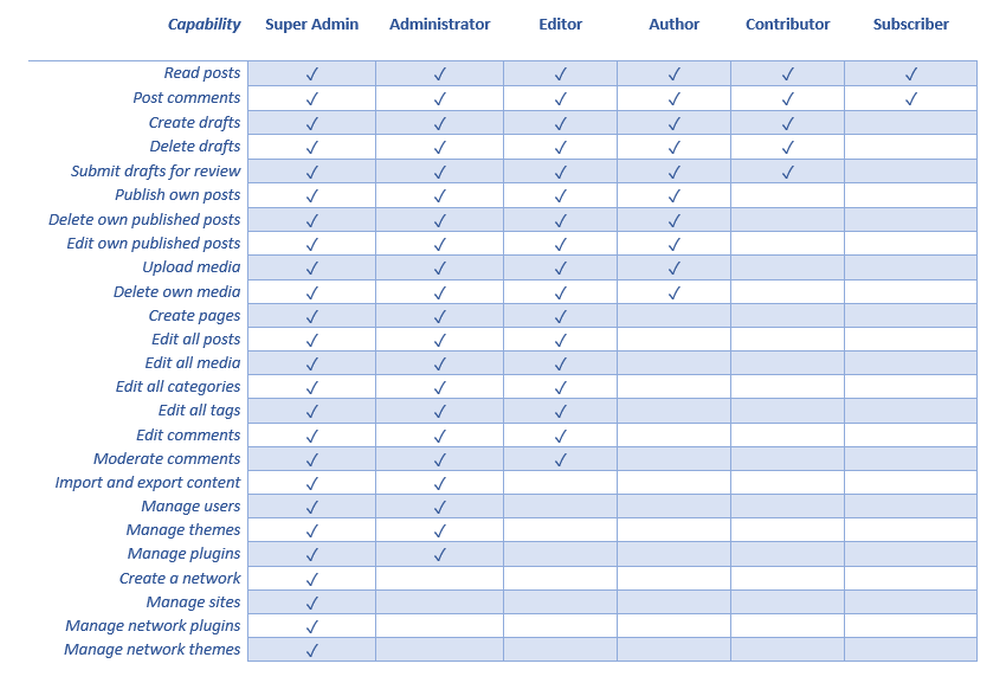
WordPress uses roles to manage what users can do. This system is called Role-Based Access Control. Each role has its own set of permissions. The most common roles are Administrator, Editor, Author, Contributor, and Subscriber.
Administrators have the most power. They can change site settings and manage users. Editors can publish and manage all posts. Authors can publish and manage their own posts. Contributors can write and edit their posts, but not publish them. Subscribers can only read posts.
Role-Based Access Control helps in preventing unauthorized access. Only certain roles can perform specific actions. This limits the risk of mistakes or attacks. For example, a Contributor cannot delete a post. This keeps the website safe. Assign roles wisely to protect your site.
Credit: usersinsights.com
Frequently Asked Questions
What Are WordPress Roles?
WordPress roles define user permissions on a site. They control access to features and functions. Common roles include Administrator, Editor, Author, Contributor, and Subscriber. Each role has specific capabilities, like publishing content or managing settings. Understanding roles helps maintain site security and workflow efficiency.
How To Change WordPress User Roles?
To change user roles, go to the WordPress dashboard. Navigate to Users, select the user, and click Edit. Choose the desired role from the dropdown menu. Update the user profile to apply changes. This process ensures users have appropriate access and responsibilities on your site.
What Can An Administrator Do?
An Administrator in WordPress has full access to the site. They can manage themes, plugins, and settings. Administrators handle user accounts and permissions. They can publish, edit, and delete any content. This role requires trust, as they control the entire site.
What Permissions Does An Editor Have?
Editors can manage and publish content on WordPress sites. They can edit posts, pages, and moderate comments. Editors have the ability to manage categories and tags. However, they can’t modify site settings or user accounts. This role suits users responsible for content management.
Conclusion
WordPress roles simplify website management. Each role has specific permissions. Admins control everything, from settings to users. Editors manage content without altering site settings. Authors write and publish their own posts. Contributors draft posts but need approval to publish. Subscribers view and comment on content.
Understanding these roles helps assign tasks effectively. This keeps your site organized and secure. Knowing role capabilities aids better collaboration. Choose roles wisely to maintain control. WordPress roles make teamwork easier. They ensure smooth operations. Tailor roles to fit your needs.
Always review role assignments regularly. Enjoy a streamlined WordPress experience.


